Snapshot summary built from the project's own GitHub metadata — there's no written TopGit review yet. The page will update automatically when a full review is published.
WHY NO REVIEW YET
TopGit writes full reviews for the most-starred, most-requested repositories. This page is a snapshot until then — see the READ ME tab for the original README in full.
Sn1per - The Offensive-Security Platform for Modern Teams
Recon, scanning, exploitation, and reporting in a single workspace - whether you're a solo pentester or a global SOC.
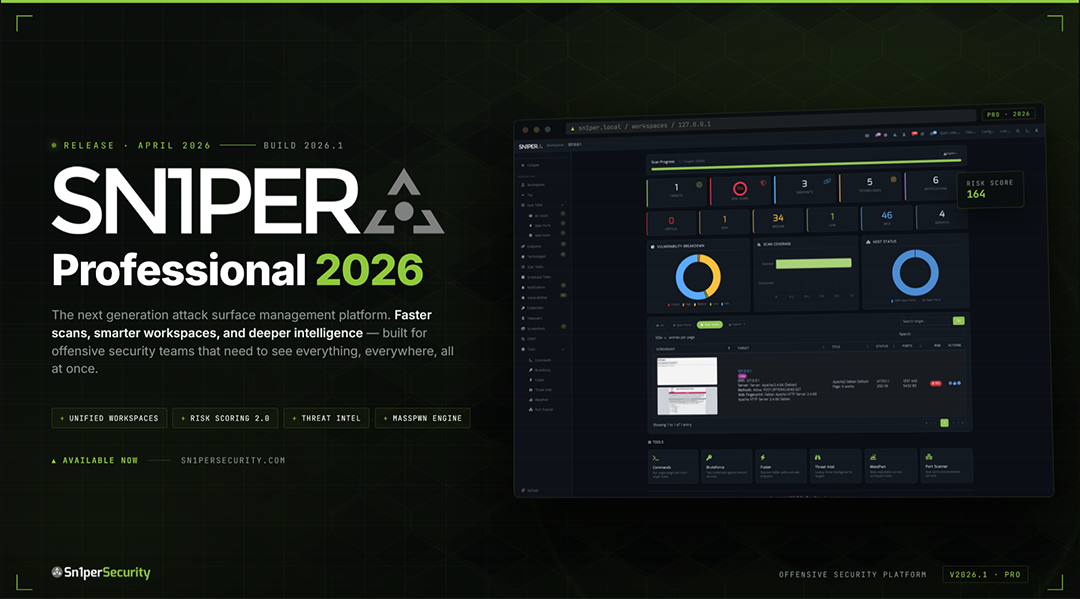
Sn1per Professional 2026 is here
The largest release since v10.0 - Docker-first deployment, Bootstrap 5 / Tabler UI, Workspace Navigator, Workspace + Host Reports with CSV / Excel / PDF export, JSON API v1.0, an Offcanvas Quick Commands sidebar with 13 panels, and expanded modules for ReverseAPK, MassPwn, Threat Intel, Nessus, and Burp.
Read the release notes → · View pricing →
Table of Contents
About
What Sn1per Is For
What's New in 2026
Editions & Pricing
Install
Quick Start
Usage
Scan Modes
Integrations
Use Sn1per from AI assistants (MCP)
Documentation & Help
News & Releases
Community & Support
Contributing
License & Legal
About Sn1per
Sn1per is an offensive-security platform that consolidates reconnaissance, vulnerability scanning, exploitation, and reporting into a single workspace. Built by pentesters since 2015, it ships in three editions - a free Community Edition (source-available, custom EULA - see LICENSE.md) in this repository, a paid Professional edition for individual operators and small teams, and an Enterprise edition for global SOCs - all backed by the same core scanning engine.
Sn1per orchestrates 90+ third-party tools, ships with 600+ exploits and 10,000+ detections, and is used by 500+ teams worldwide. Battle-tested by the community. Built by pentesters, for pentesters.
500+ Teams · 90+ Integrations · 10,000+ Detections · 600+ Exploits · Trusted since 2015
What Sn1per Is For
Sn1per ships as one platform that covers the core jobs offensive security teams otherwise stitch together from a dozen tools:
External Attack Surface Management - continuous discovery, monitoring, and active exploitation of every internet-facing asset your organization owns, including the ones nobody on your team knows about.
Continuous Attack Surface Management - daily-cadence rescans that diff yesterday's surface against today's so new exposures hit your SOC within hours, not the next quarterly pentest.
Automated Penetration Testing - 600+ exploits and 10,000+ detections orchestrated as a single workflow, with active verification eliminating the false positives version-only scanners ship as "critical."
Reconnaissance & Attack Surface Discovery - the full phased recon workflow, from OSINT and subdomain enumeration through live-host discovery and fingerprinting, run as one automated pass.
What's New in 2026
New (October 2026): the Sn1per MCP Server (beta) lets AI assistants like Claude Code launch Sn1per scans and read the results. Details below.
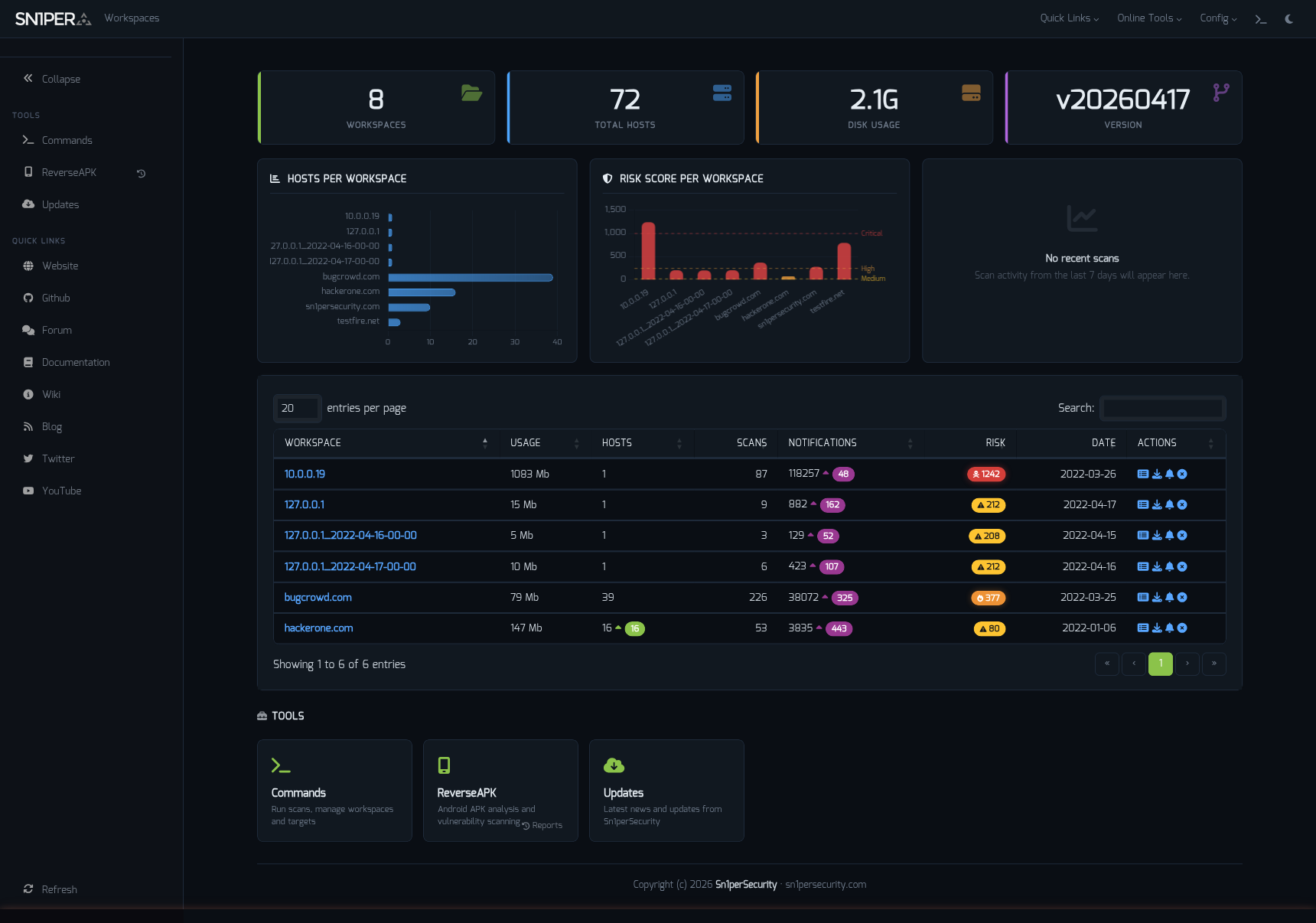
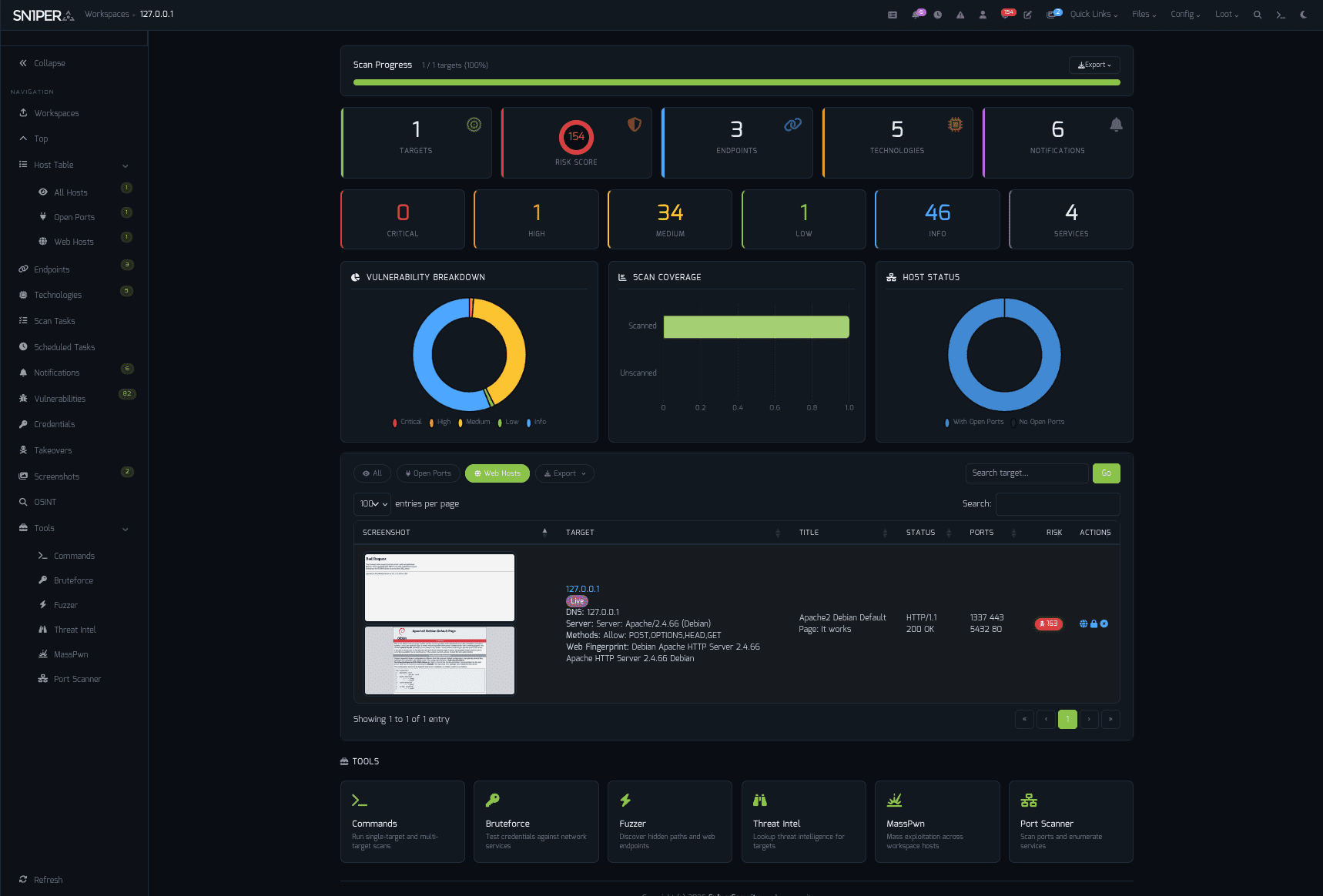
Workspace Navigator - switch contexts across hosts, scopes, and engagements.
Dashboard - at-a-glance scan posture, top findings, and exploitable assets.
Highlights
Docker-first deployment - same image, every distro
Bootstrap 5 / Tabler UI - refreshed responsive interface with light + dark mode
Workspace Navigator - fast workspace switching with state preservation
Workspace & Host Reports - CSV, Excel, and PDF export
JSON API v1.0 - programmatic access for CI / SOAR / SIEM pipelines
Offcanvas Quick Commands - 13 panels, every common action one click away
Expanded modules - ReverseAPK, MassPwn, Threat Intel, Nessus, Burp Suite
Maturing SC0PE framework - more parsers, better noise reduction
Hardened PHP library stack - modern dependencies, audited components
"Sn1per Professional 2026 is the largest release since the v10.0 line."
Read the full release notes →
Editions & Pricing
The Community Edition is free and lives in this repository. The Professional and Enterprise editions add a Web UI, commercial integrations, and email support.
Sn1per Professional
Sn1per Enterprise
Price
$984 / year (per seat)
Get a quote
Subscription
1 year
1 year
- Included -
Web UI
Professional Web UI
Enterprise Web UI
Scan Engine & UI Updates
✓
✓
All Modules & Integrations
✓
✓
On-Prem (Self Hosted)
✓
✓
Email Support
1 Year
1 Year
Improved Speed & Scalability
-
✓
Cutting-Edge Features
-
✓
- Limits & Quotas -
Max Scans
Unlimited
Unlimited
Max Assets / Workspace
30
Unlimited
Max Workspaces
5
Unlimited
Total Assets
150
500+
Licensed Systems
1
1
Buy a Sn1per Professional license → · Get an Enterprise quote →
Install
Linux (Kali / Ubuntu / Debian / Parrot)
git clone https://github.com/1N3/Sn1per.git
cd Sn1per
sudo bash install.sh
Sn1per installs to /usr/share/sniper and requires root. Use sudo bash install.sh force to skip the confirmation prompt.
Docker
Sn1per on Docker Hub →
Kali Linux base
sudo docker compose up
sudo docker run --privileged -it sn1per-kali-linux /bin/bash
BlackArch base
sudo docker compose -f docker-compose-blackarch.yml up
sudo docker run --privileged -it sn1per-blackarch /bin/bash
AWS Marketplace (EC2 AMI)
Subscribe via AWS Marketplace:
Click Continue to Subscribe
Click Continue to Configuration, choose region/instance type
Click Continue to Launch
SSH to the EC2 public IP - Sn1per is preinstalled
Quick Start
sudo bash install.sh
sniper -t example.com -m normal
Results land in /usr/share/sniper/loot/<workspace>/. See Usage for more modes.
Usage
[*] NORMAL MODE
sniper -t <TARGET>

[*] NORMAL MODE + OSINT + RECON
sniper -t <TARGET> -o -re

[*] STEALTH MODE + OSINT + RECON
sniper -t <TARGET> -m stealth -o -re

[*] DISCOVER MODE
sniper -t <CIDR> -m discover -w <WORKSPACE_ALIAS>

[*] SCAN ONLY SPECIFIC PORT
sniper -t <TARGET> -m port -p <portnum>

[*] FULLPORTONLY SCAN MODE
sniper -t <TARGET> -fp

[*] WEB MODE - PORT 80 + 443 ONLY!
sniper -t <TARGET> -m web

[*] HTTP WEB PORT MODE
sniper -t <TARGET> -m webporthttp -p <port>

[*] HTTPS WEB PORT MODE
sniper -t <TARGET> -m webporthttps -p <port>

[*] HTTP WEBSCAN MODE
sniper -t <TARGET> -m webscan

[*] ENABLE BRUTEFORCE
sniper -t <TARGET> -b

[*] AIRSTRIKE MODE
sniper -f targets.txt -m airstrike

[*] NUKE MODE WITH TARGET LIST, BRUTEFORCE ENABLED, FULLPORTSCAN ENABLED, OSINT ENABLED, RECON ENABLED, WORKSPACE & LOOT ENABLED
sniper -f targets.txt -m nuke -w <WORKSPACE_ALIAS>

[*] MASS PORT SCAN MODE
sniper -f targets.txt -m massportscan

[*] MASS WEB SCAN MODE
sniper -f targets.txt -m massweb

[*] MASS WEBSCAN SCAN MODE
sniper -f targets.txt -m masswebscan

[*] MASS VULN SCAN MODE
sniper -f targets.txt -m massvulnscan

[*] PORT SCAN MODE
sniper -t <TARGET> -m port -p <PORT_NUM>

[*] LIST WORKSPACES
sniper --list

[*] DELETE WORKSPACE
sniper -w <WORKSPACE_ALIAS> -d

[*] DELETE HOST FROM WORKSPACE
sniper -w <WORKSPACE_ALIAS> -t <TARGET> -dh

[*] GET SNIPER SCAN STATUS
sniper --status

[*] LOOT REIMPORT FUNCTION
sniper -w <WORKSPACE_ALIAS> --reimport

[*] LOOT REIMPORTALL FUNCTION
sniper -w <WORKSPACE_ALIAS> --reimportall

[*] LOOT RELOAD FUNCTION
sniper -w <WORKSPACE_ALIAS> --reload

[*] LOOT EXPORT FUNCTION
sniper -w <WORKSPACE_ALIAS> --export

[*] SCHEDULED SCANS
sniper -w <WORKSPACE_ALIAS> -s daily|weekly|monthly

[*] USE A CUSTOM CONFIG
sniper -c /path/to/sniper.conf -t <TARGET> -w <WORKSPACE_ALIAS>

[*] UPDATE SNIPER
sniper -u|--update

[*] VERBOSE OUTPUT (NEW IN 2026)
sniper -t <TARGET> -m airstrike -v

[*] DEBUG OUTPUT (NEW IN 2026)
sniper -t <TARGET> -m normal -db

[*] REMOVE RESUME FILES (NEW IN 2026)
sniper -t <TARGET> -m airstrike -v -rr
Scan Modes
Mode
Description
normal
Active + passive scan of the target and its open ports
stealth
Quick, mostly non-intrusive enumeration to avoid WAF / IPS
flyover
Fast multi-threaded high-level scans of many hosts
airstrike
Open-port enumeration + basic fingerprinting against a host file
nuke
Full audit across all targets in a host file
discover
Walks a CIDR and runs Sn1per on every live host
port
Targeted scan of a specific port
fullportonly
Full TCP port scan, results saved to XML
web
Web app scan on 80/tcp + 443/tcp only
webporthttp / webporthttps
Web app scan on a specific HTTP / HTTPS port
webscan
Full HTTP + HTTPS web app scan via Burp Suite + Arachni
vulnscan
OpenVAS vulnerability scan
mass*
Multi-target variants of the above (-f targets.txt)
Integrations
Sn1per ships with native integrations for 90+ tools and services. Featured partners:
Category
Integrations
Vulnerability scanners
Nessus · OpenVAS · GVM 21.x · Nuclei
Web app testing
Burp Suite Pro · OWASP ZAP · WPScan
Exploitation
Metasploit
Reconnaissance
Shodan · Censys · Hunter.io · VirusTotal · Nmap
AI / LLM
OpenAI · Claude · Gemini
AI assistants (MCP)
Sn1per MCP Server - drive Sn1per from Claude Code, Codex CLI, and other MCP clients
Notifications & DevOps
Slack · GitHub API
Browse all integrations on the wiki →
Use Sn1per from AI assistants (MCP)
Sn1per does the scanning. The Sn1per MCP Server (beta) lets the AI assistant you already use drive it. It is a Model Context Protocol server that runs locally over stdio beside your Sn1per installation. It:
refuses scan requests for targets outside the scope you configure;
records every scan, cancel, delete and export request in a local audit log;
returns Sn1per's findings, open ports, subdomains and technologies as structured data, with secrets redacted by default;
keeps brute-force, exploitation and destructive tools off by default.
It supports Sn1per Community Edition 9.x and the 11.x engine used by SE, Professional and Enterprise. The MCP server is free and open source (Apache-2.0) and installs from PyPI with pipx install sn1per-mcp.
Sn1per MCP Server Beta: Drive Sn1per From Your AI Assistant - launch post: what it does, how it works, and an example session
Sn1per MCP Server documentation - install, scope, sudo, and client setup
sn1per-mcp on GitHub - source, quick start, security model, and edition matrix
Example prompt, once a target you are authorized to test is in the server's scope:
Run sniper_status. Then start a stealth scan of app.example, check scan_status until it finishes, and summarize the open ports, technologies and findings.
For authorized security testing only. Use the Sn1per MCP Server only against systems you own or are explicitly permitted, in writing, to test.
Documentation & Help
Getting Started
Installation
Configuration
Usage
Architecture
Integrations
Troubleshooting
Sn1per MCP Server documentation
Wiki - full reference
Sn1per Documentation Hub
Passive Reconnaissance Techniques for Penetration Testers
Email (Pro / Enterprise customers): see your license email
Contributing
Pull requests welcome. For substantial changes, open an issue first to discuss the design.
Mode scripts live in modes/ - one bash file per scan mode
Test changes against a controlled target before opening a PR
Follow Keep a Changelog format in CHANGELOG.md
35 contributors and counting. Thank you.
License & Legal
Code: see LICENSE.md and THIRD_PARTY_LICENSES.md
Notices: see NOTICE
Trademark: "Sn1per" and the Sn1per logo are trademarks of Sn1perSecurity LLC. Use in derivative works requires permission. Contact: sn1persecurity.com
About Sn1perSecurity
Sn1per is built and maintained by Sn1perSecurity, the team behind the Sn1per attack surface management and automated penetration testing platform. Small team of pentesters shipping offensive-security tooling since 2015. We focus on the workflows we want to use ourselves - fast recon, ergonomic reporting, honest pricing, and a Community Edition that genuinely keeps up with the commercial editions. If that resonates, say hi.
TopGit's metadata for 1N3/Sn1per does not record a license. Most public repositories on GitHub ARE open source, but the exact terms vary — verify by opening the LICENSE file directly.
What else is in the Security space?
1N3/Sn1per is tracked by TopGit under the Security category, alongside 19 GitHub-tagged topics. Trending and Topics pages list peer repositories of comparable stars and language.
What is 1N3/Sn1per?
1N3/Sn1per (1N3/Sn1per) is a Shell project on GitHub. From the project's own README: Automated penetration testing & attack surface management platform. Recon, scan, exploit, report - 600+ exploits, 90+ integrations, 10K+ detections.
Where can I see 1N3/Sn1per in action?
The project maintains a homepage at https://sn1persecurity.com. The README tab on this page also usually contains screenshots and a quickstart.
Where do I read more about 1N3/Sn1per?
This TopGit page is a snapshot — the READ ME tab shows the project's own README content (links stripped, images preserved). The GitHub repository at github.com/1N3/Sn1per is the definitive source.
Why is 1N3/Sn1per categorized under Security?
TopGit places 1N3/Sn1per in the Security category based on its GitHub topics and description (tagged: "attack-surface", "attack-surface-management", "attacksurface"). Categories are assigned from real repository metadata, not editorial guesswork.
Read full README in the tab above.
Is Sn1per worth your time?
ChatGPT, Claude and Perplexity can all read this page. Ask one of them what it makes of Sn1per.

 /Sn1per