A look at aceld/zinx: 7.8k stars on GitHub, written primarily in Go, tracked under the Backend category. A lightweight concurrent server framework based on Golang.
Snapshot summary built from the project's own GitHub metadata — there's no written TopGit review yet. The page will update automatically when a full review is published.
WHY NO REVIEW YET
TopGit writes full reviews for the most-starred, most-requested repositories. This page is a snapshot until then — see the READ ME tab for the original README in full.
Zinx is a lightweight concurrent server framework based on Golang.
Document
< Zinx Wiki : English >
< Zinx 文档 : 简体中文>
Note:
Zinx has been widely used in many enterprises for development purposes, including message forwarding for backend modules, long-linked game servers, and message handling plugins for web frameworks.
Zinx is positioned as a framework with concise code that allows developers to quickly understand the internal details of the framework and easily customize it based on their own enterprise scenarios.
Source of Zinx
platform
Entry
Github
https://github.com/aceld/zinx
Gitcode
https://gitcode.com/aceld/zinx
Gitee
https://gitee.com/Aceld/zinx
Website
http://zinx.me
Online Tutorial
platform
Entry
Zinx Framework tutorial-Lightweight server based on Golang
《Golang轻量级并发服务器框架zinx》
Online Tutorial Video
platform
online video
I. One word that has been said before
Why did we create Zinx? Although there are many Golang application frameworks for servers, there are few lightweight enterprise frameworks applied in the gaming or other long-linked fields.
The purpose of designing Zinx is to provide a complete outline of how to write a TCP server based on Golang, so that more Golang enthusiasts can learn and understand this field in a straightforward manner.
The development of the Zinx framework project is synchronized with the creation of learning tutorials, and all the incremental and iterative thinking involved in the development process is incorporated into the tutorials. This approach avoids overwhelming beginners with a complete framework that they may find difficult to grasp all at once.
The tutorials will be iterated version by version, with each version adding small increments of functionality, allowing a beginner to gradually and comprehensively learn about the field of server frameworks.
Of course, we hope that more people will join Zinx and provide us with valuable feedback, enabling Zinx to become a truly enterprise-level server framework. Thank you for your attention!
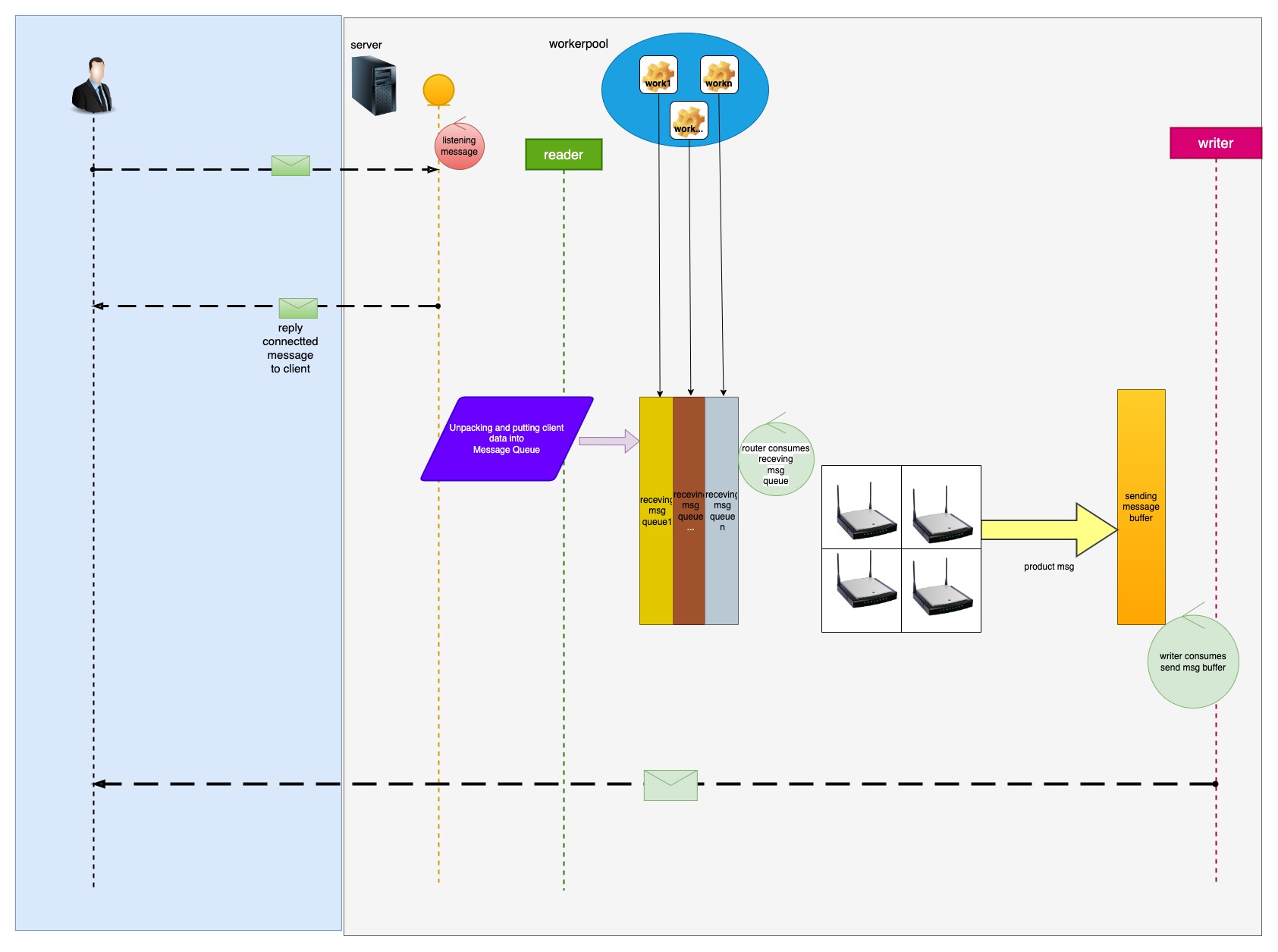
II. Zinx architecture
III. Zinx development API documentation
(1) QuickStart
<Zinx's TCP Debugging Tool>
DownLoad zinx Source
$go get github.com/aceld/zinx
note: Golang Version 1.17+
Zinx-Server
package main

import (
	"fmt"
	"github.com/aceld/zinx/ziface"
	"github.com/aceld/zinx/znet"
)

// PingRouter MsgId=1
type PingRouter struct {
	znet.BaseRouter
}

//Ping Handle MsgId=1
func (r *PingRouter) Handle(request ziface.IRequest) {
	//read client data
	fmt.Println("recv from client : msgId=", request.GetMsgID(), ", data=", string(request.GetData()))
}

func main() {
	//1 Create a server service
	s := znet.NewServer()

	//2 configure routing
	s.AddRouter(1, &PingRouter{})

	//3 start service
	s.Serve()
}
Run Server
$ go run server.go
              ██
              ▀▀
 ████████   ████     ██▄████▄  ▀██  ██▀
     ▄█▀      ██     ██▀   ██    ████
   ▄█▀        ██     ██    ██    ▄██▄
 ▄██▄▄▄▄▄  ▄▄▄██▄▄▄  ██    ██   ▄█▀▀█▄
 ▀▀▀▀▀▀▀▀  ▀▀▀▀▀▀▀▀  ▀▀    ▀▀  ▀▀▀  ▀▀▀

┌──────────────────────────────────────────────────────┐
│ [Github] https://github.com/aceld                    │
│ [tutorial] https://www.yuque.com/aceld/npyr8s/bgftov │
└──────────────────────────────────────────────────────┘
[Zinx] Version: V1.0, MaxConn: 12000, MaxPacketSize: 4096
===== Zinx Global Config =====
Host: 0.0.0.0
TCPPort: 8999
Name: ZinxServerApp
Version: V1.0
MaxPacketSize: 4096
MaxConn: 12000
WorkerPoolSize: 10
MaxWorkerTaskLen: 1024
MaxMsgChanLen: 1024
ConfFilePath: /Users/Aceld/go/src/zinx-usage/quick_start/conf/zinx.json
LogDir: /Users/Aceld/go/src/zinx-usage/quick_start/log
LogFile:
LogIsolationLevel: 0
HeartbeatMax: 10
==============================
2023/03/09 18:39:49 [INFO]msghandler.go:61: Add api msgID = 1
2023/03/09 18:39:49 [INFO]server.go:112: [START] Server name: ZinxServerApp,listenner at IP: 0.0.0.0, Port 8999 is starting
2023/03/09 18:39:49 [INFO]msghandler.go:66: Worker ID = 0 is started.
2023/03/09 18:39:49 [INFO]msghandler.go:66: Worker ID = 1 is started.
2023/03/09 18:39:49 [INFO]msghandler.go:66: Worker ID = 3 is started.
2023/03/09 18:39:49 [INFO]msghandler.go:66: Worker ID = 2 is started.
2023/03/09 18:39:49 [INFO]msghandler.go:66: Worker ID = 4 is started.
2023/03/09 18:39:49 [INFO]msghandler.go:66: Worker ID = 6 is started.
2023/03/09 18:39:49 [INFO]msghandler.go:66: Worker ID = 7 is started.
2023/03/09 18:39:49 [INFO]msghandler.go:66: Worker ID = 8 is started.
2023/03/09 18:39:49 [INFO]msghandler.go:66: Worker ID = 9 is started.
2023/03/09 18:39:49 [INFO]msghandler.go:66: Worker ID = 5 is started.
2023/03/09 18:39:49 [INFO]server.go:134: [START] start Zinx server  ZinxServerApp succ, now listenning...
Zinx-Client
package main

import (
	"fmt"
	"github.com/aceld/zinx/ziface"
	"github.com/aceld/zinx/znet"
	"time"
)

//Client custom business
func pingLoop(conn ziface.IConnection) {
	for {
		err := conn.SendMsg(1, []byte("Ping...Ping...Ping...[FromClient]"))
		if err != nil {
			fmt.Println(err)
			break
		}

		time.Sleep(1 * time.Second)
	}
}

//Executed when a connection is created
func onClientStart(conn ziface.IConnection) {
	fmt.Println("onClientStart is Called ... ")
	go pingLoop(conn)
}

func main() {
	//Create a client client
	client := znet.NewClient("127.0.0.1", 8999)

	//Set the hook function after the link is successfully established
	client.SetOnConnStart(onClientStart)

	//start the client
	client.Start()

	//Prevent the process from exiting, waiting for an interrupt signal
	select {}
}
Run Client
$ go run client.go
2023/03/09 19:04:54 [INFO]client.go:73: [START] Zinx Client LocalAddr: 127.0.0.1:55294, RemoteAddr: 127.0.0.1:8999
2023/03/09 19:04:54 [INFO]connection.go:354: ZINX CallOnConnStart....
Terminal of Zinx Print:
recv from client : msgId= 1 , data= Ping...Ping...Ping...[FromClient]
recv from client : msgId= 1 , data= Ping...Ping...Ping...[FromClient]
recv from client : msgId= 1 , data= Ping...Ping...Ping...[FromClient]
recv from client : msgId= 1 , data= Ping...Ping...Ping...[FromClient]
recv from client : msgId= 1 , data= Ping...Ping...Ping...[FromClient]
recv from client : msgId= 1 , data= Ping...Ping...Ping...[FromClient]
...
The most recent commit recorded on aceld/zinx was 2 months ago, based on the GitHub push timestamp. The repository has 1.3k forks — one of the better signals of community interest.
How many stars does aceld/zinx have?
aceld/zinx has 7.8k GitHub stars — refresh the page for the live number, or check github.com/aceld/zinx. TopGit mirrors GitHub's count but does not claim minute-by-minute accuracy.
Is aceld/zinx open source?
Yes — aceld/zinx ships under the MIT license, which makes its source code freely readable (and, depending on license terms, forkable and reusable). Source: github.com/aceld/zinx.
What else is in the Backend space?
aceld/zinx is tracked by TopGit under the Backend category, alongside 5 GitHub-tagged topics. Trending and Topics pages list peer repositories of comparable stars and language.
What topics is aceld/zinx associated with?
GitHub's repository topics for aceld/zinx: "game-server", "go", "golang", "tcp-server", "zinx". TopGit's editorial category is Backend.
Where can I see aceld/zinx in action?
The project maintains a homepage at https://github.com/aceld/zinx/wiki. The README tab on this page also usually contains screenshots and a quickstart.
Where do I read more about aceld/zinx?
This TopGit page is a snapshot — the READ ME tab shows the project's own README content (links stripped, images preserved). The GitHub repository at github.com/aceld/zinx is the definitive source.
Read full README in the tab above.
Still deciding about zinx?
One click hands the question to an AI along with this page — see what it says about zinx.
 /zinx
/zinx













 WeChat Public Account