A look at All-Hands-AI/OpenHands: 83.2k stars on GitHub, written primarily in TypeScript, tracked under the Frontend category. 🙌 OpenHands: AI-Driven Development
Snapshot summary built from the project's own GitHub metadata — there's no written TopGit review yet. The page will update automatically when a full review is published.
WHY NO REVIEW YET
TopGit writes full reviews for the most-starred, most-requested repositories. This page is a snapshot until then — see the READ ME tab for the original README in full.
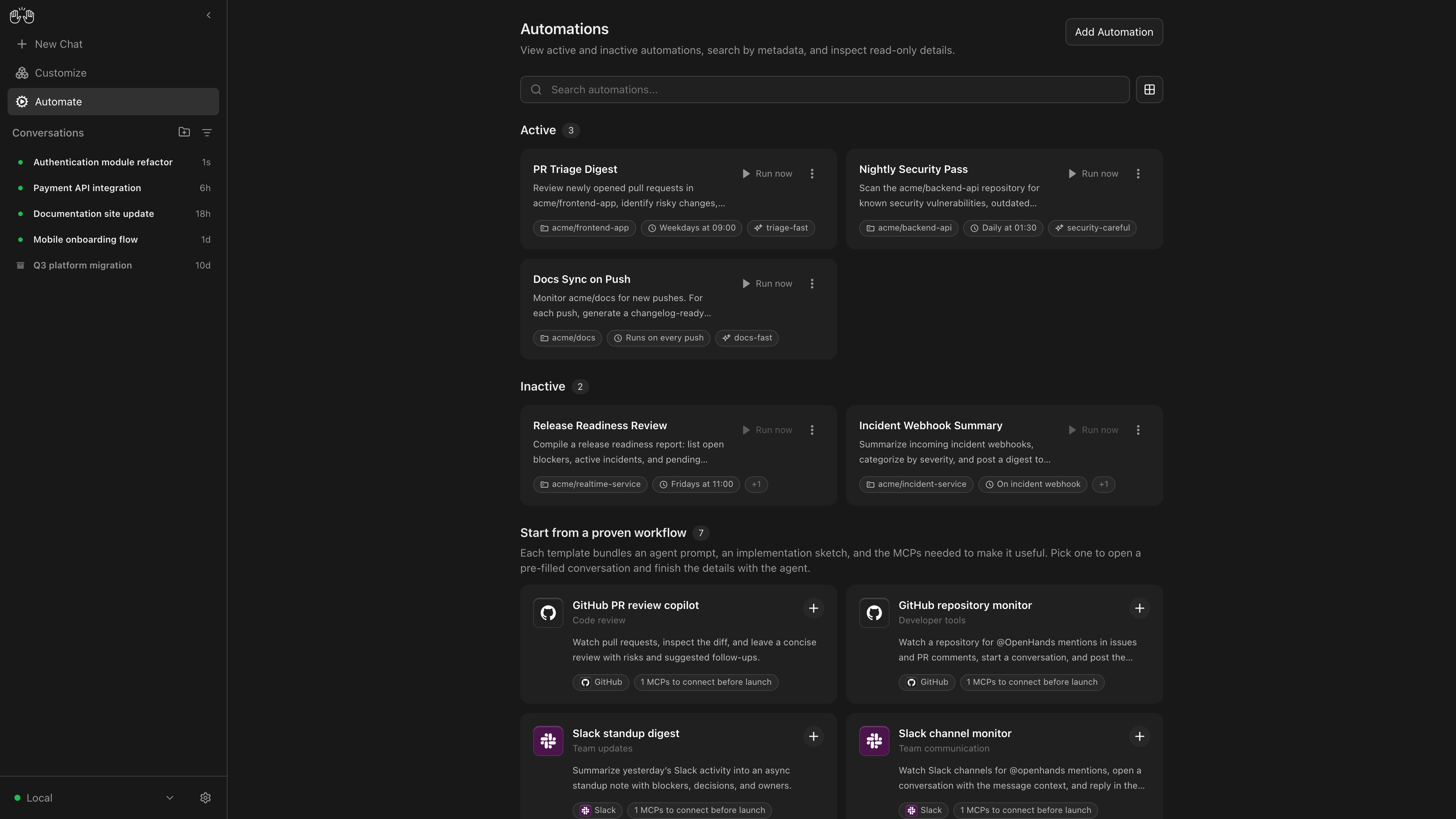
OpenHands Agent Canvas turns your coding agents into a self-hosted, always-on engineering team. It's a developer control center for starting conversations and automating everyday tasks — like generating reports that publish to Slack or automatically decomposing GitHub issues into tasks.
It runs locally on your machine by default, but can connect to multiple “agent backends”, e.g. running agents in Docker containers, on VMs, or within your company infrastructure. You can optionally choose to run agents on OpenHands Cloud or OpenHands Enterprise infrastructure.
Agent Canvas runs the open source OpenHands agent out-of-the-box, but can use any third-party agent like Claude Code and Codex.
Self-host your way
Run agents locally, in Docker, on VMs, or anywhere you can run an agent server backend
Switch between different backends
Switch between local, remote, and cloud agents without losing focus
Create automations
Create automations and workflows that integrate with Slack, GitHub, Linear, and more. Run on a schedule or in response to webhook events
Integrate with the tools you use
Connect your automations with third-party services like Slack, GitHub, Notion, and more to automate workflows
Bring your own model
Use with any LLM
Use with any agent
Use with OpenHands, Claude Code, Codex, Gemini, or any agent with Agent-Client Protocol (ACP).
If you have questions or feedback, please open a GitHub issue or join the #proj-agent-canvas channel in Slack.
Quickstart
You can install OpenHands to run agents on any machine: on your laptop, on a dedicated computer like a Mac Mini,
or on a server in the cloud.
The most powerful way to run OpenHands is on a server in the cloud. This allows your agents to continue running
even when your laptop is shut, and makes it easier to trigger your agents through third-party services
like Slack, GitHub, and Datadog. See SELF_HOSTING.md for details, especially with respect to security hardening.
Notably, you can run the backend in multiple different environments, and switch between
them from the same Agent Canvas frontend. E.g. you can share an Agent Server with your team for agents doing
code review and dependency updates, then have your personal agents running on your laptop.
Option 1: Without a Sandbox
[!WARNING]
This runs the agent-server directly on the machine you're installing on — the agent will have full access to your filesystem!
Windows (PowerShell / Windows Terminal): See README.windows.md for the equivalent commands.
The agent will be able to access any project under PROJECTS_PATH.
Option 3: From Source
[!WARNING]
This runs the agent-server directly on the machine you're installing on — the agent will have full access to your filesystem!
Prerequisites: Node.js 22.12.x or later, npm, uv (for running the agent server via uvx)
git clone https://github.com/OpenHands/OpenHands.git
cd OpenHands
npm install
npm run dev
Access the UI at http://localhost:8000 for the npm/source launchers, or http://localhost:8000/canvas for the Docker image. You can add additional backends directly from the UI.
Architecture
Agent Canvas is powered by the OpenHands Agent Server, a REST API for running multiple agents on a single machine. Each Agent Server runs on a single host/port; the Agent Canvas can connect to multiple Agent Servers and easily flip between them.
You can run an Agent Server anywhere:
Directly on your laptop (be careful!)
On a dedicated machine like a Mac Mini
On a virtual machine in the cloud
Inside OpenHands Cloud (our commercial offering)
The Agent Server is often paired with an Automation Server, which lets you set up agents that run on a schedule or in response to events.
Yes — All-Hands-AI/OpenHands ships under the MIT license, which makes its source code freely readable (and, depending on license terms, forkable and reusable). Source: github.com/All-Hands-AI/OpenHands.
What else is in the Frontend space?
All-Hands-AI/OpenHands is tracked by TopGit under the Frontend category, alongside 9 GitHub-tagged topics. Trending and Topics pages list peer repositories of comparable stars and language.
What is All-Hands-AI/OpenHands?
All-Hands-AI/OpenHands (All-Hands-AI/OpenHands) is a TypeScript project on GitHub. From the project's own README: 🙌 OpenHands: AI-Driven Development
What license does All-Hands-AI/OpenHands use?
All-Hands-AI/OpenHands is released under the MIT license. Always verify the LICENSE file directly on GitHub for the authoritative terms — license strings can be edited out of sync with a project's actual stance.
Where can I see All-Hands-AI/OpenHands in action?
The project maintains a homepage at https://openhands.dev. The README tab on this page also usually contains screenshots and a quickstart.
Where do I read more about All-Hands-AI/OpenHands?
This TopGit page is a snapshot — the READ ME tab shows the project's own README content (links stripped, images preserved). The GitHub repository at github.com/All-Hands-AI/OpenHands is the definitive source.
Why is All-Hands-AI/OpenHands categorized under Frontend?
TopGit places All-Hands-AI/OpenHands in the Frontend category based on its GitHub topics and description (tagged: "agent", "artificial-intelligence", "chatgpt"). Categories are assigned from real repository metadata, not editorial guesswork.
Read full README in the tab above.
Is OpenHands worth your time?
ChatGPT, Claude and Perplexity can all read this page. Ask one of them what it makes of OpenHands.
 /OpenHands