AlloyTeam/eslint-config-alloy is one of the UI-focused repositories TopGit tracks, currently at 2.6k stars, written primarily in JavaScript. Progressive ESLint config for your React/Vue/TypeScript projects
Snapshot summary built from the project's own GitHub metadata — there's no written TopGit review yet. The page will update automatically when a full review is published.
WHY NO REVIEW YET
TopGit writes full reviews for the most-starred, most-requested repositories. This page is a snapshot until then — see the READ ME tab for the original README in full.
NEWS: eslint-config-alloy now support TypeScript 5.0
If you are using TypeScript 4.0, please npm install --save-dev eslint-config-alloy@4
NEWS: eslint-config-alloy now support Vue 3.0
If you are using Vue 2.0, please npm install --save-dev eslint-config-alloy@3
The AlloyTeam ESLint config is not only a progressive ESLint config for your React/Vue/TypeScript projects but also the best reference for configuring your personalized ESLint rules.
Quick start
Please choose the following configuration based on the technology stack used by your project:
Built-in
React
Vue
TypeScript
TypeScript React
TypeScript Vue
Philosophy
Let Prettier handle style-related rules
Inherit ESLint's philosophy and help everyone build their own rules
High degree of automation: advanced rules management, test as a document, as a website
Keep up with the times, follow up the latest rules as soon as possible
Details
Let Prettier handle style-related rules
Prettier is a code formatting tool that offers fewer options but is more professional than the style-related rules in ESLint.
Now that Prettier has become a necessary tool in front-end projects, eslint-config-alloy does not need to maintain the style-related rules in ESLint anymore, so we completely removed all Prettier related rules in the v3 version, and use ESLint to check logical errors which it's good at.
As for whether two spaces or four spaces are used for indentation and whether there is a semicolon at the end, you can configure it in the project's .prettierrc.js. Of course, we also provide a recommended Prettier configuration for your reference.
Inherit ESLint's philosophy and help everyone build their own rules
Don't you remember how ESLint defeated JSHint and became the most popular JS code inspection tool? It is because of the plugin and configuration that ESLint advocates, which meets the individual needs of different technology stacks of different teams.
Therefore, eslint-config-alloy also inherits the philosophy of ESLint. It will not emphasize the need to use our config. Instead, we help you to make your config by reference our completed documents, examples, tests, websites, etc.
High degree of automation: advanced rules management, test as a document, as a website
Relentless push automation
eslint-config-alloy uses a high degree of automation to hand over all processes that can be managed automatically, including:
Through GitHub Actions, automatically weekly check whether ESLint and related plugins have new versions and if there are new rules in the new version which we need to add
Automatically check if our rules include Prettier rules
Automatically check if our rules include deprecated rules
Also, through automated scripts, we can even divide and conquer thousands of ESLint configuration files, and each rule is managed in a separate directory:
Integrate single configurations into a final configuration through a script
The description and reason in single configurations are built into a website by a script for everyone to view
The bad.js and good.js in a single configuration are output to website by script, and you can even see the error message (which are run in a real ESLint script) in the bad.js of website
The benefits of this are very obvious — test as a document, as a website. We can maintain the rules and tests in one place. Other tasks are handed over to an automated script, which greatly reduces the maintenance cost. In short, when we have a new rule to add, we only need to write three files test/index/another-rule/.eslintrc.js, test/index/another-rule/bad.js, test/index/another-rule/good.js.
Keep up with the times, follow up the latest rules as soon as possible
ESLint is updated very quickly, there is a new version almost every week, sometimes there are new rules, sometimes existing rules are deprecated, and related plug-ins (React/Vue/TypeScript) will be updated from time to time. Without automation tools, it is difficult to follow up.
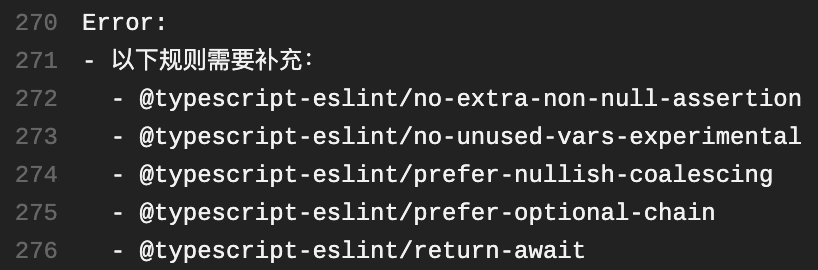
And eslint-config-alloy, through the above-mentioned automated tools, can receive notifications from GitHub Actions at the first time, telling us which rules need to be added:
In this way, we can follow the latest rules in a time when the front-end community is changing rapidly, and always keep the vitality and advanced of eslint-config-alloy.
Create an .eslintrc.js in the root directory of your project, then copy the following content into it:
module.exports = {
  extends: [
    'alloy',
    'alloy/react',
    'alloy/typescript',
  ],
  env: {
    // Your environments (which contains several predefined global variables)
    //
    // browser: true,
    // node: true,
    // mocha: true,
    // jest: true,
    // jquery: true
  },
  globals: {
    // Your global variables (setting to false means it's not allowed to be reassigned)
    //
    // myGlobal: false
  },
  rules: {
    // Customize your rules
  },
};
TypeScript Vue
It is recommended to use npm init vue@3 to create a project with Vue, TypeScript and ESLint integrated, and then refer to this example to adjust its ESLint configuration.
eslint-config-alloy does not include any style-related rules in v3, so there is no need to install eslint-config-prettier. Just install prettier and related VSCode plugins.
AlloyTeam provides a set of Prettier configuration, you can create a .prettierrc to reuse it:
"eslint-config-alloy/.prettierrc.js"
A best practice for VSCode is to auto format code with Prettier and autofix errors with ESLint by setting .vscode/settings.json to this:
# install dependencies
pnpm i
# build eslintrc like index.js, react.js, etc.
pnpm build
# run tests
pnpm test
# autofix prettier errors
pnpm prettier:fix
# check if all rules are covered
pnpm rulesCoverage
# publish new version
npm version <major|minor|patch>
git push --follow-tags
npm publish
Q & A
Why another ESLint config
Our team initially used Airbnb rules, but because it was too strict, some rules still needed to be personalized, which led to more and more changes in the future and finally decided to maintain a new set. After more than four years of maintaining, eslint-config-alloy is now very mature and progressive and has been welcomed by many teams inside and outside the company.
Why not standard
The standard specification believes that everyone should not waste time in personalized specifications, but the entire community should unify a specification. This statement makes some sense, but it runs against the ESLint's design philosophy. Don't you remember how ESLint defeated JSHint and became the most popular JS code inspection tool? It is because of the plugin and configuration that ESLint advocates, which meets the individual needs of different technology stacks of different teams.
Therefore, eslint-config-alloy also inherits the philosophy of ESLint. It will not force you to use our config. Instead, we help you to make your config by referencing our examples, tests, websites and so on.
Why not airbnb
eslint-config-alloy has officially maintained vue, typescript and react+typescript rules. In contrast, airbnb's vue and typescript are maintained by third parties.
Progressive to ensure that we can keep up with the times, as mentioned earlier
Convenient personalization, including explanations and website examples
Looks good, but I still choose airbnb
It's okay, eslint-config-alloy believes that different teams and projects can have different configurations from the design concept. Although you choose to use airbnb, you can still come to our website when you have personalized configuration needs.
How active is development on AlloyTeam/eslint-config-alloy?
The most recent commit recorded on AlloyTeam/eslint-config-alloy was 2.6 years ago, based on the GitHub push timestamp. The repository has 309 forks — one of the better signals of community interest.
How many stars does AlloyTeam/eslint-config-alloy have?
AlloyTeam/eslint-config-alloy has 2.6k GitHub stars — refresh the page for the live number, or check github.com/AlloyTeam/eslint-config-alloy. TopGit mirrors GitHub's count but does not claim minute-by-minute accuracy.
What language is AlloyTeam/eslint-config-alloy written in?
AlloyTeam/eslint-config-alloy is written primarily in JavaScript. GitHub's language field is based on the largest share of bytes in the default branch.
What topics is AlloyTeam/eslint-config-alloy associated with?
GitHub's repository topics for AlloyTeam/eslint-config-alloy: "alloyteam", "eslint", "eslint-config", "react", "typescript", "vue". TopGit's editorial category is Frontend.
Where can I see AlloyTeam/eslint-config-alloy in action?
The project maintains a homepage at https://alloyteam.github.io/eslint-config-alloy/. The README tab on this page also usually contains screenshots and a quickstart.
Where do I read more about AlloyTeam/eslint-config-alloy?
This TopGit page is a snapshot — the READ ME tab shows the project's own README content (links stripped, images preserved). The GitHub repository at github.com/AlloyTeam/eslint-config-alloy is the definitive source.
Read full README in the tab above.
Is eslint-config-alloy worth your time?
ChatGPT, Claude and Perplexity can all read this page. Ask one of them what it makes of eslint-config-alloy.