As a developer tool, amir20/dozzle has picked up 14.9k stars on GitHub (Go). Realtime log viewer for containers. Supports Docker, Swarm and K8s.
Snapshot summary built from the project's own GitHub metadata — there's no written TopGit review yet. The page will update automatically when a full review is published.
WHY NO REVIEW YET
TopGit writes full reviews for the most-starred, most-requested repositories. This page is a snapshot until then — see the READ ME tab for the original README in full.
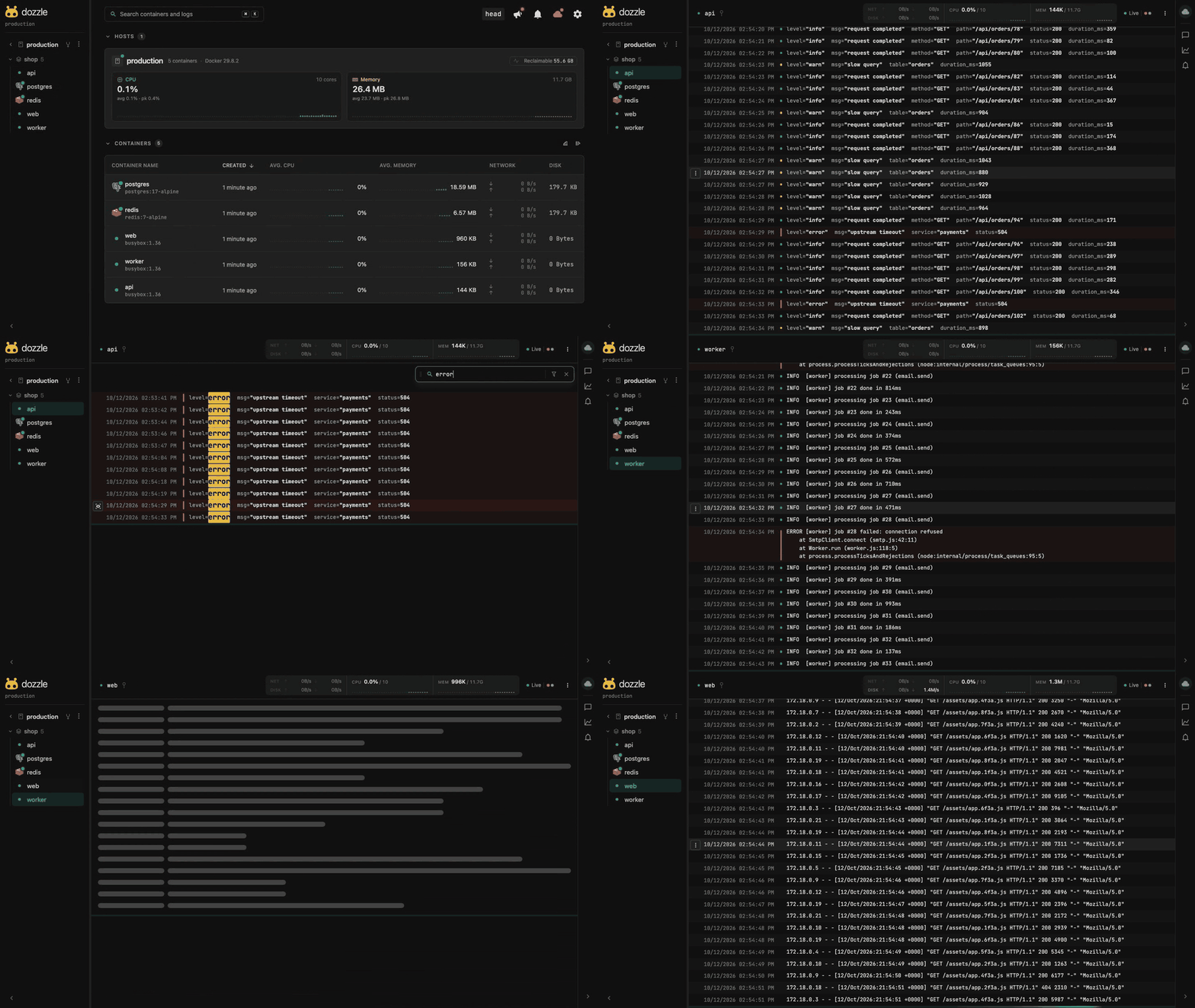
Dozzle is a lightweight, web-based application for monitoring Docker logs in real time. It doesn't store any log files—it's designed purely for live log viewing.
[!NOTE]
If you like Dozzle, check out dtop, a top-like application for monitoring Docker containers. It integrates with Dozzle to link directly to container logs.
Features
Intelligent fuzzy search for container names
Search logs using regex
Search logs using SQL queries
Small memory footprint
Split screen for viewing multiple logs
Live stats with memory and CPU usage
Multi-user authentication with support for forward proxy authorization
Swarm mode support
Agent mode for monitoring multiple Docker hosts
Dark mode
Dozzle has been tested with hundreds of containers. However, it doesn't support offline searching. Products like Loggly, Papertrail, or Kibana are better suited for full search capabilities.
Getting Started
Dozzle is a small container (7 MB compressed). Pull the latest release with:
docker pull amir20/dozzle:latest
Running Dozzle
The simplest way to use Dozzle is to run the Docker container. Mount the Docker Unix socket with --volume to /var/run/docker.sock:
For advanced options like authentication, remote hosts, or common questions, see the documentation at dozzle.dev.
Image Tags
Images are published to both Docker Hub and ghcr.io with identical tags.
Tag
Description
latest
Most recent release. Recommended for most users.
v10.6.15
An exact release. Pin this for reproducible deployments.
v10.6
Latest patch within that minor version. Picks up bug fixes only.
v10
Latest release within that major version. Picks up new features too.
alpine
Same as latest, but on an Alpine base instead of scratch.
v10.6.15-alpine, v10.6-alpine, v10-alpine
Alpine variants of the version tags above.
main
Built from the main branch on every push. Unreleased and unstable.
pr-1234, pr-1234-alpine
Built from pull request #1234, for testing a fix before it ships.
The default images are built FROM scratch and contain only the Dozzle binary, which is why they are around 7 MB compressed. That also means there is no shell inside them. Use the alpine variants only if something in your setup needs one, most commonly platforms that bind-mount a #!/bin/sh wrapper over the container entrypoint such as Unraid's per-container Tailscale toggle. See the FAQ for details.
Avoid latest and main in production. latest moves on every release and main is unreleased code.
Swarm Mode
Dozzle works with Docker Swarm. You can run Dozzle as a global service:
docker service create --name dozzle --env DOZZLE_MODE=swarm --mode global --mount type=bind,source=/var/run/docker.sock,target=/var/run/docker.sock -p 8080:8080 amir20/dozzle:latest
See the Swarm Mode documentation for more details.
Agent Mode
Dozzle can monitor multiple Docker hosts. Run Dozzle in agent mode with:
docker run -v /var/run/docker.sock:/var/run/docker.sock -p 7007:7007 amir20/dozzle:latest agent
See the Agent Mode documentation for more details.
Technical Details
Dozzle uses automatic API negotiation, which works with most Docker configurations. Dozzle also works with Colima and Podman.
Dozzle requires Docker Engine 19.03 or newer (API version 1.40+). Older daemons are not supported by the underlying Docker SDK.
Installation on Podman
By default, Podman doesn't have a background process, but you can enable the remote socket for Dozzle to work.
First, verify if your Podman installation has the remote socket enabled:
podman info
If you see output like this under the remote socket key, it's already enabled:
If it's not enabled, follow this tutorial to enable it.
Once the Podman remote socket is enabled, you can run Dozzle:
podman run --volume=/run/user/1000/podman/podman.sock:/var/run/docker.sock -d -p 8080:8080 docker.io/amir20/dozzle:latest
Nothing else is needed. Dozzle works out a stable host id for Podman on its own, since Podman is daemonless and has no engine identity to report.
[!NOTE]
Older versions of this page told you to create a /var/lib/docker/engine-id file to prevent host not found errors. That never worked. Podman's Docker-compatible /info endpoint does not read any file, it returns a new random UUID on every call, so Dozzle now derives the id instead. You can delete the file.
For more details, see Podman Info or the FAQ.
Security
Dozzle supports file-based authentication and forward proxy authentication with tools like Authelia. See the documentation at https://dozzle.dev/guide/authentication.
Analytics
Dozzle collects anonymous user configurations using Google Analytics. Why? Dozzle is an open source project with no funding, so there's no time for formal user studies. Analytics help prioritize features and fixes based on how people use Dozzle. This data is completely public and can be viewed live on the Data Studio dashboard.
To disable analytics, use the --no-analytics flag.
Environment Variables and Configuration
Dozzle follows the 12-factor model. Configuration can be done via CLI flags or environment variables. See the documentation at dozzle.dev/guide/supported-env-vars for more details.
Support
There are many ways to support Dozzle:
Use it! Write about it! Star it! If you love Dozzle, drop me a line and tell me what you love.
Blog about Dozzle to spread the word. If you're good at writing, send PRs to improve the documentation at dozzle.dev.
Sponsor my work at https://www.buymeacoffee.com/amirraminfar
License
MIT
Building
Want to contribute? Great! Dozzle has two parts: a Go backend that talks to Docker, and a Vue frontend that runs in the browser. You don't need to know both — pick the side that matches what you want to change. For documentation fixes, no setup is needed at all; just edit the file on GitHub.
1. Install the prerequisites
You'll need Go (1.25+), Node.js, Bun, just, and protoc.
On macOS, you can install everything in one go:
brew install go node oven-sh/bun/bun just protobuf
On Windows, we recommend using WSL2 and following the Linux instructions.
2. Clone and set up
git clone https://github.com/amir20/dozzle.git
cd dozzle
bun install                 # installs frontend dependencies
go install tool             # installs Go build tools listed in go.mod (air, protoc-gen-go, etc.)
just generate               # generates TLS certificates and protobuf code (only needed once)
3. Start the dev server
just dev
Open http://localhost:3100 — you should see the Dozzle UI connected to your local Docker. Both the frontend and backend reload automatically when you save a file.
Making your first change
Try editing assets/pages/index.vue and saving — the browser updates instantly. For backend changes, edit any .go file and the server will restart on its own.
Troubleshooting
Nothing shows up at localhost:3100 — make sure Docker is running and the socket is accessible at /var/run/docker.sock.
just generate fails — confirm protoc is on your PATH (protoc --version).
Still stuck? Open a question in GitHub Discussions — we're happy to help.
Adding App Icons
Dozzle shows a logo next to containers whose image it recognizes. Icons are vendored from homarr-labs/dashboard-icons into assets/icons/apps/, and matching happens in assets/utils/appIcons.ts.
The repo ships an add-app-icon skill in .claude/skills/. To add icons with an AI coding agent, paste this prompt and fill in the images:
Use the add-app-icon skill in .claude/skills/add-app-icon/SKILL.md to add app icons
for these container images: <image1>, <image2>
Yes — amir20/dozzle ships under the MIT license, which makes its source code freely readable (and, depending on license terms, forkable and reusable). Source: github.com/amir20/dozzle.
What else is in the Developer Tools space?
amir20/dozzle is tracked by TopGit under the Developer Tools category, alongside 11 GitHub-tagged topics. Trending and Topics pages list peer repositories of comparable stars and language.
What is amir20/dozzle?
amir20/dozzle (amir20/dozzle) is a Go project on GitHub. From the project's own README: Realtime log viewer for containers. Supports Docker, Swarm and K8s.
What license does amir20/dozzle use?
amir20/dozzle is released under the MIT license. Always verify the LICENSE file directly on GitHub for the authoritative terms — license strings can be edited out of sync with a project's actual stance.
Where can I see amir20/dozzle in action?
The project maintains a homepage at https://dozzle.dev/. The README tab on this page also usually contains screenshots and a quickstart.
Where do I read more about amir20/dozzle?
This TopGit page is a snapshot — the READ ME tab shows the project's own README content (links stripped, images preserved). The GitHub repository at github.com/amir20/dozzle is the definitive source.
Why is amir20/dozzle categorized under Developer Tools?
TopGit places amir20/dozzle in the Developer Tools category based on its GitHub topics and description (tagged: "docker", "docker-container", "golang"). Categories are assigned from real repository metadata, not editorial guesswork.
Read full README in the tab above.
Want a second opinion on dozzle?
Ask an AI that can read this page — one click and you get its take on dozzle.

 /dozzle