Indexed by TopGit from live GitHub metadata: AndyMik90/Aperant has 14.5k stars, written primarily in TypeScript. Autonomous multi-session AI coding
Snapshot summary built from the project's own GitHub metadata — there's no written TopGit review yet. The page will update automatically when a full review is published.
WHY NO REVIEW YET
TopGit writes full reviews for the most-starred, most-requested repositories. This page is a snapshot until then — see the READ ME tab for the original README in full.
Autonomous multi-agent coding framework that plans, builds, and validates software for you.
🚀 Status: Aperant 3.0 in active development
Aperant is alive and under active development — it is not abandoned.
We're rebuilding the entire app from the ground up for Aperant 3.0, which adds cloud features on top of the local desktop experience. Aperant 3.0 will stay fully open source under AGPL-3.0.
Why this repo looks quiet: most of the 3.0 work is happening in a separate development repository right now and will be merged back here once it's ready. So even though commits look sparse on the surface, the project is very much alive and moving fast behind the scenes.
What this means today:
🛠️ The current 2.x desktop app is in maintenance mode — it's stable and usable, but new development is going into 3.0.
🚫 Pull requests are paused. Because the codebase is being rebuilt from scratch, code PRs against the current app can't be merged and will be closed. Please hold off on opening them for now.
💬 We still want your input. Open an issue, start a discussion, or join our Discord to report bugs and help shape what 3.0 becomes.
No public release date yet — ⭐ star and watch the repo (or join Discord) to follow progress.
Download
🛠️ These are 2.x maintenance builds. They're stable and fully usable today, but active development has moved to Aperant 3.0 (see status above). Expect critical fixes here rather than new features.
Stable Release
Platform
Download
Windows
Auto-Claude-2.7.6-win32-x64.exe
macOS (Apple Silicon)
Auto-Claude-2.7.6-darwin-arm64.dmg
macOS (Intel)
Auto-Claude-2.7.6-darwin-x64.dmg
Linux
Auto-Claude-2.7.6-linux-x86_64.AppImage
Linux (Debian)
Auto-Claude-2.7.6-linux-amd64.deb
Linux (Flatpak)
Auto-Claude-2.7.6-linux-x86_64.flatpak
Beta Release
⚠️ Beta releases may contain bugs and breaking changes. View all releases
Platform
Download
Windows
Aperant-2.8.0-beta.5-win32-x64.exe
macOS (Apple Silicon)
Aperant-2.8.0-beta.5-darwin-arm64.dmg
macOS (Intel)
Aperant-2.8.0-beta.5-darwin-x64.dmg
Linux
Aperant-2.8.0-beta.5-linux-x86_64.AppImage
Linux (Debian)
Aperant-2.8.0-beta.5-linux-amd64.deb
Linux (Flatpak)
Aperant-2.8.0-beta.5-linux-x86_64.flatpak
All releases include SHA256 checksums and VirusTotal scan results for security verification.
Requirements
Claude Pro/Max subscription - Get one here
Claude Code CLI - npm install -g @anthropic-ai/claude-code
Git repository - Your project must be initialized as a git repo
Quick Start
Download and install the app for your platform
Open your project - Select a git repository folder
Connect Claude - The app will guide you through OAuth setup
Create a task - Describe what you want to build
Watch it work - Agents plan, code, and validate autonomously
Features
Feature
Description
Autonomous Tasks
Describe your goal; agents handle planning, implementation, and validation
Parallel Execution
Run multiple builds simultaneously with up to 12 agent terminals
Isolated Workspaces
All changes happen in git worktrees - your main branch stays safe
Self-Validating QA
Built-in quality assurance loop catches issues before you review
AI-Powered Merge
Automatic conflict resolution when integrating back to main
Memory Layer
Agents retain insights across sessions for smarter builds
GitHub/GitLab Integration
Import issues, investigate with AI, create merge requests
Linear Integration
Sync tasks with Linear for team progress tracking
Cross-Platform
Native desktop apps for Windows, macOS, and Linux
Auto-Updates
App updates automatically when new versions are released
Interface
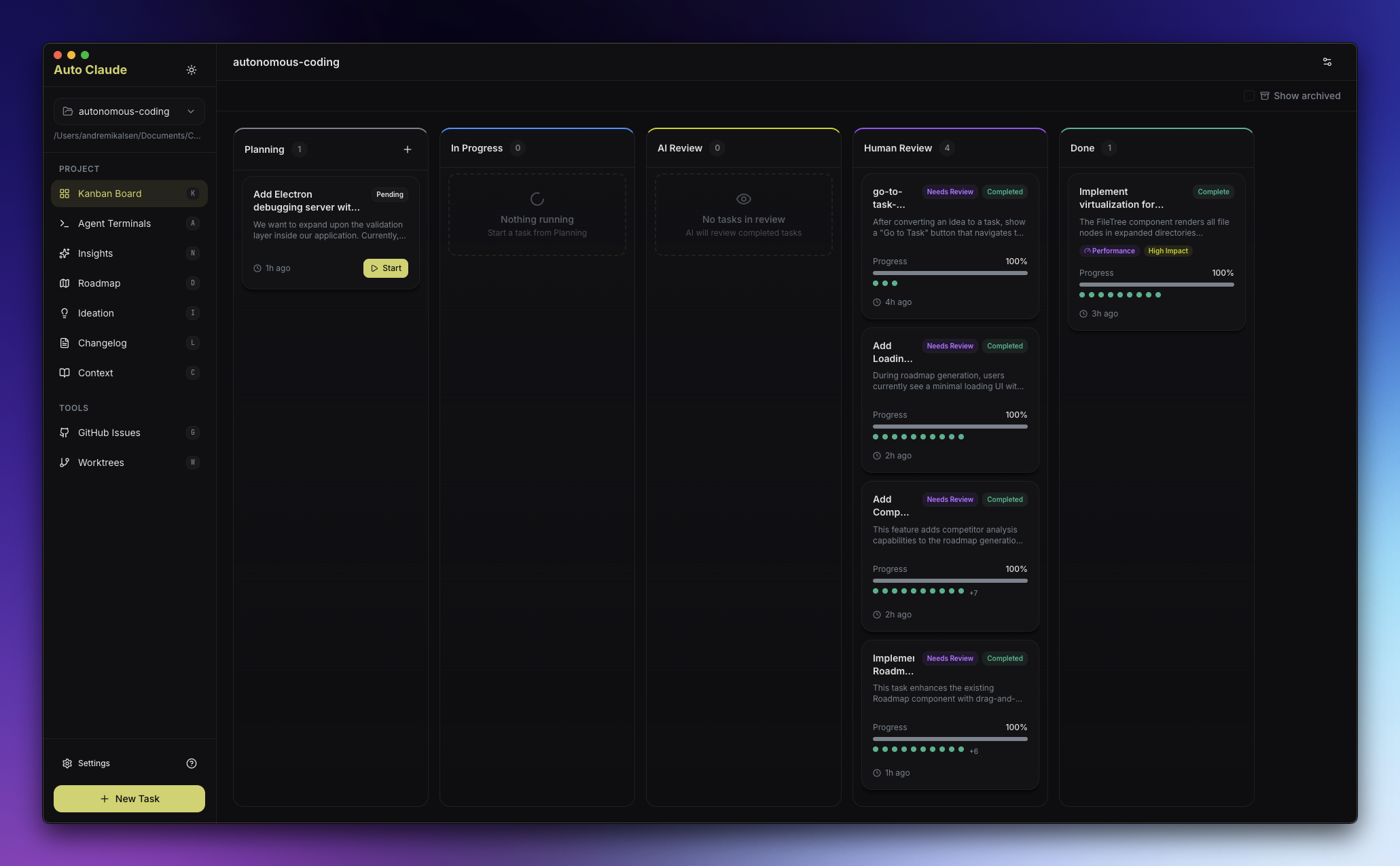
Kanban Board
Visual task management from planning through completion. Create tasks and monitor agent progress in real-time.
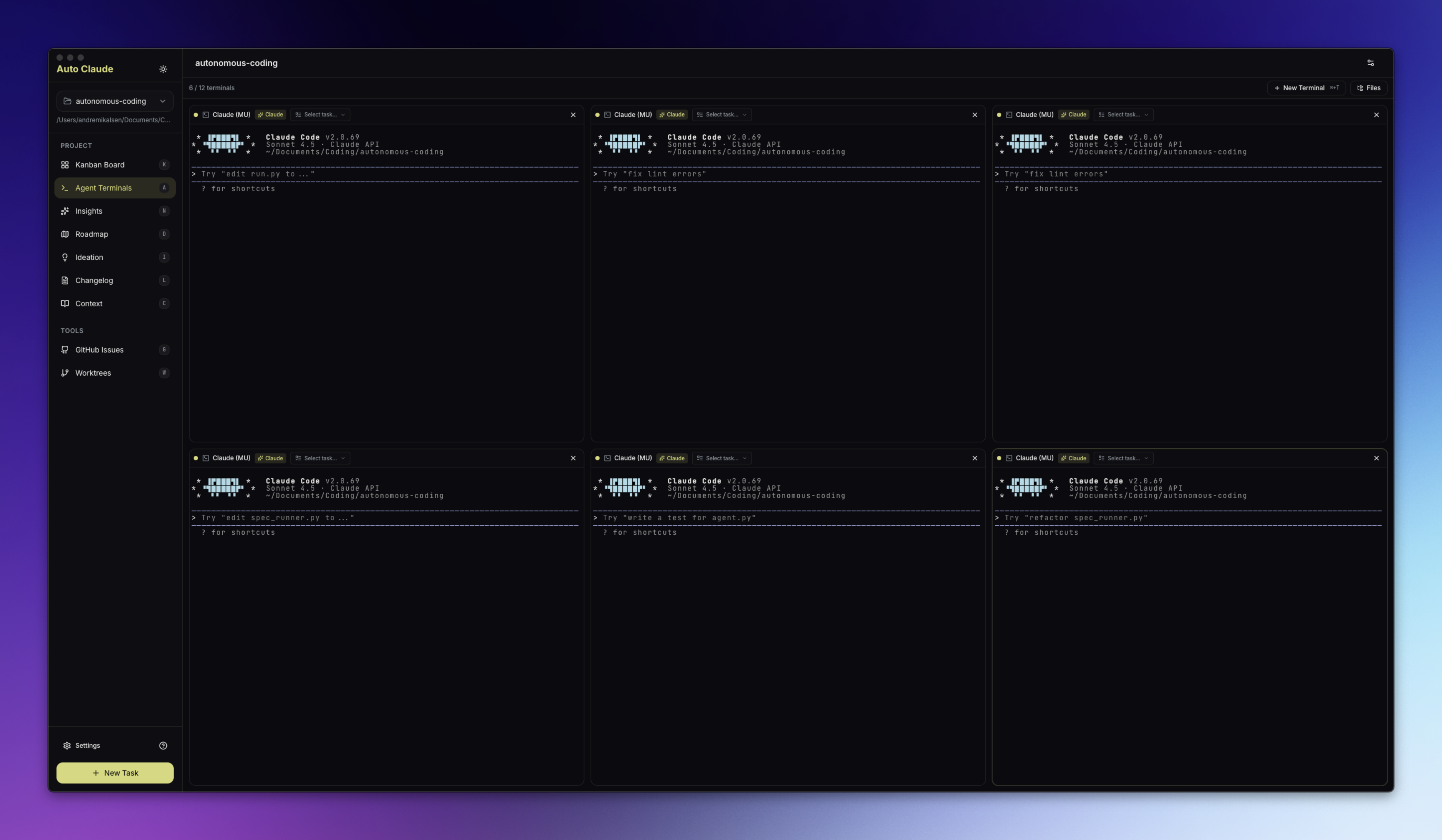
Agent Terminals
AI-powered terminals with one-click task context injection. Spawn multiple agents for parallel work.
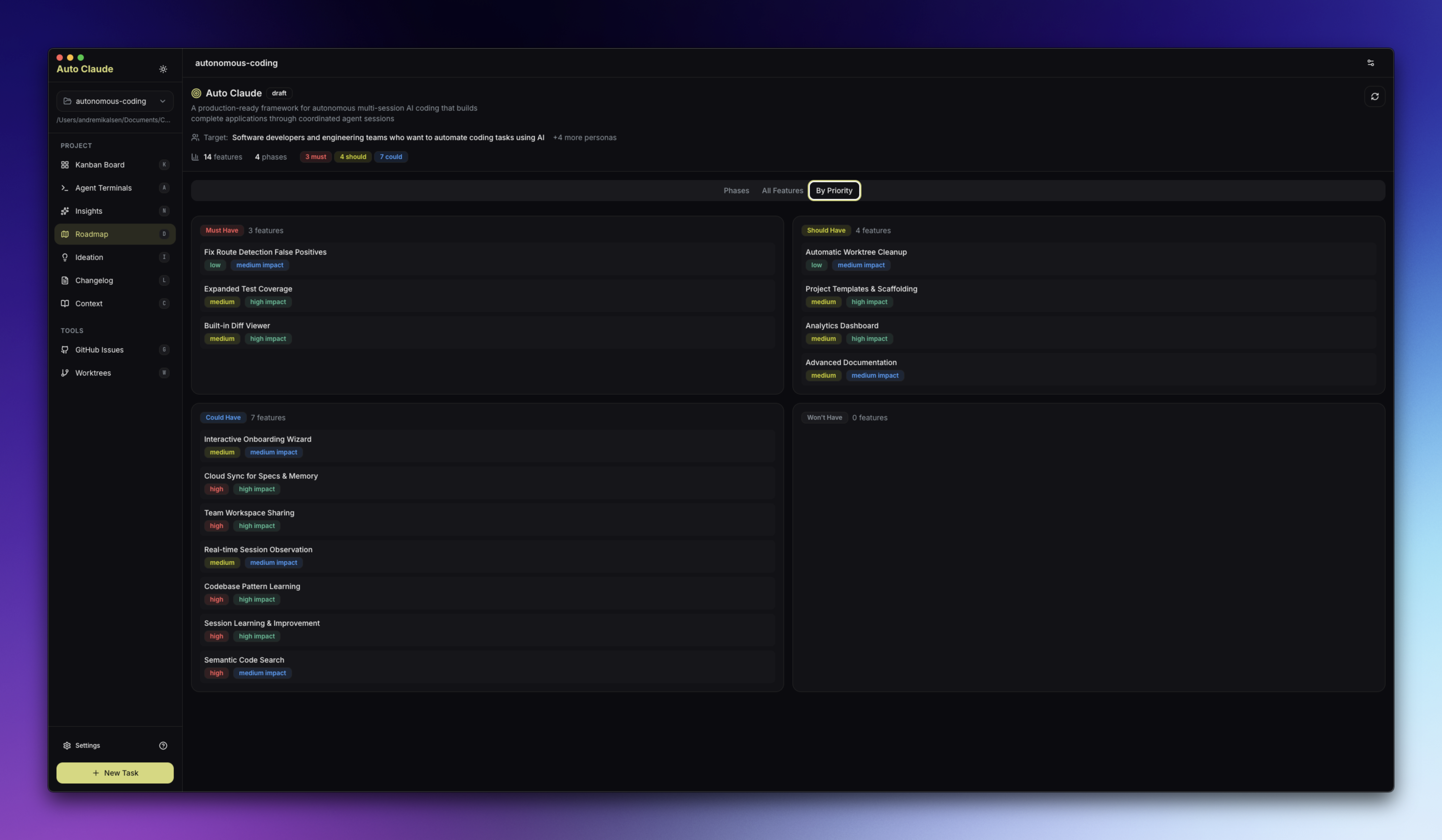
Roadmap
AI-assisted feature planning with competitor analysis and audience targeting.
Additional Features
Insights - Chat interface for exploring your codebase
Ideation - Discover improvements, performance issues, and vulnerabilities
Changelog - Generate release notes from completed tasks
Want to build and run from source? See CONTRIBUTING.md for complete development setup instructions. (Note: code contributions are paused during the 3.0 rebuild — see Contributing below.)
For Linux-specific builds (Flatpak, AppImage), see guides/linux.md.
Security
Aperant uses a three-layer security model:
OS Sandbox - Bash commands run in isolation
Filesystem Restrictions - Operations limited to project directory
Dynamic Command Allowlist - Only approved commands based on detected project stack
All releases are:
Scanned with VirusTotal before publishing
Include SHA256 checksums for verification
Code-signed where applicable (macOS)
Available Scripts
Command
Description
npm run install:all
Install all dependencies
npm start
Build and run the desktop app
npm run dev
Run in development mode with hot reload
npm run package
Package for current platform
npm run package:mac
Package for macOS
npm run package:win
Package for Windows
npm run package:linux
Package for Linux
npm run package:flatpak
Package as Flatpak (see guides/linux.md)
npm run lint
Run linter
npm test
Run frontend tests
Contributing
🚫 Pull requests are paused while we rebuild for Aperant 3.0. The current codebase is being replaced from the ground up, so code PRs against it can't be merged and will be closed. This is temporary — contribution will reopen once the 3.0 foundation lands.
You can still help shape Aperant right now:
🐛 Report bugs you hit in the current app
💡 Share ideas and feature requests for 3.0
💬 Join the Discord to follow development and influence the roadmap
When contributions reopen, CONTRIBUTING.md covers development setup, code style, testing, and the pull request process.
Community
Discord - Join our community
Issues - Report bugs or request features
Discussions - Ask questions
License
AGPL-3.0 - GNU Affero General Public License v3.0
Aperant is free to use. If you modify and distribute it, or run it as a service, your code must also be open source under AGPL-3.0.
Commercial licensing available for closed-source use cases.
The most recent commit recorded on AndyMik90/Aperant was 2 months ago, based on the GitHub push timestamp. The repository has 1.9k forks — one of the better signals of community interest.
How does AndyMik90/Aperant compare to other Developer Tools projects?
AndyMik90/Aperant is tracked by TopGit in the Developer Tools category, with 14.5k GitHub stars and written in TypeScript. Browse the Developer Tools topic page on TopGit to compare it against similar projects by stars and activity.
How many stars does AndyMik90/Aperant have?
AndyMik90/Aperant has 14.5k GitHub stars — refresh the page for the live number, or check github.com/AndyMik90/Aperant. TopGit mirrors GitHub's count but does not claim minute-by-minute accuracy.
Is AndyMik90/Aperant open source?
Yes — AndyMik90/Aperant ships under the AGPL-3.0 license, which makes its source code freely readable (and, depending on license terms, forkable and reusable). Source: github.com/AndyMik90/Aperant.
What is AndyMik90/Aperant?
AndyMik90/Aperant (AndyMik90/Aperant) is a TypeScript project on GitHub. From the project's own README: Autonomous multi-session AI coding
Where do I read more about AndyMik90/Aperant?
This TopGit page is a snapshot — the READ ME tab shows the project's own README content (links stripped, images preserved). The GitHub repository at github.com/AndyMik90/Aperant is the definitive source.
Read full README in the tab above.
Is Aperant worth your time?
ChatGPT, Claude and Perplexity can all read this page. Ask one of them what it makes of Aperant.
 /Aperant