ankane/blazer

4.8k GitHub stars and counting — ankane/blazer is a Ruby project TopGit is tracking across repositories on the platform. Business intelligence made simple
Snapshot summary built from the project's own GitHub metadata — there's no written TopGit review yet. The page will update automatically when a full review is published.
TopGit writes full reviews for the most-starred, most-requested repositories. This page is a snapshot until then — see the READ ME tab for the original README in full.
Snapshot
Top contributors
Show top contributors
Blazer
Explore your data with SQL. Easily create charts and dashboards, and share them with your team.
Try it out
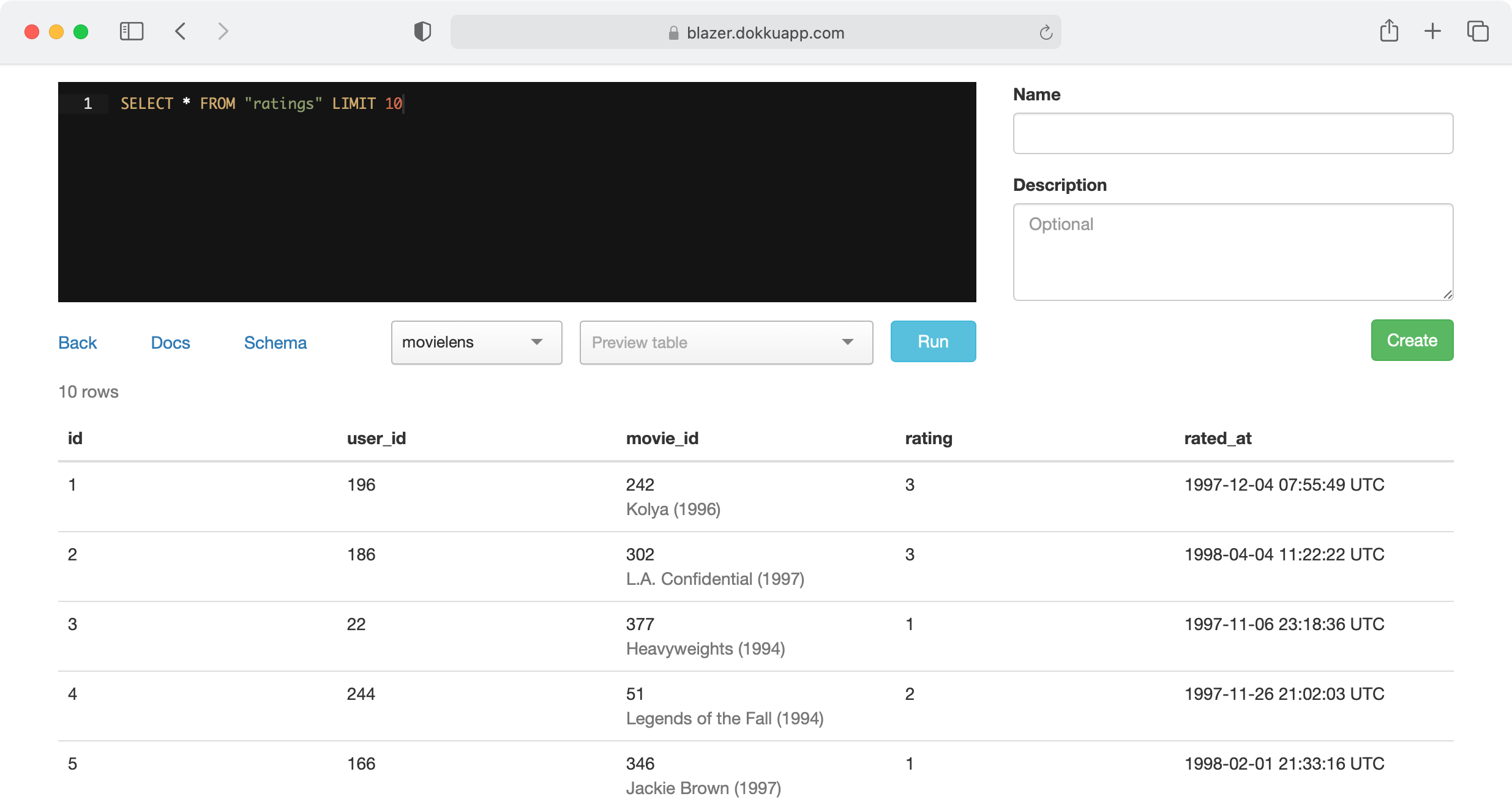
Blazer is also available as a Docker image.
:tangerine: Battle-tested at Instacart

Features
- Multiple data sources - PostgreSQL, MySQL, Redshift, and many more
- Variables - run the same queries with different values
- Checks & alerts - get emailed when bad data appears
- Audits - all queries are tracked
- Security - works with your authentication system
Docs
- Installation
- Queries
- Charts
- Dashboards
- Checks
- Cohorts
- Anomaly Detection
- Forecasting
- Uploads
- Data Sources
- Query Permissions
Installation
Add this line to your application’s Gemfile:
gem "blazer"
Run:
rails generate blazer:install
rails db:migrate
And mount the dashboard in your config/routes.rb:
mount Blazer::Engine, at: "blazer"
For production, specify your database:
ENV["BLAZER_DATABASE_URL"] = "postgres://user:password@hostname:5432/database"
When possible, Blazer tries to protect against queries which modify data by running each query in a transaction and rolling it back, but a safer approach is to use a read-only user. See how to create one.
Checks (optional)
Be sure to set a host in config/environments/production.rb for emails to work.
config.action_mailer.default_url_options = {host: "blazer.dokkuapp.com"}
Schedule checks to run (with cron, Solid Queue, Heroku Scheduler, etc). The default options are every 5 minutes, 1 hour, or 1 day, which you can customize. For each of these options, set up a task to run.
rake blazer:run_checks SCHEDULE="5 minutes"
rake blazer:run_checks SCHEDULE="1 hour"
rake blazer:run_checks SCHEDULE="1 day"
You can also set up failing checks to be sent once a day (or whatever you prefer).
rake blazer:send_failing_checks
Here’s what it looks like with cron.
*/5 * * * * rake blazer:run_checks SCHEDULE="5 minutes"
0   * * * * rake blazer:run_checks SCHEDULE="1 hour"
30  7 * * * rake blazer:run_checks SCHEDULE="1 day"
0   8 * * * rake blazer:send_failing_checks
For Solid Queue, update config/recurring.yml.
production:
  blazer_run_checks_5_minutes:
    command: "Blazer.run_checks(schedule: '5 minutes')"
    schedule: every 5 minutes
  blazer_run_checks_1_hour:
    command: "Blazer.run_checks(schedule: '1 hour')"
    schedule: every hour
  blazer_run_checks_1_day:
    command: "Blazer.run_checks(schedule: '1 day')"
    schedule: every day at 7:30am
  blazer_send_failing_checks:
    command: "Blazer.send_failing_checks"
    schedule: every day at 8am
For Slack notifications, create an incoming webhook and set:
BLAZER_SLACK_WEBHOOK_URL=https://hooks.slack.com/...
Name the webhook “Blazer” and add a cool icon.
Authentication
Don’t forget to protect the dashboard in production.
Basic Authentication
Set the following variables in your environment or an initializer.
ENV["BLAZER_USERNAME"] = "andrew"
ENV["BLAZER_PASSWORD"] = "secret"
Devise
authenticate :user, ->(user) { user.admin? } do
  mount Blazer::Engine, at: "blazer"
end
Other
Specify a before_action method to run in config/blazer.yml.
before_action_method: require_admin
You can define this method in your ApplicationController.
def require_admin
  # depending on your auth, something like...
  redirect_to main_app.root_path unless current_user && current_user.admin?
end
Be sure to render or redirect for unauthorized users.
Permissions
PostgreSQL
Create a user with read-only permissions:
BEGIN;
CREATE ROLE blazer LOGIN PASSWORD 'secret';
GRANT CONNECT ON DATABASE dbname TO blazer;
GRANT USAGE ON SCHEMA public TO blazer;
GRANT SELECT ON ALL TABLES IN SCHEMA public TO blazer;
ALTER DEFAULT PRIVILEGES FOR ROLE migrations_role IN SCHEMA public GRANT SELECT ON TABLES TO blazer;
COMMIT;
MySQL and MariaDB
Create a user with read-only permissions:
CREATE USER 'blazer'@'127.0.0.1' IDENTIFIED BY 'secret';
GRANT SELECT, SHOW VIEW ON dbname.* TO 'blazer'@'127.0.0.1';
FLUSH PRIVILEGES;
Sensitive Data
If your database contains sensitive or personal data, check out Hypershield to shield it.
Encrypted Data
If you need to search encrypted data, use blind indexing.
You can have Blazer transform specific variables with:
Blazer.transform_variable = lambda do |name, value|
  value = User.generate_email_bidx(value) if name == "email_bidx"
  value
end
Queries
Variables
Create queries with variables.
SELECT * FROM users WHERE gender = {gender}
Use {start_time} and {end_time} for time ranges. Example
SELECT * FROM ratings WHERE rated_at >= {start_time} AND rated_at <= {end_time}
Smart Variables
Example
Suppose you have the query:
SELECT * FROM users WHERE occupation_id = {occupation_id}
Instead of remembering each occupation’s id, users can select occupations by name.
Add a smart variable in config/blazer.yml with:
smart_variables:
  occupation_id: "SELECT id, name FROM occupations ORDER BY name ASC"
The first column is the value of the variable, and the second column is the label.
You can also use an array or hash for static data and enums.
smart_variables:
  period: ["day", "week", "month"]
  status: {0: "Active", 1: "Archived"}
Linked Columns
Example - title column
Link results to other pages in your apps or around the web. Specify a column name and where it should link to. You can use the value of the result with {value}.
linked_columns:
  user_id: "/admin/users/{value}"
  ip_address: "https://www.infosniper.net/index.php?ip_address={value}"
Smart Columns
Example - occupation_id column
Suppose you have the query:
SELECT name, city_id FROM users
See which city the user belongs to without a join.
smart_columns:
  city_id: "SELECT id, name FROM cities WHERE id IN {value}"
You can also use a hash for static data and enums.
smart_columns:
  status: {0: "Active", 1: "Archived"}
Caching
Blazer can automatically cache results to improve speed. It can cache slow queries:
cache:
  mode: slow
  expires_in: 60 # min
  slow_threshold: 15 # sec
Or it can cache all queries:
cache:
  mode: all
  expires_in: 60 # min
Of course, you can force a refresh at any time.
Charts
Blazer will automatically generate charts based on the types of the columns returned in your query.
Note: The order of columns matters.
Line Chart
There are two ways to generate line charts.
2+ columns - timestamp, numeric(s) - Example
SELECT date_trunc('week', created_at), COUNT(*) FROM users GROUP BY 1
3 columns - timestamp, string, numeric - Example
SELECT date_trunc('week', created_at), gender, COUNT(*) FROM users GROUP BY 1, 2
Column Chart
There are also two ways to generate column charts.
2+ columns - string, numeric(s) - Example
SELECT gender, COUNT(*) FROM users GROUP BY 1
3 columns - string, string, numeric - Example
SELECT gender, zip_code, COUNT(*) FROM users GROUP BY 1, 2
Scatter Chart
2 columns - both numeric - Example
SELECT x, y FROM table
Pie Chart
2 columns - string, numeric - and last column named pie - Example
SELECT gender, COUNT(*) AS pie FROM users GROUP BY 1
Maps
Columns named latitude and longitude or lat and lon or lat and lng - Example
SELECT name, latitude, longitude FROM cities
or a column named geojson
SELECT name, geojson FROM counties
To enable, get an access token from Mapbox and set ENV["MAPBOX_ACCESS_TOKEN"].
Targets
Use the column name target to draw a line for goals. Example
SELECT date_trunc('week', created_at), COUNT(*) AS new_users, 100000 AS target FROM users GROUP BY 1
Dashboards
Create a dashboard with multiple queries. Example
If the query has a chart, the chart is shown. Otherwise, you’ll see a table.
If any queries have variables, they will show up on the dashboard.
Checks
Checks give you a centralized place to see the health of your data. Example
Create a query to identify bad rows.
SELECT * FROM ratings WHERE user_id IS NULL /* all ratings should have a user */
Then create check with optional emails if you want to be notified. Emails are sent when a check starts failing, and when it starts passing again.
Cohorts
Create a cohort analysis from a simple SQL query. Example
Create a query with the comment /* cohort analysis */. The result should have columns named user_id and conversion_time and optionally cohort_time.
You can generate cohorts from the first conversion time:
/* cohort analysis */
SELECT user_id, created_at AS conversion_time FROM orders
(the first conversion isn’t counted in the first time period with this format)
Or from another time, like sign up:
/* cohort analysis */
SELECT users.id AS user_id, orders.created_at AS conversion_time, users.created_at AS cohort_time
FROM users LEFT JOIN orders ON orders.user_id = users.id
This feature requires PostgreSQL or MySQL 8.
Anomaly Detection
Blazer supports three different approaches to anomaly detection.
Prophet
Add prophet-rb to your Gemfile:
gem "prophet-rb"
And add to config/blazer.yml:
anomaly_checks: prophet
Trend
Add trend to your Gemfile:
gem "trend"
Set the URL to the API in an initializer:
Trend.url = "http://localhost:8000"
And add to config/blazer.yml:
anomaly_checks: trend
AnomalyDetection.rb
Add anomaly_detection to your Gemfile:
gem "anomaly_detection"
And add to config/blazer.yml:
anomaly_checks: anomaly_detection
Forecasting
Blazer supports for two different forecasting methods.
A forecast link will appear for queries that return 2 columns with types timestamp and numeric.
Prophet
Add prophet-rb to your Gemfile:
gem "prophet-rb", ">= 0.2.1"
And add to config/blazer.yml:
forecasting: prophet
Trend
Add trend to your Gemfile:
gem "trend"
Set the URL to the API in an initializer:
Trend.url = "http://localhost:8000"
And add to config/blazer.yml:
forecasting: trend
Uploads
Create database tables from CSV files. Example
Run:
rails generate blazer:uploads
rails db:migrate
And add to config/blazer.yml:
uploads:
  url: postgres://...
  schema: uploads
  data_source: main
This feature requires PostgreSQL. Create a new schema just for uploads.
CREATE SCHEMA uploads;
Data Sources
Blazer supports multiple data sources :tada:
Add additional data sources in config/blazer.yml:
data_sources:
  main:
    url: <%= ENV["BLAZER_DATABASE_URL"] %>
    # timeout, smart_variables, linked_columns, smart_columns
  catalog:
    url: <%= ENV["CATALOG_DATABASE_URL"] %>
    # ...
  redshift:
    url: <%= ENV["REDSHIFT_DATABASE_URL"] %>
    # ...
Full List
- Amazon Athena
- Amazon Redshift
- Apache Drill
- Apache Hive
- Apache Ignite
- Apache Spark
- Cassandra
- ClickHouse
- Druid
- Elasticsearch
- Google BigQuery
- IBM DB2 and Informix
- InfluxDB
- MySQL and MariaDB
- Neo4j
- OpenSearch
- Oracle
- PostgreSQL
- Presto and Trino
- Salesforce
- Snowflake
- Socrata Open Data API (SODA)
- SQLite
- SQL Server
You can also create an adapter for any other data store.
Note: In the examples below, we recommend using environment variables for urls.
data_sources:
  my_source:
    url: <%= ENV["BLAZER_MY_SOURCE_URL"] %>
Amazon Athena
Add aws-sdk-athena and aws-sdk-glue to your Gemfile and set:
data_sources:
  my_source:
    adapter: athena
    database: database

    # optional settings
    output_location: s3://some-bucket/
    workgroup: primary
    catalog: s3tablescatalog/some-bucket
    access_key_id: ...
    secret_access_key: ...
    region: ...
Here’s an example IAM policy:
{
    "Version": "2012-10-17",
    "Statement": [
        {
            "Effect": "Allow",
            "Action": [
                "athena:GetQueryExecution",
                "athena:GetQueryResults",
                "athena:StartQueryExecution"
            ],
            "Resource": [
                "arn:aws:athena:region:account-id:workgroup/primary"
            ]
        },
        {
            "Effect": "Allow",
            "Action": [
                "glue:GetTable",
                "glue:GetTables"
            ],
            "Resource": [
                "arn:aws:glue:region:account-id:catalog",
                "arn:aws:glue:region:account-id:database/default",
                "arn:aws:glue:region:account-id:table/default/*"
            ]
        }
    ]
}
You also need to configure S3 permissions.
Amazon Redshift
Add activerecord7-redshift-adapter-pennylane to your Gemfile and set:
data_sources:
  my_source:
    url: redshift://user:password@hostname:5439/database
Use a read-only user.
Apache Drill
Add drill-sergeant to your Gemfile and set:
data_sources:
  my_source:
    adapter: drill
    url: http://hostname:8047
Use a read-only user.
Apache Hive
Add hexspace to your Gemfile and set:
data_sources:
  my_source:
    adapter: hive
    url: sasl://user:password@hostname:10000/database
Use a read-only user. Requires HiveServer2.
Apache Ignite
Add ignite-client to your Gemfile and set:
data_sources:
  my_source:
    url: ignite://user:password@hostname:10800
Use a read-only user (requires a third-party plugin).
Apache Spark
Add hexspace to your Gemfile and set:
data_sources:
  my_source:
    adapter: spark
    url: sasl://user:password@hostname:10000/database
Use a read-only user. Requires the Thrift server.
Cassandra
Add cassandra-driver and sorted_set to your Gemfile and set:
data_sources:
  my_source:
    url: cassandra://user:password@hostname:9042/keyspace
Use a read-only role.
ClickHouse
Set:
data_sources:
  my_source:
    adapter: clickhouse
    url: https://user:password@hostname:8443
    database: default
Druid
Enable SQL support on the broker and set:
data_sources:
  my_source:
    adapter: druid
    url: http://hostname:8082
Use a read-only role.
Elasticsearch
Add elasticsearch to your Gemfile and set:
data_sources:
  my_source:
    adapter: elasticsearch
    url: http://user:password@hostname:9200
Use a read-only role.
Google BigQuery
Add google-cloud-bigquery to your Gemfile and set:
data_sources:
  my_source:
    adapter: bigquery
    project: your-project
    keyfile: path/to/keyfile.json
IBM DB2 and Informix
Add ibm_db to your Gemfile and set:
data_sources:
  my_source:
    url: ibm-db://user:password@hostname:50000/database
Use a read-only user.
InfluxDB
Add influxdb to your Gemfile and set:
data_sources:
  my_source:
    adapter: influxdb
    url: http://user:password@hostname:8086/database
Use a read-only user. Supports InfluxQL.
MySQL and MariaDB
Add mysql2 to your Gemfile (if it’s not there) and set:
data_sources:
  my_source:
    url: mysql2://user:password@hostname:3306/database
Use a read-only user.
Neo4j
Add neo4j-ruby-driver to your Gemfile and set:
data_sources:
  my_source:
    adapter: neo4j
    url: bolt://user:password@hostname:7687/database
Use a read-only user.
OpenSearch
Add opensearch-ruby to your Gemfile and set:
data_sources:
  my_source:
    adapter: opensearch
    url: http://user:password@hostname:9200
Use a read-only user.
Oracle
Add activerecord-oracle_enhanced-adapter and ruby-oci8 to your Gemfile and set:
data_sources:
  my_source:
    url: oracle-enhanced://user:password@hostname:1521/database
Use a read-only user.
PostgreSQL
Add pg to your Gemfile (if it’s not there) and set:
data_sources:
  my_source:
    url: postgres://user:password@hostname:5432/database
Use a read-only user.
Presto and Trino
Add presto-client or trino-client to your Gemfile and set:
data_sources:
  my_source:
    url: presto://user@hostname:8080/catalog
    # or
    url: trino://user@hostname:8080/catalog
Use a read-only user for Presto or Trino.
Salesforce
Add restforce to your Gemfile and set:
data_sources:
  my_source:
    adapter: salesforce
And set the appropriate environment variables:
SALESFORCE_USERNAME="username"
SALESFORCE_PASSWORD="password"
SALESFORCE_SECURITY_TOKEN="security token"
SALESFORCE_CLIENT_ID="client id"
SALESFORCE_CLIENT_SECRET="client secret"
SALESFORCE_API_VERSION="41.0"
Use a read-only user. Supports SOQL.
Snowflake
Set:
data_sources:
  my_source:
    adapter: snowflake2
    account_id: ...
    database: ...
    schema: PUBLIC
    access_token: ...
Use a read-only role.
Socrata Open Data API (SODA)
Set:
data_sources:
  my_source:
    adapter: soda
    url: https://soda.demo.socrata.com/resource/4tka-6guv.json
    app_token: ...
Supports SoQL.
SQLite
Add sqlite3 to your Gemfile and set:
data_sources:
  my_source:
    url: sqlite3:path/to/database.sqlite3
SQL Server
Add tiny_tds and activerecord-sqlserver-adapter to your Gemfile and set:
data_sources:
  my_source:
    url: sqlserver://user:password@hostname:1433/database
Use a read-only user.
Creating an Adapter
Create an adapter for any data store with:
class FooAdapter < Blazer::Adapters::BaseAdapter
  # code goes here
end

Blazer.register_adapter "foo", FooAdapter
See the Presto adapter for a good example. Then use:
data_sources:
  my_source:
    adapter: foo
    url: http://user:password@hostname:9200/
Query Permissions
Blazer supports a basic permissions model.
- Queries without a name are unlisted
- Queries whose name starts with
#are only listed to the creator - Queries whose name starts with
*can only be edited by the creator
Learn SQL
Have team members who want to learn SQL? Here are a few great, free resources.
- The Data School
- SQLBolt
Useful Tools
For an easy way to group by day, week, month, and more with correct time zones, check out Groupdate.sql.
Performance
By default, queries take up a request while they are running. To run queries asynchronously, add to your config:
async: true
Note: Requires caching to be enabled. If you have multiple web processes, your app must use a centralized cache store like Memcached or Redis.
config.cache_store = :mem_cache_store
Archiving
Archive queries that haven’t been viewed in over 90 days.
rake blazer:archive_queries
Content Security Policy
If views are stuck with a Loading... message, there might be a problem with strict CSP settings in your app. This can be checked with Firefox or Chrome dev tools. You can allow Blazer to override these settings for its controllers with:
override_csp: true
History
View the changelog
Thanks
Blazer uses a number of awesome open source projects, including Rails, Bootstrap, Ace, Chart.js, Moment.js, Sortable, Tom Select, and Date Range Picker.
Demo data from MovieLens.
Want to Make Blazer Better?
That’s awesome! Here are a few ways you can help:
- Report bugs
- Fix bugs and submit pull requests
- Write, clarify, or fix documentation
- Suggest or add new features
Check out the dev app to get started.
Related repositories
Bring data to life with SVG, Canvas and HTML. :bar_chart::chart_with_upwards_trend::tada:
The Kubernetes Package Manager
The System Design Primer is donnemartin's GitHub collection for learning large-scale system design and preparing for the system design interview. It combines topic explainers, a four-step interview framework, worked case studies, and Anki flashcards into one repository with 361,895 stars.
🙃 A delightful community-driven (with 2,500+ contributors) framework for managing your zsh configuration. Includes 300+ optional plugins (rails, git, macOS, hub, docker, homebrew, node, php, python, etc), 140+ themes to spice up your morning, and an auto-update tool that makes it easy to keep up with the latest updates from the community.
Quick answers
Does ankane/blazer have a project website?
No homepage URL was recorded for ankane/blazer in TopGit's last sync. The README tab above frequently contains screenshots and demo links, or check the repository description on GitHub.
How active is development on ankane/blazer?
The most recent commit recorded on ankane/blazer was 13 days ago, based on the GitHub push timestamp. The repository has 503 forks — one of the better signals of community interest.
How many stars does ankane/blazer have?
ankane/blazer has 4.8k GitHub stars — refresh the page for the live number, or check github.com/ankane/blazer. TopGit mirrors GitHub's count but does not claim minute-by-minute accuracy.
What language is ankane/blazer written in?
ankane/blazer is written primarily in Ruby. GitHub's language field is based on the largest share of bytes in the default branch.
What license does ankane/blazer use?
ankane/blazer is released under the MIT license. Always verify the LICENSE file directly on GitHub for the authoritative terms — license strings can be edited out of sync with a project's actual stance.
What topics is ankane/blazer associated with?
GitHub's repository topics for ankane/blazer: "business-intelligence", "charts", "sql". TopGit's editorial category is UI / UX.
Where do I read more about ankane/blazer?
This TopGit page is a snapshot — the READ ME tab shows the project's own README content (links stripped, images preserved). The GitHub repository at github.com/ankane/blazer is the definitive source.
Read full README in the tab above.