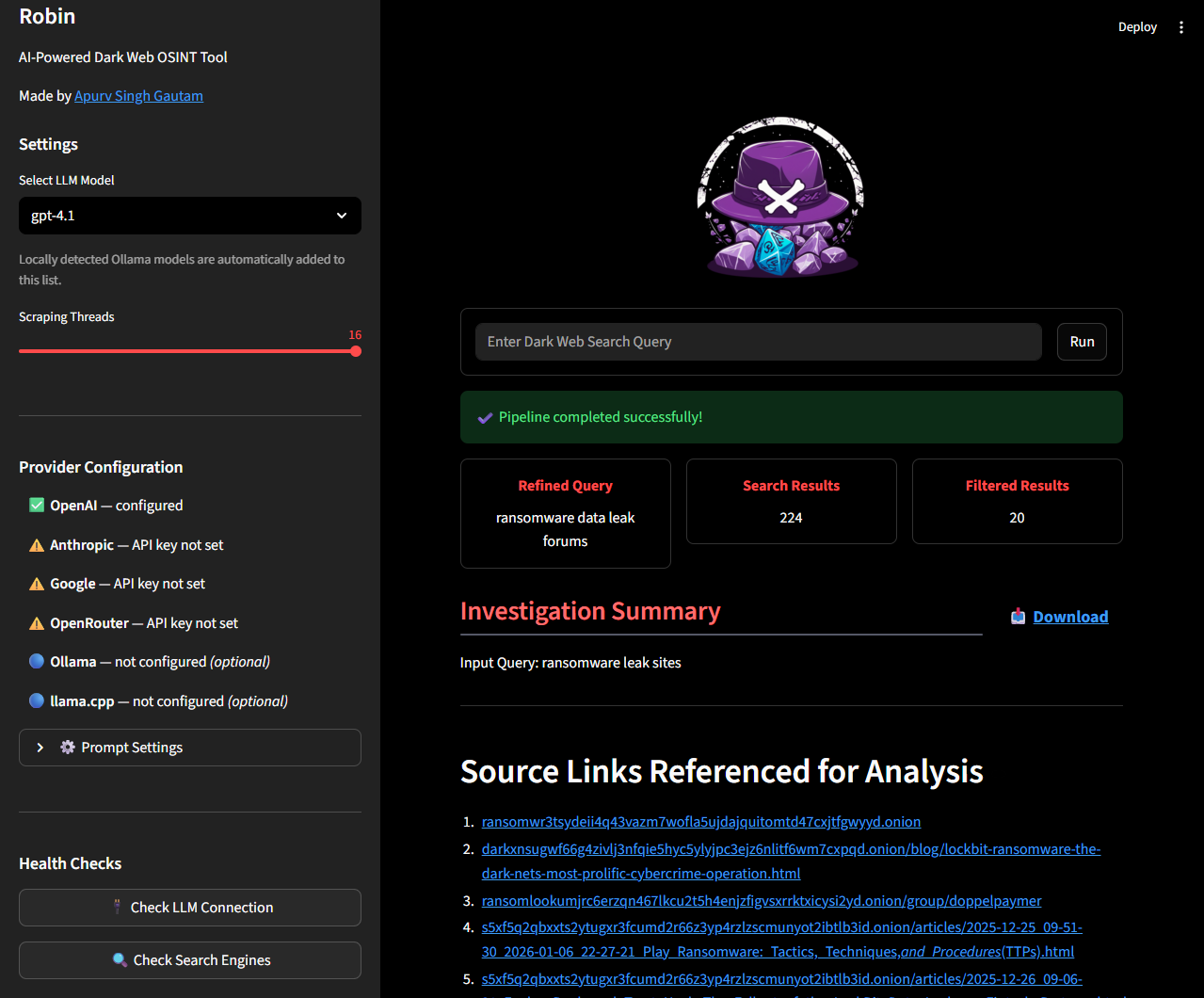
apurvsinghgautam/robin is one of the AI-powered repositories TopGit tracks, currently at 8.0k stars, written primarily in Python. AI-Powered Dark Web OSINT Tool
Snapshot summary built from the project's own GitHub metadata — there's no written TopGit review yet. The page will update automatically when a full review is published.
WHY NO REVIEW YET
TopGit writes full reviews for the most-starred, most-requested repositories. This page is a snapshot until then — see the READ ME tab for the original README in full.
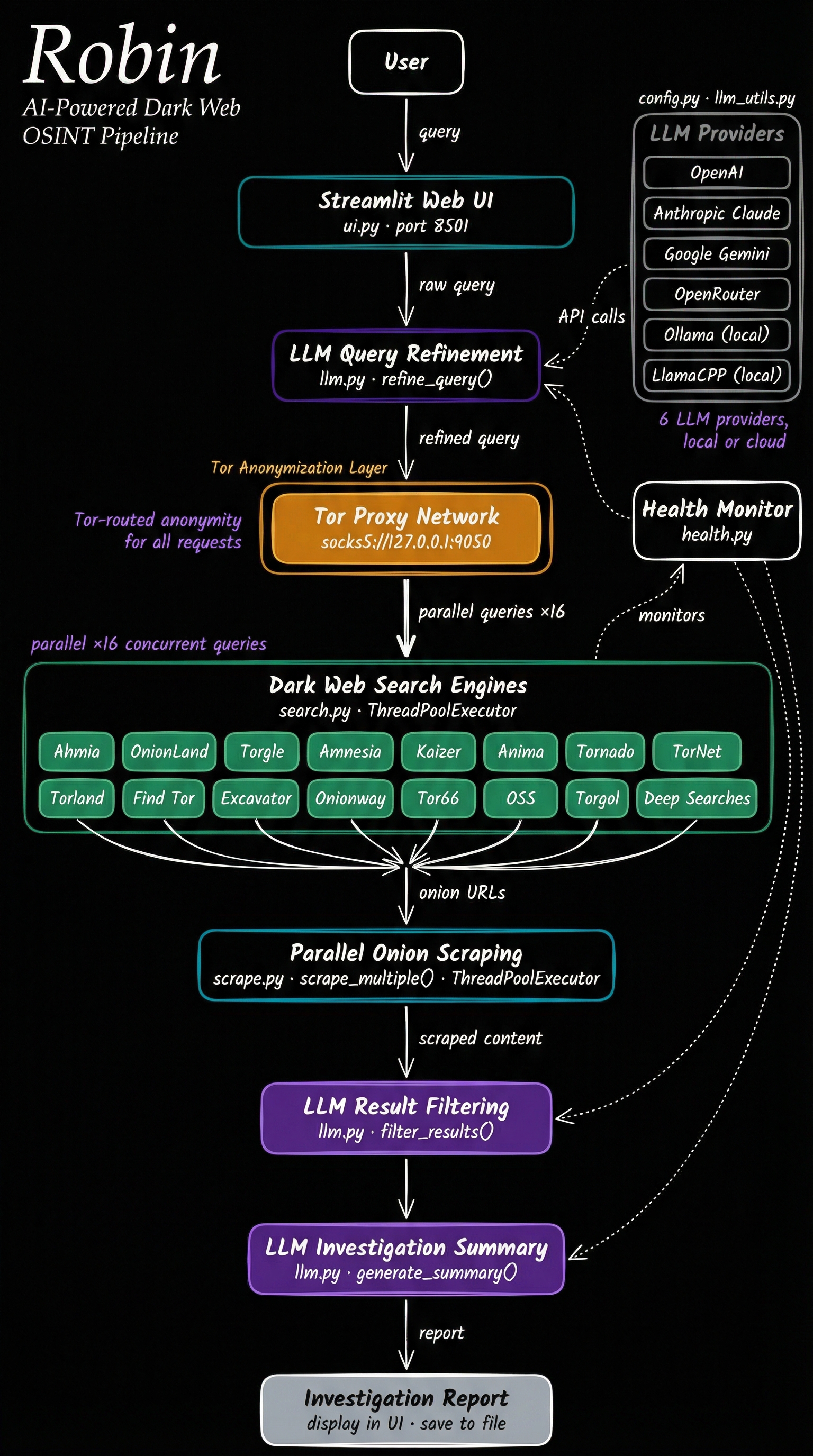
Robin is an AI-powered tool for conducting dark web OSINT investigations. It leverages LLMs to refine queries, filter search results from dark web search engines, and provide an investigation summary.
Installation • Robin as MCP • Troubleshooting • Contributing • Acknowledgements
Architecture
Features
🤖 Multi-Model Support – OpenAI, Claude, Gemini, Mistral, OpenRouter, Ollama, or any OpenAI-compatible API (LM Studio, llama.cpp, Groq, etc.).
🌐 Web UI – Streamlit-based interface for interactive investigations.
🔌 MCP Support – Run Robin from any MCP-capable agent, using that agent's own model. See Robin as MCP.
💬 Conversational Follow-ups – Ask grounded follow-up questions about an investigation without re-running the search, answered from that investigation's own data.
🔀 One-Click Pivots – Suggested follow-up queries surfaced from the findings; click one to launch a fresh investigation.
🐳 Docker-Ready – Recommended Docker deployment for clean, isolated usage.
⚠️ Disclaimer
This tool is intended for educational and lawful investigative purposes only. Accessing or interacting with certain dark web content may be illegal depending on your jurisdiction. The author is not responsible for any misuse of this tool or the data gathered using it.
Use responsibly and at your own risk. Ensure you comply with all relevant laws and institutional policies before conducting OSINT investigations.
Additionally, Robin leverages third-party APIs (including LLMs). Be cautious when sending potentially sensitive queries, and review the terms of service for any API or model provider you use.
Installation
[!NOTE]
The tool needs Tor to do the searches. You can install Tor using apt install tor on Linux/Windows(WSL) or brew install tor on Mac. Once installed, confirm if Tor is running in the background.
[!TIP]
Provide your API key either in a .env file (copy .env.example) or as environment variables. One key is enough: Robin lists models for whichever providers it finds. Supported keys are OPENAI_API_KEY, ANTHROPIC_API_KEY, GOOGLE_API_KEY, MISTRAL_API_KEY and OPENROUTER_API_KEY.
For Ollama, nothing goes in your .env. Robin defaults to http://host.docker.internal:11434, which is what the recommended Docker install needs. Two things are still on you:
Run the container with --add-host=host.docker.internal:host-gateway (the README command already does).
Make Ollama listen on all interfaces, since it binds to 127.0.0.1 by default and a container cannot reach that. If you start it yourself, OLLAMA_HOST=0.0.0.0 ollama serve &. If it runs under systemd, sudo systemctl edit ollama.service, add [Service] and Environment="OLLAMA_HOST=0.0.0.0", then sudo systemctl daemon-reload && sudo systemctl restart ollama.
See TROUBLESHOOTING.md if it still doesn't appear.
For any other OpenAI-compatible provider (LM Studio, llama.cpp, Groq, etc.), use the 🔌 Custom API Provider expander in the sidebar — no .env changes required. Enter the base URL, an optional API key, and optionally a model name if the provider doesn't expose /v1/models for auto-discovery.
Docker [Recommended]
Pull the latest Robin docker image
docker pull apurvsg/robin:latest
Create a .env file in the folder you run from, with your API key in it (see .env.example). Create it before the first run: if it does not exist, Docker mounts an empty folder in its place and Robin starts with no keys.
[!TIP]
To persist saved investigations across Docker restarts, mount a named volume or a local directory at /app/investigations.
A named volume works the same on every OS and needs no host path. It is also the volume the agent commands in Robin as MCP mount, so the UI shows the same reports your agent saved:
Investigations are saved to the investigations/ folder in your working directory and can be loaded from the Past Investigations panel in the sidebar.
Create the folder yourself first (mkdir -p investigations) so Docker does not create it as root. The container runs as UID 1000, and on Linux a folder owned by anyone else is read-only to it — Robin prints one warning and the save fails, though the investigation still runs. If you hit that, or your own UID isn't 1000, use the named volume above, or see Saved investigations fail with permission denied on Linux.
Open your browser and navigate to http://localhost:8501
Build it yourself
To run your own build instead of the published image, clone the repository and
build it:
docker build -t robin .
Then use the same run commands with robin in place of apurvsg/robin:latest:
docker run --rm \
   -v "$(pwd)/.env:/app/.env" \
   --add-host=host.docker.internal:host-gateway \
   -p 8501:8501 \
   robin
docker run --rm \
   -v "$(pwd)/.env:/app/.env" \
   -v "$(pwd)/investigations:/app/investigations" \
   --add-host=host.docker.internal:host-gateway \
   -p 8501:8501 \
   robin
Open your browser and navigate to http://localhost:8501
Robin as MCP
Any LLM service that speaks MCP can run it, using its own model. The sections
below are worked examples for the common hosts; a host that is not listed works
the same way, with whatever wording it uses for "add an MCP server".
Claude Code
claude mcp add robin -- docker run -i --rm -v robin-investigations:/app/investigations apurvsg/robin mcp
Or check it into the project in .mcp.json. A Tor investigation takes minutes,
so raise the per-server timeout:
codex mcp add robin -- docker run -i --rm -v robin-investigations:/app/investigations apurvsg/robin mcp
The ChatGPT desktop app shares this host: adding Robin under Settings → MCP
servers there writes the same configuration, and its tools appear in Codex
sessions rather than in an ordinary ChatGPT chat.
A Tor search usually takes a couple of minutes, which can outlast Codex's default
MCP tool timeout, so raise the limits in ~/.codex/config.toml:
[mcp_servers.robin]
command = "docker"
args = ["run", "-i", "--rm", "-v", "robin-investigations:/app/investigations", "apurvsg/robin", "mcp"]
tool_timeout_sec = 600
startup_timeout_sec = 60

# Only for non-interactive runs (`codex exec`): Codex declines MCP tool calls
# that would need approval, so pre-approve Robin's read-only tools.
default_tools_approval_mode = "approve"
Pull the image first (docker pull apurvsg/robin:latest) so the first start is
not also a download.
Claude Desktop
Add this to claude_desktop_config.json and restart the app:
The desktop app's Settings → MCP servers configures the Codex host that the
app, the Codex CLI and the IDE extension share, so add Robin there and it
appears in Codex sessions: see Codex. An ordinary ChatGPT chat cannot
run it, because chat reaches MCP servers through connectors that run in OpenAI's
infrastructure rather than on your machine.
Security
Nothing sends, executes, or runs a shell. The only writes are saved reports,
into investigations/ under a filename Robin picks; the agent never names a
path.
Searches, page scrapes and search-engine health checks go through Tor, so the
app you are using never fetches a dark web page itself. Model provider calls
and the model list refresh go directly, not through Tor.
Scraped text comes back inside untrusted-data delimiters, with control,
zero-width and bidi characters stripped first, so your model reads it as
evidence rather than as instructions.
Acknowledgements
Idea inspiration from Thomas Roccia and his demo of Perplexity of the Dark Web.
Tools inspiration from my OSINT Tools for the Dark Web repository.
LLM Prompt inspiration from OSINT-Assistant repository.
Does apurvsinghgautam/robin have a project website?
No homepage URL was recorded for apurvsinghgautam/robin in TopGit's last sync. The README tab above frequently contains screenshots and demo links, or check the repository description on GitHub.
How active is development on apurvsinghgautam/robin?
The most recent commit recorded on apurvsinghgautam/robin was 1 month ago, based on the GitHub push timestamp. The repository has 1.5k forks — one of the better signals of community interest.
How many stars does apurvsinghgautam/robin have?
apurvsinghgautam/robin has 8.0k GitHub stars — refresh the page for the live number, or check github.com/apurvsinghgautam/robin. TopGit mirrors GitHub's count but does not claim minute-by-minute accuracy.
What language is apurvsinghgautam/robin written in?
apurvsinghgautam/robin is written primarily in Python. GitHub's language field is based on the largest share of bytes in the default branch.
What license does apurvsinghgautam/robin use?
apurvsinghgautam/robin is released under the MIT license. Always verify the LICENSE file directly on GitHub for the authoritative terms — license strings can be edited out of sync with a project's actual stance.
What topics is apurvsinghgautam/robin associated with?
GitHub's repository topics for apurvsinghgautam/robin: "ai-tool", "darkweb", "darkweb-osint", "investigation-tool", "llm-powered", "osint", "osint-tool". TopGit's editorial category is AI Tools.
Where do I read more about apurvsinghgautam/robin?
This TopGit page is a snapshot — the READ ME tab shows the project's own README content (links stripped, images preserved). The GitHub repository at github.com/apurvsinghgautam/robin is the definitive source.
Read full README in the tab above.
Is robin worth your time?
ChatGPT, Claude and Perplexity can all read this page. Ask one of them what it makes of robin.

 /robin