armbian/build is a Developer Tools project on GitHub, written primarily in Shell. It has 5.5k stars. The official build framework for the Armbian Linux distribution. This repository contains the complete toolchain and scripts required to compile custom OS images from source, including kernel configuration, U-Boot handling, and board-specific tweaks for various ARM and ARM64 single-board computers.
Snapshot summary built from the project's own GitHub metadata — there's no written TopGit review yet. The page will update automatically when a full review is published.
WHY NO REVIEW YET
TopGit writes full reviews for the most-starred, most-requested repositories. This page is a snapshot until then — see the READ ME tab for the original README in full.
The Armbian Linux Build Framework builds customizable OS images based on Debian or Ubuntu for single-board computers (SBCs) and other embedded devices. It assembles the kernel, bootloader, firmware, device trees and root filesystem into a reproducible image, with per-board and per-family configuration.
Looking for prebuilt images? Use Armbian Imager — the easiest way to download and flash Armbian to an SD card or USB drive. Available for Linux, macOS and Windows.
Quick Start
git clone https://github.com/armbian/build
cd build
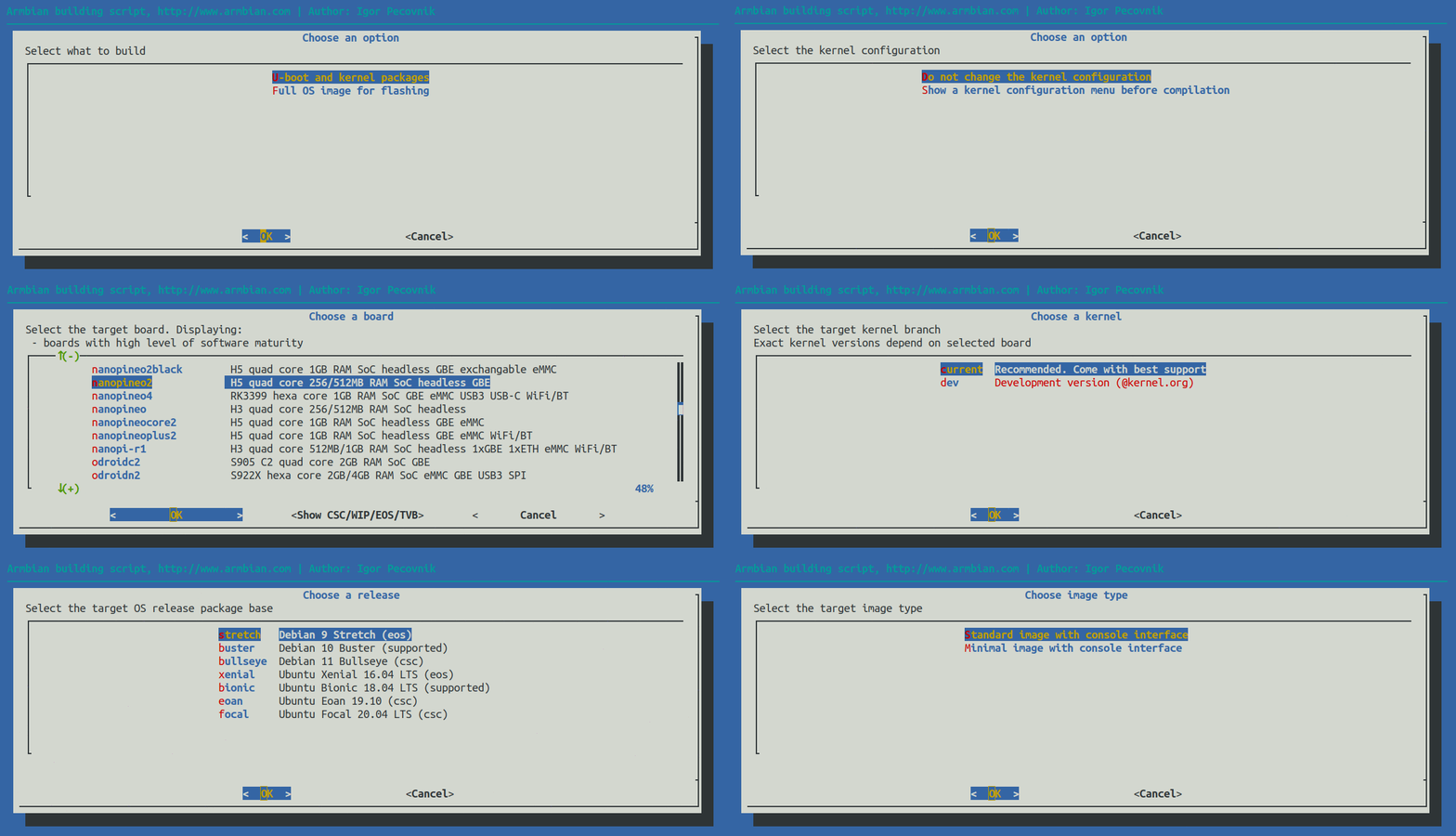
./compile.sh
The entrypoint compile.sh sources lib/single.sh and dispatches into the framework in lib/. Build-time options can be passed on the command line, e.g.:
Files under config/boards/ use an extension that signals support status:
Extension
Meaning
.conf
Standard board configuration
.csc
Community maintained / unstable (no active Armbian maintainer)
.wip
Work in progress
.eos
End of life
.tvb
TV box, community supported (no Armbian maintainer)
See config/boards/README.md for the full list of per-board variables (e.g. BOARD_NAME, BOARD_VENDOR, BOARDFAMILY, BOOTCONFIG, KERNEL_TARGET, SERIALCON, MODULES, DEFAULT_OVERLAYS).
Release/package base statuses used under config/distributions/ are defined separately in config/distributions/README.md.
Built With
Bash — build framework in lib/, entrypoint compile.sh, most of extensions/, and the shell portions of board/family configs
Python — developer and build helpers under lib/tools/
Make / Kbuild — kernel and U-Boot build systems invoked by the framework; overlay Makefiles under patch/kernel/archive/*/overlay/
Device Tree Source (.dts / .dtsi / .dtso) — board and overlay sources carried under patch/
GitHub Actions (YAML) — repository automation under .github/workflows/
Patch series — thousands of *.patch files under patch/ applied to kernel, U-Boot and ATF trees
Continuous Integration
Repository automation (board/maintainer data sync, labeling, security scanning, artifact builds, mirroring, etc.) lives in .github/workflows/. For a live overview of workflow runs and status, see:
👉 CI overview for armbian/build
Self-hosted runner setup notes live in .github/workflows/README.md.
Using the GitHub Action
This repository publishes a composite action (action.yml, "Rebuild Armbian") that can be consumed from other workflows to build an image or a kernel.
Input
Required
Default
armbian_token
yes
—
armbian_target
no
kernel
armbian_board
no
uefi-x86
armbian_branch
no
main
armbian_kernel_branch
no
current
armbian_release
no
noble
armbian_ui
no
minimal
armbian_compress
no
sha,img,xz
armbian_extensions
no
(empty)
armbian_artifacts
no
build/output/images/
See action.yml for the full input list (versioning, signing, publishing and release-metadata options).
Contributing
Contributions are welcome. See CONTRIBUTING.md for how to report issues, how to prepare patches (including the ./compile.sh CREATE_PATCHES="yes" flow) and the PR / labeling conventions. The .github/labels.yml file is the source of truth for labels.
Resources
Documentation — building, configuring and customizing
Website — news, features and supported boards
Blog — development updates and technical articles
Forums — community support and discussion
Support
Community Forums
👉 forum.armbian.com
Real-time chat
👉 Community chat (IRC / Discord)
Paid consultation
For commercial projects, guaranteed response times, or advanced needs, paid support is available from Armbian maintainers.
👉 Contact us
Contributors
Thank you to everyone who has contributed to Armbian.
See also CREDITS.md.
Armbian Partners
Our partnership program supports Armbian's development and community. Learn more about our Partners.
License
Released under the GNU General Public License v2.0. See LICENSE for the full text.
The most recent commit recorded on armbian/build was 3 months ago, based on the GitHub push timestamp. The repository has 3.2k forks — one of the better signals of community interest.
Is armbian/build open source?
Yes — armbian/build ships under the GPL-2.0 license, which makes its source code freely readable (and, depending on license terms, forkable and reusable). Source: github.com/armbian/build.
What license does armbian/build use?
armbian/build is released under the GPL-2.0 license. Always verify the LICENSE file directly on GitHub for the authoritative terms — license strings can be edited out of sync with a project's actual stance.
The project maintains a homepage at https://www.armbian.com. The README tab on this page also usually contains screenshots and a quickstart.
Where do I read more about armbian/build?
This TopGit page is a snapshot — the READ ME tab shows the project's own README content (links stripped, images preserved). The GitHub repository at github.com/armbian/build is the definitive source.
Read full README in the tab above.
Still deciding about build?
One click hands the question to an AI along with this page — see what it says about build.

 /build