Snapshot of babysor/MockingBird: 36.9k★, Python, AI Tools. 🚀Clone a voice in 5 seconds to generate arbitrary speech in real-time
Snapshot summary built from the project's own GitHub metadata — there's no written TopGit review yet. The page will update automatically when a full review is published.
WHY NO REVIEW YET
TopGit writes full reviews for the most-starred, most-requested repositories. This page is a snapshot until then — see the READ ME tab for the original README in full.
🚧 While I no longer actively update this repo, you can find me continuously pushing this tech forward to good side and open-source. I'm also building an optimized and cloud hosted version: https://noiz.ai/ and we're hiring.
English | 中文| 中文Linux
Features
🌍 Chinese supported mandarin and tested with multiple datasets: aidatatang_200zh, magicdata, aishell3, data_aishell, and etc.
🤩 PyTorch worked for pytorch, tested in version of 1.9.0(latest in August 2021), with GPU Tesla T4 and GTX 2060
🌍 Windows + Linux run in both Windows OS and linux OS (even in M1 MACOS)
🤩 Easy & Awesome effect with only newly-trained synthesizer, by reusing the pretrained encoder/vocoder
🌍 Webserver Ready to serve your result with remote calling
DEMO VIDEO
Quick Start
1. Install Requirements
1.1 General Setup
Follow the original repo to test if you got all environment ready.
**Python 3.7 or higher ** is needed to run the toolbox.
Install PyTorch.
If you get an ERROR: Could not find a version that satisfies the requirement torch==1.9.0+cu102 (from versions: 0.1.2, 0.1.2.post1, 0.1.2.post2 ) This error is probably due to a low version of python, try using 3.9 and it will install successfully
Install ffmpeg.
Run pip install -r requirements.txt to install the remaining necessary packages.
The recommended environment here is Repo Tag 0.0.1Pytorch1.9.0 with Torchvision0.10.0 and cudatoolkit10.2requirements.txtwebrtcvad-wheels because requirements. txt was exported a few months ago, so it doesn't work with newer versions
Install webrtcvad pip install webrtcvad-wheels(If you need)
or
install dependencies with conda or mamba
conda env create -n env_name -f env.yml
mamba env create -n env_name -f env.yml
will create a virtual environment where necessary dependencies are installed. Switch to the new environment by conda activate env_name and enjoy it.
env.yml only includes the necessary dependencies to run the project,temporarily without monotonic-align. You can check the official website to install the GPU version of pytorch.
1.2 Setup with a M1 Mac
The following steps are a workaround to directly use the original demo_toolbox.pywithout the changing of codes.
Since the major issue comes with the PyQt5 packages used in demo_toolbox.py not compatible with M1 chips, were one to attempt on training models with the M1 chip, either that person can forgo demo_toolbox.py, or one can try the web.py in the project.
1.2.1 Install PyQt5, with ref here.
Create and open a Rosetta Terminal, with ref here.
Use system Python to create a virtual environment for the project
Both packages seem to be unique to this project and are not seen in the original Real-Time Voice Cloning project. When installing with pip install, both packages lack wheels so the program tries to directly compile from c code and could not find Python.h.
Install pyworld
brew install pythonPython.h can come with Python installed by brew
export CPLUS_INCLUDE_PATH=/opt/homebrew/Frameworks/Python.framework/Headers The filepath of brew-installed Python.h is unique to M1 MacOS and listed above. One needs to manually add the path to the environment variables.
pip install pyworld that should do.
Installctc-segmentation
Same method does not apply to ctc-segmentation, and one needs to compile it from the source code on github.
/usr/bin/arch -x86_64 python setup.py build Build with x86 architecture.
/usr/bin/arch -x86_64 python setup.py install --optimize=1 --skip-buildInstall with x86 architecture.
1.2.3 Other dependencies
/usr/bin/arch -x86_64 pip install torch torchvision torchaudio Pip installing PyTorch as an example, articulate that it's installed with x86 architecture
pip install ffmpeg Install ffmpeg
pip install -r requirements.txt Install other requirements.
1.2.4 Run the Inference Time (with Toolbox)
To run the project on x86 architecture. ref.
vim /PathToMockingBird/venv/bin/pythonM1 Create an executable file pythonM1 to condition python interpreter at /PathToMockingBird/venv/bin.
If using PyCharm IDE, configure project interpreter to pythonM1(steps here), if using command line python, run /PathToMockingBird/venv/bin/pythonM1 demo_toolbox.py
2. Prepare your models
Note that we are using the pretrained encoder/vocoder but not synthesizer, since the original model is incompatible with the Chinese symbols. It means the demo_cli is not working at this moment, so additional synthesizer models are required.
You can either train your models or use existing ones:
2.1 Train encoder with your dataset (Optional)
Preprocess with the audios and the mel spectrograms:
python encoder_preprocess.py <datasets_root> Allowing parameter --dataset {dataset} to support the datasets you want to preprocess. Only the train set of these datasets will be used. Possible names: librispeech_other, voxceleb1, voxceleb2. Use comma to sperate multiple datasets.
Train the encoder: python encoder_train.py my_run <datasets_root>/SV2TTS/encoder
For training, the encoder uses visdom. You can disable it with --no_visdom, but it's nice to have. Run "visdom" in a separate CLI/process to start your visdom server.
2.2 Train synthesizer with your dataset
Download dataset and unzip: make sure you can access all .wav in folder
Preprocess with the audios and the mel spectrograms:
python pre.py <datasets_root>
Allowing parameter --dataset {dataset} to support aidatatang_200zh, magicdata, aishell3, data_aishell, etc.If this parameter is not passed, the default dataset will be aidatatang_200zh.
Train the synthesizer:
python train.py --type=synth mandarin <datasets_root>/SV2TTS/synthesizer
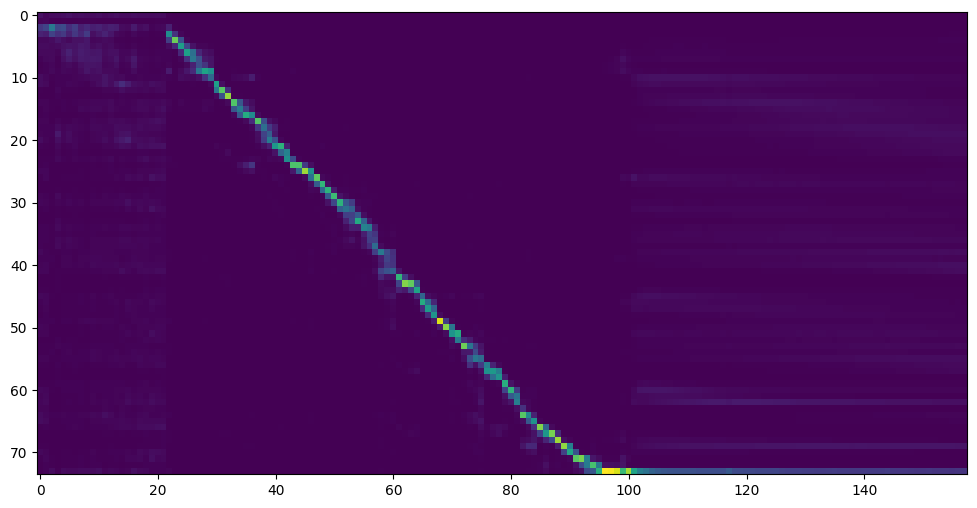
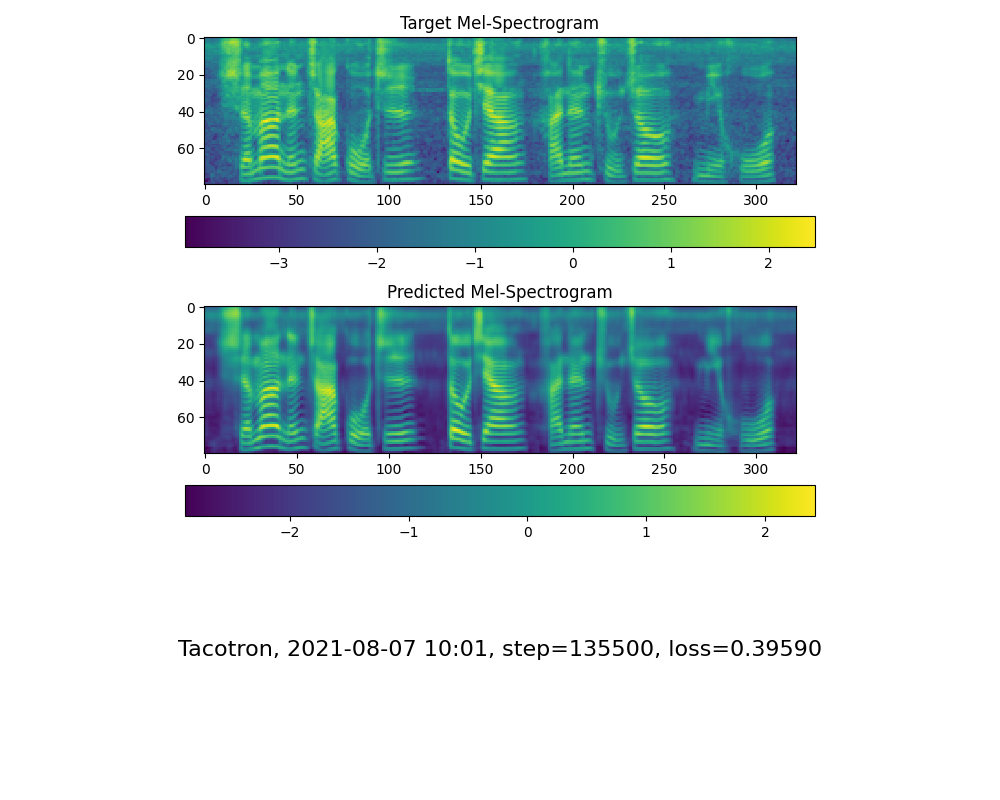
Go to next step when you see attention line show and loss meet your need in training folder synthesizer/saved_models/.
2.3 Use pretrained model of synthesizer
Thanks to the community, some models will be shared:
note: vocoder has little difference in effect, so you may not need to train a new one.
Preprocess the data:
python vocoder_preprocess.py <datasets_root> -m <synthesizer_model_path>
<datasets_root> replace with your dataset root,<synthesizer_model_path>replace with directory of your best trained models of sythensizer, e.g. sythensizer\saved_mode\xxx
Train the wavernn vocoder:
python vocoder_train.py mandarin <datasets_root>
Train the hifigan vocoder
python vocoder_train.py mandarin <datasets_root> hifigan
3. Launch
3.1 Using the web server
You can then try to run:python web.py and open it in browser, default as http://localhost:8080
3.2 Using the Toolbox
You can then try the toolbox:
python demo_toolbox.py -d <datasets_root>
3.3 Using the command line
You can then try the command:
python gen_voice.py <text_file.txt> your_wav_file.wav
you may need to install cn2an by "pip install cn2an" for better digital number result.
Reference
This repository is forked from Real-Time-Voice-Cloning which only support English.
URL
Designation
Title
Implementation source
1803.09017
GlobalStyleToken (synthesizer)
Style Tokens: Unsupervised Style Modeling, Control and Transfer in End-to-End Speech Synthesis
This repo
2010.05646
HiFi-GAN (vocoder)
Generative Adversarial Networks for Efficient and High Fidelity Speech Synthesis
4.If it happens RuntimeError: Error(s) in loading state_dict for Tacotron: size mismatch for encoder.embedding.weight: copying a param with shape torch.Size([70, 512]) from checkpoint, the shape in current model is torch.Size([75, 512]).
Please refer to issue #37
5. How to improve CPU and GPU occupancy rate?
Adjust the batch_size as appropriate to improve
6. What if it happens the page file is too small to complete the operation
Please refer to this video and change the virtual memory to 100G (102400), for example : When the file is placed in the D disk, the virtual memory of the D disk is changed.
7. When should I stop during training?
FYI, my attention came after 18k steps and loss became lower than 0.4 after 50k steps.
How does babysor/MockingBird compare to other AI Tools projects?
babysor/MockingBird is tracked by TopGit in the AI Tools category, with 36.9k GitHub stars and written in Python. Browse the AI Tools topic page on TopGit to compare it against similar projects by stars and activity.
Is babysor/MockingBird open source?
TopGit's metadata for babysor/MockingBird does not record a license. Most public repositories on GitHub ARE open source, but the exact terms vary — verify by opening the LICENSE file directly.
What else is in the AI Tools space?
babysor/MockingBird is tracked by TopGit under the AI Tools category, alongside 6 GitHub-tagged topics. Trending and Topics pages list peer repositories of comparable stars and language.
What is babysor/MockingBird?
babysor/MockingBird (babysor/MockingBird) is a Python project on GitHub. From the project's own README: 🚀Clone a voice in 5 seconds to generate arbitrary speech in real-time
Where do I read more about babysor/MockingBird?
This TopGit page is a snapshot — the READ ME tab shows the project's own README content (links stripped, images preserved). The GitHub repository at github.com/babysor/MockingBird is the definitive source.
Why is babysor/MockingBird categorized under AI Tools?
TopGit places babysor/MockingBird in the AI Tools category based on its GitHub topics and description (tagged: "ai", "deep-learning", "pytorch"). Categories are assigned from real repository metadata, not editorial guesswork.
Read full README in the tab above.
Want a second opinion on MockingBird?
Ask an AI that can read this page — one click and you get its take on MockingBird.
 /MockingBird