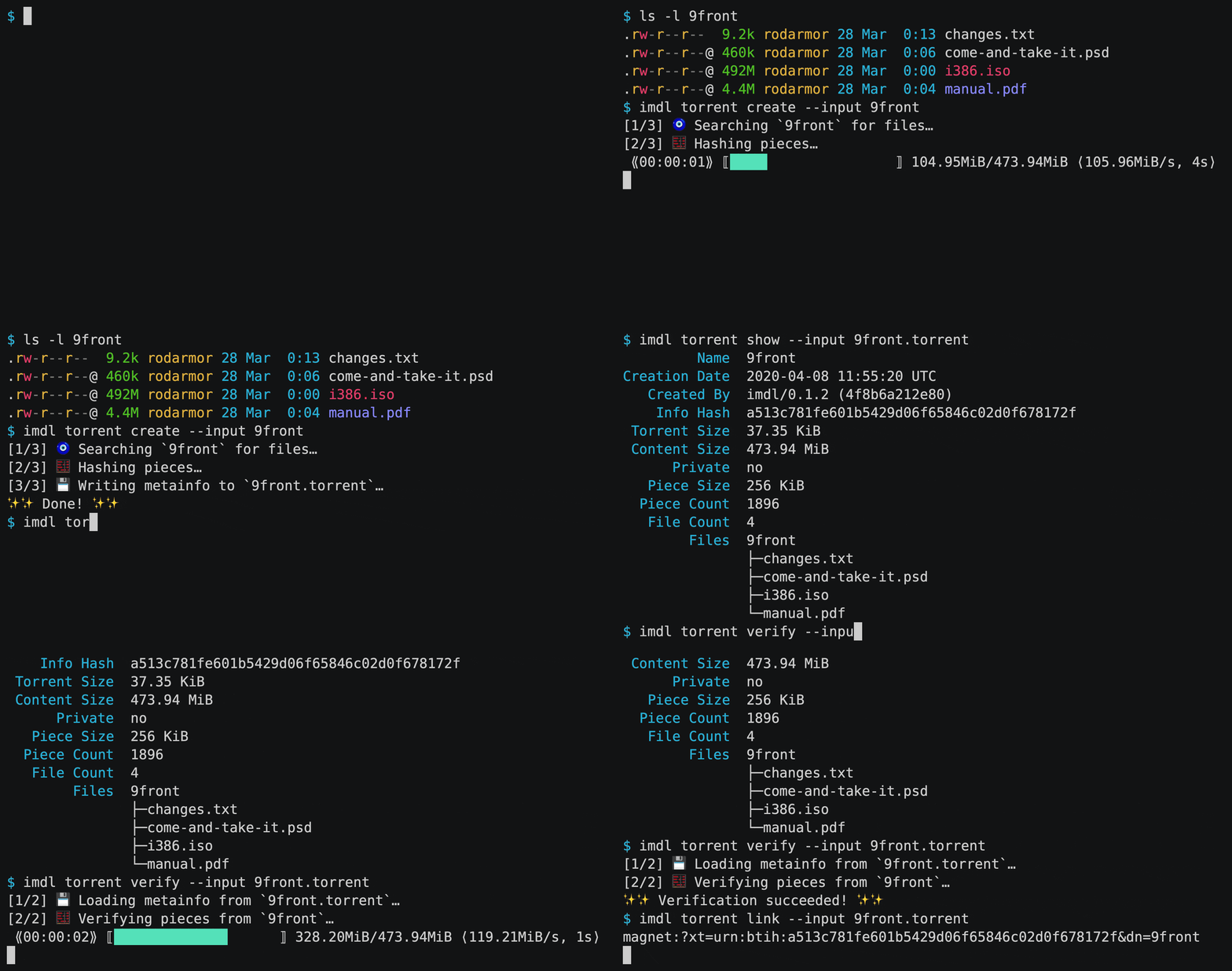
casey/intermodal is a Rust project with 658 stars in the Developer Tools space. command-line utility for BitTorrent torrent file creation, verification, and more
Snapshot summary built from the project's own GitHub metadata — there's no written TopGit review yet. The page will update automatically when a full review is published.
WHY NO REVIEW YET
TopGit writes full reviews for the most-starred, most-requested repositories. This page is a snapshot until then — see the READ ME tab for the original README in full.
Intermodal is a user-friendly and featureful command-line BitTorrent metainfo
utility. The binary is called imdl and runs on Linux, Windows, and macOS.
At the moment, creation, viewing, and verification of .torrent files is
supported. See the book for examples and usage
information.
For more about the project and its goals, check out
this post.
Table of Contents
Supported Operating Systems
Packages
Pre-built binaries
Linux and MacOS Install Script
Cargo
Shell Completion Scripts
Usage
Commands
Examples
FAQ
Notes for Packagers
Build Artifacts
Release Updates
Chat
Contributing
Benchmarks
Semantic Versioning
Unstable Features
New Releases
Acknowledgments
Installation
Supported Operating Systems
imdl supports Linux, MacOS, and Windows, and should work on other unix OSes.
If it does not, please open an issue!
Packages
Operating System
Package Manager
Package
Command
Various
Cargo
imdl
cargo install imdl
Arch Linux
Yay
intermodal-binAUR
yay -S intermodal-bin
Arch Linux
Yay
intermodalAUR
yay -S intermodal
Arch Linux
Manual Installation
intermodalAUR
wiki
macOS
Homebrew
intermodal
brew install intermodal
Void Linux
XBPS
intermodal
xbps-install -S intermodal
Windows
Scoop
intermodal
scoop install intermodal
Pre-built binaries
Pre-built binaries for Linux, macOS, and Windows can be found on
the releases page.
Linux and MacOS Install Script
You can use the following command on Linux and MacOS to download the latest
binary, just replace DEST with the directory where you'd like to install the
imdl binary:
A good place to install personal binaries is ~/bin, which install.sh uses
when --to is not supplied. To create the ~/bin directory and install imdl
there, do:
Additionally, you'll have to add ~/bin to the PATH environment variable,
which the system uses to find executables. How to do this depends on the shell.
For sh, bash, and zsh, it should be done in ~/.profile:
echo 'export PATH=$HOME/bin:$PATH' >> ~/.profile
For fish, it should be done in ~/.config/fish/config.fish:
imdl is written in Rust and can be built from
source and installed with cargo install imdl. To get Rust, use the
rustup installer.
Shell Completion Scripts
Shell completion scripts for Bash, Zsh, Fish, PowerShell, and Elvish are
included in all binary releases.
For Bash, move imdl.bash to $XDG_CONFIG_HOME/bash_completion or
/etc/bash_completion.d/.
For Fish, move imdl.fish to $HOME/.config/fish/completions/.
For the Z shell, move _imdl to one of your $fpath directories.
For PowerShell, add . _imdl.ps1 to your PowerShell
profile
(note the leading period). If the _imdl.ps1 file is not on your PATH, do
. /path/to/_imdl.ps1 instead.
The imdl binary can also generate the same completion scripts at runtime,
using the completions command:
$ imdl completions --shell bash > imdl.bash
The --dir argument can be used to write a completion script into a directory
with a filename that's appropriate for the shell. For example, the following
command will write the Z shell completion script to $fpath[0]/_imdl:
$ imdl completions --shell zsh --dir $fpath[0]
Usage
Online documentation is available in the book, hosted
here.
Commands
Adding --help to any command will print help text about how to use that
command, including detailed information about any command-line arguments it
accepts.
So, to get information about imdl torrent create, run imdl torrent create --help.
Additionally, the same help text is available online in
the book.
Examples
The intro to the book has a few simple examples. Check
the FAQ for more complex usage examples.
FAQ
The FAQ covers a variety of specific
use-cases. If there's a use case you think should be covered, feel free to open
an issue.
Notes for Packagers
First off, thank you very much! If I can do anything to make packaging
Intermodal easier, please don't hesistate to open
an issue.
The Intermodal binary is called imdl, and the suggested name for the package
is intermodal.
Intermodal is written in Rust, and can be built with cargo build --release.
Intermodal is distributed under the
Creative Commons Zero,
a public domain dedication with a fallback all-permissive license. The SPDX
identifier of the CC0 is CC0-1.0.
Build Artifacts
There are a number of build artifacts: the binary, the man pages, the
changelog, and the shell completion scripts.
The binary is built with cargo, and the other artifacts are built gen,
located in bin/gen.
The binary can be built with:
cargo build --release
gen requires help2man to be
installed, which is used to generate man pages from subcommand --help
strings.
The rest of the build artifacts can be built with gen:
cargo run --package gen -- --bin target/release/imdl all
The path to the built imdl executable should be passed to gen with the --bin flag.
After running the above commands, the following table shows the location of the
built artifacts.
Artifact
Location
Binary
target/release/imdl
Man Pages
target/gen/man/*
Completion Scripts
target/gen/completions/*
Changelog
target/gen/CHANGELOG.md
Readme
target/gen/README.md
Release Updates
If you'd like to receive an update whenever a new version is released, you can
watch the intermodal repository in "Releases only" mode.
Chat
The primary chat is on Discord.
Contributing
Your bug reports, feature requests, pull requests, and design help are much
appreciated!
Check out issues with the
"good first issue" label
for some ideas.
Quite a few files are generated by the program in bin/gen. Some files are
generated from templates, so those templates should be edited to make changes
to those files:
Some files are completely generated, and so shouldn't be manually edited at
all:
CHANGELOG.md
book/src/commands/*
completions/*
man/*
All files can be regenerated by running cargo run --package gen all, or
just gen, if you have just installed.
The changelog is generated from YAML metadata in commit messages. Here is an
example commit message, with metadata:
Upgrade foo

Upgrade foo to v7.5, which is much better.

type: changed
pr:
- https://github.com/casey/intermodal/pull/1
fixes:
- https://github.com/intermodal/issues/2
- https://github.com/intermodal/issues/3
The only required field is type. To see the possible values for type, run
cargo run --package gen commit-types.
Benchmarks
Performance benchmarks can be run with:
$ cargo bench --features bench
The benchmark framework used is criterion.
The bench targets themselves are in the benches directory. These targets call benchmarking functions in src/benches.rs, which are only enabled when the bench feature is enabled.
Semantic Versioning
Intermodal follows semantic versioning.
In particular:
v0.0.X: Breaking changes may be introduced at any time.
v0.X.Y: Breaking changes may only be introduced with a minor version number
bump.
vX.Y.Z: Breaking changes may only be introduced with a major version number
bump
Unstable Features
To avoid premature stabilization and excessive version churn, unstable features
are unavailable unless the --unstable / -u flag is passed, for example
imdl --unstable torrent create .. Unstable features may be changed or removed
at any time.
New Releases
New releases of imdl are made frequently so that users quickly get access to
new features.
Release commit messages use the following template:
The most recent commit recorded on casey/intermodal was 5 months ago, based on the GitHub push timestamp. The repository has 36 forks — one of the better signals of community interest.
How many stars does casey/intermodal have?
casey/intermodal has 658 GitHub stars — refresh the page for the live number, or check github.com/casey/intermodal. TopGit mirrors GitHub's count but does not claim minute-by-minute accuracy.
What language is casey/intermodal written in?
casey/intermodal is written primarily in Rust. GitHub's language field is based on the largest share of bytes in the default branch.
What license does casey/intermodal use?
casey/intermodal is released under the CC0-1.0 license. Always verify the LICENSE file directly on GitHub for the authoritative terms — license strings can be edited out of sync with a project's actual stance.
What topics is casey/intermodal associated with?
GitHub's repository topics for casey/intermodal: "bittorrent", "cli", "rust". TopGit's editorial category is Developer Tools.
Where can I see casey/intermodal in action?
The project maintains a homepage at https://imdl.io. The README tab on this page also usually contains screenshots and a quickstart.
Where do I read more about casey/intermodal?
This TopGit page is a snapshot — the READ ME tab shows the project's own README content (links stripped, images preserved). The GitHub repository at github.com/casey/intermodal is the definitive source.
Read full README in the tab above.
Is intermodal worth your time?
ChatGPT, Claude and Perplexity can all read this page. Ask one of them what it makes of intermodal.
 /intermodal