cisagov/RedEye is a security-focused project on GitHub with 2.8k stars, written primarily in TypeScript. RedEye is a visual analytic tool supporting Red & Blue Team operations
Snapshot summary built from the project's own GitHub metadata — there's no written TopGit review yet. The page will update automatically when a full review is published.
WHY NO REVIEW YET
TopGit writes full reviews for the most-starred, most-requested repositories. This page is a snapshot until then — see the READ ME tab for the original README in full.
This GitHub repository is no longer under active development. We'll review community issues and pull requests for bug fixes, but won't consider any new feature additions.
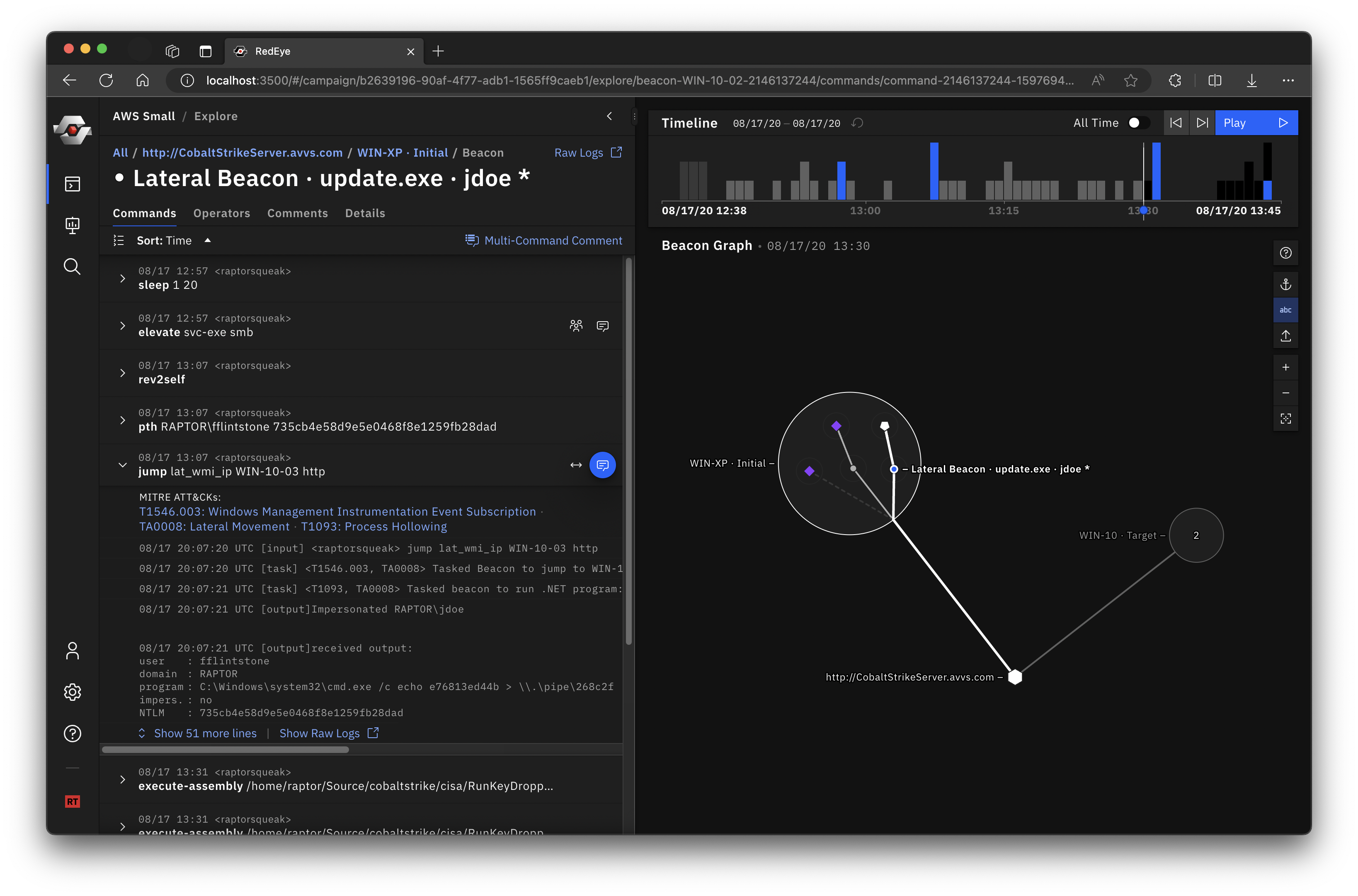
RedEye is an open-source analytic tool developed by CISA and DOE’s Pacific Northwest National Laboratory to assist Red Teams with visualizing and reporting command and control activities. This tool allows an operator to assess and display complex data, evaluate mitigation strategies, and enable effective decision making in response to a Red Team assessment. The tool parses logs, such as those from Cobalt Strike, and presents the data in an easily digestible format. The users can then tag and add comments to activities displayed within the tool. The operators can use the RedEye’s presentation mode to present findings and workflow to stakeholders.
RedEye can assist an operator to efficiently:
Replay and demonstrate Red Team’s assessment activities as they occurred rather than manually pouring through thousands of lines of log text.
Display and evaluate complex assessment data to enable effective decision making.
Gain a clearer understanding of the attack path taken and the hosts compromised during a Red Team assessment or penetration test.
Red Team
Blue Team
Quick start
Download the latest RedEye binaries for your OS* from the Releases page.
Pick a mode and Run the server
Red Team mode enables the full feature set: upload C2 logs, explore data, and create presentations. You must provide a password to run in Red Team mode. To start the server in Red Team mode, run the following in a terminal.
./RedEye --redTeam --password <your_password>
Blue Team mode (default) enables a simplified, read-only UI for reviewing campaigns exported by a Red Team. To start the server in Blue Team mode, run the following in a terminal.
./RedEye # Or simplify double-click the "RedEye" executable
Use the web app in a browser at http://127.0.0.1:4000. The RedEye binary runs as a server in a terminal window and will automatically open the web app UI your default browser. You must close the terminal window to quit the RedEye server.
Try importing the gt.redeye example dataset to get started. Or try a different example dataset.
MacOS Issue - When running RedEye for the first time, you may get a "not verified" error. You must go to "System Preferences" > "Security & Privacy" > "General" and click "Open Anyway." More info on the Apple support page.
Follow the User Guide to learn about RedEye's feature set.
Red Team & Blue Team Modes
RedEye has two modes that cover two stages of the Red Teaming process. Red Team mode allows importing C2 data, editing imported data, and making comments and presentations. After curating and annotating campaign data, Red Teams can export their campaign as a standalone .redeye file and hand it off to a Blue Team for reporting and remediation. Blue Team mode runs RedEye in a simplified read-only mode for viewing curated data exported by a Red Team.
Note: Both Red and Blue Team modes can be started from the same RedEye application binary.
There are three options to run RedEye in Red Team mode:
Run the downloaded binary, passing in the --redTeam and password options:
./RedEye --redTeam --password <your_password>
Clone, install, and run the project directly (covered in the Local Build section).
Docker Compose
Clone the repo
Update the environment variables in docker-compose.yml.
Run:
docker-compose -f docker-compose.yml up -d redeye-core
Blue Team
The Blue Team mode is a simplified, read-only UI for displaying data that has been curated, annotated, and exported by a Red Team. This mode runs by default to make startup more simple for the Blue Team.
The Blue Team version can be run by double-clicking the 'RedEye' application binary. RedEye runs at http://127.0.0.1:4000 (by default) and will automatically open your default browser.
Blue Team Presentation Handoff
If a campaigns folder is located in the same directory as the RedEye application, RedEye will attempt to import any .redeye campaign files within. Campaign files can be exported in the Red Team mode.
To prepare a version for the Blue Team, follow these two steps:
Copy the RedEye application binary to an empty folder.
Create a campaigns folder in the same directory and place the .redeye campaign files you want to send inside.
.redeye files can also be uploaded in Blue Team mode via the "+ Add Campaign" dialog.
Example Datasets
There are example datasets in this repo available for download. These are located in the ./applications/redeye-e2e/src/fixtures folder.
gtdataset - available as gt.redeye and as Cobalt Strike Logs
smalldata - available as smalldata.redeye and as Cobalt Strike Logs
testdata - available as Cobalt Strike Logs
You may want to use a tool like download-directory.github.io to download just one folder of a github repo
RedEye Server Parameters
Type ./Redeye -h to view the options
-d, --developmentMode [boolean]  put the database and server in development mode
-r, --redTeam [boolean]          run the server in red team mode
--port [number]                  the port the server should be exposed at
-p, --password [string]          the password for user authentication
--parsers [string...]            A list of parsers to use or a flag to use all parsers in the parsers folder
-t, --childProcesses [number]    max # of child processes the parser can use
-h, --help                       display help for command
you can also configure the server parameters in a config.json file that sits next to the RedEye binary
The most recent commit recorded on cisagov/RedEye was 3.0 years ago, based on the GitHub push timestamp. The repository has 290 forks — one of the better signals of community interest.
Is cisagov/RedEye open source?
Yes — cisagov/RedEye ships under the BSD-3-Clause license, which makes its source code freely readable (and, depending on license terms, forkable and reusable). Source: github.com/cisagov/RedEye.
What license does cisagov/RedEye use?
cisagov/RedEye is released under the BSD-3-Clause license. Always verify the LICENSE file directly on GitHub for the authoritative terms — license strings can be edited out of sync with a project's actual stance.
What topics is cisagov/RedEye associated with?
GitHub's repository topics for cisagov/RedEye: "blue-team", "cybersecurity", "red-team". TopGit's editorial category is Security.
Where can I see cisagov/RedEye in action?
The project maintains a homepage at https://cisagov.github.io/RedEye/. The README tab on this page also usually contains screenshots and a quickstart.
Where do I read more about cisagov/RedEye?
This TopGit page is a snapshot — the READ ME tab shows the project's own README content (links stripped, images preserved). The GitHub repository at github.com/cisagov/RedEye is the definitive source.
Read full README in the tab above.
Is RedEye worth your time?
ChatGPT, Claude and Perplexity can all read this page. Ask one of them what it makes of RedEye.
 /RedEye