containers/podlet

containers/podlet sits at 1.7k stars on GitHub, written primarily in Rust. Generate Podman Quadlet files from a Podman command, compose file, or existing object
Snapshot summary built from the project's own GitHub metadata — there's no written TopGit review yet. The page will update automatically when a full review is published.
TopGit writes full reviews for the most-starred, most-requested repositories. This page is a snapshot until then — see the READ ME tab for the original README in full.
Snapshot
Top contributors
Show top contributors
Podlet



Podlet generates Podman Quadlet files from a Podman command, compose file, or existing object.
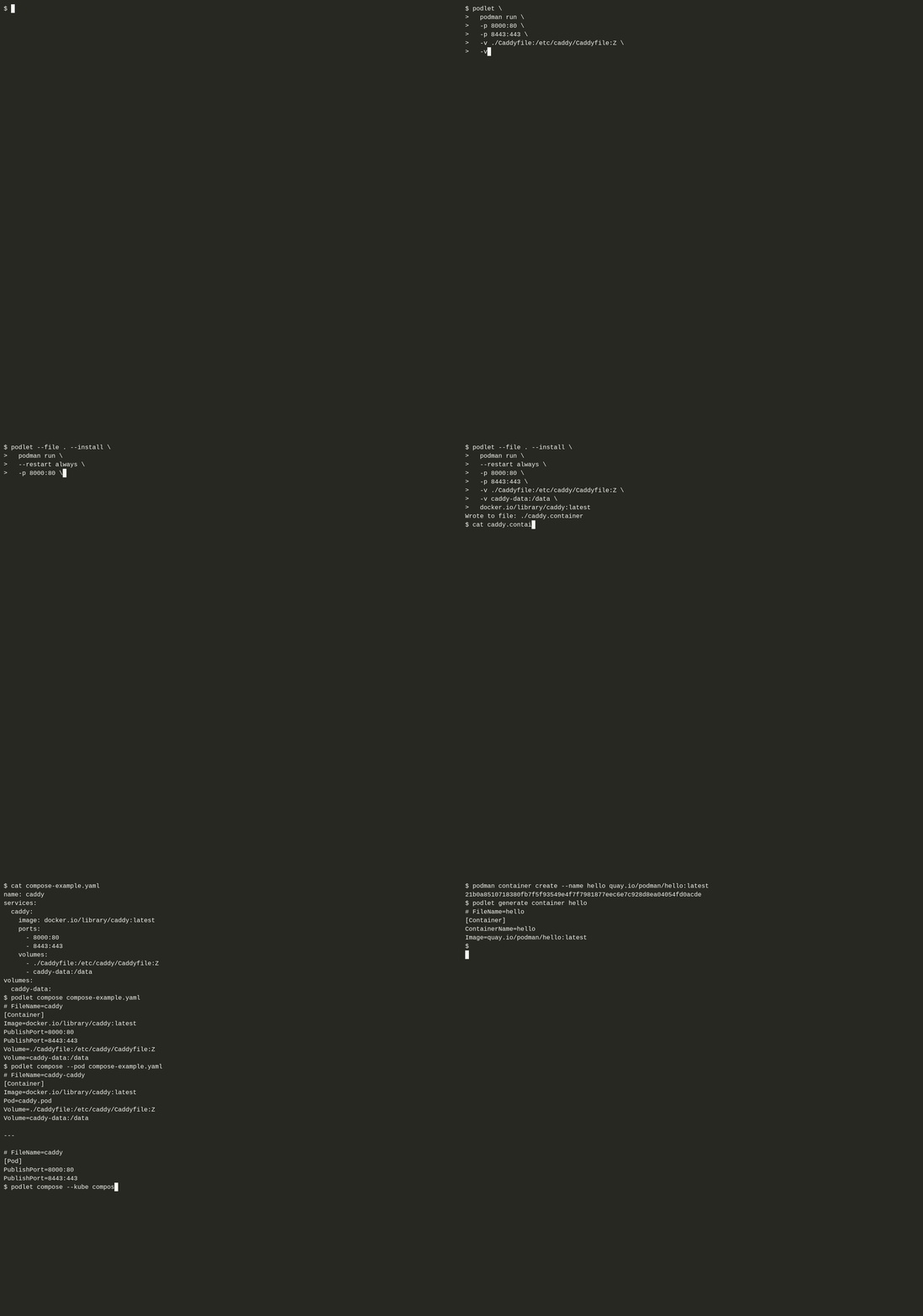 Demo created with Autocast. You can also view the demo on asciinema.
Features
- Supports the following Podman commands:
podman runpodman pod createpodman kube playpodman network createpodman volume createpodman buildpodman image pullpodman artifact pull
- Convert a (docker) compose file to:
- Multiple Quadlet
.containerfiles. - A Quadlet
.podfile and.containerfiles. - A Quadlet
.kubefile and Kubernetes Pod YAML. - A
.quadletsfile for use withpodman quadlet install.
- Multiple Quadlet
- Generate from existing:
- Containers
- Pods
- Networks
- Volumes
- Images
- Write to stdout or to a file.
- Options for including common systemd unit options.
- Checks for existing systemd services to avoid conflict.
- Opt-out with
--skip-services-check.
- Opt-out with
- Set Podman version compatibility with
--podman-version. - Resolve relative host paths with
--absolute-host-paths.
Communication
The Podlet project shares communication channels with other projects in the Containers organization. On the Podman Discord, there are two dedicated channels for Podlet:
- #podlet for user discussions.
- #podlet-dev for development of Podlet.
For discussions about issues, bugs, or features, feel free to create an issue, discussion, or pull request on GitHub.
Install
Podlet can be acquired in several ways:
- Download a prebuilt binary from releases.
- As a container:
podman run ghcr.io/containers/podlet. - Use cargo-binstall to get a prebuilt binary:
cargo binstall podlet. - Build and install with
cargo install podlet. - From your package manager
- homebrew:
brew install podlet
- homebrew:
Usage
$ podlet -h

Generate Podman Quadlet files from a Podman command, compose file, or existing object

Usage: podlet [OPTIONS] <COMMAND>

Commands:
  podman    Generate a Podman Quadlet file from a Podman command
  compose   Generate Podman Quadlet files from a compose file
  generate  Generate a Podman Quadlet file from an existing object
  help      Print this message or the help of the given subcommand(s)

Options:
  -f, --file [<FILE>]                         Generate file(s) instead of printing to stdout
  -u, --unit-directory                        Generate file(s) in the Podman unit directory instead of printing to stdout [aliases: --unit-dir]
      --quadlets-file <NAME>                  Generate a single `.quadlets` file instead of separate Quadlet files
  -n, --name <NAME>                           Override the name of the generated file (without the extension)
      --overwrite                             Overwrite existing files when generating a file
  -s, --split-options <QUADLET_OPTION,...>    Split Quadlet options instead of joining them together [possible values: AddCapability, After, Annotation, Before, BindsTo, BuildArg, DropCapability, Environment, Label, Mask, PartOf, RequiredBy, Requires, Sysctl, Unmask, UpheldBy, Upholds, WantedBy, Wants]
      --skip-services-check                   Skip the check for existing services of the same name
  -p, --podman-version <PODMAN_VERSION>       Podman version generated Quadlet files should conform to [default: 5.8] [aliases: --compatibility, --compat] [possible values: 4.4, 4.5, 4.6, 4.7, 4.8, 5.0, 5.1, 5.2, 5.3, 5.4, 5.5, 5.6, 5.7, 5.8]
  -a, --absolute-host-paths [<RESOLVE_DIR>]   Convert relative host paths to absolute paths
      --service-name <SERVICE_NAME>           Change the name of the systemd service Quadlet generates
  -d, --description <DESCRIPTION>             Add a description to the unit
      --wants <WANTS>                         Add (weak) requirement dependencies to the unit
      --requires <REQUIRES>                   Similar to --wants, but adds stronger requirement dependencies
      --binds-to <BINDS_TO>                   Similar to --requires, but when the dependency stops, this unit also stops
      --part-of <PART_OF>                     Similar to --binds-to, but this unit only stops when the dependency is explicitly stopped
      --upholds <UPHOLDS>                     Similar to --wants, but dependencies are continuously started when inactive or failed
      --before <BEFORE>                       Configure ordering dependency between units
      --after <AFTER>                         Configure ordering dependency between units
  -i, --install                               Add an [Install] section to the unit
      --wanted-by <WANTED_BY>                 Add (weak) parent dependencies to the unit
      --required-by <REQUIRED_BY>             Similar to --wanted-by, but adds stronger parent dependencies
      --upheld-by <UPHELD_BY>                 Similar to --wanted-by, but ensures this unit is up if the parent dependency is
      --disable-default-quadlet-dependencies  Disable Quadlet's default network dependencies
      --no-start-with-pod                     Do not start container units with their associated pod
  -h, --help                                  Print help (see more with '--help')
  -V, --version                               Print version
See podlet --help for more information.
Podman Command
$ podlet podman -h

Generate a Podman Quadlet file from a Podman command

Usage: podlet podman [OPTIONS] <COMMAND>

Commands:
  run       Generate a Podman Quadlet `.container` file
  pod       Generate a Podman Quadlet `.pod` file
  kube      Generate a Podman Quadlet `.kube` file
  network   Generate a Podman Quadlet `.network` file
  volume    Generate a Podman Quadlet `.volume` file
  build     Generate a Podman Quadlet `.build` file
  image     Generate a Podman Quadlet `.image` file
  artifact  Generate a Podman Quadlet `.artifact` file
  help      Print this message or the help of the given subcommand(s)

Options:
  -h, --help  Print help (see more with '--help')

Podman Global Options:
      --cdi-spec-dir <PATH>                  CDI spec directory path
      --cgroup-manager <MANAGER>             Cgroup manager to use [possible values: cgroupfs, systemd]
      --config <PATH>                        Location of the authentication config file
      --conmon <PATH>                        Path of the conmon binary
      --connection <CONNECTION_URI>          Connection to use for remote Podman service
      --events-backend <TYPE>                Backend to use for storing events [possible values: file, journald, none]
      --hooks-dir <PATH>                     Set the OCI hooks directory path
      --identity <PATH>                      Path to ssh identity file
      --imagestore <PATH>                    Path to the 'image store'
      --log-level <LEVEL>                    Log messages at and above specified level [default: warn] [possible values: debug, info, warn, error, fatal, panic]
      --module <PATH>                        Load the specified `containers.conf(5)` module
      --network-cmd-path <PATH>              Path to the `slirp4netns(1)` command binary
      --network-config-dir <DIRECTORY>       Path of the configuration directory for networks
      --out <PATH>                           Redirect the output of Podman to a file without affecting the container output or its logs
  -r, --remote[=<REMOTE>]                    Access remote Podman service [possible values: true, false]
      --root <VALUE>                         Path to the graph root directory where images, containers, etc. are stored
      --runroot <VALUE>                      Storage state directory where all state information is stored
      --runtime <VALUE>                      Path to the OCI-compatible binary used to run containers
      --runtime-flag <FLAG>                  Add global flags for the container runtime
      --ssh <VALUE>                          Define the ssh mode [possible values: golang, native]
      --storage-driver <VALUE>               Select which storage driver is used to manage storage of images and containers
      --storage-opt <VALUE>                  Specify a storage driver option
      --syslog                               Output logging information to syslog as well as the console
      --tmpdir <PATH>                        Path to the tmp directory for libpod state content
      --transient-store[=<TRANSIENT_STORE>]  Enable transient container storage [possible values: true, false]
      --url <VALUE>                          URL to access Podman service
      --volumepath <VALUE>                   Volume directory where builtin volume information is stored
To generate a Quadlet file, just put podlet in front of your Podman command!
$ podlet podman run quay.io/podman/hello

# FileName=hello
[Container]
Image=quay.io/podman/hello
This is useful for more complicated commands you are copying. For example, let's create a Quadlet file for running Caddy. We'll also use a few options for additional sections in the file.
$ podlet --file . --install --description Caddy \
  podman run \
  --restart always \
  -p 8000:80 \
  -p 8443:443 \
  -v ./Caddyfile:/etc/caddy/Caddyfile:Z \
  -v caddy_data:/data \
  docker.io/library/caddy:latest

Wrote to file: ./caddy.container

$ cat caddy.container

[Unit]
Description=Caddy

[Container]
Image=docker.io/library/caddy:latest
PublishPort=8000:80
PublishPort=8443:443
Volume=./Caddyfile:/etc/caddy/Caddyfile:Z
Volume=caddy_data:/data

[Service]
Restart=always

[Install]
WantedBy=default.target
The name for the file was automatically pulled from the image name, but can be overridden with the --name option.
Podlet also supports creating .pod, .kube, .network, .volume, .build, .image, and .artifact Quadlet files.
$ podlet podman kube play --network pasta --userns auto caddy.yaml

# FileName=caddy
[Kube]
Yaml=caddy.yaml
Network=pasta
UserNS=auto
Global Podman options are added to the GlobalArgs= Quadlet option.
Compose
$ podlet compose -h

Generate Podman Quadlet files from a compose file

Usage: podlet compose [OPTIONS] [COMPOSE_FILE]

Arguments:
  [COMPOSE_FILE]  The compose file to convert

Options:
      --pod   Create a `.pod` file and link it with each `.container` file
      --kube  Create a Kubernetes YAML file for a pod instead of separate containers
  -h, --help  Print help (see more with '--help')
Let's return to the Caddy example, say you have a compose file at compose-example.yaml:
name: caddy
services:
  caddy:
    image: docker.io/library/caddy:latest
    ports:
      - 8000:80
      - 8443:443
    volumes:
      - ./Caddyfile:/etc/caddy/Caddyfile:Z
      - caddy-data:/data
volumes:
  caddy-data:
podlet compose compose-example.yaml will create a caddy.container file like so:
# FileName=caddy
[Container]
Image=docker.io/library/caddy:latest
PublishPort=8000:80
PublishPort=8443:443
Volume=./Caddyfile:/etc/caddy/Caddyfile:Z
Volume=caddy-data:/data
If a compose file is not given, Podlet will search for the following files in the current working directory, in order:
compose.yamlcompose.ymldocker-compose.yamldocker-compose.ymlpodman-compose.yamlpodman-compose.yml
Pod
The --pod option will create a .pod Quadlet file and link each .container file to it.
$ podlet compose --pod compose-example.yaml

# FileName=caddy-caddy
[Container]
Image=docker.io/library/caddy:latest
Pod=caddy.pod
Volume=./Caddyfile:/etc/caddy/Caddyfile:Z
Volume=caddy-data:/data

---

# FileName=caddy
[Pod]
PublishPort=8000:80
PublishPort=8443:443
Kubernetes YAML
The --kube option will generate Kubernetes YAML which groups all compose services in a pod.
$ podlet compose --kube compose-example.yaml

# FileName=caddy
[Kube]
Yaml=caddy-kube.yaml

---

# caddy-kube.yaml
apiVersion: v1
kind: Pod
metadata:
  name: caddy
spec:
  containers:
  - image: docker.io/library/caddy:latest
    name: caddy
    ports:
    - containerPort: 80
      hostPort: 8000
    - containerPort: 443
      hostPort: 8443
    volumeMounts:
    - mountPath: /etc/caddy/Caddyfile:Z
      name: caddy-etc-caddy-Caddyfile
    - mountPath: /data
      name: caddy-data
  volumes:
  - hostPath:
      path: ./Caddyfile
    name: caddy-etc-caddy-Caddyfile
  - name: caddy-data
    persistentVolumeClaim:
      claimName: caddy-data
Notes
When converting Compose files, not all options are supported by Podman/Quadlet. This is especially true when converting to Kubernetes YAML as some options must be applied to the pod as a whole. If Podlet encounters an unsupported option an error will be returned. You will have to remove or comment out unsupported options to proceed.
Podlet does not yet support Compose interpolation.
See podlet compose --help for more information.
Generate from Existing
$ podlet generate -h

Generate a Podman Quadlet file from an existing object

Usage: podlet generate <COMMAND>

Commands:
  container  Generate a Quadlet file from an existing container
  pod        Generate Quadlet files from an existing pod and its containers
  network    Generate a Quadlet file from an existing network
  volume     Generate a Quadlet file from an existing volume
  image      Generate a Quadlet file from an image in local storage
  help       Print this message or the help of the given subcommand(s)

Options:
  -h, --help  Print help (see more with '--help')
If you have an existing container, pod, network, volume, or image, you can use podlet generate to create a Quadlet file from it.
$ podman container create --name hello quay.io/podman/hello:latest

$ podlet generate container hello

# FileName=hello
[Container]
ContainerName=hello
Image=quay.io/podman/hello:latest
These commands require that podman is installed and searchable from the PATH environment variable.
See podlet generate --help for more information.
In a Container
While Podlet can be used as-is in a container, passing the command to it; if you want to utilize some of the write-to-file functionality, or create Quadlet files from compose files, additional volumes may need to be attached.
An example of a generic Podman command that runs the most up-to-date version of Podlet with the current directory and user's Quadlet directory attached to the container would be:
podman run --rm --userns keep-id -e HOME -e XDG_CONFIG_HOME --user $(id -u) -v "$PWD":"$PWD" -v "$HOME/.config/containers/systemd/":"$HOME/.config/containers/systemd/" -w "$PWD" --security-opt label=disable --pull=newer ghcr.io/containers/podlet
Please note that --security-opt label=disable may be required for systems with SELinux. If your system does not use SELinux, the option is not needed. Podman recommends disabling SELinux separation when mounting system files and directories to containers. See the note at the end of the "Labeling Volume Mounts" section in the podman run --volume documentation.
Alternatively, if you just want Podlet to read a specific compose file you can use:
podman run --rm -v ./compose.yaml:/compose.yaml:Z ghcr.io/containers/podlet compose /compose.yaml
Cautions
Podlet is primarily a tool for helping to get started with Podman systemd units, aka Quadlet files. It is not meant to be an end-all solution for creating and maintaining Quadlet files. Files created with Podlet should always be reviewed before starting the unit.
Podlet is not (yet) a validator for Podman commands. Some Podman options are incompatible with each other and most options require specific formatting and/or only accept certain values. However, a few options are fully parsed and validated in order to facilitate creating the Quadlet file.
Contribution
Contributions, suggestions, and/or comments are appreciated! See the contribution guide for more information on reporting issues, submitting pull requests, building Podlet, the Minimum Supported Rust Version (MSRV) policy, and running CI tasks locally.
License
All source code for Podlet is licensed under the Mozilla Public License v2.0. View the LICENSE file for more information.
Related repositories
Kubernetes is an open source system, per its own README, for managing containerized applications across multiple hosts, covering their deployment, maintenance, and scaling. It's hosted by the Cloud Native Computing Foundation, written in Go, and released under the Apache-2.0 license. The repository has 124,479 stars and 43,850 forks on GitHub.
rust-lang/rust is the main source code repository for the Rust programming language, according to its own README: it holds the compiler, the standard library, and the project's documentation together in one place. The README frames Rust around three points: performance suited to critical services and embedded devices, reliability from a type system and ownership model that catch memory and thread-safety bugs at compile time, and productivity through tooling like Cargo, rustfmt, Clippy, and rust-analyzer. It's licensed under a dual MIT/Apache-2.0 scheme with some BSD-like licensed portions, and its Rust and Cargo trademarks are owned by the Rust Foundation.
Tauri is an open-source framework at tauri-apps/tauri for building desktop and mobile apps by pairing a Rust backend with a web frontend of the developer's choice. The README describes small, fast binaries rendered through the operating system's own webview via WRY, with a built-in bundler, self-updater, system tray, and native notifications, released under Apache-2.0.
Moby is the open-source project moby/moby on GitHub, created by Docker to package the pieces of a container system, build tools, a registry, orchestration tools, and a runtime, as separate, well-defined components developers can assemble or swap. It is written in Go, and ships under the Apache-2.0 license. Docker uses Moby as the upstream for Docker Engine, and the two supported Go modules, client and api, are how other Go programs talk to Docker Engine's API.
Quick answers
How active is development on containers/podlet?
The most recent commit recorded on containers/podlet was 3 months ago, based on the GitHub push timestamp. The repository has 48 forks — one of the better signals of community interest.
How many stars does containers/podlet have?
containers/podlet has 1.7k GitHub stars — refresh the page for the live number, or check github.com/containers/podlet. TopGit mirrors GitHub's count but does not claim minute-by-minute accuracy.
What language is containers/podlet written in?
containers/podlet is written primarily in Rust. GitHub's language field is based on the largest share of bytes in the default branch.
What license does containers/podlet use?
containers/podlet is released under the MPL-2.0 license. Always verify the LICENSE file directly on GitHub for the authoritative terms — license strings can be edited out of sync with a project's actual stance.
What topics is containers/podlet associated with?
GitHub's repository topics for containers/podlet: "containers", "podman", "quadlet", "rust". TopGit's editorial category is Backend.
Where can I see containers/podlet in action?
The project maintains a homepage at https://crates.io/crates/podlet. The README tab on this page also usually contains screenshots and a quickstart.
Where do I read more about containers/podlet?
This TopGit page is a snapshot — the READ ME tab shows the project's own README content (links stripped, images preserved). The GitHub repository at github.com/containers/podlet is the definitive source.
Read full README in the tab above.
Want a second opinion on podlet?
Ask an AI that can read this page — one click and you get its take on podlet.