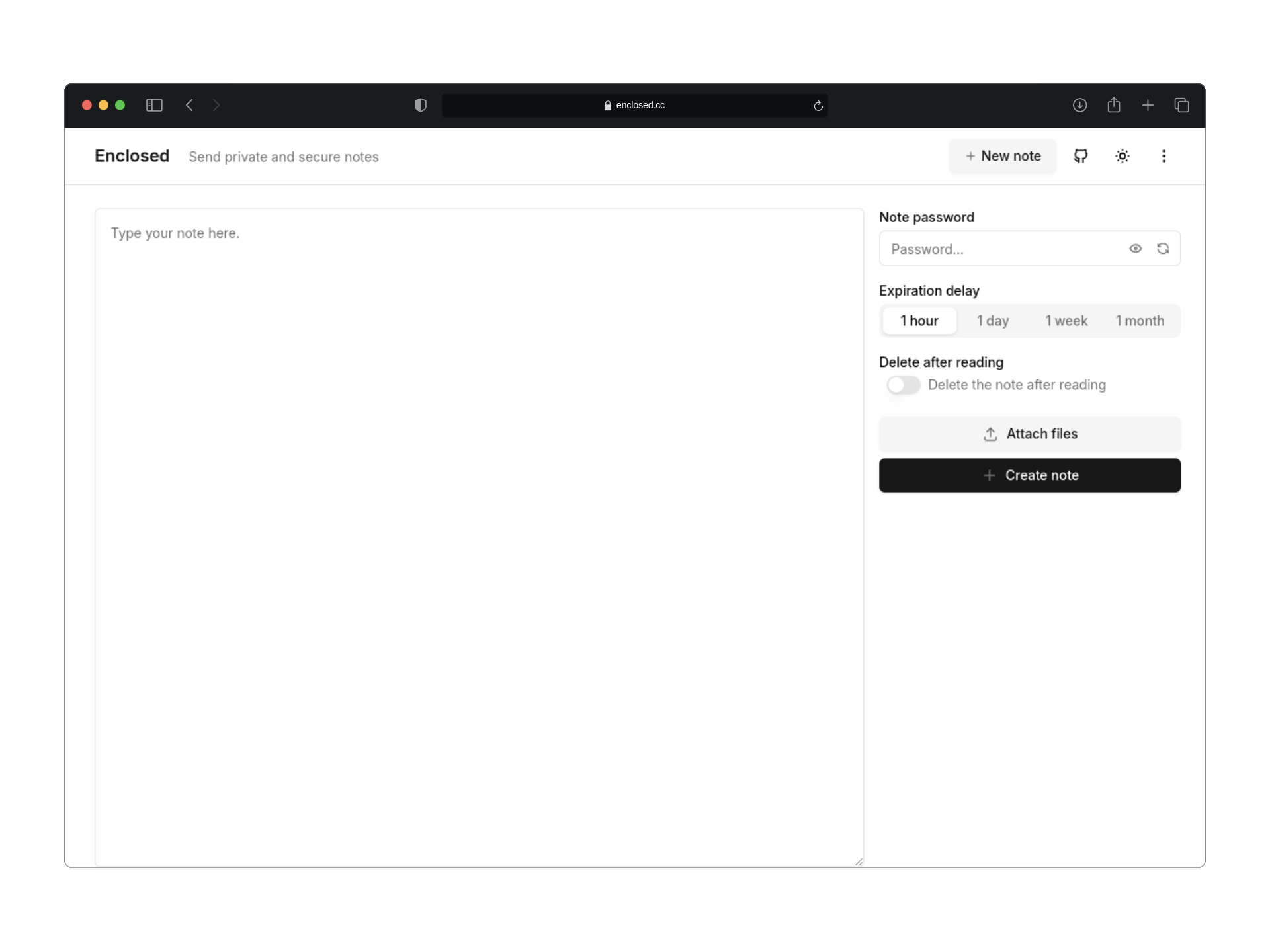
Indexed by TopGit from live GitHub metadata: CorentinTh/enclosed has 2.1k stars, written primarily in TypeScript. Minimalistic web app designed for sending private and secure notes.
Snapshot summary built from the project's own GitHub metadata — there's no written TopGit review yet. The page will update automatically when a full review is published.
WHY NO REVIEW YET
TopGit writes full reviews for the most-starred, most-requested repositories. This page is a snapshot until then — see the READ ME tab for the original README in full.
Minimalistic web application designed for sending end-to-end encrypted notes and files.
Demo
•
Docs
•
CLI
•
Self-hosting
Introduction
Enclosed is a minimalistic web application designed for sending private and secure notes.
All notes are end-to-end encrypted, ensuring that the server and storage have zero knowledge of the content. Users can set a password, define an expiration period (TTL), and choose to have the note self-destruct after being read.
A live instance is available at enclosed.cc.
Features
End-to-End Encryption: Your notes are encrypted on the client side, using AES-GCM with a 256-bit key derived using PBKDF2.
File Attachments: Share files securely with your notes.
Zero Knowledge: The server does not have access to the content of the notes or files.
Configurable Security Options: Set a password, expiration time, and choose self-destruction after the note is read.
Minimalistic UI: Simple and intuitive user interface for quick note sharing.
i18n Support: Available in multiple languages.
Authentication: Optional email/password authentication to create notes.
Dark Mode: A dark theme for late-night note sharing.
Responsive Design: Works on all devices, from desktops to mobile phones.
Open Source: The source code is available under the Apache 2.0 License.
Self-Hostable: Run your instance of Enclosed for private note sharing.
CLI: A command-line interface for creating notes from the terminal.
Very low environmental impact: the app and the docs is rated A+ on websitecarbon.com (see here and here).
Self host
Try it with Docker
You can quickly run the application using Docker.
docker run -d --name enclosed --restart unless-stopped -p 8787:8787 corentinth/enclosed
To go further
Please refer to the self-hosting documentation for more information on how to configure and run the application.
For example:
Setup persistent storage
Use rootless image
Use Docker Compose
Configuration
You can refer to the configuration documentation for more information on how to configure the application.
How It Works
Note Creation: A user creates a note with some content and optionally sets a password.
Key Generation: A base key is generated on the client side to ensure encryption, even if no password is set.
Master Key Derivation: A master key is derived from the base key and the optional password using PBKDF2 with SHA-256.
Note Encryption: The note is encrypted using the master key with AES-GCM encryption.
Sending to Server: The encrypted note is sent to the server along with some metadata (ttl, is the note password-protected, should it self-destruct after reading).
Storage and ID Assignment: The server stores the encrypted note and provides an ID for it.
Link Generation: A link is generated that includes the note ID and the base key (included as a URL hash fragment to maximize security since hashes are not sent to the server).
Link Sharing: The link is shared with the intended recipient.
Note Retrieval: The recipient opens the link, and the app fetches the encrypted note and metadata from the server using the note ID.
Key Extraction: The base key is extracted from the URL hash fragment.
Password Prompt (If Applicable): If the note is password-protected, the recipient is prompted to enter the password.
Master Key Derivation: The master key is derived from the base key and the entered password using PBKDF2 with SHA-256.
Note Decryption: The note is decrypted using the master key with AES-GCM and can now be read by the recipient.
This ensures that the note remains securely encrypted during transmission and storage, with decryption only possible by those with the correct link and (if applicable) password.
CLI
The Enclosed CLI allows you to create notes from the terminal. You can install it globally using npm, yarn, or pnpm.
Installation
# with npm
npm install -g @enclosed/cli

# with yarn
yarn global add @enclosed/cli

# with pnpm
pnpm add -g @enclosed/cli
Create a note
# Basic usage
enclosed create "Hello, World!"

# Using stdin
cat file.txt | enclosed create

# With full options
enclosed create --deleteAfterReading --password "password" --ttl 3600 "Hello, World!"
View a note
# The password will be prompted if the note is password-protected
enclosed view <note-url>

# Or you can provide the password directly
enclosed view --password "password" <note-url>
Configure the enclosed instance to use
# By default, the CLI uses the public instance at enclosed.cc
enclosed config set instance-url https://enclosed.cc
Project Structure
This project is organized as a monorepo using pnpm workspaces. The structure is as follows:
packages/app-client: Frontend application built with SolidJS.
packages/app-server: Backend application using HonoJS.
packages/deploy-cloudflare: Cloudflare Pages build scripts and configuration.
packages/lib: Core functionalities of Enclosed.
packages/cli: Command-line interface for Enclosed.
Contributing
Contributions are welcome! Please refer to the CONTRIBUTING.md file for guidelines on how to get started, report issues, and submit pull requests.
You can find easy-to-pick-up tasks with the good first issue label.
License
This project is licensed under the Apache 2.0 License. See the LICENSE file for more information.
Credits and Acknowledgements
This project is crafted with ❤️ by Corentin Thomasset.
If you find this project helpful, please consider supporting my work.
Thank you to all the contributors who have helped make Enclosed better!
Stack
Enclosed would not have been possible without the following open-source projects:
Frontend
SolidJS: A declarative JavaScript library for building user interfaces.
Shadcn Solid: UI components library for SolidJS based on Shadcn designs.
UnoCSS: An instant on-demand atomic CSS engine.
Tabler Icons: A set of open-source icons.
And other dependencies listed in the client package.json
Backend
HonoJS: A small, fast, and lightweight web framework for building APIs.
Unstorage: An unified key-value storage API.
Zod: A TypeScript-first schema declaration and validation library.
And other dependencies listed in the server package.json
Hosting
The live instance of Enclosed is hosted on Cloudflare Pages using Cloudflare KV for storage.
Inspiration
PrivateBin: A minimalist, open-source online pastebin where the server has zero knowledge of pasted data.
Bitwarden Send: A secure and ephemeral way to share sensitive information.
The shadcn playground example for the ui
Contact Information
Please use the issue tracker on GitHub for any questions or feedback.
The most recent commit recorded on CorentinTh/enclosed was 5 days ago, based on the GitHub push timestamp. The repository has 186 forks — one of the better signals of community interest.
How does CorentinTh/enclosed compare to other Developer Tools projects?
CorentinTh/enclosed is tracked by TopGit in the Developer Tools category, with 2.1k GitHub stars and written in TypeScript. Browse the Developer Tools topic page on TopGit to compare it against similar projects by stars and activity.
How many stars does CorentinTh/enclosed have?
CorentinTh/enclosed has 2.1k GitHub stars — refresh the page for the live number, or check github.com/CorentinTh/enclosed. TopGit mirrors GitHub's count but does not claim minute-by-minute accuracy.
Is CorentinTh/enclosed open source?
Yes — CorentinTh/enclosed ships under the Apache-2.0 license, which makes its source code freely readable (and, depending on license terms, forkable and reusable). Source: github.com/CorentinTh/enclosed.
What is CorentinTh/enclosed?
CorentinTh/enclosed (CorentinTh/enclosed) is a TypeScript project on GitHub. From the project's own README: Minimalistic web app designed for sending private and secure notes.
Where do I read more about CorentinTh/enclosed?
This TopGit page is a snapshot — the READ ME tab shows the project's own README content (links stripped, images preserved). The GitHub repository at github.com/CorentinTh/enclosed is the definitive source.
Read full README in the tab above.
Is enclosed worth your time?
ChatGPT, Claude and Perplexity can all read this page. Ask one of them what it makes of enclosed.
 /enclosed