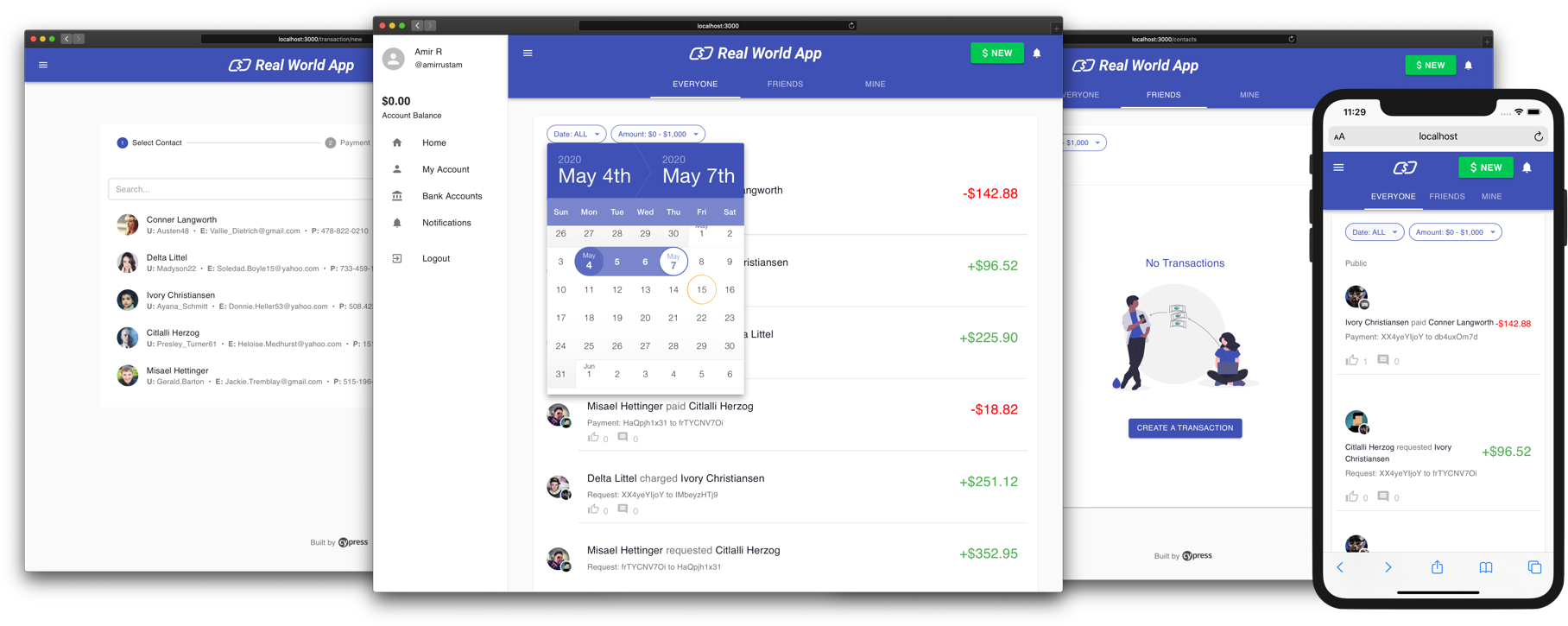
cypress-io/cypress-realworld-app is a Developer Tools project on GitHub, written primarily in TypeScript. It has 5.9k stars. A payment application to demonstrate real-world usage of Cypress testing methods, patterns, and workflows.
Snapshot summary built from the project's own GitHub metadata — there's no written TopGit review yet. The page will update automatically when a full review is published.
WHY NO REVIEW YET
TopGit writes full reviews for the most-starred, most-requested repositories. This page is a snapshot until then — see the READ ME tab for the original README in full.
A payment application to demonstrate real-world usage of Cypress testing methods, patterns, and workflows.
💬 Note from maintainers
This application is purely for demonstration and educational purposes. Its setup and configuration resemble typical real-world applications, but it's not a full-fledged production system. Use this app to learn, experiment, tinker, and practice application testing with Cypress.
Happy Testing!
Features
🛠 Built with React, XState, Express, lowdb, Material-UI and TypeScript
⚡️ Zero database dependencies
🚀 Full-stack Express/React application with real-world features and tests
👮♂️ Local Authentication
🔥 Database Seeding with End-to-end Tests
💻 CI/CD + Cypress Cloud
Getting Started
The Cypress Real-World App (RWA) is a full-stack Express/React application backed by a local JSON database (lowdb).
The app is bundled with example data (data/database.json) that contains everything you need to start using the app and run tests out-of-the-box.
🚩 Note
You can login to the app with any of the example app users. The default password for all users is s3cret.
Example users can be seen by running yarn list:dev:users.
Prerequisites
This project requires Node.js to be installed on your machine. Refer to the .node-version file for the exact version.
Yarn Classic is also required. Once you have Node.js installed, execute the following to install the npm module yarn (Classic - version 1) globally.
npm install yarn@1 -g
If you have Node.js' experimental Corepack feature enabled,
then you should skip the step npm install yarn@1 -g to install Yarn Classic globally.
The RWA project is locally configured for Corepack to use Yarn Classic (version 1).
Yarn Modern
This project is not compatible with Yarn Modern (version 2 and later).
Installation
To clone the repo to your local system and install dependencies, execute the following commands:
git clone https://github.com/cypress-io/cypress-realworld-app
cd cypress-realworld-app
yarn
Mac users with M-series chips will need to prepend PUPPETEER_SKIP_CHROMIUM_DOWNLOAD=true.
The app will run on port 3000 (frontend) and 3001 (API backend) by default. Please make sure there are no other applications or services running on both ports.
If you want to change the default ports, you can do so by modifying PORT and VITE_BACKEND_PORT variables in .env file.
However, make sure the modified port numbers in .env are not committed into Git since the CI environments still expect the application to run on the default ports.
Start Cypress
yarn cypress:open
🚩 Note
If you have changed the default ports, then you need to update Cypress configuration file (cypress.config.ts) locally.
There are three properties that you need to update in cypress.config.ts: e2e.baseUrl, expose.apiUrl, and expose.codeCoverage.url.
The port number in e2e.baseUrl corresponds to PORT variable in .env file. Similarly, the port number in expose.apiUrl and expose.codeCoverage.url correspond to VITE_BACKEND_PORT.
For example, if you have changed PORT to 13000 and VITE_BACKEND_PORT to 13001 in .env file, then your cypress.config.ts should look similar to the following snippet:
Avoid committing the modified cypress.config.ts into Git since the CI environments still expect the application to be run on default ports.
Tests
Type
Location
api
cypress/tests/api
ui
cypress/tests/ui
component
src/(next to component)
unit
src/__tests__
Database
The local JSON database is located in data/database.json and is managed with lowdb.
The database is reseeded each time the application is started (via yarn dev). Database seeding is done in between each Cypress End-to-End test.
Updates via the React frontend are sent to the Express server and handled by a set of database utilities
Generate a new database using yarn db:seed.
An empty database seed is provided along with a script (yarn start:empty) to view the application without data.
Additional NPM Scripts
Script
Description
dev
Starts backend in watch mode and frontend
dev:coverage
Starts backend in watch mode and frontend with instrumented code coverage enabled
dev:auth0
Starts backend in watch mode and frontend; Uses Auth0 for Authentication > Read Guide
dev:okta
Starts backend in watch mode and frontend; Uses Okta for Authentication > Read Guide
dev:cognito
Starts backend in watch mode and frontend; Uses Cognito for Authentication > Read Guide
dev:google
Starts backend in watch mode and frontend; Uses Google for Authentication > Read Guide
start
Starts backend and frontend
types
Validates types
db:seed
Generates fresh database seeds for json files in /data
start:empty
Starts backend, frontend and Cypress with empty database seed
tsnode
Customized ts-node command to get around react-scripts restrictions
list:dev:users
Provides id and username for users in the dev database
For a complete list of scripts see package.json
Code Coverage Report
The Cypress Real-World App uses the @cypress/code-coverage plugin to generate code coverage reports for the app frontend and backend.
To generate a code coverage report:
Start the development server with coverage enabled by running yarn dev:coverage.
Run yarn cypress:run --env coverage=true and wait for the test run to complete.
Once the test run is complete, you can view the report at coverage/index.html.
3rd Party Authentication Providers
Support for 3rd party authentication is available in the application to demonstrate the concepts on logging in with a 3rd party provider.
The app contains different entry points for each provider. There is a separate index file for each provider, and to use one, you must replace the current index.tsx file with the desired one. The following providers are supported:
Auth0 (index.auth0.tsx)
Okta (index.okta.tsx)
Amazon Cognito (index.cognito.tsx)
Google (index.google.tsx)
Auth0
The Auth0 tests have been rewritten to take advantage of our cy.session and cy.origin commands.
Prerequisites include an Auth0 account and a Tenant configured for use with a SPA. Environment variables from Auth0 are to be placed in the .env. For more details see Auth0 Application Setup and Setting Auth0 app credentials in Cypress.
To start the application with Auth0, replace the current src/index.tsx file with the src/index.auth0.tsx file and start the application with yarn dev:auth0 and run Cypress with yarn cypress:open.
The only passing spec on this branch will be the auth0 spec; all others will fail. Please note that your test user will need to authorize your Auth0 app before the tests will pass.
Okta
A guide has been written with detail around adapting the RWA to use Okta and to explain the programmatic command used for Cypress tests.
Prerequisites include an Okta account and application configured for use with a SPA. Environment variables from Okta are to be placed in the .env.
To start the application with Okta, replace the current src/index.tsx file with the src/index.okta.tsx file and start the application with yarn dev:okta and run Cypress with yarn cypress:open.
The only passing spec on this branch will be the okta spec; all others will fail.
Amazon Cognito
A guide has been written with detail around adapting the RWA to use Amazon Cognito as the authentication solution and to explain the programmatic command used for Cypress tests.
Prerequisites include an Amazon Cognito account. Environment variables from Amazon Cognito are provided by the AWS Amplify CLI.
A user pool is required (identity pool is not used here)
The user pool must have a hosted UI domain configured, which must:
allow callback and sign-out URLs of http://localhost:3000/,
allow implicit grant Oauth grant type,
allow these OpenID Connect scopes:
aws.cognito.signin.user.admin
email
openid
The user pool must have an app client configured, with:
enabled auth flow ALLOW_USER_PASSWORD_AUTH, only for programmatic login flavor of test.
The cy.origin() flavor of test only requires auth flow ALLOW_USER_SRP_AUTH, and does not require ALLOW_USER_PASSWORD_AUTH.
The user pool must have a user corresponding to the AWS_COGNITO env vars mentioned below, and the user's Confirmation Status must be Confirmed. If it is Force Reset Password, then use a browser to log in once at http://localhost:3000 while yarn dev:cognito is running to reset their password.
The test knobs are in a few places:
The .env file has VITE_AUTH_TOKEN_NAME and vars beginning AWS_COGNITO. Be careful not to commit any secrets.
Both scripts/mock-aws-exports.js and scripts/mock-aws-exports-es5.js must have the same data; only their export statements differ. These files can be edited manually or exported from the amplify CLI.
cypress.config.ts has cognito_programmatic_login to control flavor of the test.
To start the application with Cognito, replace the current src/index.tsx file with the src/index.cognito.tsx file and start the application with yarn dev:cognito and run Cypress with yarn cypress:open. yarn dev may need to have been run once first.
The only passing spec on this branch will be the cognito spec; all others will fail.
Google
A guide has been written with detail around adapting the RWA to use Google as the authentication solution and to explain the programmatic command used for Cypress tests.
Prerequisites include an Google account. Environment variables from Google are to be placed in the .env.
To start the application with Google, replace the current src/index.tsx file with the src/index.google.tsx file and start the application with yarn dev:google and run Cypress with yarn cypress:open.
The only passing spec when run with yarn dev:google will be the google spec; all others will fail.
License
This project is licensed under the terms of the MIT license.
Contributors ✨
Thanks goes to these wonderful people (emoji key):
Kevin Old
Amir Rustamzadeh
Brian Mann
Gleb Bahmutov
Ben Hong
David Khourshid
This project follows the all-contributors specification. Contributions of any kind welcome!!
How active is development on cypress-io/cypress-realworld-app?
The most recent commit recorded on cypress-io/cypress-realworld-app was 4 months ago, based on the GitHub push timestamp. The repository has 2.6k forks — one of the better signals of community interest.
How many stars does cypress-io/cypress-realworld-app have?
cypress-io/cypress-realworld-app has 5.9k GitHub stars — refresh the page for the live number, or check github.com/cypress-io/cypress-realworld-app. TopGit mirrors GitHub's count but does not claim minute-by-minute accuracy.
Is cypress-io/cypress-realworld-app open source?
Yes — cypress-io/cypress-realworld-app ships under the MIT license, which makes its source code freely readable (and, depending on license terms, forkable and reusable). Source: github.com/cypress-io/cypress-realworld-app.
What else is in the Developer Tools space?
cypress-io/cypress-realworld-app is tracked by TopGit under the Developer Tools category, alongside 7 GitHub-tagged topics. Trending and Topics pages list peer repositories of comparable stars and language.
What topics is cypress-io/cypress-realworld-app associated with?
GitHub's repository topics for cypress-io/cypress-realworld-app: "api-testing", "code-coverage", "component-testing", "cypress", "end-to-end-testing", "testing", "testing-practices". TopGit's editorial category is Developer Tools.
Where can I see cypress-io/cypress-realworld-app in action?
The project maintains a homepage at https://docs.cypress.io. The README tab on this page also usually contains screenshots and a quickstart.
Where do I read more about cypress-io/cypress-realworld-app?
This TopGit page is a snapshot — the READ ME tab shows the project's own README content (links stripped, images preserved). The GitHub repository at github.com/cypress-io/cypress-realworld-app is the definitive source.
Read full README in the tab above.
Still deciding about cypress-realworld-app?
One click hands the question to an AI along with this page — see what it says about cypress-realworld-app.

 /cypress-realworld-app