A look at Datalux/Osintgram: 15.6k stars on GitHub, written primarily in Python, tracked under the Security category. Osintgram is a OSINT tool on Instagram. It offers an interactive shell to perform analysis on Instagram account of any users by its nickname
Snapshot summary built from the project's own GitHub metadata — there's no written TopGit review yet. The page will update automatically when a full review is published.
WHY NO REVIEW YET
TopGit writes full reviews for the most-starred, most-requested repositories. This page is a snapshot until then — see the READ ME tab for the original README in full.
Point it at an Instagram account and find out who's behind it. Osintgram
collects, cross-references and lays out everything a public profile gives away
— followers, captions, hashtags, geotagged locations, posting habits, public
contact details — in a web interface you run on your own machine.
Ask in plain language and a local AI model figures out which lookups to
run. Or don't: pick the commands yourself and skip the model entirely.
Why you might like it
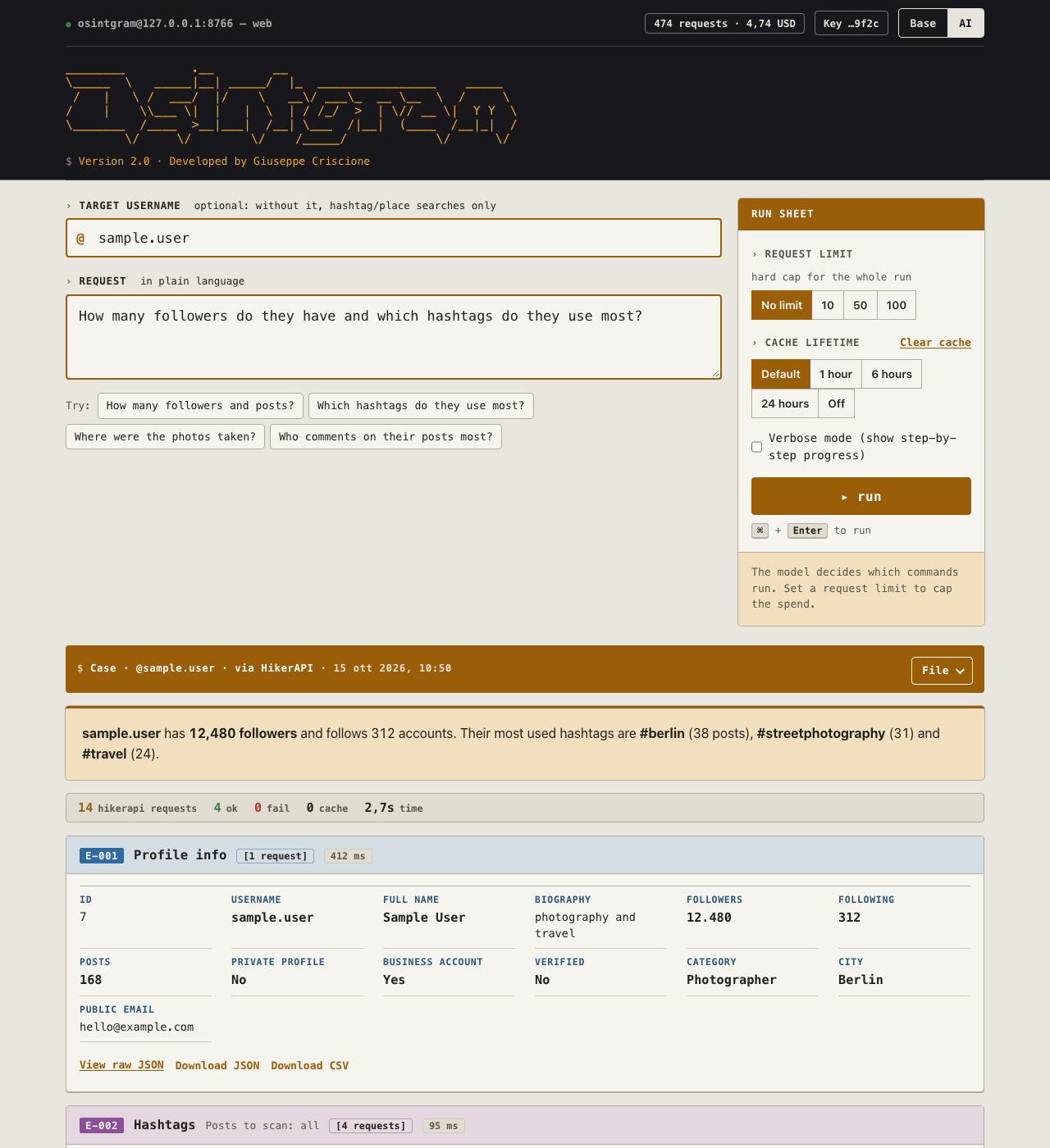
It answers questions, not just commands."How many followers do they have and which
hashtags do they use most?" runs three lookups and comes back with a written answer —
and the raw results underneath, so you can check the work instead of trusting
the prose.
Nothing leaves your machine except the lookups themselves. The AI runs
locally through Ollama: no OpenAI key, no subscription, no
prompt of yours sent to anyone. The interface is served from 127.0.0.1.
It tells you what a search will cost before you run it. Instagram data
isn't free, and most tools let you find out the expensive way. This one prices
your selection up front, shows your remaining credit, caches every request so
you never pay twice for the same lookup, and lets you cap or stop a run —
server-side, not just in the browser.
It shows you what it found, properly. Post thumbnails in a filterable grid,
geotagged locations on a map, a weekday × hour heatmap of when someone posts,
comparison between two accounts. Not a wall of JSON — though the JSON is one
click away on every card.
You can hand the result to someone else. One button turns a finished search
into a standalone HTML report that opens in any browser, with no server and no
Osintgram.
Two ways to drive it
AI mode — describe what you want. A local model picks the commands, runs
them and summarizes. It can only choose from the same list below; it can't
invent lookups or make up data.
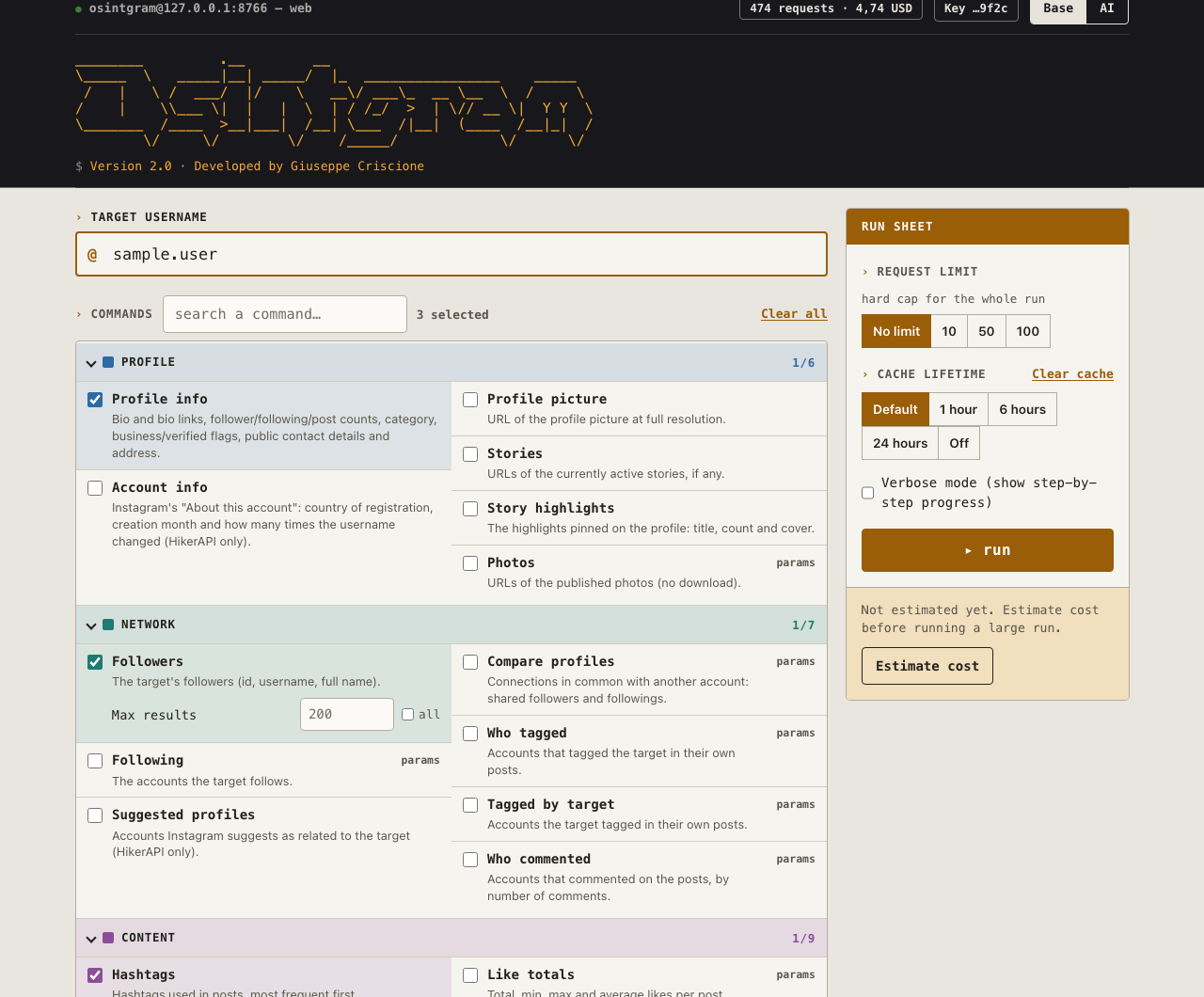
Base mode — no model, no Ollama needed. All 29 commands, one line each,
grouped and searchable. Tick what you want, set the parameters, run them in
order.
You can also leave the username empty in AI mode and just ask about a hashtag
or a place — those searches belong to no account.
What you can find out
Profile
Bio and every link in it, follower/following/post counts, category, public email, phone and business address down to the coordinates, linked Facebook id — plus Instagram's own About this account: country of registration, creation date, how many times the username changed
Network
Followers and followings, accounts Instagram suggests as related, who tagged them, who they tagged, who comments most — and mutual connections between two accounts
Content
Hashtags ranked by use, captions, every comment, like and comment statistics, photo/video/carousel breakdown with views and paid partnerships, posting-times heatmap, geotagged locations on a map, photo alt text
Contacts
Public emails and phone numbers among a target's followers or followings
No target needed
Posts published with a hashtag (top or recent) or from a place, and who published them — plus every comment on one specific post or reel, given its URL, shortcode or id
Stories, highlights and profile pictures come back as direct CDN links — and
any card with media in it offers a one-click zip of the originals.
Quick start
pip install -r requirements.txt
uvicorn src.web.app:app --host 127.0.0.1 --port 8000 --reload   # or: make run
Open http://127.0.0.1:8000.
You need a data backend. The page opens on a panel where you can paste a
HikerAPI key directly — it's verified before it's
accepted, and can be saved for next time. (A free
instagrapi login works too, using an
Instagram account of your own — see the guide for the trade-offs.)
For AI mode, install Ollama and pull a
tool-calling capable model:
ollama pull llama3.1:8b # ~4.7 GB, the default
Base mode works without it.
Prefer containers?
docker compose up --build # or: make docker
Same address, same behaviour — published on 127.0.0.1 only. Your key, cache
and saved searches stay on the host in config/, cache/ and dossier/,
never inside the image. AI mode reaches an Ollama running on your host.
$${\color{red}Warning:}$$ This runs on 127.0.0.1 with no authentication. It's built to run on your own machine — don't expose it beyond localhost without putting an auth layer in front of it first.
📖 Read the full guide → doc/web-ui.md
Setup for both backends, every command with its parameters and cost, how to
keep spending down, exporting and sharing results, all configuration options,
and troubleshooting.
Before you use it
FOR EDUCATIONAL PURPOSE ONLY. The contributors do not assume any
responsibility for the use of this tool.
Don't use your own or primary Instagram account with it.
Never commit config/credentials.ini — API keys and Instagram
credentials live there. It's git-ignored; keep it that way. If a key has ever
been pushed, rotate it: deleting the file doesn't remove it from history.
Results contain other people's personal data. Handle them in line with
data-protection law (GDPR and equivalents) and Instagram's Terms of Use.
You cannot see private profiles. Nothing can. Tools claiming otherwise are
scams.
The test suite runs entirely against synthetic fixtures — no API key, no quota,
no network. It also checks that the documentation hasn't drifted away from the
code.
Feature requests and pull requests are welcome — open an issue. Found a
security problem? Please report it privately instead: see SECURITY.md.
Credits
Osintgram is written by Giuseppe Criscione
(Datalux). Version 2.0 rebuilds it around a web
interface and a reusable service layer, and adds the AI mode, the cost controls
and the newer analyses — see the changelog.
It owes a great deal to everyone who has contributed since the first release:
Instagram data comes from HikerAPI or
instagrapi. Geocoding by
Nominatim / OpenStreetMap.
Maps by Leaflet. Local models via
Ollama.
Released under the GPL-3.0 licence.
Instagram is a trademark of Meta Platforms, Inc. This project is not affiliated
with, endorsed by, or approved by Meta.
No homepage URL was recorded for Datalux/Osintgram in TopGit's last sync. The README tab above frequently contains screenshots and demo links, or check the repository description on GitHub.
Is Datalux/Osintgram open source?
Yes — Datalux/Osintgram ships under the GPL-3.0 license, which makes its source code freely readable (and, depending on license terms, forkable and reusable). Source: github.com/Datalux/Osintgram.
What else is in the Security space?
Datalux/Osintgram is tracked by TopGit under the Security category, alongside 13 GitHub-tagged topics. Trending and Topics pages list peer repositories of comparable stars and language.
What is Datalux/Osintgram?
Datalux/Osintgram (Datalux/Osintgram) is a Python project on GitHub. From the project's own README: Osintgram is a OSINT tool on Instagram. It offers an interactive shell to perform analysis on Instagram account of any users by its nickname
What license does Datalux/Osintgram use?
Datalux/Osintgram is released under the GPL-3.0 license. Always verify the LICENSE file directly on GitHub for the authoritative terms — license strings can be edited out of sync with a project's actual stance.
Where do I read more about Datalux/Osintgram?
This TopGit page is a snapshot — the READ ME tab shows the project's own README content (links stripped, images preserved). The GitHub repository at github.com/Datalux/Osintgram is the definitive source.
Why is Datalux/Osintgram categorized under Security?
TopGit places Datalux/Osintgram in the Security category based on its GitHub topics and description (tagged: "analysis", "hacking", "information-gathering"). Categories are assigned from real repository metadata, not editorial guesswork.
Read full README in the tab above.
Still deciding about Osintgram?
One click hands the question to an AI along with this page — see what it says about Osintgram.

 /Osintgram