dipakkr/ES6-Guide — a frontend project — sits at 55 GitHub stars in the Frontend space. ✅ A Comprehensive Guide to Learn ES6 Concepts
Snapshot summary built from the project's own GitHub metadata — there's no written TopGit review yet. The page will update automatically when a full review is published.
WHY NO REVIEW YET
TopGit writes full reviews for the most-starred, most-requested repositories. This page is a snapshot until then — see the READ ME tab for the original README in full.
Var keyword was previously used for declaring variable in javascript.
Variables declared with var can be re-initialised and re-declared too.
It is not recommended to use var after release of let and const.
    var a = 10;

    for(var i=0;i<5;i++){
    		var a = 20;
    		console.log(a); //Returns 20
    }

    console.log(a); // Returns 20
1.2 LET
"let" is used when you have to change the value of the variable later in the code.
It has block scope.
It can be re-initialised but not re-declared.
    let a = 10;

    // re-initialization
    a = 30; // Updating a value to 30.

    //re-declartion
    let a = 20; // Throws Error

    // Block 1
    {
    	 let c = 10;
    	 console.log(c); // c=10
    }

    console.log(c); // Throws Error, c not defined.
1.3 CONST
Const is used to define a constant variable which can't be changed throught the code.
It has block scope.
You can neither be re-initiased nor re-declared.
    const a = 10;

    // re-initialization
    a = 30; // Throws Error, CONST variable can't be changed

    //re-declartion
    const a = 20; // Throws Error

    // Block 1
    {
    	 const c = 10;
    	 console.log(c); // c=10
    }

    console.log(c); // Throws Error, c not defined.
2. Template Literals
Template literals are string literals allowing embedded expressions. You can use multi-line strings and string interpolation features with them. They were called "template strings" in prior editions of the ES2015 specification.
Template literals are basically the formatting of string in javascript. In ES5, formatting string was a tedious task as it involved a very manual formatting syntax.
Let's see an example how we used to format string in ES5.
    # TEMPLATE STRING (WITHOUT ES6)

    function greet(name){
    	const greeting = 'Hello,' + ' ' + name + ' ' + Welcome to JavaScript Course;
    	return greeting;
    }

    greet('Deepak');

    // Hello, Deepak Welcome to JavaScript Course.
    # TEMPLATE STRING (WITH ES6)

    function greet(name){
    	const greeting = `Hello, ${name} Welcome to JavaScript Course`;
    	return greeting;
    }

    greet('Deepak');

    // Hello, Deepak Welcome to JavaScript Course.
Now, you see the diffference how easy it is to use format string with ES6 new syntax.
RECAP
Template String are enclosed by back tick(``) instead of single or double quote.
Template literals can contain placeholders. These are indicated by the dollar sign and curly braces (${expression}). The expressions in the placeholders and the text between the back-ticks (``) get passed to a function.
3. Default Arguments
Default argument or default parameter is the new feature in ES6. It allows you to set a default value for your function parameter/argument if no value or undefined of is passed.
Handling Default Argument with ES5
    function add(a, b){
    		return a + b;
    }

    add() // NaN

    // Handling Default Argument without ES6.

    function add(a, b){
    	const a = (typeof(a) !== 'undefined') ? a : 5;
    	const b = (typeof(b) !== 'undefined') ? b : 10;
      return a+b;
    }

    add() // Returns 15
When no parameter is passed you can see we have to explicitly handle the error by setting default values of a & b. This doesn't look like a favourable way of handling default arguments.
Handling Default Argument with ES6
    function add(a=5, b=10){
    	return a+b;
    }

    add(); // a=5, b=10, sum = 15;

    add(2, 3); // a=2, b=3, sum = 5;

    add(4); // a=4, b=10, sum=14 ;
Default value of A and B will be only used when no parameter is passed.
4. Arrow Functions
An arrow function is a syntactically compact alternative to a regular function expression without its own binding to this, super,
**Using Regular Function Express (ES5)**

    // Example 1
    function add(a, b){
    	return a+b;
    }

    add(5, 10);

    // Example 2

    const x = [1, 2, 3, 4, 5];

    const square = x.map(function(x){
    	return x*x;
    });

    console.log(sqaure);
Destructuring is a new feature introduced in ES6 to unpack values from arrays or properties from object. It helps in improving the readability and performance of our code.
Map, Reduce and Filter are the array methods which was introduced in ES6. The common things among these three methods are that when these methods applied on an array, it returns a new array based on the given parameter.
Map Method
Let's understand the Map method by taking a simple example. Let's say you have users array that contains multiple user object. But, you just need the username of each user.
Filter methods take a function parameter which applies on each array element, then whichever element satisfies the parameter condition returns in the new array.
for...of is a new feature got introduced in ES6 to access the interables element more easily. The for...of statement simply creates a loop iterating over iterable objects.
Looping Without for...of
const array = [5, 10, 15, 20, 25, 30, 35];

for(var value in array){
	console.log(array[value]);
}

// To access the element of the array, We are using array[postion] notation.
Looping with for...of
const array = [5, 10, 15, 20, 25, 30, 35];

for(var value of a){
	console.log(value);
}
So, we can see we are able to access interable elements directly with for...of method.
8. Rest and Spread Operator
Spread and Rest Operators are denoted by ... three dots. These three dots can be used in 2 ways, one as Spread Operator and other as Rest Parameter
⇒ Rest Parameter
It collects all the remaining elements into an array.
Rest Parameter can collect any number of arguments into an array.
Rest Parameter has to be the last arguments.
Without Using Rest Parameter
    // Write a Function to print sum of arguments.

    function add() {
      var sum = 0;
      for (var i = 0; i < arguments.length; i++) {
        sum = sum + arguments[i];
      }
      return sum;
    }

    console.log(add(1, 2, 3, 4, 5)); // 15

    console.log(add(1, 3, 4)); // 8
Example Using Rest Operator
    function add(...args) {
      let sum = 0;
      for (let i of args) {
        sum += i;
      }
      return sum;
    }

    console.log(add(3, 4, 5, 10, 20)); // 42

    console.log(add(1, 3, 4)); // 8
Spread Operator
It allows iterables like arrays / objects /strings to be expanded into single arguments/elements.
Spread operator is opposite of Rest Parameter. In Rest Parameter We were collecting the list of arguments into an array, while with spread operator we can unpack the array elements.
Let's see an example to understand spread
    ## EXAMPLE - 1

    const cars = ['BMW', 'Honda', 'Audi'];
    const moreCars = ['Maruti', 'Swift', ...cars];

    console.log(moreCars);  // ['Maruti', 'Swift', 'BMW', 'Honda', 'Audi'];


    ## EXAMPLE - 2 //Copying one array to other

    const array1 = [1, 2, 3];
    const copiedArray = ...array1;

    console.log(copiedArray); // [1, 2, 3]
9. Object Literals
Object literals are used to create an object in javascript. Enhancement in Object literals in ES2015 (ES6) release has made it more powerful.
Object can be initialised by directly using the variable name. See Example 1 below.
Object's method in ES5 require function statement. This is no longer required in ES6, you can directly return statement. See Example 2 below.
Object literals key in ES6 can be dynamic. Any Express can be used to create a key.
Let's take a look at this example to see the working of Object literals.
Object Literals Without ES6 ( ES5 Supported )
    # Example 1

    var username = 'dipakkr'
    var name = 'Deepak Kumar'
    var country = 'India'
    var password = '123456'

    var user = {
    	username : username,
      name : name,
    	country : country,
    	password : password
    }

    # Example 2

    var calculate = {
      sqaure :  function(a) { return a*a; },
      sum : function(a, b) { return a + b; }
    };

    console.log(calculate.square(5));  // 25
    console.log(calculate.sum(4,5));   //  9
Object Literals with ES6
    # Example 1

    const username = 'dipakkr'
    const name = 'Deepak Kumar'
    const country = 'India'
    const password = '123456'

    const user = {
    	username,
    	name,
    	country,
    	password,
    };


    # Example 2

    const calculate = {
    	square(a) return a*a,
      sum(a, b) return a+b
    }

    console.log(calculate.square(5));   // 25
    console.log(calculate.sum(5,7));    // 12
10. Classes in ES6
JavaScript introduced in ECMAScript 2015. Classes support prototype-based inheritance, constructors, super calls, instance and static methods
There are two ways to define classes in JavaScript.
Class Declaration
Class Expression
Class Declaration
In order to define class using-declaration method you need to use class keyword followed by className. The class name must start with Capital letter.
A class expression is another way to define a class. Class expressions can be named or unnamed. The name given to a named class expression is local to the class's body.
    let Rectangle = class {
      constructor(height, width) {
        this.height = height;
        this.width = width;
      }
    };

    console.log(Rectangle.name);
Mozilla Developer has great explanation for javascript classes. Read more here
11. Promises
For supporting asynchronous programming, JavaScript uses a callback. However, the callback implementation has a major problem which is called as Callback hell. Promises come to rescue to solve the problem of callback hell.
Promises are a pattern that greatly simplifies asynchronous programming by making the code look synchronous and avoid problems associated with callbacks.
A Promise has three states.
pending: Initial state, neither fulfilled nor rejected.
fulfilled: It means that the operation completed successfully.
Hi, I am Deepak Kumar, a Full Stack JavaScript Developer, Freelancer and an aspiring Entrepreneur. I love building and scaling products that has real impact in community.
Join the Community and Stay updated on new release
Copyright 2019 Deepak Kumar

Licensed under the Apache License, Version 2.0 (the "License");
you may not use this file except in compliance with the License.
You may obtain a copy of the License at

   http://www.apache.org/licenses/LICENSE-2.0

Unless required by applicable law or agreed to in writing, software
distributed under the License is distributed on an "AS IS" BASIS,
WITHOUT WARRANTIES OR CONDITIONS OF ANY KIND, either express or implied.
See the License for the specific language governing permissions and
limitations under the License.
How does dipakkr/ES6-Guide compare to other Frontend projects?
dipakkr/ES6-Guide is tracked by TopGit in the Frontend category, with 55 GitHub stars. Browse the Frontend topic page on TopGit to compare it against similar projects by stars and activity.
How many stars does dipakkr/ES6-Guide have?
dipakkr/ES6-Guide has 55 GitHub stars — refresh the page for the live number, or check github.com/dipakkr/ES6-Guide. TopGit mirrors GitHub's count but does not claim minute-by-minute accuracy.
Is dipakkr/ES6-Guide open source?
TopGit's metadata for dipakkr/ES6-Guide does not record a license. Most public repositories on GitHub ARE open source, but the exact terms vary — verify by opening the LICENSE file directly.
What else is in the Frontend space?
dipakkr/ES6-Guide is tracked by TopGit under the Frontend category, alongside 5 GitHub-tagged topics. Trending and Topics pages list peer repositories of comparable stars and language.
What is dipakkr/ES6-Guide?
dipakkr/ES6-Guide (dipakkr/ES6-Guide) is a multi-language project on GitHub. From the project's own README: ✅ A Comprehensive Guide to Learn ES6 Concepts
Where can I see dipakkr/ES6-Guide in action?
The project maintains a homepage at http://bit.ly/a2z-es6. The README tab on this page also usually contains screenshots and a quickstart.
Where do I read more about dipakkr/ES6-Guide?
This TopGit page is a snapshot — the READ ME tab shows the project's own README content (links stripped, images preserved). The GitHub repository at github.com/dipakkr/ES6-Guide is the definitive source.
Read full README in the tab above.
Curious whether ES6-Guide is right for you?
Let ChatGPT, Claude, or Perplexity look into it — click below and see what AI actually says about ES6-Guide.

 /ES6-Guide


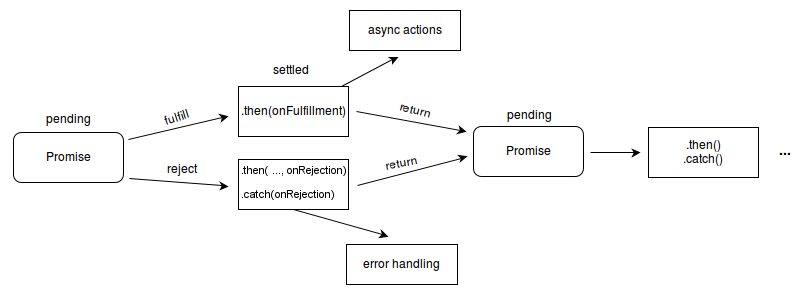 Image Credit : MDN