As an image tool, disintegration/imaging has picked up 5.8k stars on GitHub (Go). Imaging is a simple image processing package for Go
Snapshot summary built from the project's own GitHub metadata — there's no written TopGit review yet. The page will update automatically when a full review is published.
WHY NO REVIEW YET
TopGit writes full reviews for the most-starred, most-requested repositories. This page is a snapshot until then — see the READ ME tab for the original README in full.
All the image processing functions provided by the package accept any image type that implements image.Image interface
as an input, and return a new image of *image.NRGBA type (32bit RGBA colors, non-premultiplied alpha).
A few usage examples can be found below. See the documentation for the full list of supported functions.
Image resizing
// Resize srcImage to size = 128x128px using the Lanczos filter.
dstImage128 := imaging.Resize(srcImage, 128, 128, imaging.Lanczos)

// Resize srcImage to width = 800px preserving the aspect ratio.
dstImage800 := imaging.Resize(srcImage, 800, 0, imaging.Lanczos)

// Scale down srcImage to fit the 800x600px bounding box.
dstImageFit := imaging.Fit(srcImage, 800, 600, imaging.Lanczos)

// Resize and crop the srcImage to fill the 100x100px area.
dstImageFill := imaging.Fill(srcImage, 100, 100, imaging.Center, imaging.Lanczos)
Imaging supports image resizing using various resampling filters. The most notable ones:
Lanczos - A high-quality resampling filter for photographic images yielding sharp results.
CatmullRom - A sharp cubic filter that is faster than Lanczos filter while providing similar results.
MitchellNetravali - A cubic filter that produces smoother results with less ringing artifacts than CatmullRom.
Linear - Bilinear resampling filter, produces smooth output. Faster than cubic filters.
Box - Simple and fast averaging filter appropriate for downscaling. When upscaling it's similar to NearestNeighbor.
NearestNeighbor - Fastest resampling filter, no antialiasing.
The full list of supported filters: NearestNeighbor, Box, Linear, Hermite, MitchellNetravali, CatmullRom, BSpline, Gaussian, Lanczos, Hann, Hamming, Blackman, Bartlett, Welch, Cosine. Custom filters can be created using ResampleFilter struct.
Resampling filters comparison
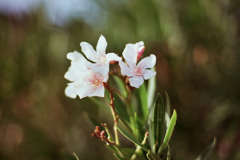
Original image:
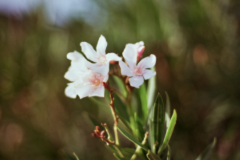
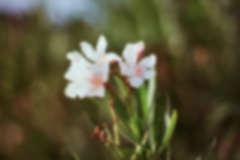
The same image resized from 600x400px to 150x100px using different resampling filters.
From faster (lower quality) to slower (higher quality):
Filter
Resize result
imaging.NearestNeighbor
imaging.Linear
imaging.CatmullRom
imaging.Lanczos
Gaussian Blur
dstImage := imaging.Blur(srcImage, 0.5)
Sigma parameter allows to control the strength of the blurring effect.
Original image
Sigma = 0.5
Sigma = 1.5
Sharpening
dstImage := imaging.Sharpen(srcImage, 0.5)
Sharpen uses gaussian function internally. Sigma parameter allows to control the strength of the sharpening effect.
Incorrect image orientation after processing (e.g. an image appears rotated after resizing)
Most probably, the given image contains the EXIF orientation tag.
The standard image/* packages do not support loading and saving
this kind of information. To fix the issue, try opening images with
the AutoOrientation decode option. If this option is set to true,
the image orientation is changed after decoding, according to the
orientation tag (if present). Here's the example:
What's the difference between imaging and gift packages?
imaging
is designed to be a lightweight and simple image manipulation package.
It provides basic image processing functions and a few helper functions
such as Open and Save. It consistently returns *image.NRGBA image
type (8 bits per channel, RGBA).
gift
supports more advanced image processing, for example, sRGB/Linear color
space conversions. It also supports different output image types
(e.g. 16 bits per channel) and provides easy-to-use API for chaining
multiple processing steps together.
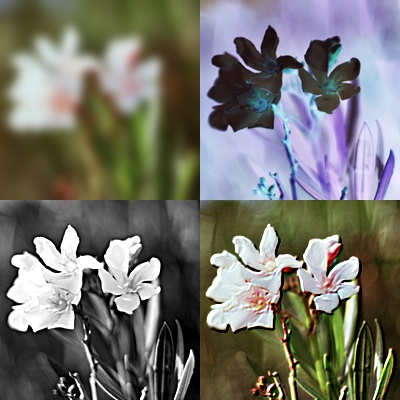
Example code
package main

import (
	"image"
	"image/color"
	"log"

	"github.com/disintegration/imaging"
)

func main() {
	// Open a test image.
	src, err := imaging.Open("testdata/flowers.png")
	if err != nil {
		log.Fatalf("failed to open image: %v", err)
	}

	// Crop the original image to 300x300px size using the center anchor.
	src = imaging.CropAnchor(src, 300, 300, imaging.Center)

	// Resize the cropped image to width = 200px preserving the aspect ratio.
	src = imaging.Resize(src, 200, 0, imaging.Lanczos)

	// Create a blurred version of the image.
	img1 := imaging.Blur(src, 5)

	// Create a grayscale version of the image with higher contrast and sharpness.
	img2 := imaging.Grayscale(src)
	img2 = imaging.AdjustContrast(img2, 20)
	img2 = imaging.Sharpen(img2, 2)

	// Create an inverted version of the image.
	img3 := imaging.Invert(src)

	// Create an embossed version of the image using a convolution filter.
	img4 := imaging.Convolve3x3(
		src,
		[9]float64{
			-1, -1, 0,
			-1, 1, 1,
			0, 1, 1,
		},
		nil,
	)

	// Create a new image and paste the four produced images into it.
	dst := imaging.New(400, 400, color.NRGBA{0, 0, 0, 0})
	dst = imaging.Paste(dst, img1, image.Pt(0, 0))
	dst = imaging.Paste(dst, img2, image.Pt(0, 200))
	dst = imaging.Paste(dst, img3, image.Pt(200, 0))
	dst = imaging.Paste(dst, img4, image.Pt(200, 200))

	// Save the resulting image as JPEG.
	err = imaging.Save(dst, "testdata/out_example.jpg")
	if err != nil {
		log.Fatalf("failed to save image: %v", err)
	}
}
How active is development on disintegration/imaging?
The most recent commit recorded on disintegration/imaging was 3.1 years ago, based on the GitHub push timestamp. The repository has 478 forks — one of the better signals of community interest.
How many stars does disintegration/imaging have?
disintegration/imaging has 5.8k GitHub stars — refresh the page for the live number, or check github.com/disintegration/imaging. TopGit mirrors GitHub's count but does not claim minute-by-minute accuracy.
What else is in the Image Tools space?
disintegration/imaging is tracked by TopGit under the Image Tools category, alongside 10 GitHub-tagged topics. Trending and Topics pages list peer repositories of comparable stars and language.
What language is disintegration/imaging written in?
disintegration/imaging is written primarily in Go. GitHub's language field is based on the largest share of bytes in the default branch.
What topics is disintegration/imaging associated with?
Where do I read more about disintegration/imaging?
This TopGit page is a snapshot — the READ ME tab shows the project's own README content (links stripped, images preserved). The GitHub repository at github.com/disintegration/imaging is the definitive source.
Why is disintegration/imaging categorized under Image Tools?
TopGit places disintegration/imaging in the Image Tools category based on its GitHub topics and description (tagged: "blur", "brightness", "contrast"). Categories are assigned from real repository metadata, not editorial guesswork.
Read full README in the tab above.
Curious whether imaging is right for you?
Let ChatGPT, Claude, or Perplexity look into it — click below and see what AI actually says about imaging.

 /imaging