dschep/ntfy is an open-source project on GitHub with 5.0k stars, written primarily in Python. 🖥️📱🔔 A utility for sending notifications, on demand and when commands finish.
Snapshot summary built from the project's own GitHub metadata — there's no written TopGit review yet. The page will update automatically when a full review is published.
WHY NO REVIEW YET
TopGit writes full reviews for the most-starred, most-requested repositories. This page is a snapshot until then — see the READ ME tab for the original README in full.
ntfy brings notification to your shell. It can automatically provide
desktop notifications when long running commands finish or it can send
push notifications to your phone when a specific command finishes.
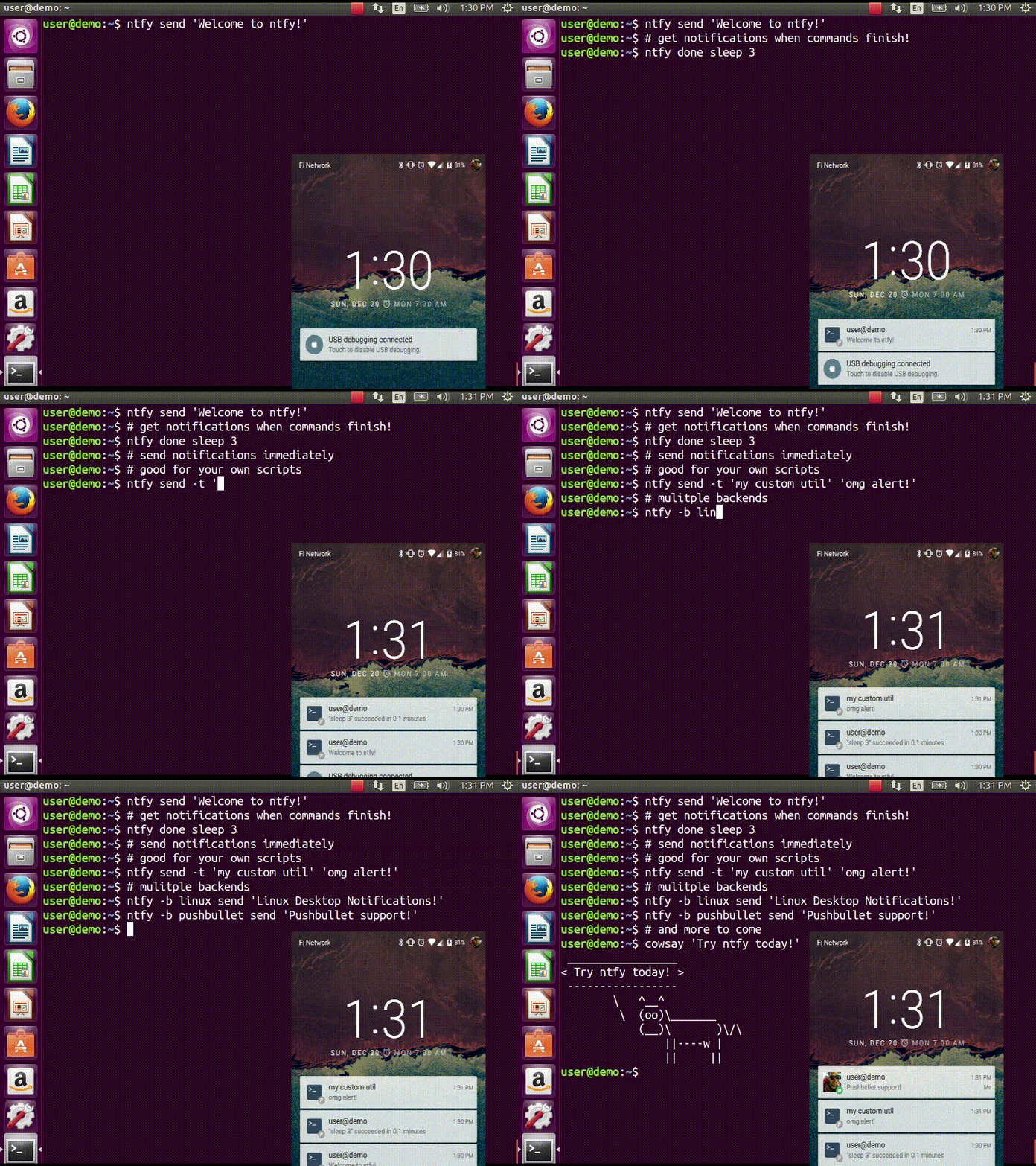
Confused? This video demonstrates some of this functionality:
Quickstart
$ sudo pip install ntfy
$ ntfy send test
# send a notification when the command `sleep 10` finishes
# this sends the message '"sleep 10" succeeded in 0:10 minutes'
$ ntfy done sleep 10
$ ntfy -b pushover -o user_key t0k3n send 'Pushover test!'
$ ntfy -t 'ntfy' send "Here's a custom notification title!"
$ echo -e 'backends: ["pushover"]\npushover: {"user_key": "t0k3n"}' > ~/.ntfy.yml
$ ntfy send "Pushover via config file!"
$ ntfy done --pid 6379  # pid extra
$ ntfy send ":tada: ntfy supports emoji! :100:"  # emoji extra
# Enable shell integration
$ echo 'eval "$(ntfy shell-integration)"' >> ~/.bashrc
Install
The install technique in the quickstart is the suggested method of
installation. It can be installed in a virtualenv, but with some
caveats: Linux notifications require --system-site-packages for the
virtualenv and OS X notifications don't work at all.
:penguin: NOTE: Linux Desktop
Notifications require Python DBUS
bindings. See here for more
info.
Shell integration
ntfy has support for automatically sending notifications when long
running commands finish in bash and zsh. In bash it emulates zsh's
preexec and precmd functionality with
rcaloras/bash-preexec. To
enable it add the following to your .bashrc or .zshrc:
eval "$(ntfy shell-integration)"
By default it will only send notifications for commands lasting longer
than 10 seconds and if the terminal is focused. Terminal focus works on
X11(Linux) and with Terminal.app and iTerm2 on MacOS. Both options can
be configured via the --longer-than and --foreground-too options.
To avoid unnecessary notifications when running interactive programs,
programs listed in AUTO_NTFY_DONE_IGNORE don't generate
notifications. For example:
export AUTO_NTFY_DONE_IGNORE="vim screen meld"
Extras
ntfy has a few features that require extra dependencies.
: - ntfy done -p $PID requires installing as
pip install ntfy[pid]
- emoji support requires
installing as pip install ntfy[emoji]
- XMPP support requires installing as
pip install ntfy[xmpp]
- Telegram support requires installing as
pip install ntfy[telegram]
- Instapush support requires installing
as pip install ntfy[instapush]
- Slack support requires installing as
pip install ntfy[slack]
- Slack Incoming webhook - simpler slack
implementation that doesn't have additional dependencies
- Rocket.Chat support requires installing
as pip install ntfy[rocketchat]
To install multiple extras, separate with commas: e.g.,
pip install ntfy[pid,emoji].
Configuring ntfy
ntfy is configured with a YAML file stored at ~/.ntfy.yml or in
standard platform specific locations:
See the backends below for available backends and options. As of v2.6.0
ntfy also supports 3rd party backends
Pushover - pushover
Required parameters:
: - user_key
Optional parameters:
: - sound
- priority
- expire
- retry
- callback
- api_token - use your own application token
- device - target a device, if omitted, notification is sent to
all devices
- url
- url_title
- html
Pushbullet - pushbullet
Required parameter:
: - access_token - Your Pushbullet access token, created at
https://www.pushbullet.com/#settings/account
Optional parameters:
: - device_iden - a device identifier, if omited, notification is
sent to all devices
- email - send notification to pushbullet user with the
specified email or send an email if they aren't a pushullet
user
Simplepush - simplepush
Required parameter:
: - key - Your Simplepush key, created by installing the Android
App (no registration required) at https://simplepush.io
Optional parameters:
: - event - sets ringtone and vibration pattern for incoming
notifications (can be defined in the simplepush app)
XMPP - xmpp
Requires parameters:
: - jid
- password
- recipient
Optional parameters
: - hostname (if not from jid)
- port
- path_to_certs
- mtype
Requires extras, install like this: pip install ntfy[xmpp].
To verify the SSL certificates offered by a server: path_to_certs =
"path/to/ca/cert"
Without dnspython library installed, you will need to specify the server
hostname if it doesn't match the jid.
Specify port if other than 5222. NOTE: Ignored without specified
hostname
NOTE: Google Hangouts doesn't support XMPP since 2017
Telegram - telegram
Requires extras, install like this: pip install ntfy[telegram].
Requires ntfy to be installed as ntfy[telegram]. This backend is
configured the first time you will try to use it:
ntfy -b telegram send "Telegram configured for ntfy".
Pushjet - pushjet
Required parameter:
: - secret - The Pushjet service secret token, created with
http://docs.pushjet.io/docs/creating-a-new-service
Optional parameters:
: -
    `endpoint` - custom Pushjet API endpoint

    :   (defaults to <https://api.pushjet.io>)

-   `level` - The importance level from 1(low) to 5(high)

-   `link`
Notifico - notifico
Required parameter:
: -
    `webhook` - The webhook link, created at <https://n.tkte.ch/>

    :   (choose `Plain Text` service when creating the webhook)
Slack - slack
Requires extras, install like this: pip install ntfy[slack].
Required parameter:
: - token - The Slack service secret token, either a legacy user
token created at
https://api.slack.com/custom-integrations/legacy-tokens or a
token obtained by creating an app at
https://api.slack.com/apps?new_app=1 with chat:write:bot
scope and linking it to a workspace.
- recipient - The Slack channel or user to send notifications
to. If you use the # symbol the message is send to a Slack
channel and if you use the @ symbol the message is send to a
Slack user.
Slack Incoming Webhook - slack_webhook
~~~~~~~~~~~~~~~~~~~~~~~~~~~~~~~~~~~~~~~~~~~~~~~~~
Required parameter: * url - the URL of the incoming webhook *
user - The Slack channel or user to send notifications to
Instapush - insta
Requires extras, install like this pip install ntfy[instapush].
Instapush does not support notification title. It sends template-driven
notifications, so you have to setup you events on the dashboard first.
The backend is called insta due to homonymy with the instapush python
wrapper
Required parameters:
: - appid - The application id
- secret - The application secret
- event_name - The instapush event to be used
- trackers - The array of trakers to use
Note on trackers: Trackers are placeholders for events (a sort of
notification template). If you defined more than one tracker in your
event you'll have to provide more messages. At the moment, the only way
to do so is to separate each message with a colon (:) character. You can
also escape the separator character: Example:
Works via [dbus]{.title-ref}, works with most DEs like Gnome, KDE, XFCE
and with libnotify.
The following dependecies should be installed.
$ sudo apt install python-dbus # on ubuntu/debian
You will need to install some font that supports emojis (in Debian
[fonts-symbola]{.title-ref} or Gentoo
[media-fonts/symbola]{.title-ref}).
Optional parameters:
: - icon - Specifies path to the notification icon, empty string
for no icon.
- urgency - Specifies the urgency level (low, normal, critical).
- transient - Skip the history (exp: the Gnome message tray)
(true, false).
- soundfile - Specifies the notification sound file (e.g.
/usr/share/sounds/notif.wav).
- timeout - Specifies notification expiration time level (-1 -
system default, 0 - never expire).
Windows Desktop Notifications - win32
Uses pywin32.
Mac OS X Notification Center - darwin
Requires ntfy to be installed globally (not in a virtualenv).
System log - systemlog
Uses the syslog core Python module, which is not available on Windows
platforms.
Optional parameters:
: - prio - Syslog priority level. Default is ALERT. Possible
values are:
    -   EMERG
    -   ALERT
    -   CRIT
    -   ERR
    -   WARNING
    -   NOTICE
    -   INFO
    -   DEBUG

-   `facility` - Syslog facility. Default is `LOCAL5`. Possible
    values are:

    -   KERN
    -   USER
    -   MAIL
    -   DAEMON
    -   AUTH
    -   LPR
    -   NEWS
    -   UUCP
    -   CRON
    -   SYSLOG
    -   LOCAL0
    -   LOCAL1
    -   LOCAL2
    -   LOCAL3
    -   LOCAL4
    -   LOCAL5
    -   LOCAL6
    -   LOCAL7

-   `fmt` - Format of the message to be sent to the system logger.
    The title and the message are specified using the following
    placeholders:

    -   `{title}`
    -   `{message}`

    Default is `[{title}] {message}`.
Termux:API - termux
Requires the app to be install from the Play store and the CLI utility
be installed with apt install termux-api.
Pushalot - pushalot
Required parameter:
: - auth_token - Your private Pushalot auth token, found here
https://pushalot.com/manager/authorizations
Optional parameters:
: - source - source of the notification
- ttl - message expire time in minutes (time to live)
- url - URL to include in the notifications
- url_title - visible URL title (ignored if no url specified)
- image - URL of image included in the notifications
- important - mark notifications as important
- silent - mark notifications as silent
Rocket.Chat - rocketchat
Requires extras, install like this: pip install ntfy[rocketchat].
Required parameters:
: - url - URL of your Rocket.Chat instance
- username - login username
- password - login password
- room - room/channel name to post in
Matrix.org - matrix
Requires extras, install like this: pip install ntfy[matrix].
Required parameters:
: - url - URL of your homeserver instance
- roomId - room to post in
- userId - login userid
- password - login password
- token - access token
You must either specify token, or userId and password.
Webpush - ntfy_webpush
~~~~~~~~~~~~~~~~~~~~~~~~~~~~~~~~~~~~~~~~~~~~~~~~~~~~~~~
Webpush support is provded by an external ntfy module, install like
this: pip install ntfy ntfy-webpush.
Required parameters:
: - subscription_info - A
PushSubscription
Object
- private_key - the path to private key file or anything else
that works with
pywebpush.
For more info, see [ntfy-webpush]{#ntfy-webpush}
<https://github.com/dschep/ntfy-webpush\>\`\_
3rd party backends
To use or implement your own backends, specify the full path of the
module as your backend. The module needs to contain a module with a
function called notify with the following signature:
def notify(title, message, **kwargs):
    """
    kwargs contains retcode if using ntfy done or ntfy shell-integration
    and all options in your backend's section of the config
    """
    pass
Other options
Title is configurable with the [title]{.title-ref} key in the config.
Example:
---
title: Customized Title
Backends ToDo
Airgram
Boxcar
Testing
python setup.py test
Contributors
dschep - Maintainer & Lead Developer
danryder - XMPP Backend & emoji
support
oz123 - Linux desktop notification
improvements
schwert - PushJet support
rahiel - Telegram support
tymm - Simplepush support
jungle-boogie - Documentation
updates
tjbenator - Advanced Pushover
options
mobiusklein - Win32 Bugfix
rcaloras - Creator of
[bash-prexec]{.title-ref}, without which there woudn't be bash
shell integration for [ntfy]{.title-ref}
eightnoteight - Notifico support
juanpabloaj - Slack support
giuseongit - Instapush support
jlesage - Systemlog support
sambrightman - Prowl support
mlesniew - Pushalot support
webworxshop - Rocket.Chat support
rhabbachi - transient option in
Linux desktop notifications
The most recent commit recorded on dschep/ntfy was 9 months ago, based on the GitHub push timestamp. The repository has 216 forks — one of the better signals of community interest.
How many stars does dschep/ntfy have?
dschep/ntfy has 5.0k GitHub stars — refresh the page for the live number, or check github.com/dschep/ntfy. TopGit mirrors GitHub's count but does not claim minute-by-minute accuracy.
What language is dschep/ntfy written in?
dschep/ntfy is written primarily in Python. GitHub's language field is based on the largest share of bytes in the default branch.
What license does dschep/ntfy use?
dschep/ntfy is released under the GPL-3.0 license. Always verify the LICENSE file directly on GitHub for the authoritative terms — license strings can be edited out of sync with a project's actual stance.
What topics is dschep/ntfy associated with?
GitHub's repository topics for dschep/ntfy: "bash", "linux", "macos", "notifications", "push-notifications", "windows", "zsh". TopGit's editorial category is open-source.
Where can I see dschep/ntfy in action?
The project maintains a homepage at http://ntfy.rtfd.io. The README tab on this page also usually contains screenshots and a quickstart.
Where do I read more about dschep/ntfy?
This TopGit page is a snapshot — the READ ME tab shows the project's own README content (links stripped, images preserved). The GitHub repository at github.com/dschep/ntfy is the definitive source.
Read full README in the tab above.
Want a second opinion on ntfy?
Ask an AI that can read this page — one click and you get its take on ntfy.
 /ntfy
/ntfy