On GitHub, explosion/spacy-course has picked up 2.4k stars, AI Tools, Python. 👩🏫 Advanced NLP with spaCy: A free online course
Snapshot summary built from the project's own GitHub metadata — there's no written TopGit review yet. The page will update automatically when a full review is published.
WHY NO REVIEW YET
TopGit writes full reviews for the most-starred, most-requested repositories. This page is a snapshot until then — see the READ ME tab for the original README in full.
This repo contains both an online course, as well
as its modern open-source web framework. In the course, you'll learn how to use
spaCy to build advanced natural language understanding
systems, using both rule-based and machine learning approaches. The front-end is
powered by Gatsby, Reveal.js and
Plyr, and the back-end code execution uses
Binder 💖 It's all open-source and published under the
MIT license (code and framework) and CC BY-NC (spaCy course materials).
This course is mostly intended for self-study. Yes, you can cheat – the
solutions are all in this repo, there's no penalty for clicking "Show hints" or
"Show solution", and you can mark an exercise as done when you think it's done.
If you spot a mistake, I always appreciate
pull requests!
1. This is the language used for the text examples and resources used in the
exercises. For example, the German version of the course also uses German text
examples and models. It's not always possible to translate all code examples, so
some translations may still use and analyze English text as part of the course.
Related resources
📚 Prefer notebooks? Check out
the Jupyter notebook version of this
course, put together by @cristianasp.
💁 FAQ
Is this related to the spaCy course on DataCamp?
I originally developed the content for DataCamp, but I wanted to make a free
version to make it available to more people, and so you don't have to sign up
for their service. As a weekend project, I ended up putting together my own
little app to present the exercises and content in a fun and interactive way.
Can I use this to build my own course?
Probably, yes! If you've been looking for a DIY way to publish your materials, I
hope that my little framework can be useful. Because so many people expressed
interest in this, I put together some starter repos that you can fork and adapt:
🐍 Python:
ines/course-starter-python
🇷 R: ines/course-starter-r
Why the different licenses?
The source of the app, UI components and Gatsby framework for building
interactive courses is licensed as MIT, like pretty much all of my open-source
software. The course materials themselves (slides and chapters), are licensed
under CC BY-NC. This means that you can use them freely – you just can't make
money off them.
I want to help translate this course into my language. How can I contribute?
First, thanks so much, this is really cool and valuable to the community 🙌 I've
tried to set up the course structure so it's easy to add different languages:
language-specific files are organized into directories in
exercises and chapters, and other language specific
texts are available in locale.json. If you want to contribute,
there are two different ways to get involved:
Start a community translation project. This is the easiest,
no-strings-attached way. You can fork the repo, copy-paste the English
version, change the
language code,
start translating and invite others to contribute (if you like). If you're
looking for contributors, feel free to open an issue here or tag
@spacy_io on Twitter so we can help get the
word out. We're also happy to answer your questions on the issue tracker.
Make us an offer. We're open to commissioning translations for different
languages, so if you're interested, email us at
[email protected] and include your offer,
estimated time schedule and a bit about you and your background (and any
technical writing or translation work you've done in the past, if available).
It doesn't matter where you're based, but you should be able to issue
invoices as a freelancer or similar, depending on your country.
I want to help create an audio/video tutorial for an existing translation. How can I get involved?
Again, thanks, this is super cool! While the
English and
German videos also include a
video recording, it's not a requirement and we'd be happy to just provide an
audio track alongside the slides. We'd take care of the postprocessing and video
editing, so all we need is the audio recording. If you feel comfortable
recording yourself reading out the slide notes in your language, email us at
[email protected] and make us an offer and
include a bit about you and similar work you've done in the past, if available.
🎛 Usage & API
Running the app
To start the local development server, install Gatsby
and then all other dependencies, then use npm run dev to start the development
server. Make sure you have at least Node 10.15 installed.
npm install -g gatsby-cli  # Install Gatsby globally
npm install                # Install dependencies
npm run dev                # Run the development server
If running with docker just run make build and then make gatsby-dev
How it works
When building the site, Gatsby will look for .py files and make their contents
available to query via GraphQL. This lets us use the raw code within the app.
Under the hood, the app uses Binder to serve up an image
with the package dependencies, including the spaCy models. By calling into
JupyterLab, we can then execute
code using the active kernel. This lets you edit the code in the browser and see
the live results. Also see my juniper repo
for more details on the implementation.
To validate the code when the user hits "Submit", I'm currently using a slightly
hacky trick. Since the Python code is sent back to the kernel as a string, we
can manipulate it and add tests – for example, exercise exc_01_02_01.py will
be validated using test_01_02_01.py (if available). The user code and test are
combined using a string template. At the moment, the testTemplate in the
meta.json looks like this:
from wasabi import msg
__msg__ = msg
__solution__ = """${solution}"""
${solution}

${test}
try:
    test()
except AssertionError as e:
    __msg__.fail(e)
If present, ${solution} will be replaced with the string value of the
submitted user code. In this case, we're inserting it twice: once as a string so
we can check whether the submission includes something, and once as the code, so
we can actually run it and check the objects it creates. ${test} is replaced
by the contents of the test file. I'm also making
wasabi's printer available as __msg__, so
we can easily print pretty messages in the tests. Finally, the try/accept
block checks if the test function raises an AssertionError and if so, displays
the error message. This also hides the full error traceback (which can easily
leak the correct answers).
A test file could then look like this:
def test():
    assert "spacy.load" in __solution__, "Are you calling spacy.load?"
    assert nlp.meta["lang"] == "en", "Are you loading the correct model?"
    assert nlp.meta["name"] == "core_web_sm", "Are you loading the correct model?"
    assert "nlp(text)" in __solution__, "Are you processing the text correctly?"
    assert "print(doc.text)" in __solution__, "Are you printing the Doc's text?"

    __msg__.good(
        "Well done! Now that you've practiced loading models, let's look at "
        "some of their predictions."
    )
With this approach, it's not always possible to validate the input perfectly –
there are too many options and we want to avoid false positives.
Running automated tests
The automated tests make sure that the provided solution code is compatible with
the test file that's used to validate submissions. The test suite is powered by
the pytest framework and runnable test
files are generated automatically in a directory __tests__ before the test
session starts. See the conftest.py for implementation details.
# Install requirements
pip install -r binder/requirements.txt
# Run the tests (will generate the files automatically)
python -m pytest __tests__
If running with docker just run make build and then make pytest
Directory Structure
├── binder
|   └── requirements.txt  # Python dependency requirements for Binder
├── chapters              # chapters, grouped by language
|   ├── en                # English chapters, one Markdown file per language
|   |   └── slides        # English slides, one Markdown file per presentation
|   └── ...               # other languages
├── exercises             # code files, tests and assets for exercises
|   ├── en                # English exercises, solutions, tests and data
|   └── ...               # other languages
├── public                # compiled site
├── src                   # Gatsby/React source, independent from content
├── static                # static assets like images, available in slides/chapters
├── locale.json           # translations of meta and UI text
├── meta.json             # course metadata
└── theme.sass            # UI theme colors and settings
Setting up Binder
The requirements.txt in the repository defines the
packages that are installed when building it with Binder. For this course, I'm
using the source repo as the Binder repo, as it allows to keep everything in one
place. It also lets the exercises reference and load other files (e.g. JSON),
which will be copied over into the Python environment. I build the binder from a
branch binder, though, which I only update if Binder-relevant files change.
Otherwise, every update to master would trigger an image rebuild.
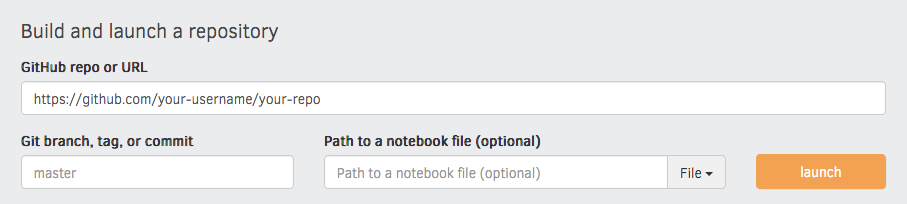
You can specify the binder settings like repo, branch and kernel type in the
"juniper" section of the meta.json. I'd recommend running the very first
build via the interface on the Binder website, as this
gives you a detailed build log and feedback on whether everything worked as
expected. Enter your repository URL, click "launch" and wait for it to install
the dependencies and build the image.
File formats
Chapters
Chapters are placed in /chapters and are Markdown files
consisting of <exercise> components. They'll be turned into pages, e.g.
/chapter1. In their frontmatter block at the top of the file, they need to
specify type: chapter, as well as the following meta:
---
title: The chapter title
description: The chapter description
prev: /chapter1 # exact path to previous chapter or null to not show a link
next: /chapter3 # exact path to next chapter or null to not show a link
id: 2 # unique identifier for chapter
type: chapter # important: this creates a standalone page from the chapter
---
Slides
Slides are placed in /slides and are markdown files consisting of
slide content, separated by ---. They need to specify the following
frontmatter block at the top of the file:
---
type: slides
---
The first and last slide use a special layout and will display the headline
in the center of the slide. Speaker notes (in this case, the script) can be
added at the end of a slide, prefixed by Notes:. They'll then be shown on the
right next to the slides. Here's an example slides file:
---
type: slide
---

# Processing pipelines

Notes: This is a slide deck about processing pipelines.

---

# Next slide

- Some bullet points here
- And another bullet point

<img src="/image.jpg" alt="An image located in /static" />
Custom Elements
When using custom elements, make sure to place a newline between the
opening/closing tags and the children. Otherwise, Markdown content may not
render correctly.
<exercise>
Container of a single exercise.
Argument
Type
Description
id
number / string
Unique exercise ID within chapter.
title
string
Exercise title.
type
string
Optional type. "slides" makes container wider and adds icon.
children
-
The contents of the exercise.
<exercise id="1" title="Introduction to spaCy">

Content goes here...

</exercise>
<codeblock>
Argument
Type
Description
id
number / string
Unique identifier of the code exercise.
source
string
Name of the source file (without file extension). Defaults to exc_${id} if not set.
solution
string
Name of the solution file (without file extension). Defaults to solution_${id} if not set.
test
string
Name of the test file (without file extension). Defaults to test_${id} if not set.
children
string
Optional hints displayed when the user clicks "Show hints".
<codeblock id="02_03">

This is a hint!

</codeblock>
<slides>
Container to display slides interactively using Reveal.js and a Markdown file.
Yes — explosion/spacy-course ships under the MIT license, which makes its source code freely readable (and, depending on license terms, forkable and reusable). Source: github.com/explosion/spacy-course.
What else is in the AI Tools space?
explosion/spacy-course is tracked by TopGit under the AI Tools category, alongside 14 GitHub-tagged topics. Trending and Topics pages list peer repositories of comparable stars and language.
What is explosion/spacy-course?
explosion/spacy-course (explosion/spacy-course) is a Python project on GitHub. From the project's own README: 👩🏫 Advanced NLP with spaCy: A free online course
What license does explosion/spacy-course use?
explosion/spacy-course is released under the MIT license. Always verify the LICENSE file directly on GitHub for the authoritative terms — license strings can be edited out of sync with a project's actual stance.
Where can I see explosion/spacy-course in action?
The project maintains a homepage at https://course.spacy.io. The README tab on this page also usually contains screenshots and a quickstart.
Where do I read more about explosion/spacy-course?
This TopGit page is a snapshot — the READ ME tab shows the project's own README content (links stripped, images preserved). The GitHub repository at github.com/explosion/spacy-course is the definitive source.
Why is explosion/spacy-course categorized under AI Tools?
TopGit places explosion/spacy-course in the AI Tools category based on its GitHub topics and description (tagged: "binder", "course", "dependency-parsing"). Categories are assigned from real repository metadata, not editorial guesswork.
Read full README in the tab above.
Want a second opinion on spacy-course?
Ask an AI that can read this page — one click and you get its take on spacy-course.
 /spacy-course