On GitHub, exyte/ScalingHeaderScrollView has picked up 1.5k stars, Mobile, Swift. A scroll view with a sticky header which shrinks as you scroll. Written with SwiftUI.
Snapshot summary built from the project's own GitHub metadata — there's no written TopGit review yet. The page will update automatically when a full review is published.
WHY NO REVIEW YET
TopGit writes full reviews for the most-starred, most-requested repositories. This page is a snapshot until then — see the READ ME tab for the original README in full.
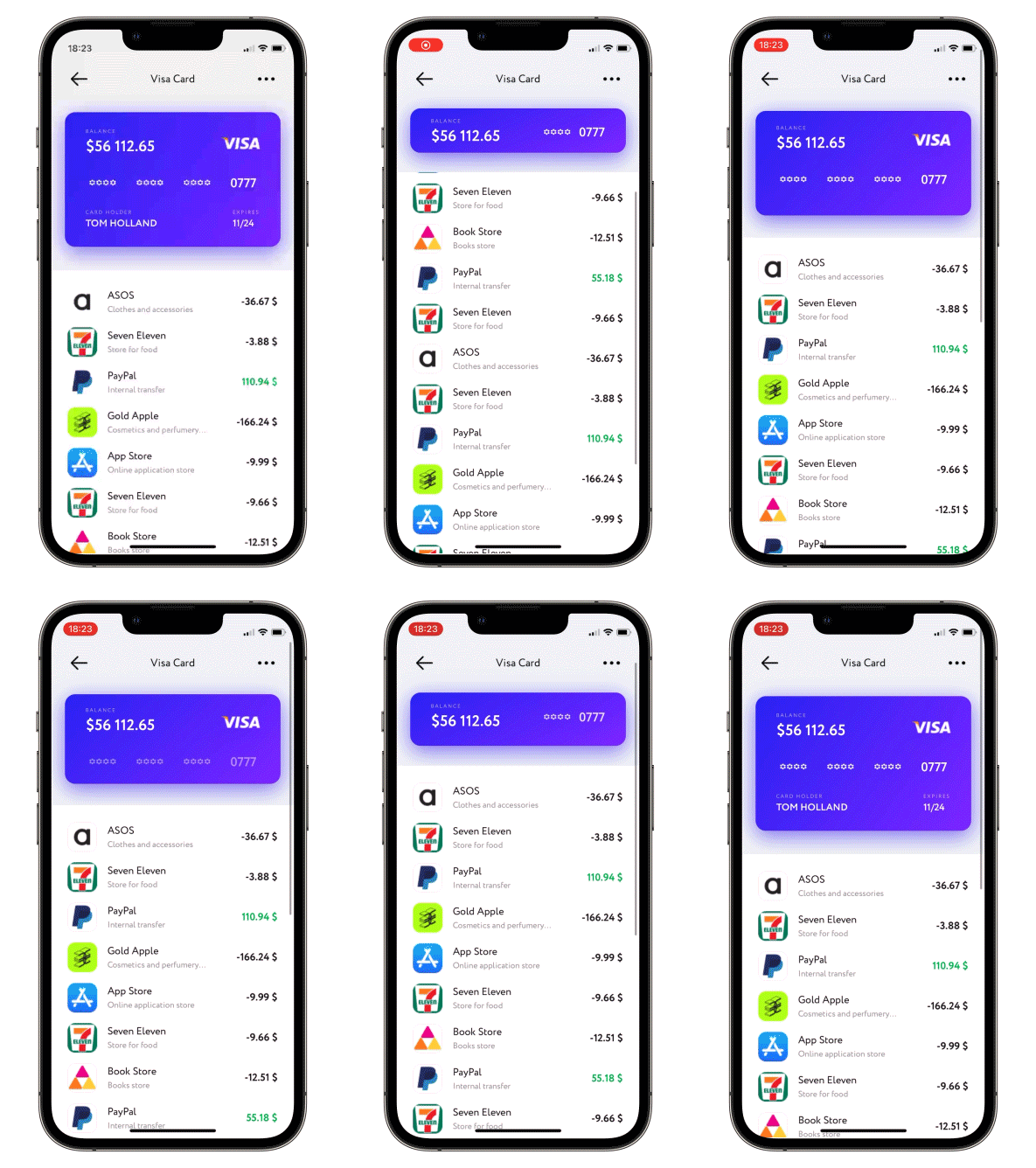
A scroll view with a sticky header which shrinks as you scroll. Written with SwiftUI.
Read Article »
Usage
Put your header and content bodies code into a ScalingHeaderScrollView constructor.
Set the necessary modifiers, see below.
struct ContentView: View {

    var body: some View {
       ScalingHeaderScrollView {
            ZStack {
                Rectangle()
                    .fill(.gray.opacity(0.15))
                Image("header")
            }
        } content: {
            Text("↓ Pull to refresh ↓")
                .multilineTextAlignment(.center)
                .padding()
        }
    }
}
TabView won't work
Please note that ScalingScrollview is just a ScrollView under the hood, so it works very similar to it. If content's height changes between tabs inside the scroll view, there is no way to keep scroll position nice and stable. Usually when using a TabView, you put separate ScrollViews on every tab, not the other way around. And if you were to put a TabView inside a ScrollView, it wouldn't work as you expect, and neither will putting it inside a ScalingScrollview.
Moreover, TabView gives almost no control over itself (getting/setting its current position, getting tab's content height, etc.), so there is no way to manually mess with its scrollOffset, which is what this library relies heavily upon.
Required parameters
header - @ViewBuilder for your header content - @ViewBuilder for your content
Available modifiers, optional
passes current collapse progress value into progress binding: 0 for not collapsed at all, 1 - for fully collapsed
.collapseProgress(_ progress: Binding<CGFloat>)
allows to set up callback for ScrollView reaching the bottom
isActive - dynamically enable/disable pull-to-refresh, if disabled, loading indicator won't be displayed on pull-to-refresh perform - async closure to be performed on pull-to-refresh, after the closure is done loading indicator will be hidden automatically
allows to set up an action for pull-to-load-more; if not set up loading indicator on pull-to-load-more will never be displayed
isActive - dynamically enable/disable pull-to-load-more, if disabled, loading indicator won't be displayed on pull-to-load-more contentOffset - padding value of the content from the bottom edge when pull-to-load is active perform - async closure to be performed on pull-to-load-more, after the closure is done loading indicator will be hidden automatically
allows content scroll reset, need to change Binding to true
.scrollToTop(resetScroll: Binding<Bool>)
allows to change current header height, need to change state, possible values are .collapsed, .expanded or .custom(CFGloat)
when scrolling up - switch between actual header collapse and simply moving it up (by default moving up)
.allowsHeaderCollapse()
when scrolling down - enable (disabled by default) header scale
.allowsHeaderGrowth()
Enable/disable (disabled by default) header snap. Available modes:
.disabled - Disable header snap.
.immediately - Once you lift your finger header snaps either to min or max height automatically.
.afterFinishAccelerating - At the end of scroll view deceleration the header snaps either to min or max height automatically.
.setHeaderSnapMode(.immediately)
Set custom positions for header snap (explained previous point). Specify any amount of values in 0...1 to set snapping points, 0 - fully collapsed header, 1 - fully expanded
Set custom initial position to which scroll view will be automatically snapped to. Specify a value in 0...1, 0 - fully collapsed header, 1 - fully expanded
PopupView - Toasts and popups library
AnchoredPopup - Anchored Popup grows "out" of a trigger view (similar to Hero animation)
Grid - The most powerful Grid container
AnimatedTabBar - A tabbar with a number of preset animations
MediaPicker - Customizable media picker
Chat - Chat UI framework with fully customizable message cells, input view, and a built-in media picker
CalendarView - Calendar view with fully customizable month/day cells
OpenAI Wrapper lib for OpenAI REST API
AnimatedGradient - Animated linear gradient
ConcentricOnboarding - Animated onboarding flow
FloatingButton - Floating button menu
ActivityIndicatorView - A number of animated loading indicators
ProgressIndicatorView - A number of animated progress indicators
FlagAndCountryCode - Phone codes and flags for every country
SVGView - SVG parser
LiquidSwipe - Liquid navigation animation
How does exyte/ScalingHeaderScrollView compare to other Mobile projects?
exyte/ScalingHeaderScrollView is tracked by TopGit in the Mobile category, with 1.5k GitHub stars and written in Swift. Browse the Mobile topic page on TopGit to compare it against similar projects by stars and activity.
Is exyte/ScalingHeaderScrollView open source?
Yes — exyte/ScalingHeaderScrollView ships under the MIT license, which makes its source code freely readable (and, depending on license terms, forkable and reusable). Source: github.com/exyte/ScalingHeaderScrollView.
What else is in the Mobile space?
exyte/ScalingHeaderScrollView is tracked by TopGit under the Mobile category, alongside 7 GitHub-tagged topics. Trending and Topics pages list peer repositories of comparable stars and language.
What is exyte/ScalingHeaderScrollView?
exyte/ScalingHeaderScrollView (exyte/ScalingHeaderScrollView) is a Swift project on GitHub. From the project's own README: A scroll view with a sticky header which shrinks as you scroll. Written with SwiftUI.
Where do I read more about exyte/ScalingHeaderScrollView?
This TopGit page is a snapshot — the READ ME tab shows the project's own README content (links stripped, images preserved). The GitHub repository at github.com/exyte/ScalingHeaderScrollView is the definitive source.
Why is exyte/ScalingHeaderScrollView categorized under Mobile?
TopGit places exyte/ScalingHeaderScrollView in the Mobile category based on its GitHub topics and description (tagged: "headerview", "ios", "scrollview"). Categories are assigned from real repository metadata, not editorial guesswork.