filamentgroup/tablesaw is tracked by TopGit as a frontend project, with 5.4k stars on GitHub, written primarily in JavaScript. A group of plugins for responsive tables.
Snapshot summary built from the project's own GitHub metadata — there's no written TopGit review yet. The page will update automatically when a full review is published.
WHY NO REVIEW YET
TopGit writes full reviews for the most-starred, most-requested repositories. This page is a snapshot until then — see the READ ME tab for the original README in full.
:warning: This project is archived and the repository is no longer maintained.
Tablesaw
A set of plugins for responsive tables.
Getting Started
Stack Mode
Column Toggle Mode
Swipe Mode
Mini-Map
Mode Switcher
Sortable
Kitchen Sink Example
Check All
Internationalization i18n
Limitations
Run Tests
Browser Support
Bundler Compatibility
Roadmap and Enhancement Queue
This repository is now using lodash style issue management for enhancements. This means enhancement issues will be closed instead of leaving them open.
Look through the enhancement backlog and vote for your favorite features by adding a 👍 to the top comment.
Stack Mode
Stack Demo and Stack-Only Demo
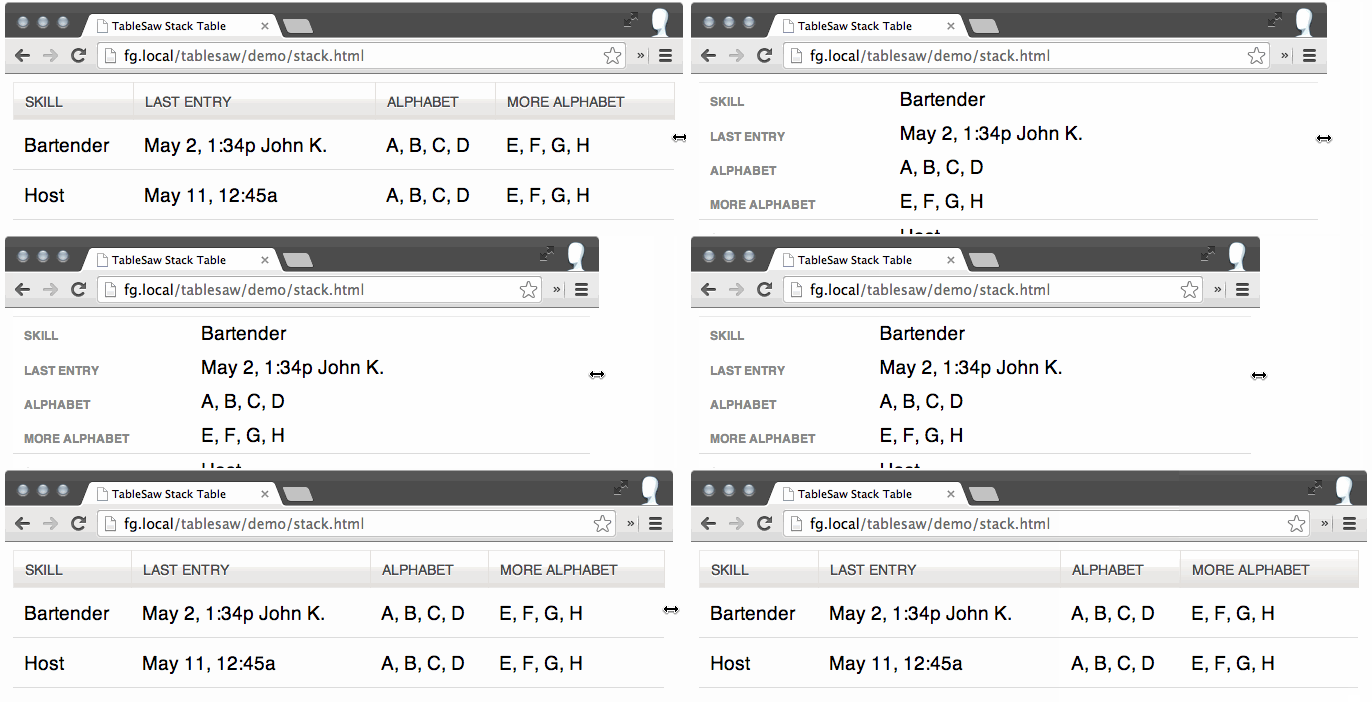
The Stack Table stacks the table headers to a two column layout with headers on the left when the viewport width is less than 40em (640px).
If you only want to use the Stack Table and don’t want all the extra features below (save yourself some bytes), Tablesaw provides a Stack-Only version.
Option
Description
Opt out of inline labels
To opt-out of inline label creation (the table header cell text that shows at small breakpoints) on a per-table basis, use <table data-tablesaw-no-labels>; on a per-row basis, use <tr data-tablesaw-no-labels>; on a per-cell basis, use <td data-tablesaw-no-labels> (added in v3.1.0)
Hide headers for empty body cells
When the table cell is empty, use <table data-tablesaw-hide-empty> to hide the header when stacked.
Column Toggle Mode
Column Toggle Demo
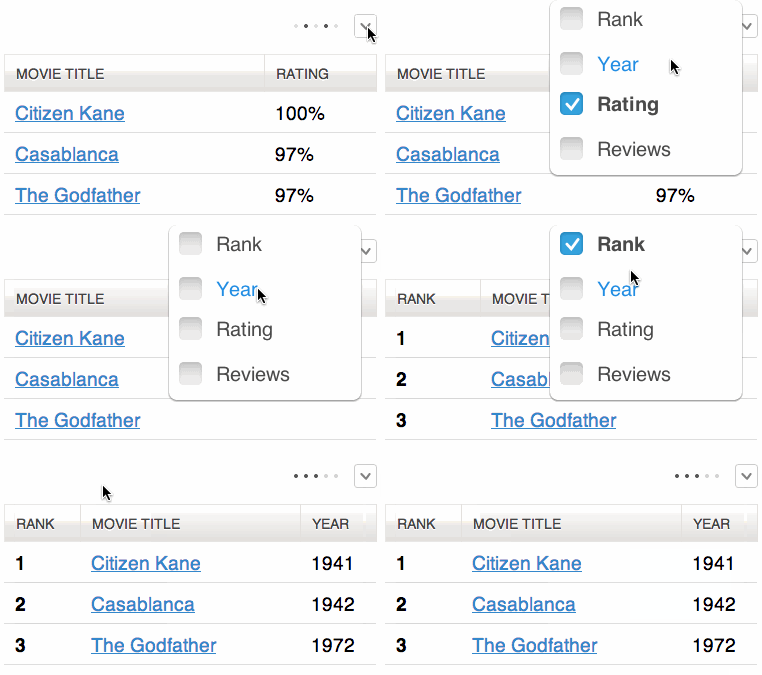
The Column Toggle Table allows the user to select which columns they want to be visible.
<table data-tablesaw-mode="columntoggle">
Option
Description
Add a Mini-Map
The little dots that appear next to the column toggle popup. Use the data-tablesaw-minimap attribute: <table data-tablesaw-mode="columntoggle" data-tablesaw-minimap>
The user always has the option to select all columns. If the table gets too wide for the viewport, it can overflow and cause a page-level scrollbar. To combat this issue, we recommend wrapping your table in a <div class="tablesaw-overflow"> element to restrict scrolling to the table-only. The toggle demo has one such example.
Advanced Option: Prioritize Columns
Table headers must have a data-tablesaw-priority attribute to be eligible to toggle. data-tablesaw-priority is a numeric value from 1 to 6, which determine default breakpoints at which a column will show. The breakpoint defaults are:
<th data-tablesaw-priority="persist"><!-- Not eligible for toggle, always shows --></th>
<th data-tablesaw-priority="0"><!-- Hidden at all breakpoints by default, must be toggled back on manually --></th>
<th data-tablesaw-priority="1"><!-- Shows at (min-width: 20em) (320px) --></th>
<th data-tablesaw-priority="2"><!-- Shows at (min-width: 30em) (480px) --></th>
<th data-tablesaw-priority="3"><!-- Shows at (min-width: 40em) (640px) --></th>
<th data-tablesaw-priority="4"><!-- Shows at (min-width: 50em) (800px) --></th>
<th data-tablesaw-priority="5"><!-- Shows at (min-width: 60em) (960px) --></th>
<th data-tablesaw-priority="6"><!-- Shows at (min-width: 70em) (1120px) --></th>
Keep in mind that the priorities are not exclusive—multiple columns can reuse the same priority value.
Swipe Mode
Swipe Demo
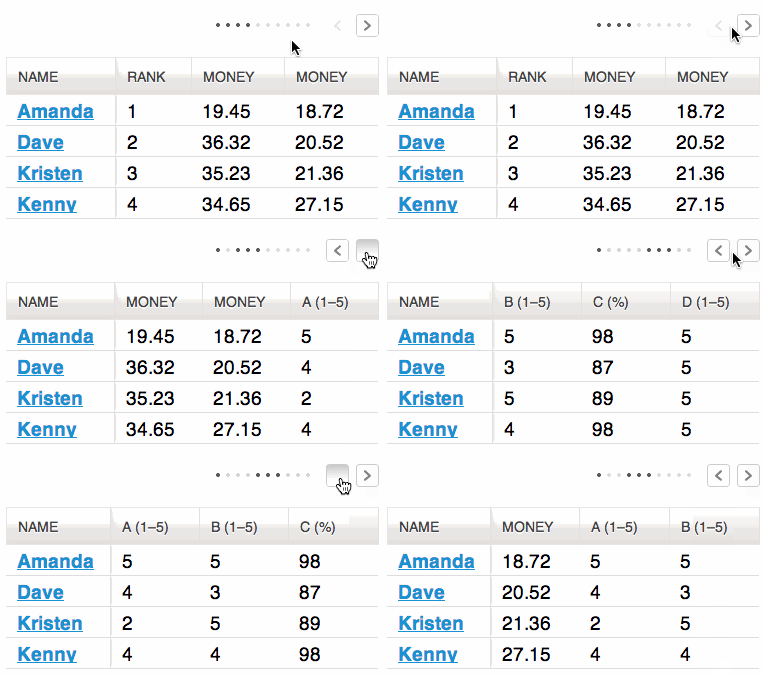
Allows the user to use the swipe gesture (or use the left and right buttons) to navigate the columns.
<table data-tablesaw-mode="swipe">
Options
Description
Persist a Column
Columns also respect the data-tablesaw-priority="persist" attribute: <th data-tablesaw-priority="persist"><!-- Always shows --></th>
Add a Mini-Map
The little dots that appear next to the column navigation buttons. Use the data-tablesaw-minimap attribute: <table data-tablesaw-mode="swipe" data-tablesaw-minimap>
All columns visible class
Tablesaw also exposes a tablesaw-all-cols-visible class that is toggled on when all of the table columns are visible (and off when not). You can use this in CSS to hide the minimap or navigation buttons if needed.
Disable swipe touch events
Use the <table data-tablesaw-no-touch> attribute to opt-out of swiping left or right to navigate columns. Users will need to use the provided buttons instead.
Advanced Option: Configure Swipe Thresholds
Add a TablesawConfig object to your page in a <script> element. It doesn’t matter if it’s declared before or after the Tablesaw JavaScript.
Use data-tablesaw-minimap to add a series of small dots to show which columns are currently visible and which are hidden. Only available on swipe and columntoggle tables. Examples available above.
Mode Switcher
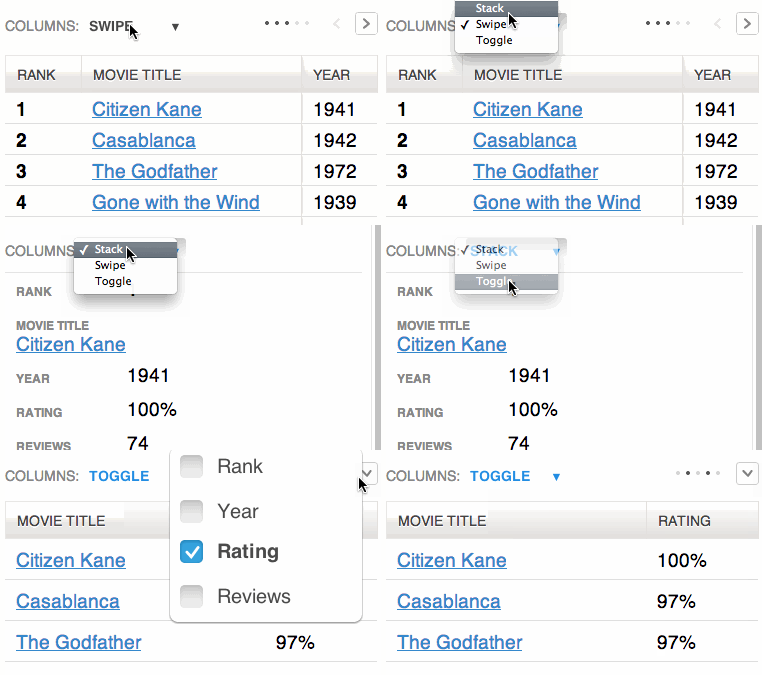
Mode Switcher Demo
<table data-tablesaw-mode-switch>

<!-- With a different default mode -->
<table data-tablesaw-mode-switch data-tablesaw-mode="swipe">

<!-- Exclude a mode from the switcher -->
<table data-tablesaw-mode-switch data-tablesaw-mode-exclude="columntoggle">
Sortable
Sortable Demo
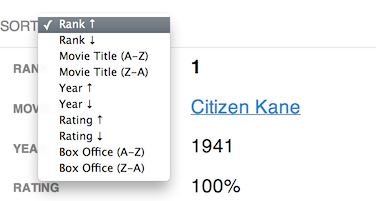
The “sortable” option allows the user to sort the table data by clicking on the table headers. Since all the columns may not be visible on smaller breakpoints (or not there at all if using the “stack” table mode), relying solely on the column headers to choose the table sort isn’t practical. To address this, there is an optional data-tablesaw-sortable-switch attribute on the table that adds a select menu auto-populated with the names of each column in the table with options for choosing ascending or descending sort direction. Data options on table headers can be used to control which columns are sortable (data-tablesaw-sortable-col) and the default sort order (data-tablesaw-sortable-default-col).
Tablesaw provides two methods of sorting built-in: string and numeric. To use numeric sort, use the data-tablesaw-sortable-numeric class as shown in the above sorting markup example. Otherwise, tablesaw uses a case insensitive string sort.
All other types of sorting must use a Custom Sort function on the individual columns (working example). In the contrived example below, we want to sort full dates (e.g. 12/02/2014) just on the year.
// Add a data function to the table header cell
$( "th#custom-sort" ).data( "tablesaw-sort", function( ascending ) {
    // return a function
    return function( a, b ) {
        // Ignore rows with data-tablesaw-ignorerow (leave them where they were)
        if( a.ignored || b.ignored ) {
            return 0;
        }

        // use a.cell and b.cell for cell values
        var dateA = a.cell.split( "/" ),
            dateB = b.cell.split( "/" ),
            yearA = parseInt( dateA[ 2 ], 10 ),
            yearB = parseInt( dateB[ 2 ], 10 );

        if( ascending ) {
            return yearA >= yearB ? 1 : -1;
        } else { // descending
            return yearA < yearB ? 1 : -1;
        }
    };
});
Kitchen Table Sink
Kitchen Sink Demo
All of the above options combined into a single table.
Check All
Added in 3.0.1. Add the data-tablesaw-checkall to a checkbox in a thead cell to enable that checkbox to toggle the other checkboxes in the same column.
Check All Demo
Internationalization i18n
Added in 3.0.2. Use the TablesawConfig global on your page to override internationalization strings. It doesn’t matter if it’s declared before or after the Tablesaw JavaScript library.
The demos above include full markup examples for all of the Tablesaw types.
Manual initialization of Tablesaw Components
If you want to initialize your Tablesaw tables manually, don’t include <script src="tablesaw-init.js"> in your markup. Instead, you can use Tablesaw.init(). This will scan the tree for any Tablesaw tables and initialize them for you.
Tables must be visible for proper initialization.
Tablesaw.init();
Tablesaw.init( myElement ); // OR pass an element to only init within a context
Dynamically Loading Tablesaw
For user interfaces that are dynamically built, Tablesaw can be loaded on an as-needed basis.
Here's how you might do this with jQuery:
To easily customize the breakpoint at which the stack table switches, use the SCSS mixin. First, include the tablesaw.stackonly.scss file instead of tablesaw.stackonly.css in your SASS. Then, use a parent selector on your table.
Does filamentgroup/tablesaw have a project website?
No homepage URL was recorded for filamentgroup/tablesaw in TopGit's last sync. The README tab above frequently contains screenshots and demo links, or check the repository description on GitHub.
How active is development on filamentgroup/tablesaw?
The most recent commit recorded on filamentgroup/tablesaw was 3.8 years ago, based on the GitHub push timestamp. The repository has 420 forks — one of the better signals of community interest.
How many stars does filamentgroup/tablesaw have?
filamentgroup/tablesaw has 5.4k GitHub stars — refresh the page for the live number, or check github.com/filamentgroup/tablesaw. TopGit mirrors GitHub's count but does not claim minute-by-minute accuracy.
Is filamentgroup/tablesaw open source?
Yes — filamentgroup/tablesaw ships under the MIT license, which makes its source code freely readable (and, depending on license terms, forkable and reusable). Source: github.com/filamentgroup/tablesaw.
What else is in the Frontend space?
filamentgroup/tablesaw is tracked by TopGit under the Frontend category, alongside 6 GitHub-tagged topics. Trending and Topics pages list peer repositories of comparable stars and language.
What topics is filamentgroup/tablesaw associated with?
GitHub's repository topics for filamentgroup/tablesaw: "datatables", "html", "npm-package", "responsive", "rwd", "table". TopGit's editorial category is Frontend.
Where do I read more about filamentgroup/tablesaw?
This TopGit page is a snapshot — the READ ME tab shows the project's own README content (links stripped, images preserved). The GitHub repository at github.com/filamentgroup/tablesaw is the definitive source.
Read full README in the tab above.
Curious whether tablesaw is right for you?
Let ChatGPT, Claude, or Perplexity look into it — click below and see what AI actually says about tablesaw.
 /tablesaw