Indexed by TopGit from live GitHub metadata: formulahendry/vscode-acp has 403 stars, written primarily in TypeScript. Agent Client Protocol client for VS Code — connect to any ACP-compatible AI coding agent (Claude, Codex, Copilot, Qwen, Gemini, OpenCode, Kiro, OpenClaw, Hermes and more)
Snapshot summary built from the project's own GitHub metadata — there's no written TopGit review yet. The page will update automatically when a full review is published.
WHY NO REVIEW YET
TopGit writes full reviews for the most-starred, most-requested repositories. This page is a snapshot until then — see the READ ME tab for the original README in full.
A Visual Studio Code extension that provides a client for the Agent Client Protocol (ACP) — connect to any ACP-compatible AI coding agent directly from your editor.
Features
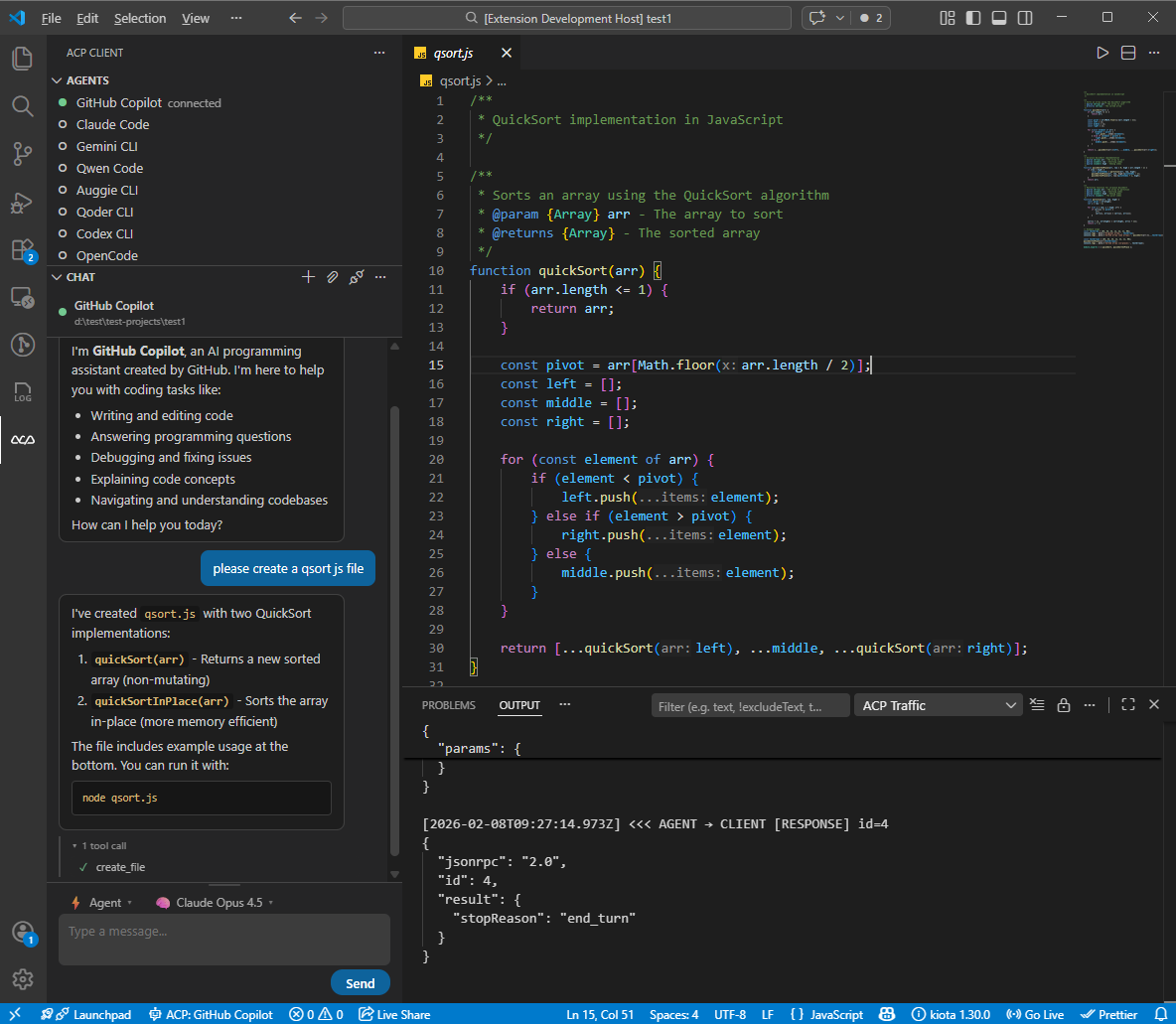
Multi-Agent Support: Connect to 11 pre-configured ACP agents or add your own
Single-Agent Focus: One agent active at a time — seamlessly switch between agents
Per-Agent Session List: Each agent in the Agents view is expandable into its previous sessions. Click a session to restore its history in the chat. Backed by session/list when the agent supports it, or by a local per-workspace cache otherwise.
Session Config Options: Dynamic per-session selectors (mode, model, reasoning level, …) advertised by the agent are rendered automatically in the composer toolbar.
Interactive Chat: Built-in chat panel with Markdown rendering, inline tool call display, and collapsible tool sections
Thinking Display: See agent reasoning in a collapsible block with streaming animation and elapsed time
Slash Commands: Autocomplete popup for agent-provided commands with keyboard navigation
Mode & Model Picker: Switch agent modes and models directly from the chat toolbar (kept for agents that haven't migrated to Session Config Options yet)
File System Integration: Agents can read and write files in your workspace
Terminal Execution: Agents can run commands with terminal output display
Permission Management: Configurable auto-approve policies for agent actions
Protocol Traffic Logging: Inspect all ACP JSON-RPC messages with request/response/notification labels
Agent Registry: Browse and discover available ACP agents
Chat Persistence: Conversations are preserved when switching panels
Quick Start
Install: Visual Studio Code Marketplace | Open in VS Code | Open VSX Marketplace
Open the ACP Client panel from the Activity Bar (ACP icon)
Click + to add an agent configuration, or use the defaults
Click an agent to connect
Start chatting!
Requirements
Node.js 18+ (for spawning agent processes)
An ACP-compatible agent installed or available via npx
Pre-configured Agents
The extension comes with default configurations for:
You can add custom agent configurations in settings.
Note on Hermes Agent: Hermes is a Python package, not an npm package. Install it via the Hermes Quickstart (Linux/macOS/WSL2 only — Windows requires WSL2). Make sure hermes is on your PATH and launch VS Code from the same shell/venv. Configure credentials with hermes model.
Extension Settings
Setting
Default
Description
acp.agents
(11 agents)
Agent configurations. Each key is the agent name, value has command, args, and env.
acp.autoApprovePermissions
ask
How agent permission requests are handled: ask or allowAll.
acp.defaultWorkingDirectory
""
Default working directory for agent sessions. Empty uses current workspace.
acp.logTraffic
true
Log all ACP protocol traffic to the ACP Traffic output channel.
Commands
All commands are accessible via the Command Palette (Ctrl+Shift+P):
Command
Description
ACP: Connect to Agent
Connect to an agent
ACP: New Conversation
Start a new conversation with the connected agent
ACP: Send Prompt
Send a message to the agent
ACP: Cancel Current Turn
Cancel the current agent turn
ACP: Disconnect Agent
Disconnect from the current agent
ACP: Restart Agent
Restart the current agent process
ACP: Open Chat Panel
Focus the chat webview
ACP: Add Agent Configuration
Add a new agent to settings
ACP: Remove Agent
Remove an agent configuration
ACP: Set Agent Mode
Change the agent's operating mode
ACP: Set Agent Model
Change the agent's model
ACP: Refresh Sessions
Re-fetch the session list for an agent (also on the agent's right-click menu)
ACP: Show Log
Open the ACP Client log output channel
ACP: Show Protocol Traffic
Open the ACP Traffic output channel
ACP: Browse Agent Registry
Browse the ACP agent registry
Keyboard Shortcuts
Shortcut
Action
Ctrl+Shift+A (Cmd+Shift+A on Mac)
Open Chat Panel
Escape (when turn in progress)
Cancel Current Turn
Development
Prerequisites
Node.js 18+
VS Code 1.85+
Setup
git clone https://github.com/formulahendry/vscode-acp.git
cd vscode-acp
npm install
Build & Run
npm run compile    # One-time build
npm run watch      # Watch mode for development
Press F5 in VS Code to launch the Extension Development Host.
Testing
npm run pretest    # Compile tests + lint
npm test           # Run tests
Packaging
npm run package    # Production build
npx @vscode/vsce package   # Create .vsix
Yes — formulahendry/vscode-acp ships under the MIT license, which makes its source code freely readable (and, depending on license terms, forkable and reusable). Source: github.com/formulahendry/vscode-acp.
What else is in the Developer Tools space?
formulahendry/vscode-acp is tracked by TopGit under the Developer Tools category, alongside 5 GitHub-tagged topics. Trending and Topics pages list peer repositories of comparable stars and language.
What is formulahendry/vscode-acp?
formulahendry/vscode-acp (formulahendry/vscode-acp) is a TypeScript project on GitHub. From the project's own README: Agent Client Protocol client for VS Code — connect to any ACP-compatible AI coding agent (Claude, Codex, Copilot, Qwen, Gemini, OpenCode, Kiro, OpenClaw, Hermes and more)
What license does formulahendry/vscode-acp use?
formulahendry/vscode-acp is released under the MIT license. Always verify the LICENSE file directly on GitHub for the authoritative terms — license strings can be edited out of sync with a project's actual stance.
Where can I see formulahendry/vscode-acp in action?
The project maintains a homepage at https://marketplace.visualstudio.com/items?itemName=formulahendry.acp-client. The README tab on this page also usually contains screenshots and a quickstart.
Where do I read more about formulahendry/vscode-acp?
This TopGit page is a snapshot — the READ ME tab shows the project's own README content (links stripped, images preserved). The GitHub repository at github.com/formulahendry/vscode-acp is the definitive source.
Why is formulahendry/vscode-acp categorized under Developer Tools?
TopGit places formulahendry/vscode-acp in the Developer Tools category based on its GitHub topics and description (tagged: "acp", "agent-client-protocol", "agentclientprotocol"). Categories are assigned from real repository metadata, not editorial guesswork.
Read full README in the tab above.
Curious whether vscode-acp is right for you?
Let ChatGPT, Claude, or Perplexity look into it — click below and see what AI actually says about vscode-acp.
 /vscode-acp