1.7k GitHub stars and counting — GetStream/stream-chat-android is a Kotlin project TopGit is tracking across repositories on the platform. :speech_balloon: Android Chat SDK ➜ Stream Chat API. UI component libraries for chat apps. Kotlin & Jetpack Compose messaging SDK for Android chat
Snapshot summary built from the project's own GitHub metadata — there's no written TopGit review yet. The page will update automatically when a full review is published.
WHY NO REVIEW YET
TopGit writes full reviews for the most-starred, most-requested repositories. This page is a snapshot until then — see the READ ME tab for the original README in full.
Note: The SDK sizes reflect the maximum possible addition if none of their internal dependencies are already in your app. In most cases, the actual impact will be smaller.
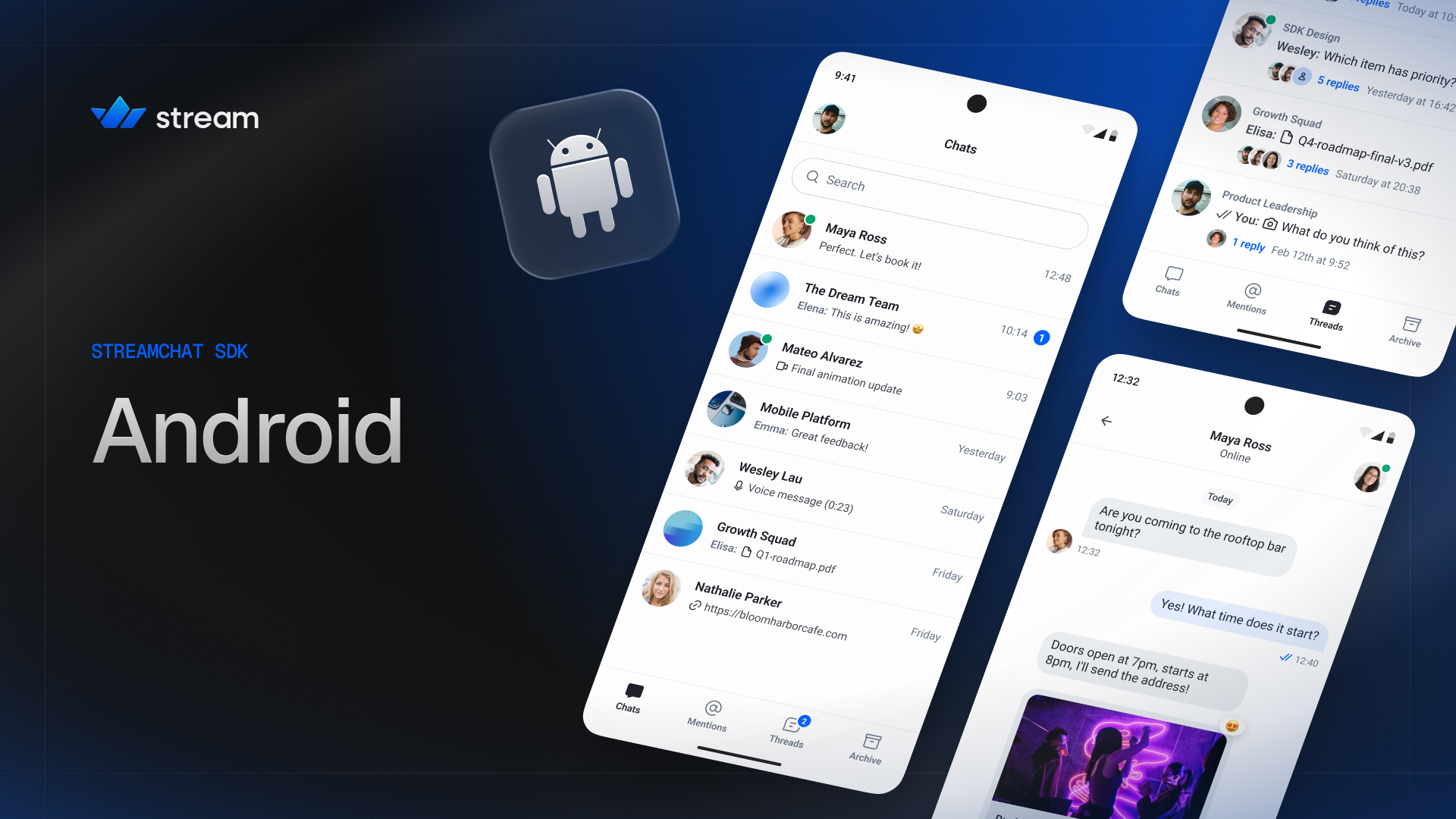
This is the official Android SDK for Stream Chat, a service for building chat and messaging applications. This library includes both a low-level chat SDK and a set of reusable UI components. Most users start with the UI components, and fall back to the lower level API when they want to customize things.
We're proud to say that we're the first Android Chat SDK that supports Jetpack Compose! We released our Compose UI Components one day after the official Jetpack Compose 1.0 release and our team members have been working hard on it since then.
Now it's mature and stable enough for us to officially recommend it for all new applications and all modern chat implementations. If you're looking for something highly customizable and extremely performant, check out our Compose SDK.
The Android SDK supports both Kotlin and Java, but we strongly recommend using Kotlin.
Note: The Compose SDK supports only Kotlin, since Compose uses Kotlin compiler plugins to process the UI.
🔗 Quick Links
Register: Create an account and get an API key for Stream Chat
Chat Tutorial: Learn the basics of the SDK by building a simple messaging app (Kotlin or Java)
UI Components sample app: Full messaging app with threads, reactions, optimistic UI updates and offline storage
Compose UI Components sample app: Messaging sample app built with Jetpack Compose!
Client Documentation
UI Components Documentation
Compose UI Components Documentation
API docs: Full generated docs from Dokka
Jetpack Compose Planning: Jetpack Compose public project management board and milestone overview
👩💻 Free for Makers 👨💻
Stream is free for most side and hobby projects. To qualify, your project/company needs to have < 5 team members and < $10k in monthly revenue.
For complete pricing details, visit our Chat Pricing Page.
🗺️ Overview and Documentation 📚
This SDK has one low-level artifact you can build on:
Client: A low-level client for making API calls and receiving chat events, with built-in offline support (local caching and automatic retries).
Documentation website
Offline Support
We also have two UI SDKs. You can use our Compose UI Components SDK, or if you're using older UI solutions, the XML-based UI Components:
Compose UI Components: Reusable and modular Composables for displaying conversations, lists of channels, and more!
Sample app
Documentation
Compose SDK Guidelines
UI Components: Reusable and customizable chat Views for displaying conversations, lists of channels, and more!
Sample app
Documentation
For AI assistants there are three separate artifacts. No other Chat SDK artifact depends on them:
AI Compose Components: Composables for AI replies: streaming text, reasoning and tool-call steps, tool approvals and a composer.
Sample app
On-device model: A model on the device, such as Gemini Nano, to answer when your agent can't.
A2UI: Shows the generative UI agents write in A2UI 1.0.
OpenUI: Parses and runs OpenUI Lang, the language models answer in to describe generative UI, writes the system prompt that teaches it, and shows the answers with native Compose components: text, Markdown, layout (tabs, accordions, carousels), tables, forms, buttons, lists, follow-ups, card blocks and charts. OpenUIRenderer shows them in the generative UI of AI Compose Components.
Learn more about the modules by visiting the documentation.
📖 Tutorial
The best place to start is the Compose Chat Messaging Tutorial. It teaches you the basics of using the Compose Chat SDK and also shows how to make frequently required changes.
Note: If you're using older UI toolkits, like XML, you can follow the Android Chat Messaging Tutorial which features the XML-based UI Components.
🛠️ Installation and Getting Started 🚀
Releases are published to the Stream Maven repository. Add it to your settings.gradle.kts:
Next, open Android Studio and open the newly created project folder. You'll want to run the stream-chat-android-compose-sample module.
Since Compose is a highly customizable SDK, we're eager to hear your feedback on how it helps you build complex Chat UI. Join us in this repo's discussions or tweet at us @getstream_io!
Sample App
However, if you're still using XML due to technical limitations, our UI Components SDK includes a fully functional example app featuring threads, reactions, typing indicators, optimistic UI updates and offline storage. To run the sample app, start by cloning this repo:
Next, open Android Studio and open the newly created project folder. You'll want to run the stream-chat-android-ui-components-sample app.
Other Sample Apps
We also maintain a dedicated repository for fully-fledged sample applications at GetStream/Android-Samples.
💡 Supported features 🎨
Here are some of the features that the SDK supports out-of-the-box:
Channels list UI
Channel UI
Message reactions
Link previews
Image, video and file attachments
Editing and deleting messages
Typing indicators
Read indicators
Push notifications
Image gallery
GIF support
Light and dark themes
Style customization
UI customization
Threads
Slash commands
Markdown message formatting
Unread message counts
For more, see the SDK's website.
🛠️ R8 / ProGuard
When utilizing R8, the rules for shrinking and obfuscation are applied automatically.
If you are using ProGuard, you will need to add the following rules from client and ui-common modules to your application.
You might also need apply rules for Coroutines, Retrofit, kotlin-reflect and OkHttp which are dependencies of the SDK.
💼 We are hiring!
We've recently closed a $38 million Series B funding round and we keep actively growing.
Our APIs are used by more than a billion end-users, and you'll have a chance to make a huge impact on the product within a team of the strongest engineers all over the world.
Check out our current openings and apply via Stream's website.
License
Copyright (c) 2014-2022 Stream.io Inc. All rights reserved.

Licensed under the Stream License;
you may not use this file except in compliance with the License.
You may obtain a copy of the License at

   https://github.com/GetStream/stream-chat-android/blob/main/LICENSE

Unless required by applicable law or agreed to in writing, software
distributed under the License is distributed on an "AS IS" BASIS,
WITHOUT WARRANTIES OR CONDITIONS OF ANY KIND, either express or implied.
See the License for the specific language governing permissions and
limitations under the License.
How active is development on GetStream/stream-chat-android?
The most recent commit recorded on GetStream/stream-chat-android was 3 months ago, based on the GitHub push timestamp. The repository has 322 forks — one of the better signals of community interest.
How does GetStream/stream-chat-android compare to other Mobile projects?
GetStream/stream-chat-android is tracked by TopGit in the Mobile category, with 1.7k GitHub stars and written in Kotlin. Browse the Mobile topic page on TopGit to compare it against similar projects by stars and activity.
How many stars does GetStream/stream-chat-android have?
GetStream/stream-chat-android has 1.7k GitHub stars — refresh the page for the live number, or check github.com/GetStream/stream-chat-android. TopGit mirrors GitHub's count but does not claim minute-by-minute accuracy.
What is GetStream/stream-chat-android?
GetStream/stream-chat-android (GetStream/stream-chat-android) is a Kotlin project on GitHub. From the project's own README: :speech_balloon: Android Chat SDK ➜ Stream Chat API. UI component libraries for chat apps. Kotlin & Jetpack Compose messaging SDK for Android chat
What language is GetStream/stream-chat-android written in?
GetStream/stream-chat-android is written primarily in Kotlin. GitHub's language field is based on the largest share of bytes in the default branch.
What topics is GetStream/stream-chat-android associated with?
Why is GetStream/stream-chat-android categorized under Mobile?
TopGit places GetStream/stream-chat-android in the Mobile category based on its GitHub topics and description (tagged: "android", "android-chat", "android-chat-sdk"). Categories are assigned from real repository metadata, not editorial guesswork.
Read full README in the tab above.
Is stream-chat-android worth your time?
ChatGPT, Claude and Perplexity can all read this page. Ask one of them what it makes of stream-chat-android.

 /stream-chat-android