As a developer tool, gnunn1/tilix has picked up 5.7k stars on GitHub (D). A tiling terminal emulator for Linux using GTK+ 3
Snapshot summary built from the project's own GitHub metadata — there's no written TopGit review yet. The page will update automatically when a full review is published.
WHY NO REVIEW YET
TopGit writes full reviews for the most-starred, most-requested repositories. This page is a snapshot until then — see the READ ME tab for the original README in full.
A tiling terminal emulator for Linux using GTK+ 3. The Tilix web site for users is available at https://gnunn1.github.io/tilix-web.
:warning: Maintainers Wanted
This project is looking for maintainers!
At the moment, only very minimal maintenance is done, no new features will be implemented and pull-requests may be reviewed very slowly.
If you are interested in giving Tilix some :heart:, please chime in!
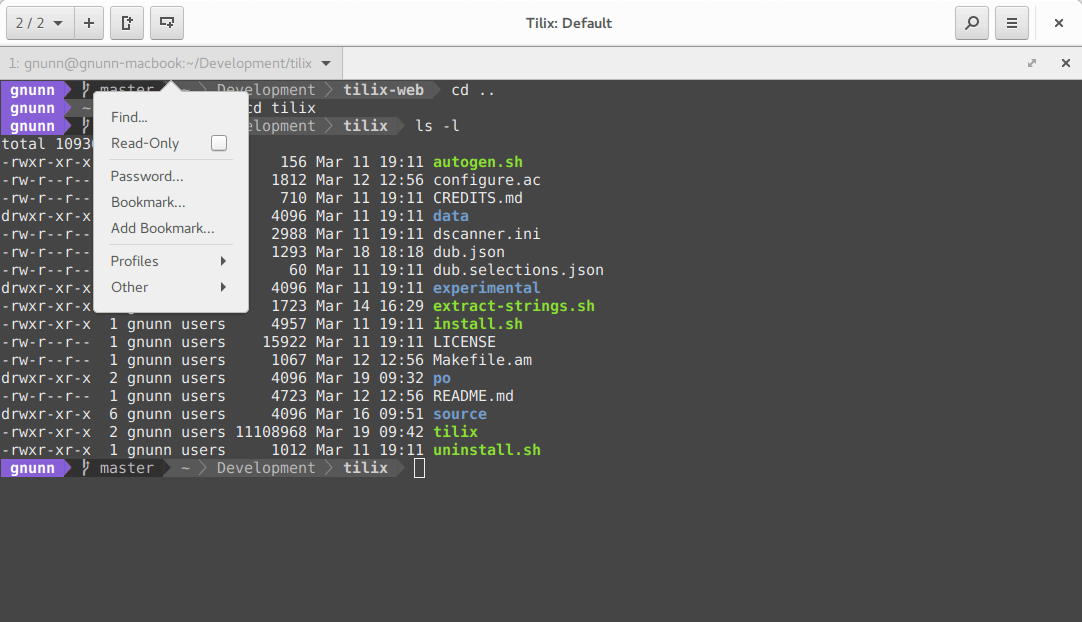
Screenshot
About
Tilix is a tiling terminal emulator which uses the VTE GTK+ 3 widget with the following features:
Layout terminals in any fashion by splitting them horizontally or vertically
Terminals can be re-arranged using drag and drop both within and between windows
Terminals can be detached into a new window via drag and drop
Tabs or sidebar list current sessions
Input can be synchronized between terminals so commands typed in one terminal are replicated to the others
The grouping of terminals can be saved and loaded from disk
Terminals support custom titles
Color schemes are stored in files and custom color schemes can be created by simply creating a new file
Transparent background
Background images
Quake mode support (i.e. drop-down terminal)
Custom hyperlinks
Automatic (triggered) profile switches based on hostname and directory
Supports notifications when processes are completed out of view. Requires the Fedora notification patches for VTE
Experimental trigger support (Requires patched VTE, see wiki)
Experimental badge support (Requires patched VTE, see wiki)
The application was written using GTK 3 and an effort was made to conform to GNOME Human Interface Guidelines (HIG). As a result, it does use CSD (i.e. the GTK HeaderBar)
though it can be disabled if necessary. Other than GNOME, only Unity has been tested officially though users have had success with other desktop environments.
Dependencies
Tilix requires the following libraries to be installed in order to run:
GTK 3.18 or later (Tilix 1.8.3 or later, earlier versions supported GTK 3.14)
GTK VTE 0.46 or later
dconf
GSettings
Nautilus-Python (Required for Nautilus integration)
Migrating Settings From Terminix
Terminix was recently re-named to Tilix and as a result the settings key changed. To migrate your settings to Tilix, please perform the following steps:
This will export your settings from the Terminix key in dconf and re-import them into the Tilix key.
Note that this will work even after you have uninstalled the Terminix schema, since the user customized settings are available even after the schema got removed, and the
default settings are identical between the two and thus do not matter.
Once you have imported the settings and everything is ok you can clear the old Terminix settings with:
dconf reset -f /com/gexperts/Terminix/
Finally to copy the bookmarks and custom themes just do:
mv ~/.config/terminix ~/.config/tilix
Optional Fonts
In some of the screenshots, the powerline statusline shell plugin is used. In order to ensure it works well, you may need to install its fonts
and ensure Tilix is aware of them. They can be installed via sudo apt install fonts-powerline on Debian/Ubuntu and sudo dnf install powerline-fonts on Fedora/RedHat-based
Linux distributions.
After installing the fonts, select the "Powerline Symbols" font in Tilix via Preferences -> Default -> Custom Font. Sessions are updated automatically.
Support
If you are having issues with Tilix, feel free to open issues here in github as necessary.
Localization
Tilix is localized using Weblate, please visit the Weblate hosted Tilix translations site in order to assist
with translations, please do not submit direct pull requests to this repository for translations.
Building
Tilix is written in D and GTK 3 using the gtkd framework. This project uses dub to manage the build process including fetching the dependencies,
thus there is no need to install dependencies manually. The only thing you need to install to build the application is the D tools (compiler and Phobos) along with dub itself.
Note that D supports three compilers (DMD, GDC and LDC) but Tilix only supports DMD and LDC.
Once you have those installed, compiling the application is a one line command as follows:
dub build --build=release
The application depends on various resources to function correctly, run sudo ./install.sh to build and copy all of the resources to the correct locations. Note this
has only been tested on Arch Linux, use with caution.
Note : install.sh will install Tilix to your /usr directory. If you are interested in installing Tilix to a custom location, you can specify the PREFIX as an
argument to the install.sh script (e.g : ./install.sh $HOME/.local will install Tilix into $HOME/.local). However, this requires you to add your $PREFIX/share
directory to your $XDG_DATA_DIRS environment variable.
Note there is also support for building with the Meson buildsystem, please see the wiki page on Meson
for more information.
Build Dependencies
Tilix depends on the following libraries as defined in dub.json:
gtkd >= 3.11.0
gdk-pixbuf-pixdata (Used when building resource file)
Install Tilix
Tilix is available as packages for a variety of distributions.
Uninstall Tilix
This method only applies if you installed Tilix manually using the install instructions. If you installed Tilix from a distribution package then use your package manager
to remove tilix, do not use these instructions.
Download the uninstall.sh script from this repository and then open a terminal (not Tilix!) in the directory where you saved it. First set the executable flag on the script:
Yes — gnunn1/tilix ships under the MPL-2.0 license, which makes its source code freely readable (and, depending on license terms, forkable and reusable). Source: github.com/gnunn1/tilix.
What else is in the Developer Tools space?
gnunn1/tilix is tracked by TopGit under the Developer Tools category, alongside 5 GitHub-tagged topics. Trending and Topics pages list peer repositories of comparable stars and language.
What is gnunn1/tilix?
gnunn1/tilix (gnunn1/tilix) is a D project on GitHub. From the project's own README: A tiling terminal emulator for Linux using GTK+ 3
What license does gnunn1/tilix use?
gnunn1/tilix is released under the MPL-2.0 license. Always verify the LICENSE file directly on GitHub for the authoritative terms — license strings can be edited out of sync with a project's actual stance.
Where can I see gnunn1/tilix in action?
The project maintains a homepage at https://gnunn1.github.io/tilix-web. The README tab on this page also usually contains screenshots and a quickstart.
Where do I read more about gnunn1/tilix?
This TopGit page is a snapshot — the READ ME tab shows the project's own README content (links stripped, images preserved). The GitHub repository at github.com/gnunn1/tilix is the definitive source.
Why is gnunn1/tilix categorized under Developer Tools?
TopGit places gnunn1/tilix in the Developer Tools category based on its GitHub topics and description (tagged: "dlang", "gtk3", "terminal"). Categories are assigned from real repository metadata, not editorial guesswork.
Read full README in the tab above.
Still deciding about tilix?
One click hands the question to an AI along with this page — see what it says about tilix.

 /tilix