google/magika is a AI Tools project on GitHub, written primarily in Rust. It has 18.8k stars. Fast and accurate AI powered file content types detection
Snapshot summary built from the project's own GitHub metadata — there's no written TopGit review yet. The page will update automatically when a full review is published.
WHY NO REVIEW YET
TopGit writes full reviews for the most-starred, most-requested repositories. This page is a snapshot until then — see the READ ME tab for the original README in full.
Magika is a novel AI-powered file type detection tool that relies on the recent advance of deep learning to provide accurate detection. Under the hood, Magika employs a custom, highly optimized model that only weighs about a few MBs, and enables precise file identification within milliseconds, even when running on a single CPU. Magika has been trained and evaluated on a dataset of ~100M samples across 200+ content types (covering both binary and textual file formats), and it achieves an average ~99% accuracy on our test set.
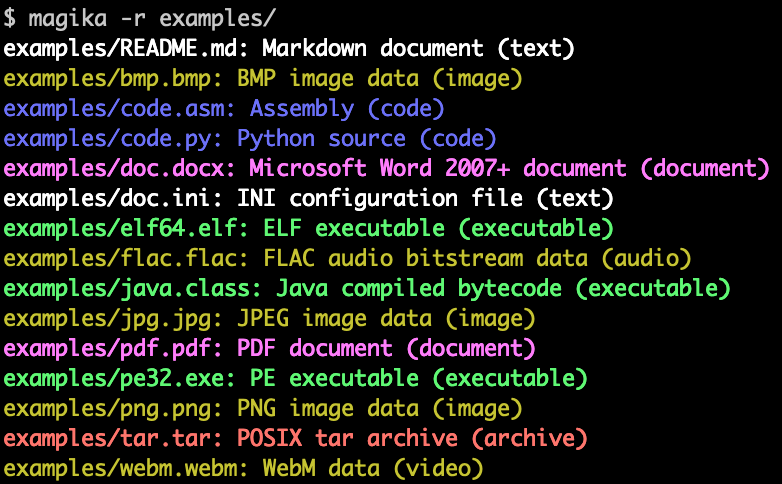
Here is an example of what Magika command line output looks like:
Magika is used at scale to help improve Google users' safety by routing Gmail, Drive, and Safe Browsing files to the proper security and content policy scanners, processing hundreds billions samples on a weekly basis. Magika has also been integrated with VirusTotal (example) and abuse.ch (example).
For more context you can read our initial announcement post on Google's OSS blog, you can consult Magika's website, and you can read more in our research paper, published at the IEEE/ACM International Conference on Software Engineering (ICSE) 2025.
You can try Magika without installing anything by using our web demo, which runs locally in your browser!
Highlights
Available as a command line tool written in Rust, a Python API, and additional bindings for Rust, JavaScript/TypeScript (with an experimental npm package, which powers our web demo), and GoLang (WIP).
Trained and evaluated on a dataset of ~100M files across 200+ content types.
On our test set, Magika achieves ~99% average precision and recall, outperforming existing approaches -- especially on textual content types.
After the model is loaded (which is a one-off overhead), the inference time is about 5ms per file, even when run on a single CPU.
You can invoke Magika with even thousands of files at the same time. You can also use -r for recursively scanning a directory.
Near-constant inference time, independently from the file size; Magika only uses a limited subset of the file's content.
Magika uses a per-content-type threshold system that determines whether to "trust" the prediction for the model, or whether to return a generic label, such as "Generic text document" or "Unknown binary data".
The tolerance to errors can be controlled via different prediction modes, such as high-confidence, medium-confidence, and best-guess.
The client and the bindings are already open source, and more is coming soon!
Table of Contents
Getting Started
Installation
Quick Start
Documentation
Security Vulnerabilities
License
Disclaimer
Getting Started
Installation
Command Line Tool
Magika ships a CLI written in Rust, and can be installed in several ways.
Via magika python package:
pipx install magika
Via brew (macOS / Linux)
brew install magika
Via installer script:
curl -LsSf https://securityresearch.google/magika/install.sh | sh
% magika --help
Determines file content types using AI

Usage: magika [OPTIONS] [PATH]...

Arguments:
  [PATH]...
          List of paths to the files to analyze.

          Use a dash (-) to read from standard input (can only be used once).

Options:
  -r, --recursive
          Identifies files within directories instead of identifying the directory itself

      --no-dereference
          Identifies symbolic links as is instead of identifying their content by following them

      --colors
          Prints with colors regardless of terminal support

      --no-colors
          Prints without colors regardless of terminal support

  -s, --output-score
          Prints the prediction score in addition to the content type

  -i, --mime-type
          Prints the MIME type instead of the content type description

  -l, --label
          Prints a simple label instead of the content type description

      --json
          Prints in JSON format

      --jsonl
          Prints in JSONL format

      --format <CUSTOM>
          Prints using a custom format (use --help for details).

          The following placeholders are supported:

            %p  The file path
            %l  The unique label identifying the content type
            %d  The description of the content type
            %g  The group of the content type
            %m  The MIME type of the content type
            %e  Possible file extensions for the content type
            %s  The score of the content type for the file
            %S  The score of the content type for the file in percent
            %b  The model output if overruled (empty otherwise)
            %%  A literal %

  -h, --help
          Print help (see a summary with '-h')

  -V, --version
          Print version
For more examples and documentation about the CLI, see https://crates.io/crates/magika-cli.
Python Examples
>>> from magika import Magika
>>> m = Magika()
>>> res = m.identify_bytes(b'function log(msg) {console.log(msg);}')
>>> print(res.output.label)
javascript
>>> from magika import Magika
>>> m = Magika()
>>> res = m.identify_path('./tests_data/basic/ini/doc.ini')
>>> print(res.output.label)
ini
>>> from magika import Magika
>>> m = Magika()
>>> with open('./tests_data/basic/ini/doc.ini', 'rb') as f:
>>>     res = m.identify_stream(f)
>>> print(res.output.label)
ini
For more examples and documentation about the Python module, see the Python Magika module section.
Documentation
Please consult Magika's website for detailed documentation about:
We review pull requests only for issues labeled help wanted and for a short
list of always-welcome changes; for anything else, open a concise issue first.
See CONTRIBUTING.md and the
contribution policy.
This project is not an official Google project. It is not supported by
Google and Google specifically disclaims all warranties as to its quality,
merchantability, or fitness for a particular purpose.
How does google/magika compare to other AI Tools projects?
google/magika is tracked by TopGit in the AI Tools category, with 18.8k GitHub stars and written in Rust. Browse the AI Tools topic page on TopGit to compare it against similar projects by stars and activity.
How many stars does google/magika have?
google/magika has 18.8k GitHub stars — refresh the page for the live number, or check github.com/google/magika. TopGit mirrors GitHub's count but does not claim minute-by-minute accuracy.
Is google/magika open source?
Yes — google/magika ships under the Apache-2.0 license, which makes its source code freely readable (and, depending on license terms, forkable and reusable). Source: github.com/google/magika.
What else is in the AI Tools space?
google/magika is tracked by TopGit under the AI Tools category, alongside 7 GitHub-tagged topics. Trending and Topics pages list peer repositories of comparable stars and language.
What is google/magika?
google/magika (google/magika) is a Rust project on GitHub. From the project's own README: Fast and accurate AI powered file content types detection
Where can I see google/magika in action?
The project maintains a homepage at https://securityresearch.google/magika/. The README tab on this page also usually contains screenshots and a quickstart.
Where do I read more about google/magika?
This TopGit page is a snapshot — the READ ME tab shows the project's own README content (links stripped, images preserved). The GitHub repository at github.com/google/magika is the definitive source.
Read full README in the tab above.
Curious whether magika is right for you?
Let ChatGPT, Claude, or Perplexity look into it — click below and see what AI actually says about magika.

 /magika