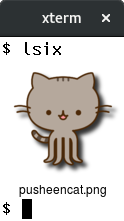
hackerb9/lsix — a developer tool — sits at 4.2k GitHub stars in the Developer Tools space. Like "ls", but for images. Shows thumbnails in terminal using sixel graphics.
Snapshot summary built from the project's own GitHub metadata — there's no written TopGit review yet. The page will update automatically when a full review is published.
WHY NO REVIEW YET
TopGit writes full reviews for the most-starred, most-requested repositories. This page is a snapshot until then — see the READ ME tab for the original README in full.
Like "ls", but for images. Shows thumbnails in terminal using sixel
graphics.
Usage
lsix [ FILES ... ]
Examples
Basic Usage
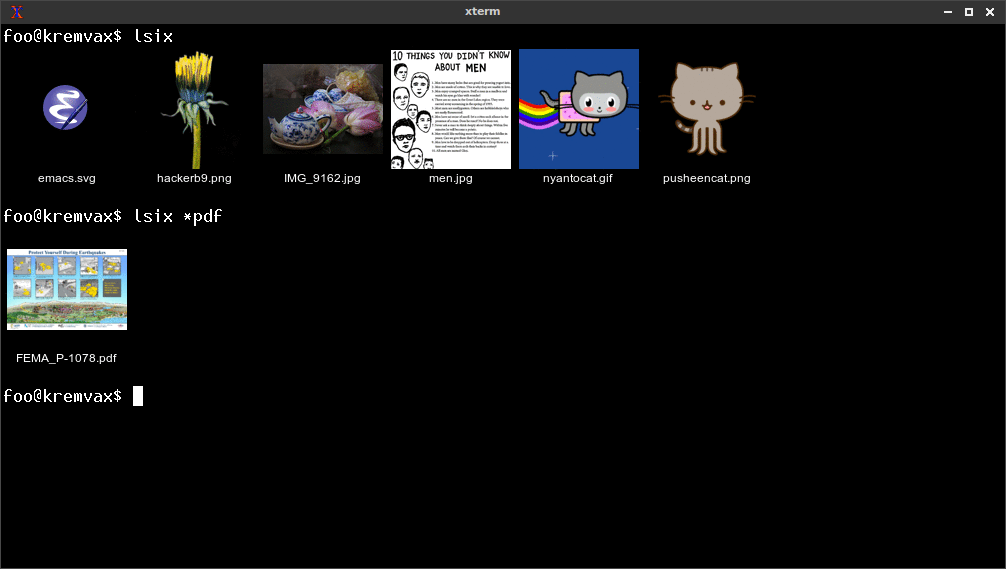
Just typing lsix will show images in the current working directory.
You can also specify filenames and, of course, use shell wild cards
(e.g., lsix *jpg *png).
Because lsix uses ImageMagick pretty much any image format will be
supported. However, some may be slow to render (like PDF), so lsix
doesn't show them unless you ask specifically. If you want to force a
listing of a certain type of image simply specify the filenames or
use a wildcard (*.pdf in the example below),.
Expanding GIFs
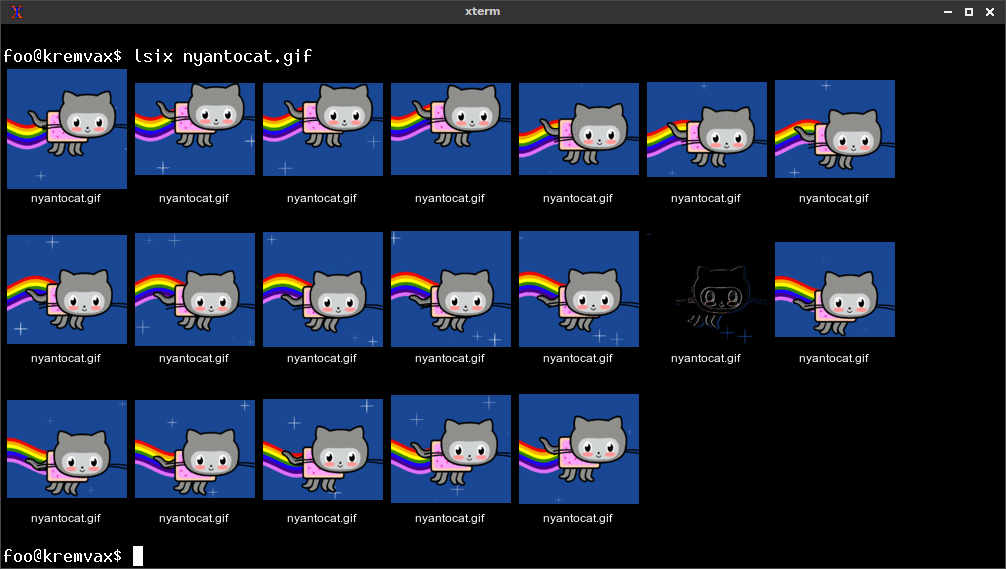
If you specify a GIF (or actually any file that has multiple images in
it) on the command line, all the frames will get expanded and shown in
a montage. For example, lsix nyancat.gif shows all the frames. Note
that GIF stores some frames as only the pixels that differ from the
previous frame.
Terminal background color is detected
You may have noticed that PNGs and SVG files have correct alpha
channel for the terminal background. That is because lsix uses
terminal escape sequences to try to figure out your foreground and
background colors. (Foreground is used for the text fill color.)
In the first example below, after running lsix in a white on black
xterm, I sent an escape sequence to swap foreground and background
colors. When I ran it again, lsix detected it and changed the
background color to white. Of course, you can pick whatever default
colors you want (e.g., xterm -bg blue, in the second example below).
Features
Detects if your terminal can display SIXEL graphics inline using control sequences.
Works great over ssh. Perfect for manipulating those images on the
web server when you can't quite remember what each one was.
Non-bitmap graphics often work fine (.svg, .eps, .pdf, .xcf).
Automatically detects if your terminal, like xterm, can increase the
number of color registers to improve the image quality and does so.
Automatically detects terminal's foreground and background colors.
In terminals that support dtterm WindowOps, the number of tiles per
row will adjust appropriately to the window width.
If there are many images in a directory (>21), lsix will display them
one row at a time so you don't need to wait for the entire montage
to be created.
If your filenames are too long, lsix will wrap the text before
passing it into ImageMagick's montage. (Without lsix, montage just
jumbles long filenames on top of one another.)
You can easily change things like the width of each tile in the
montage, the font family, and point size by editing simple variables
at the top of the file. (Tip: try convert -list font to see what
fonts you have on your machine.)
Unicode filenames work fine, as long as your font has the glyphs.
Installation
Just put the lsix file in your path (e.g., /usr/local/bin) and run
it. It's just a BASH shell script.
The only prerequisite software is ImageMagick. If you don't have it
yet, your OS's package manager will make it easy to get. (E.g.,
apt-get install imagemagick).
MacOS users may prefer to install lsix using brew install lsix which
installs ImageMagick, if necessary.
Your Terminal must support Sixel graphics
I developed this using xterm in
vt340 emulation mode, but I believe this should work on
any Sixel compatible terminal. You may test your terminal by viewing a
single image, like so:
convert foo.jpg -geometry 800x480 sixel:-
XTerm
Note that xterm does not have Sixel mode enabled by default, so you
need to either run it like so:
xterm -ti vt340
Or, make vt340 the default terminal type for xterm. Add the following
to your .Xresources file and run xrdb -merge .Xresources.
Further, some distributions, such as Fedora, appear to not compile xterm
with sixel support. In that case, try an alternate terminal, such as
foot or mlterm.
SIXEL compatible terminals
XTerm (tested)
MLterm (tested)
foot (tested)
Wezterm (tested)
Contour (tested)
iTerm2 for Apple MacOS (tested)
Konsole (reported)
yakuake (reported)
WSLtty for Microsoft Windows (reported)
MinTTY for Cygwin (Microsoft Windows) (reported)
Yaft for Linux framebuffer (tested)
VTE (special compilation, reported)
sixel-tmux (fork of tmux, reported)
ttyd (reported)
SIXEL incompatible terminals
MacOS Terminal, kitty
All standard libvte based terminals
gnome-terminal
terminator
lxterm
Alacritty (might work with a patch)
Configuration
Because lsix is currently designed to be very simple, there are no
command line flags, no configuration files, no knobs to twiddle, or
frobs to frobnosticate. However, since the script is so simple, if you
want to make a change, it's pretty easy to do just by editing the
file. Everything is nicely commented with the most common default
variables at the top.
Contact the author
I welcome feedback. If you use lsix and like it or have suggestions
for how it can be improved, please go ahead and send your thoughts to
me @hackerb9 via
GitHub.
Bugs
XTerm's reverse video mode (xterm -rv) is different from
specifying the foreground and background explicitly. There is a way
to detect the latter, but not the former. That means the background
color will be incorrect for folks who use XTerm's reverseVideo
resource. (See issue #20).
XTerm's screen width is currently limited to 1000px due to a
misfeature which causes it to silently show nothing. This limitation
will be removed once xterm can handle images greater than 1000x1000.
[Last tested with XTerm(344)].
Filenames that begin with "@" are special to ImageMagick and it'll
freak out if you don't prepend a directory. (lsix ./@foo.png)
(This is a bug in ImageMagick, not lsix).
Specifying the empty string "" as a filename makes ImageMagick hang.
(This appears to be an ImageMagick bug / misfeature).
Long filenames are wrapped, but not intelligently. Would it
complicate this script too much to make it prefer to wrap on whites
space, dashes, underscores, and periods? Maybe.
Directories specified on the command line are processed as if the
user had cd'd to that directory. It wouldn't be hard to implement
recursion, but is there actually a need? I'm reluctant to complicate
such a simple script with command line flags.
If you run lsix foo.avi, you're asking for trouble.
Future Issues
The Sixel standard doesn't appear to have a way to query the size of
the graphics screen. Reading the VT340 documentation, it appears
your program has to already know the resolution of the device you're
rendering on.
XTerm, as of version 344, has added a control
sequence
that solves the problem — CSI ? Pi ; Pa ; Pv S — but some
terminals, for example mlterm, haven't yet implemented it.
There is an alternate way to read the window size using the dtterm
WindowOps extension but it is not quite the right solution as the
geometry of the Sixel graphics screen is not necessarily the same as
the window size. (For example, xterm limits the graphics geometry to
1000x1000, even though the window can actually be larger.) To help
with terminals such as mlterm, lsix will use the dtterm WindowOps
as a fallback.
If neither solution works, lsix will assume you are on a VT340
(800x480) and can fit only 6 tiles per row.
The Sixel standard also lacks a way to query the number of
color registers available. I used the extensions from xterm to do
so, but I do not know how widely implemented they are. If a terminal
does not respond, lsix presumes you're on an original vt340 and
uses only 16 color registers. (Sorry, 4-gray vt330 users! Time to
upgrade. ;-) )
The Kermit project created a MS-DOS
terminal emulator that was popular in the late 1980s/early 1990s.
Its sixel implementation is not compatible with lsix because it
shows the graphics on a screen separate from the text. However, I
noticed one feature in its documentation: an escape sequence to
request the current graphics window size and number of colors:
 ESC [ ? 256 n                  Request screen size report

        Report is ESC [ ? 256; Ph; Pw; Pc n     for graphics systems

        where   Ph is screen height in dots
                Pw is screen width in dots
                Pc is number of colors (0, 1 or 16, for none, b/w, ega/vga)

        Report is ESC [ ? 24; 80; 0 n  for pure text mono systems.
Did any other terminal emulators ever use the sequence? Would it be
worthwhile to add to lsix?
libsixel is an excellent
project for writing programs that can output optimized Sixel
graphics commands. Because I have a lot of respect for the project,
I feel I should explain why lsix does not use libsixel.
(a) I wanted lsix to work everywhere easily. Bash and imagemagick
are ubiquitous, so a shell script is a natural solution.
(b) I wanted lsix to be simple enough that it could be easily
customized and extended by other people. (Including myself.)
(c) ImageMagick has better support for reading different formats
than stb_image (the library used by libsixel's img2sixel). (For
example: xpm, svg, 16-bit png, and even sixel files are not
recognized by img2sixel). Since ImageMagick can read all of those
and write sixel output directly, it made sense to use it for both.
(d) While libsixel is optimized and would surely be faster than
ImageMagick, it's overkill. For a simple directory listing, this
is plenty fast enough.
Resources
XTerm Control Sequences
ImageMagick
VT340 Programmer's Reference:
Chapter 14. Sixel Graphics.
Chapter 16 Difference between Level 1 and Level 2 Sixel implementations.
Nota bene: this reference has the sense for DECSDM (sixel
display mode) reversed! The actual behaviour of the VT340 is
that when DECSDM is reset (the default), sixel scrolling is enabled.
This can be done by sending Esc[?80l, but lsix does not do
so as it would break many current terminal emulators.
See issue #41 for details.
DEC STD 070 Video Systems Reference Manual.
A weighty tome which covers nearly everything in exacting detail. I referred mostly to sections 4 (escape sequences) and 9 (sixel programming).
VT340 Test, a project to document the actual behaviour of the DEC VT340 hardware.
Digital ANSI-Compliant Printing Protocol: Level 2 Programming Reference Manual, Chapter 5: Sixel Graphics. An excellent and reasonably clear discussion for anyone who wants to generate or parse sixel graphics.
No homepage URL was recorded for hackerb9/lsix in TopGit's last sync. The README tab above frequently contains screenshots and demo links, or check the repository description on GitHub.
Is hackerb9/lsix open source?
Yes — hackerb9/lsix ships under the GPL-3.0 license, which makes its source code freely readable (and, depending on license terms, forkable and reusable). Source: github.com/hackerb9/lsix.
What else is in the Developer Tools space?
hackerb9/lsix is tracked by TopGit under the Developer Tools category, alongside 11 GitHub-tagged topics. Trending and Topics pages list peer repositories of comparable stars and language.
What is hackerb9/lsix?
hackerb9/lsix (hackerb9/lsix) is a Shell project on GitHub. From the project's own README: Like "ls", but for images. Shows thumbnails in terminal using sixel graphics.
What license does hackerb9/lsix use?
hackerb9/lsix is released under the GPL-3.0 license. Always verify the LICENSE file directly on GitHub for the authoritative terms — license strings can be edited out of sync with a project's actual stance.
Where do I read more about hackerb9/lsix?
This TopGit page is a snapshot — the READ ME tab shows the project's own README content (links stripped, images preserved). The GitHub repository at github.com/hackerb9/lsix is the definitive source.
Why is hackerb9/lsix categorized under Developer Tools?
TopGit places hackerb9/lsix in the Developer Tools category based on its GitHub topics and description (tagged: "files", "graphics", "imagemagick"). Categories are assigned from real repository metadata, not editorial guesswork.
Read full README in the tab above.
Want a second opinion on lsix?
Ask an AI that can read this page — one click and you get its take on lsix.

 /lsix