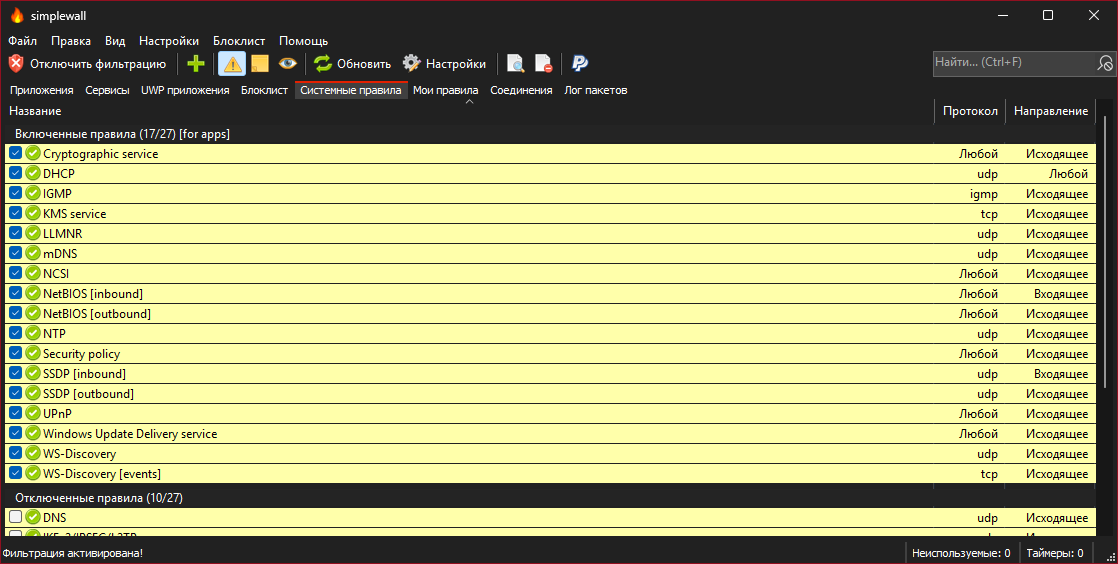
henrypp/simplewall sits at 9.2k stars on GitHub, written primarily in C. Simple tool to configure Windows Filtering Platform (WFP) which can configure network activity on your computer.
Snapshot summary built from the project's own GitHub metadata — there's no written TopGit review yet. The page will update automatically when a full review is published.
WHY NO REVIEW YET
TopGit writes full reviews for the most-starred, most-requested repositories. This page is a snapshot until then — see the READ ME tab for the original README in full.
Simple tool to configure Windows Filtering Platform (WFP) which can configure network activity on your computer.
The lightweight application is less than a megabyte, and it is compatible with Windows 7 SP1 and higher operating systems.
You can download either the installer or portable version. For correct working you are require administrator rights.
Nota bene:
Keep in mind, simplewall is not a control UI over Windows Firewall, and does not interact in any level with Windows Firewall. It works
over Windows Filtering Platform (WFP) which is a set of internal API and system services that provide a platform for creating network filtering
applications. Windows Filtering Platform is a development technology and not a firewall itself, but simplewall is the tool that uses this technology.
Features:
Simple interface without annoying pop ups
Rules editor (create your own rules)
Internal blocklist (block Windows spy / telemetry)
Dropped packets information with notification and logging to a file feature (win7+)
Allowed packets information with logging to a file feature (win8+)
Windows Subsystem for Linux (WSL) support
Windows Store support (win8+)
Windows services support
Free and open source
Localization support
IPv6 support
To activate portable mode, create "simplewall.ini" in application folder, or move it from "%APPDATA%\Henry++\simplewall".
System requirements:
Windows 7, 8, 8.1, 10, 11 64-bit/ARM64
An SSE2-capable CPU
KB2533623 KB3063858 update for Windows 7 was required
Donate:
Bitcoin (BTC)
Ethereum (ETH)
Yandex Money (RUB)
Paypal (USD)
GPG Signature:
Binaries have GPG signature simplewall.exe.sig in application folder.
Look at them, he does not know about .gitmodules and how to use, lol.
PS: Without idiots we are not to be fun, yeah!
Installation:
When install rules, you can choose two modes:
Permanent rules - rules are working until you disable it manually.
Temporary rules - rules are reset after the next reboot.
Uninstall:
When you uninstall simplewall, all previously configured filters stay alive in system.
To remove all filters created by simplewall, start simplewall and press "Disable filters" button.
Command line:
-install - enable filtering.
-install -temp - enable filtering until next reboot.
-install -silent - enable filtering without prompt.
-uninstall - remove all installed filters.
Rules editor:
simplewall have two types of custom user rules rules:
Global rules: rule applied for all applications.
Special rules: rule applied only for specified applications.
Rule syntax format:
To set rule applications, open rule and then navigate to "Apps" tab.
Rule syntax format:
IP addresses 192.168.0.1; 192.168.0.1; [fc00::]
IP addresses with port 192.168.0.1:80; 192.168.0.1:443; [fc00::]:443;
IP ranges 192.168.0.1-192.168.0.255; 192.168.0.1-192.168.0.255;
IP ranges (with port) 192.168.0.1-192.168.0.255:80; 192.168.0.1-192.168.0.255:443; (v2.0.20+)
IP with prefix lengths (CIDR) 192.168.0.0/16; 192.168.0.0/24; fe80::/10
Ports 21; 80; 443;
Ports ranges 20-21; 49152-65534;
To specify more than one ip, port and/or host, use semicolon.
IPv4 CIDR blocks:
Address format
Mask
a.b.c.d/32
255.255.255.255
a.b.c.d/31
255.255.255.254
a.b.c.d/30
255.255.255.252
a.b.c.d/29
255.255.255.248
a.b.c.d/28
255.255.255.240
a.b.c.d/27
255.255.255.224
a.b.c.d/26
255.255.255.192
a.b.c.d/25
255.255.255.128
a.b.c.0/24
255.255.255.0
a.b.c.0/23
255.255.254.0
a.b.c.0/22
255.255.252.0
a.b.c.0/21
255.255.248.0
a.b.c.0/20
255.255.240.0
a.b.c.0/19
255.255.224.0
a.b.c.0/18
255.255.192.0
a.b.c.0/17
255.255.128.0
a.b.0.0/16
255.255.0.0
a.b.0.0/15
255.254.0.0
a.b.0.0/14
255.252.0.0
a.b.0.0/13
255.248.0.0
a.b.0.0/12
255.240.0.0
a.b.0.0/11
255.224.0.0
a.b.0.0/10
255.192.0.0
a.b.0.0/9
255.128.0.0
a.0.0.0/8
255.0.0.0
a.0.0.0/7
254.0.0.0
a.0.0.0/6
252.0.0.0
a.0.0.0/5
248.0.0.0
a.0.0.0/4
240.0.0.0
a.0.0.0/3
224.0.0.0
a.0.0.0/2
192.0.0.0
a.0.0.0/1
128.0.0.0
0.0.0.0/0
0.0.0.0
IPv6 CIDR blocks:
IPv6 CIDR blocks
FAQ:
Q: Are internet connections blocked when simplewall is not running?
A: Yes. Installed filters are working even if simplewall is terminated.
Q: What apps are blocked in default configuration?
A: By default, simplewall blocks all applications. You do not need to create custom rules to block specific applications.
Q: Is it safe to use simplewall with Windows Firewall?
A: Yes. You do not need to disable Windows Firewall. These two firewalls work independently.
Q: How can i disable blocklist entirely?
A: Open Settings -> Blocklist and then click the radio buttons labeled Disable.
Q: Where is blacklist mode?
A: Blacklist was removed many days ago for uselessness. But if you need it, you can still configure it.
Solution: Configure blacklist mode in simplewall:
Open Settings -> Rules
Uncheck Block outbound for all and Block inbound for all options.
Create user rule (green cross on toolbar) with block action, any direction, Block connection name and empty remote and local rule.
You can assign this rule for apps whatever you want to block network access.
Q: Why does my network icon have an exclamation mark?
A: When you are connected to a network, Windows checks for internet connectivity using Active Probing. This feature is named as NCSI (Network Connectivity Status Indicator). You can resolve this problem in one of the following ways:
Solution 1: Enable NCSI through internal system rule:
Open System rules tab.
Allow NCSI rule (enabled by default).
Solution 2: Disable NCSI through system registry:
Create Disable NCSI.reg and import it into registry.
Windows Registry Editor Version 5.00

[HKEY_LOCAL_MACHINE\SOFTWARE\Policies\Microsoft\Windows\NetworkConnectivityStatusIndicator]
"NoActiveProbe"=dword:00000001
"DisablePassivePolling"=dword:00000001
Solution 3: Disable NCSI through group policy:
Launch the group policy editor (gpedit.msc ).
Go to Computer Configuration -> Administrative Templates -> System -> Internet Communication Management -> Internet Communication Settings.
Double-click Turn off Windows Network Connectivity Status Indicator active tests and then select Enabled. Click Ok.
Open the Command Prompt (Admin) and enter gpupdate /force to enforce the changes made to the Group Policies.
Q: How can I disable Windows Firewall?
Start the command line as an administrator, and enter the commands below.
Disable Windows Firewall profiles:
netsh advfirewall set allprofiles state off
Enable Windows Firewall profiles:
netsh advfirewall set allprofiles state on
Q: How can I view all filters information?
Start the command line as an administrator, and enter the commands below.
Dump filters information saved into a `filters.xml` file:
cd /d %USERPROFILE%\Desktop

netsh wfp show filters
Dump providers, callouts and layers information into a `wfpstate.xml` file:
cd /d %USERPROFILE%\Desktop

netsh wfp show state
Open it in any text editor and study.
Q: How to fix Windows Update internet access?
Windows 10 and above:
Open main window menu Settings -> Rules -> Allow Windows Update.
This is working by method described here.
Windows 8.1:
Open main window, Navigate into System rules tab and then enable Windows Update service rule.
No homepage URL was recorded for henrypp/simplewall in TopGit's last sync. The README tab above frequently contains screenshots and demo links, or check the repository description on GitHub.
How active is development on henrypp/simplewall?
The most recent commit recorded on henrypp/simplewall was 3 months ago, based on the GitHub push timestamp. The repository has 667 forks — one of the better signals of community interest.
Is henrypp/simplewall open source?
Yes — henrypp/simplewall ships under the GPL-3.0 license, which makes its source code freely readable (and, depending on license terms, forkable and reusable). Source: github.com/henrypp/simplewall.
What license does henrypp/simplewall use?
henrypp/simplewall is released under the GPL-3.0 license. Always verify the LICENSE file directly on GitHub for the authoritative terms — license strings can be edited out of sync with a project's actual stance.
What topics is henrypp/simplewall associated with?
GitHub's repository topics for henrypp/simplewall: "arm64", "firewall", "foss", "network", "simplewall", "wfp", "win64", "windows", "windows-firewall". TopGit's editorial category is Security.
Where do I read more about henrypp/simplewall?
This TopGit page is a snapshot — the READ ME tab shows the project's own README content (links stripped, images preserved). The GitHub repository at github.com/henrypp/simplewall is the definitive source.
Read full README in the tab above.
Curious whether simplewall is right for you?
Let ChatGPT, Claude, or Perplexity look into it — click below and see what AI actually says about simplewall.

 /simplewall