A look at JanDeDobbeleer/oh-my-posh2: 5.2k stars on GitHub, written primarily in PowerShell, tracked under the UI / UX category. A prompt theming engine for Powershell
Snapshot summary built from the project's own GitHub metadata — there's no written TopGit review yet. The page will update automatically when a full review is published.
WHY NO REVIEW YET
TopGit writes full reviews for the most-starred, most-requested repositories. This page is a snapshot until then — see the READ ME tab for the original README in full.
It's been an amazing ride for Oh myPosh, but the time has come to step it up a notch.
Developers nowadays no longer stick to one shell/language, they are all tools we use to solve a certain problem.
The same needs to apply to Oh my Posh. It's time to adjust to that philosophy.
That's why this version of Oh my Posh is entering maintenance mode while I'm working hard on getting V3 out of the door.
Given that V3 is entirely different under the hood, it's hosted separately for now.
From a user perspective, it should give the same experience out-of-the-box, with the added advantage
that custom themes are a first class, no code citizen.
Documentation is also available which should give a better experience than this README has over the past few years :-)
If you're a developer looking to add functionality, please have a look at V3 to see if it already exists there.
If not, feel free to create an issue or PR on V3, I will only be accepting bug fixes on V2 from now on.
Table of Contents
About
Prerequisites
Installation
Configuration
Helper functions
Themes
About
A theme engine for Powershell inspired by the work done by Chris Benti on PS-Config and Oh-My-ZSH on OSX and Linux (hence the name).
More information about why I made this can be found on my blog.
Features:
Easy installation
Awesome prompt themes for PowerShell in ConEmu
Git status indications (powered by posh-git)
Failed command indication
Admin indication
Current session indications (admin, failed command, user)
Configurable
Easily create your own theme
Separate settings for oh-my-posh and posh-git
Does not mess with the default Powershell console
Prerequisites
You should use a modern console host like ConEmu, Alacritty, Terminus, Hyper, FluentTerminal, or the official Windows Terminal to have a great terminal experience on Windows.
There are multiple ways to acquire Windows Terminal - from the Microsoft Store, the GitHub repo, or the below commandline methods:
Via WinGet (official package manager for Windows):
winget install --id=Microsoft.WindowsTerminal -e
Via Chocolatey:
choco install microsoft-windows-terminal
Via Scoop:
scoop install windows-terminal
The fonts I use are Powerline fonts, there is a great repository containing them.
I use Meslo LG M Regular for Powerline Nerd Font in my ConEmu setup together with custom colors. You can find my theme here.
In case you notice weird glyphs after installing a font of choice, make sure the glyphs are available (maybe they have a different location in the font, if so, adjust the correct $ThemeSettings icon). If it turns out the character you want is not supported, select a different font.
Installation
You need to use the PowerShell Gallery to install oh-my-posh.
Also do not forget the Posh-Git settings itself (enable the stash indication for example):
$GitPromptSettings
Hide your username@domain when not in a virtual machine for the Agnoster, Fish, Honukai, Paradox and Sorin themes:
$DefaultUser = 'yourUsernameHere'
Helper functions
Set-Theme: set a theme from the Themes directory. If no match is found, it will not be changed. Autocomplete is available to list and complete available themes.
Set-Theme paradox
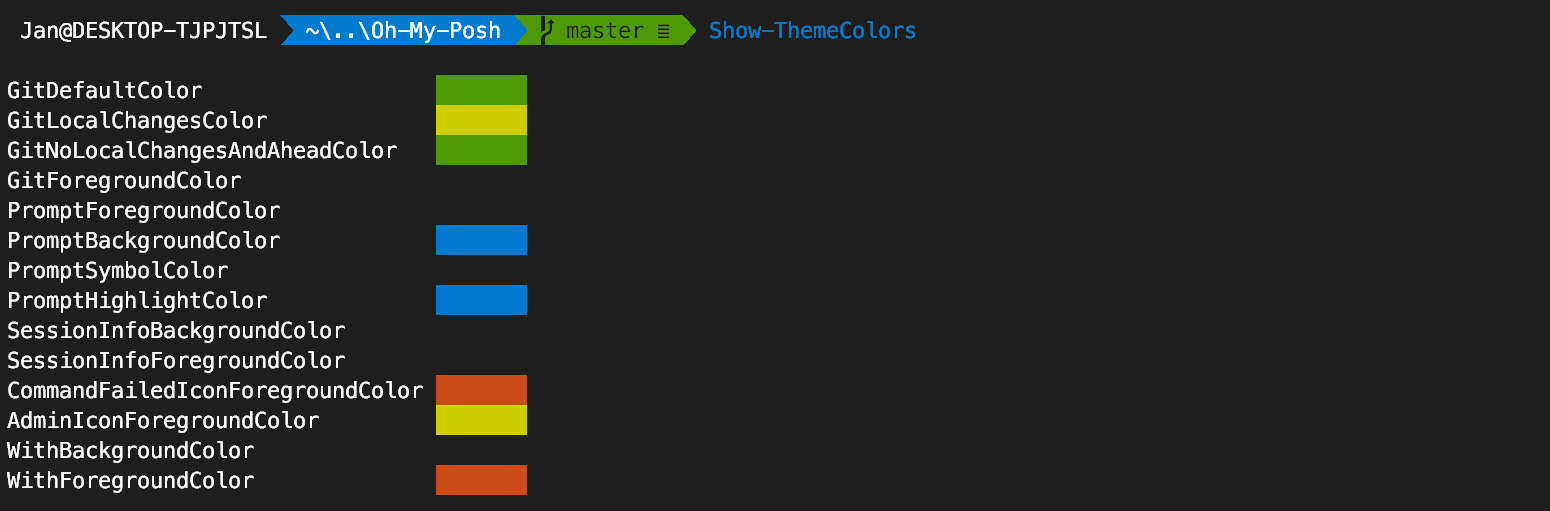
Show-ThemeColors: display the colors used by the theme
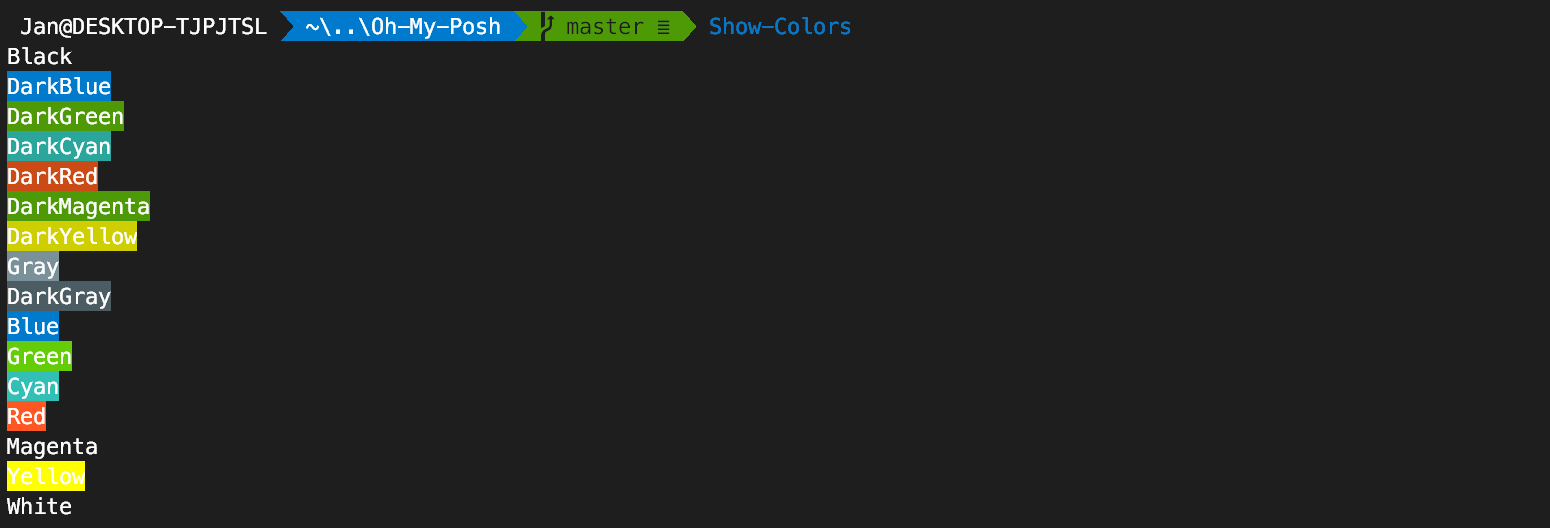
Show-Colors: display colors configured in ConEmu
Themes
Agnoster
Paradox
Sorin
Darkblood
Avit
Honukai
Fish
Robbyrussell
Pararussel
Material
Star
Zash
Lambda
Emodipt
Operator
Creating your own theme
If you want to create a theme it can be done rather easily by adding a mytheme.psm1 file in the folder indicated in $ThemeSettings.MyThemesLocation (the folder defaults to ~\Documents\WindowsPowerShell\PoshThemes, feel free to change it).
The only required function is Write-Theme. You can use the following template to get started:
#requires -Version 2 -Modules posh-git

function Write-Theme
{
    param(
        [bool]
        $lastCommandFailed,
        [string]
        $with
    )

    # enter your prompt building logic here
}

$sl = $global:ThemeSettings #local settings
Feel free to use the public helper functions Get-VCSStatus, Get-VcsInfo, Get-FormattedRootLocation, Get-ShortPath, Set-CursorForRightBlockWrite, Set-CursorUp, Set-Newline or add your own logic completely.
To test the output in ConEmu, just switch to your theme:
Set-Theme mytheme
If you want to include your theme in oh-my-posh, send me a PR and I'll try to give feedback ASAP.
Happy theming!
Adding stack count to a custom theme
As it seems getting access to the stack information when using pushd/popd is sort of mission impossible from within a theme, you can use a workaround proposed by Jonathan Leech-Pepin. In your $PROFILE, add a variable that will act as a correctly scoped pointer to fetch the stack context:
$getStackContext = {Get-Location -Stack}
Next, in your custom theme, access the information you want to display:
$stackCount = (&$getStackContext).count
iTerm2 is creating notifications every time
This is caused by the ConsoleTitle functionality.
As explained by Andrew Stanton-Nurse it's linked to how terminals work with OSC codes.
The fix is to disable the ConsoleTitle functionality when in iTerm2 by adding the following snippet to your $PROFILE.
How active is development on JanDeDobbeleer/oh-my-posh2?
The most recent commit recorded on JanDeDobbeleer/oh-my-posh2 was 5.7 years ago, based on the GitHub push timestamp. The repository has 278 forks — one of the better signals of community interest.
How does JanDeDobbeleer/oh-my-posh2 compare to other UI / UX projects?
JanDeDobbeleer/oh-my-posh2 is tracked by TopGit in the UI / UX category, with 5.2k GitHub stars and written in PowerShell. Browse the UI / UX topic page on TopGit to compare it against similar projects by stars and activity.
How many stars does JanDeDobbeleer/oh-my-posh2 have?
JanDeDobbeleer/oh-my-posh2 has 5.2k GitHub stars — refresh the page for the live number, or check github.com/JanDeDobbeleer/oh-my-posh2. TopGit mirrors GitHub's count but does not claim minute-by-minute accuracy.
Is JanDeDobbeleer/oh-my-posh2 open source?
Yes — JanDeDobbeleer/oh-my-posh2 ships under the MIT license, which makes its source code freely readable (and, depending on license terms, forkable and reusable). Source: github.com/JanDeDobbeleer/oh-my-posh2.
What is JanDeDobbeleer/oh-my-posh2?
JanDeDobbeleer/oh-my-posh2 (JanDeDobbeleer/oh-my-posh2) is a PowerShell project on GitHub. From the project's own README: A prompt theming engine for Powershell
Where do I read more about JanDeDobbeleer/oh-my-posh2?
This TopGit page is a snapshot — the READ ME tab shows the project's own README content (links stripped, images preserved). The GitHub repository at github.com/JanDeDobbeleer/oh-my-posh2 is the definitive source.
Read full README in the tab above.
Want a second opinion on oh-my-posh2?
Ask an AI that can read this page — one click and you get its take on oh-my-posh2.
 /oh-my-posh2