7.9k GitHub stars and counting — jwyang/faster-rcnn.pytorch is a Python project TopGit is tracking across repositories on the platform. A faster pytorch implementation of faster r-cnn
Snapshot summary built from the project's own GitHub metadata — there's no written TopGit review yet. The page will update automatically when a full review is published.
WHY NO REVIEW YET
TopGit writes full reviews for the most-starred, most-requested repositories. This page is a snapshot until then — see the READ ME tab for the original README in full.
[05/29/2020] This repo was initaited about two years ago, developed as the first open-sourced object detection code which supports multi-gpu training. It has been integrating tremendous efforts from many people. However, we have seen many high-quality repos emerged in the last years, such as:
maskrcnn-benchmark
detectron2
mmdetection
At this point, I think this repo is out-of-data in terms of the pipeline and coding style, and will not maintain actively. Though you can still use this repo as a playground, I highly recommend you move to the above repos to delve into west world of object detection!
Introduction
:boom: Good news! This repo supports pytorch-1.0 now!!! We borrowed some code and techniques from maskrcnn-benchmark. Just go to pytorch-1.0 branch!
This project is a faster pytorch implementation of faster R-CNN, aimed to accelerating the training of faster R-CNN object detection models. Recently, there are a number of good implementations:
rbgirshick/py-faster-rcnn, developed based on Pycaffe + Numpy
longcw/faster_rcnn_pytorch, developed based on Pytorch + Numpy
endernewton/tf-faster-rcnn, developed based on TensorFlow + Numpy
ruotianluo/pytorch-faster-rcnn, developed based on Pytorch + TensorFlow + Numpy
During our implementing, we referred the above implementations, especailly longcw/faster_rcnn_pytorch. However, our implementation has several unique and new features compared with the above implementations:
It is pure Pytorch code. We convert all the numpy implementations to pytorch!
It supports multi-image batch training. We revise all the layers, including dataloader, rpn, roi-pooling, etc., to support multiple images in each minibatch.
It supports multiple GPUs training. We use a multiple GPU wrapper (nn.DataParallel here) to make it flexible to use one or more GPUs, as a merit of the above two features.
It supports three pooling methods. We integrate three pooling methods: roi pooing, roi align and roi crop. More importantly, we modify all of them to support multi-image batch training.
It is memory efficient. We limit the image aspect ratio, and group images with similar aspect ratios into a minibatch. As such, we can train resnet101 and VGG16 with batchsize = 4 (4 images) on a single Titan X (12 GB). When training with 8 GPU, the maximum batchsize for each GPU is 3 (Res101), totaling 24.
It is faster. Based on the above modifications, the training is much faster. We report the training speed on NVIDIA TITAN Xp in the tables below.
What we are doing and going to do
Support both python2 and python3 (great thanks to cclauss).
Add deformable pooling layer (mainly supported by Xander).
Support pytorch-0.4.0 (this branch).
Support tensorboardX.
Support pytorch-1.0 (go to pytorch-1.0 branch).
Other Implementations
Feature Pyramid Network (FPN)
Mask R-CNN (ongoing already implemented by roytseng-tw)
Graph R-CNN (extension to scene graph generation)
Tutorial
Blog by ankur6ue
Benchmarking
We benchmark our code thoroughly on three datasets: pascal voc, coco and visual genome, using two different network architectures: vgg16 and resnet101. Below are the results:
1). PASCAL VOC 2007 (Train/Test: 07trainval/07test, scale=600, ROI Align)
model
#GPUs
batch size
lr
lr_decay
max_epoch
time/epoch
mem/GPU
mAP
VGG-16
1
1
1e-3
5
6
0.76 hr
3265MB
70.1
VGG-16
1
4
4e-3
8
9
0.50 hr
9083MB
69.6
VGG-16
8
16
1e-2
8
10
0.19 hr
5291MB
69.4
VGG-16
8
24
1e-2
10
11
0.16 hr
11303MB
69.2
Res-101
1
1
1e-3
5
7
0.88 hr
3200 MB
75.2
Res-101
1
4
4e-3
8
10
0.60 hr
9700 MB
74.9
Res-101
8
16
1e-2
8
10
0.23 hr
8400 MB
75.2
Res-101
8
24
1e-2
10
12
0.17 hr
10327MB
75.1
2). COCO (Train/Test: coco_train+coco_val-minival/minival, scale=800, max_size=1200, ROI Align)
model
#GPUs
batch size
lr
lr_decay
max_epoch
time/epoch
mem/GPU
mAP
VGG-16
8
16
1e-2
4
6
4.9 hr
7192 MB
29.2
Res-101
8
16
1e-2
4
6
6.0 hr
10956 MB
36.2
Res-101
8
16
1e-2
4
10
6.0 hr
10956 MB
37.0
NOTE. Since the above models use scale=800, you need add "--ls" at the end of test command.
3). COCO (Train/Test: coco_train+coco_val-minival/minival, scale=600, max_size=1000, ROI Align)
model
#GPUs
batch size
lr
lr_decay
max_epoch
time/epoch
mem/GPU
mAP
Res-101
8
24
1e-2
4
6
5.4 hr
10659 MB
33.9
Res-101
8
24
1e-2
4
10
5.4 hr
10659 MB
34.5
4). Visual Genome (Train/Test: vg_train/vg_test, scale=600, max_size=1000, ROI Align, category=2500)
model
#GPUs
batch size
lr
lr_decay
max_epoch
time/epoch
mem/GPU
mAP
VGG-16
1 P100
4
1e-3
5
20
3.7 hr
12707 MB
4.4
Thanks to Remi for providing the pretrained detection model on visual genome!
Click the links in the above tables to download our pre-trained faster r-cnn models.
If not mentioned, the GPU we used is NVIDIA Titan X Pascal (12GB).
Pytorch 0.4.0 (now it does not support 0.4.1 or higher)
CUDA 8.0 or higher
Data Preparation
PASCAL_VOC 07+12: Please follow the instructions in py-faster-rcnn to prepare VOC datasets. Actually, you can refer to any others. After downloading the data, create softlinks in the folder data/.
COCO: Please also follow the instructions in py-faster-rcnn to prepare the data.
Visual Genome: Please follow the instructions in bottom-up-attention to prepare Visual Genome dataset. You need to download the images and object annotation files first, and then perform proprecessing to obtain the vocabulary and cleansed annotations based on the scripts provided in this repository.
Pretrained Model
We used two pretrained models in our experiments, VGG and ResNet101. You can download these two models from:
VGG16: Dropbox, VT Server
ResNet101: Dropbox, VT Server
Download them and put them into the data/pretrained_model/.
NOTE. We compare the pretrained models from Pytorch and Caffe, and surprisingly find Caffe pretrained models have slightly better performance than Pytorch pretrained. We would suggest to use Caffe pretrained models from the above link to reproduce our results.
If you want to use pytorch pre-trained models, please remember to transpose images from BGR to RGB, and also use the same data transformer (minus mean and normalize) as used in pretrained model.
Compilation
As pointed out by ruotianluo/pytorch-faster-rcnn, choose the right -arch in make.sh file, to compile the cuda code:
GPU model
Architecture
TitanX (Maxwell/Pascal)
sm_52
GTX 960M
sm_50
GTX 1080 (Ti)
sm_61
Grid K520 (AWS g2.2xlarge)
sm_30
Tesla K80 (AWS p2.xlarge)
sm_37
More details about setting the architecture can be found here or here
Install all the python dependencies using pip:
pip install -r requirements.txt
Compile the cuda dependencies using following simple commands:
cd lib
sh make.sh
It will compile all the modules you need, including NMS, ROI_Pooing, ROI_Align and ROI_Crop. The default version is compiled with Python 2.7, please compile by yourself if you are using a different python version.
As pointed out in this issue, if you encounter some error during the compilation, you might miss to export the CUDA paths to your environment.
Train
Before training, set the right directory to save and load the trained models. Change the arguments "save_dir" and "load_dir" in trainval_net.py and test_net.py to adapt to your environment.
To train a faster R-CNN model with vgg16 on pascal_voc, simply run:
Specify the specific model session, checkepoch and checkpoint, e.g., SESSION=1, EPOCH=6, CHECKPOINT=416.
Demo
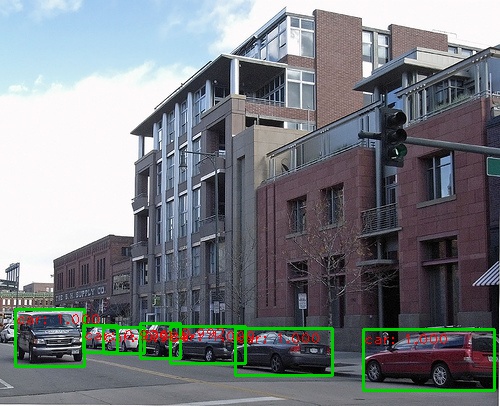
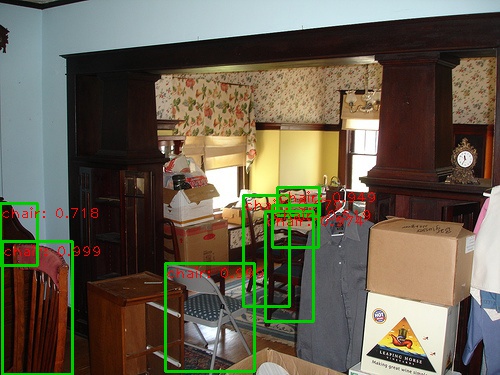
If you want to run detection on your own images with a pre-trained model, download the pretrained model listed in above tables or train your own models at first, then add images to folder $ROOT/images, and then run
The demo is stopped by clicking the image window and then pressing the 'q' key.
Authorship
This project is equally contributed by Jianwei Yang and Jiasen Lu, and many others (thanks to them!).
Citation
@article{jjfaster2rcnn,
    Author = {Jianwei Yang and Jiasen Lu and Dhruv Batra and Devi Parikh},
    Title = {A Faster Pytorch Implementation of Faster R-CNN},
    Journal = {https://github.com/jwyang/faster-rcnn.pytorch},
    Year = {2017}
}

@inproceedings{renNIPS15fasterrcnn,
    Author = {Shaoqing Ren and Kaiming He and Ross Girshick and Jian Sun},
    Title = {Faster {R-CNN}: Towards Real-Time Object Detection
             with Region Proposal Networks},
    Booktitle = {Advances in Neural Information Processing Systems ({NIPS})},
    Year = {2015}
}
Does jwyang/faster-rcnn.pytorch have a project website?
No homepage URL was recorded for jwyang/faster-rcnn.pytorch in TopGit's last sync. The README tab above frequently contains screenshots and demo links, or check the repository description on GitHub.
How active is development on jwyang/faster-rcnn.pytorch?
The most recent commit recorded on jwyang/faster-rcnn.pytorch was 4.3 years ago, based on the GitHub push timestamp. The repository has 2.3k forks — one of the better signals of community interest.
How many stars does jwyang/faster-rcnn.pytorch have?
jwyang/faster-rcnn.pytorch has 7.9k GitHub stars — refresh the page for the live number, or check github.com/jwyang/faster-rcnn.pytorch. TopGit mirrors GitHub's count but does not claim minute-by-minute accuracy.
Is jwyang/faster-rcnn.pytorch open source?
Yes — jwyang/faster-rcnn.pytorch ships under the MIT license, which makes its source code freely readable (and, depending on license terms, forkable and reusable). Source: github.com/jwyang/faster-rcnn.pytorch.
What else is in the AI Tools space?
jwyang/faster-rcnn.pytorch is tracked by TopGit under the AI Tools category, alongside 2 GitHub-tagged topics. Trending and Topics pages list peer repositories of comparable stars and language.
What topics is jwyang/faster-rcnn.pytorch associated with?
GitHub's repository topics for jwyang/faster-rcnn.pytorch: "faster-rcnn", "pytorch". TopGit's editorial category is AI Tools.
Where do I read more about jwyang/faster-rcnn.pytorch?
This TopGit page is a snapshot — the READ ME tab shows the project's own README content (links stripped, images preserved). The GitHub repository at github.com/jwyang/faster-rcnn.pytorch is the definitive source.
Read full README in the tab above.
Want a second opinion on faster-rcnn.pytorch?
Ask an AI that can read this page — one click and you get its take on faster-rcnn.pytorch.
 /faster-rcnn.pytorch