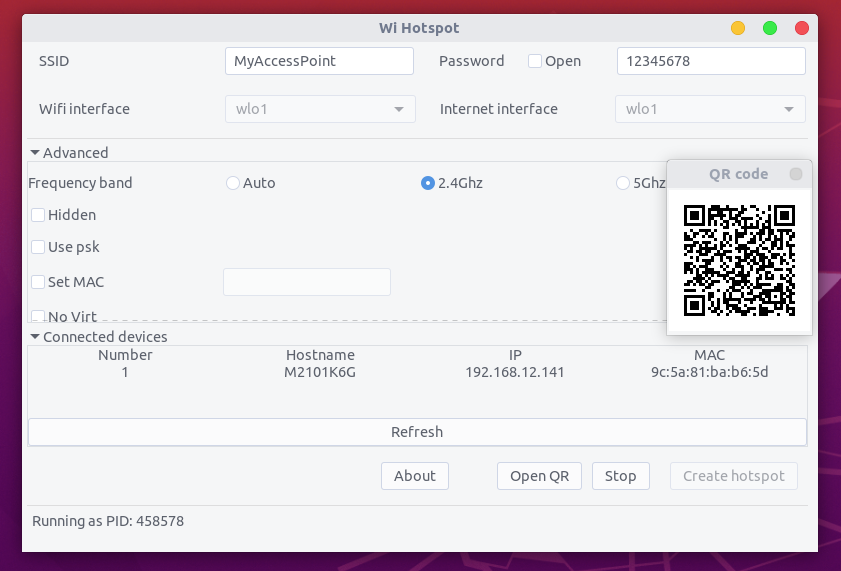
On GitHub, lakinduakash/linux-wifi-hotspot has picked up 4.5k stars, Shell. Feature-rich wifi hotspot creator for Linux which provides both GUI and command-line interface. It is also able to create a hotspot using the same wifi card which is connected to an AP already ( Similar to Windows 10).
Snapshot summary built from the project's own GitHub metadata — there's no written TopGit review yet. The page will update automatically when a full review is published.
WHY NO REVIEW YET
TopGit writes full reviews for the most-starred, most-requested repositories. This page is a snapshot until then — see the READ ME tab for the original README in full.
The GUI now shows the full create_ap log in a scrollable box instead of just the last line (#527)
5GHz hotspots now work on Intel adapters - new guide and helper scripts to restore the removed iwlwifilar_disable parameter (#527)
The hotspot now follows the channel your WiFi client is on instead of failing with Failed to set beacon parameters (#527)
Frequency band selection in the GUI no longer silently falls back to 2.4GHz (#527)
--ieee80211ac can now actually reach 80MHz, with the new --vht-chwidth option (#527)
Errors from create_ap are now shown in the GUI instead of failing silently (#525)
WiFi and Internet interfaces are preselected, so hotspot creation works out of the box (#525)
Virtual interfaces are no longer refused on PCIe/USB brcmfmac adapters (#525)
Use aa-complain instead of complain to fix the permission issue for dnsmasq
Fix some 5Ghz band not working issue
Compatible with iw 6.7
Project Update
Hi everyone — I've been inactive on this project for a while due to other commitments. I'm now actively looking for contributors and maintainers to help keep the project alive and growing.
If you're interested in contributing — whether it's fixing bugs, improving documentation, or developing new features — please open an issue to introduce yourself.
I'm also open to adding trusted collaborators with commit access who demonstrate consistent contributions and interest.
Thanks for being part of the community and keeping Linux-WiFi-Hotspot going!
Features
Share your wifi like in Windows - Use wifi and enable hotspot at the same time.
Share a wifi access point from any network interface
Create a hotspot with VPN - The hotspot has the traffic tunnelled through VPN. Useful for devices with no VPN app support like TV or gaming consoles.
Share wifi via QR code
MAC filter
View connected devices
Includes Both command line and GUI.
Support both 2.4GHz and 5GHz (Need to be compatible with your wifi adapter). Ex: You have connected to the 5GHz network and share a connection with 2.4GHz.
Customise wifi Channel, Change MAC address, etc.
Hide SSID
customize gateway IP address
Enable IEEE 80211n, IEEE 80211ac and IEEE 80211ax modes
Command line help and documentation
Read Command line help and documentation here.
If you only need the command line without GUI run make install-cli-only as the root user.
Notes
5Ghz hotspot will not start: on Intel (iwlwifi) adapters this is almost always the adapter's firmware keeping every 5GHz channel flagged no IR, which forbids beaconing. See 5GHz hotspots on Intel adapters - it explains how to confirm it and includes scripts that fix it. As a quick workaround, unselect Auto and select 2.4Ghz in frequency selection.
Failed to set beacon parameters: many adapters can only host an access point on the channel their WiFi client is already using, so the hotspot follows your current connection. Connect to a 2.4GHz network for a 2.4GHz hotspot, or a 5GHz one for 5GHz. See the same guide.
If any problems with RealTeK Wifi Adapters see this
Unable to allocate IP: firewalld issue: Please check for potential fixes: #209 #166
Could not open configuration file / Failed to run hostapd: on distributions that ship an enforcing AppArmor profile for hostapd (openSUSE, Debian/Ubuntu), that profile grants config reads through a narrow glob such as /etc/hostapd.* r,. A single * does not cross / in AppArmor, so everything under /tmp - where the generated config used to go - was denied, and hostapd reported it as a missing file. create_ap now reads the active profile and places its config and hostapd's control socket where the policy actually permits, and prints the denial if one happens anyway. See #524.
Clients see the hotspot but cannot connect: if devices keep associating and disconnecting, your adapter's firmware may not support AP mode with encryption. create_ap now warns when it detects this. Broadcom adapters in T2 Macs are known to be affected, and no create_ap option works around it - a USB WiFi adapter is needed. See #525.
Installation
Debian/Ubuntu ( deprecated - build yourself )
Download the Debian package from the latest release
OR
Good news! I was able to restore keys, new versions will be available via the PPA
Arch based distributions ( deprecated - build yourself )
Linux Wifi Hotspot is available as an AUR package. You can install it manually or with your favorite AUR helper.
For example, if you use yay you can do:
yay -S linux-wifi-hotspot
git clone https://github.com/lakinduakash/linux-wifi-hotspot
cd linux-wifi-hotspot

#build binaries
make

#install
sudo make install
Uninstallation
sudo make uninstall
Running
You can launch the GUI by searching for "Wifi Hotspot" in the Application Menu
or using the terminal with:
wihotspot
Create VPN Hotspot
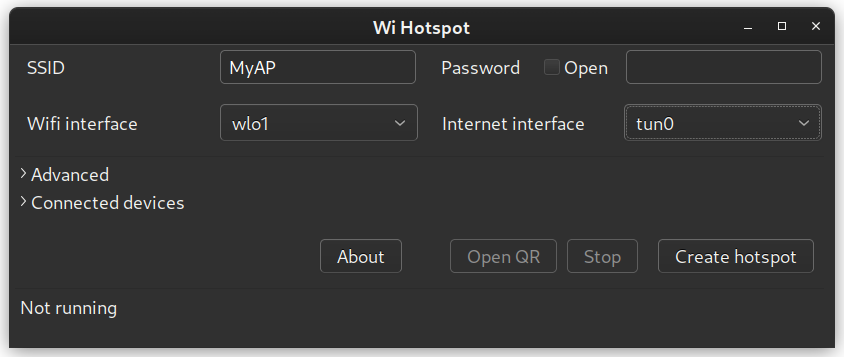
After connecting to VPN, Open wihotspot GUI. Select the virtual interface created by the VPN. In this case it is tun0
Run on Startup
The wihotspot GUI uses create_ap to create and manage access points. This service and core logic were originally created by
@oblique, and are now maintained in this
repository.
Start the hotspot service on startup (using your saved configuration) with:
systemctl enable create_ap
Contributing
If you found a bug or you have an idea about improving this make an issue. Even a small contribution makes the open source world more beautiful.
Please read CONTRIBUTING.md for more info.
Does lakinduakash/linux-wifi-hotspot have a project website?
No homepage URL was recorded for lakinduakash/linux-wifi-hotspot in TopGit's last sync. The README tab above frequently contains screenshots and demo links, or check the repository description on GitHub.
How active is development on lakinduakash/linux-wifi-hotspot?
The most recent commit recorded on lakinduakash/linux-wifi-hotspot was 9 months ago, based on the GitHub push timestamp. The repository has 395 forks — one of the better signals of community interest.
Is lakinduakash/linux-wifi-hotspot open source?
Yes — lakinduakash/linux-wifi-hotspot ships under the BSD-2-Clause license, which makes its source code freely readable (and, depending on license terms, forkable and reusable). Source: github.com/lakinduakash/linux-wifi-hotspot.
What license does lakinduakash/linux-wifi-hotspot use?
lakinduakash/linux-wifi-hotspot is released under the BSD-2-Clause license. Always verify the LICENSE file directly on GitHub for the authoritative terms — license strings can be edited out of sync with a project's actual stance.
What topics is lakinduakash/linux-wifi-hotspot associated with?
Where do I read more about lakinduakash/linux-wifi-hotspot?
This TopGit page is a snapshot — the READ ME tab shows the project's own README content (links stripped, images preserved). The GitHub repository at github.com/lakinduakash/linux-wifi-hotspot is the definitive source.
Read full README in the tab above.
Want a second opinion on linux-wifi-hotspot?
Ask an AI that can read this page — one click and you get its take on linux-wifi-hotspot.

 /linux-wifi-hotspot