lirantal/npq

A look at lirantal/npq: 1.8k stars on GitHub, written primarily in JavaScript, tracked under the Security category. safely install npm packages by auditing them pre-install stage
Snapshot summary built from the project's own GitHub metadata — there's no written TopGit review yet. The page will update automatically when a full review is published.
TopGit writes full reviews for the most-starred, most-requested repositories. This page is a snapshot until then — see the READ ME tab for the original README in full.
Snapshot
Top contributors
Show top contributors
npq allows you to audit npm packages before you install them





TL;DR how to use npq:
$ npx npq install express --dry-run
What it does: the npx tool downloads and execute npq package, runs an install check for the express package and --dry-run means npq exists regardless of success/errors.
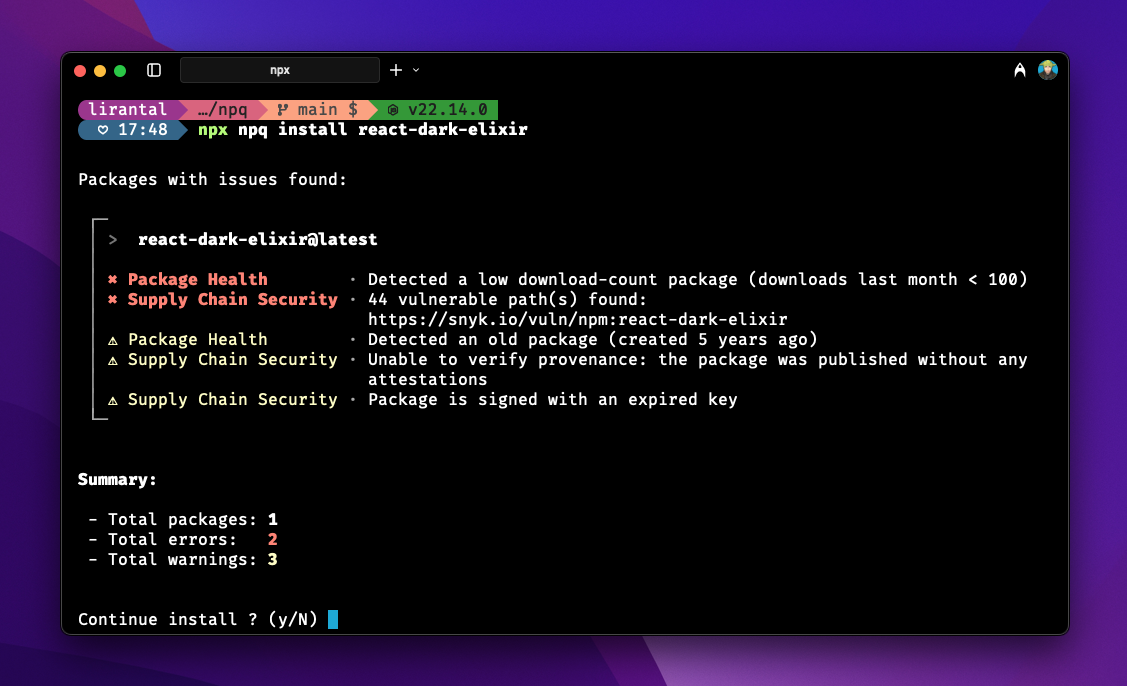
Here's a screenshot of npq in action:
Media coverage about npq:
- As mentioned on Thomas Gentilhomme's French book of Become a Node.js Developer
- Tao Bojlén's A web of trust for npm
- Zander's favorite list of command line tools
- Ran Bar Zik's npq review to install safe modules
- ostechnix's How To Safely Install Packages Using Npm Or Yarn On Linux
- debricked's How to evaluate the security of your NPM Package dependencies
- JavaScript January advent calendar's post on Open Source From Heaven, Modules From Hell
- Liran Tal's Malicious Modules — what you need to know when installing npm packages
About
Once npq is installed, you can safely* install packages:
npq install express
npq will perform the following steps to sanity check that the package is safe by employing syntactic heuristics and querying a CVE database:
- Consult the snyk.io database of publicly disclosed vulnerabilities to check if a security vulnerability exists for this package and its version.
- Package age on npm
- Package download count as a popularity metric
- Package has a README file
- Package has a LICENSE file
- Package has pre/post install scripts
IMPORTANT: npq by default uses an auto-continue mode when warnings are detected (no errors), waiting 15 seconds before proceeding with the installation. You can disable this behavior via the --disable-auto-continue CLI flag or the NPQ_DISABLE_AUTO_CONTINUE=true environment variable to enforce a strict review and security hardened installs. See the auto-continue documentation for more details.
When npq completes its signal checks it hands over the actual package install job to the package manager (npm by default, or as specified via the NPQ_PKG_MGR environment variable).
DISCLAIMER: there's no guaranteed absolute safety; a malicious or vulnerable package could still exist that has no security vulnerabilities publicly disclosed and passes npq's checks.
Demo
https://github.com/user-attachments/assets/619ab3f6-aa3f-483c-9560-0f18e033e6bf
Install
npm install -g npq
Note: we recommend installing with npm rather than yarn. That way, npq can automatically install shell aliases for you.
You can also install npq via Homebrew on macOS or Linux:
brew install npq
Usage
Install packages with npq
npq install express
Custom registries
NPQ reads standard npm registry configuration, including default and scoped registries, authentication, proxies, and TLS settings. You can also select a registry on the command line; the option is shared with the package manager used for installation:
npq install @company/tool --registry=https://artifactory.example.com/artifactory/api/npm/npm-virtual/
See Custom registries for .npmrc examples, configuration precedence, private CA setup, skipped capability behavior, and NPQ's no-fallback privacy guarantee.
Embed in your day to day
Since npq is a pre-step to ensure that the npm package you're installing is safe, you can safely embed it in your day-to-day npm usage so there's no need to remember to run npq explicitly.
alias npm='npq-hero'
Offload to package managers
If you're using yarn, pnpm, or generally want to explicitly tell npq which package manager to use you can specify an environment variable: NPQ_PKG_MGR=<package-manager>
Examples:
Using yarn 1.x:
alias yarn="NPQ_PKG_MGR=yarn npq-hero"
Using yarn 4.x:
NPQ_PKG_MGR=yarn yarn run npq-hero
or
NPQ_PKG_MGR=yarn yarn exec npq-hero
Using pnpm:
NPQ_PKG_MGR=pnpm npx npq install fastify
Using pnpm with alias:
alias pnpm="NPQ_PKG_MGR=pnpm npq-hero"
pnpm --filter workspace... add express
Note: npq by default will offload all commands and their arguments to the npm (or other package manager as specified) after it finished its due-diligence checks for the respective packages.
Marshalls
| Marshall Name | Description | Notes |
|---|---|---|
| age | Will show a warning for a package if its age on npm is less than 22 days | Checks a package creation date, not a specific version |
| author | Validates the resolved version’s publisher (_npmUser), flags a new maintainer on the package (first publish by that email or trusted publisher configuration within 21 days), dormant maintainer gaps on versions published within 30 days (warning if over ~6 months since their last publish on that package, error if over ~9 months), and very recent publishes | See docs/feature/author-marshall.md |
| downloads | Will show a warning for a package if its download count in the last month is less than 20 | Reports not evaluated for custom-registry packages instead of querying the public npm downloads service |
| readme | Will show a warning if a package has no README or it has been detected as a security placeholder package by npm staff | |
| repo | Will show a warning if a package has been found without a valid and working repository URL | Checks the latest version for a repository URL |
| scripts | Will show a warning if a package has a pre/post install script which could potentially be malicious | |
| snyk | Will show a warning if a package has been found with vulnerabilities in Snyk's database | For Snyk to work you need to either have the snyk npm package installed with a valid API token, or make the token available in the SNYK_TOKEN environment variable, and npq will use it |
| license | Will show a warning if a package has been found without a license field | Checks the latest version for a license |
| expired domains | Normalizes and checks complete maintainer email hosts, then corroborates a simple two-label DNS failure through authoritative RDAP before warning | Multipart and otherwise inconclusive results are reported as not evaluated; see expired-domain marshall documentation |
| signatures | Will compare the package's signature as it shows on the registry's packument with signing keys published by the selected registry | Reports not evaluated if the selected registry does not expose signing keys |
| provenance | Will verify the package's attestations of provenance metadata for the published package, and error on provenance regression (an older semver had registry provenance metadata but the version you install does not) | Reports not evaluated if the selected registry does not expose signing keys or attestations |
| version-maturity | Will show an error if the specific version being installed was published less than 7 days ago | Suggests the highest older semver outside npq's 30-day version-recency window when one is available |
| newBin | Will show a warning if the package version being installed introduces a new command-line binary (via the bin field in package.json) that was not present in its previous version. | Helps identify potentially unexpected new executables being added to your node_modules/.bin/ directory. |
| typosquatting | Will show a warning if the package name is similar to a popular package name, which could indicate a potential typosquatting attack. | Helps identify packages that may be trying to trick users into installing them by mimicking popular package names. |
| deprecation | Will show a warning if the package version is deprecated on npm or if its GitHub repository has been archived. | Helps identify packages that are no longer maintained or recommended for use. Set GITHUB_TOKEN environment variable for higher GitHub API rate limits. |
Older release suggestions
When a requested version fails the version-maturity check, npq may show the highest older semver published outside its 30-day package-version recency window:
 │
 │ ℹ Suggested older release · @openai/[email protected] — published 33 days ago
 │   Clears npq's package-version recency windows. Re-run npq to audit this
 │   version; compatibility is not evaluated.
The suggestion:
- can cross a major-version boundary for tags such as
latest; - is based on cached package publication metadata and is not automatically installed;
- is not a statement that the older release is safe or that it passes every npq check;
- does not evaluate API or runtime compatibility.
Run npq again with the suggested version and review its compatibility before installing it.
Disabling Marshalls
To disable a marshall altogether, set an environment variable using with the marshall's shortname.
Example, to disable the Snyk vulnerability marshall:
MARSHALL_DISABLE_SNYK=1 npq install express
Available Marshall Environment Variables
Here are all the available environment variable names for disabling specific marshalls:
| Marshall Name | Environment Variable | Description |
|---|---|---|
| age | MARSHALL_DISABLE_AGE | Disable package age checks |
| author | MARSHALL_DISABLE_AUTHOR | Disable package author verification |
| downloads | MARSHALL_DISABLE_DOWNLOADS | Disable download count checks |
| expired domains | MARSHALL_DISABLE_MAINTAINERS_EXPIRED_EMAILS | Disable expired domain checks for maintainer emails |
| license | MARSHALL_DISABLE_LICENSE | Disable license availability checks |
| provenance | MARSHALL_DISABLE_PROVENANCE | Disable package provenance verification |
| repo | MARSHALL_DISABLE_REPO | Disable repository URL validation |
| scripts | MARSHALL_DISABLE_SCRIPTS | Disable pre/post install script checks |
| signatures | MARSHALL_DISABLE_SIGNATURES | Disable registry signature verification |
| snyk | MARSHALL_DISABLE_SNYK | Disable Snyk vulnerability checks |
| typosquatting | MARSHALL_DISABLE_TYPOSQUATTING | Disable typosquatting detection |
| version-maturity | MARSHALL_DISABLE_VERSION_MATURITY | Disable version maturity checks |
| newBin | MARSHALL_DISABLE_NEWBIN | Disable new binary introduction checks |
| deprecation | MARSHALL_DISABLE_DEPRECATION | Disable deprecation checks |
Run checks on package without installing it
Running npq without an install / i / add subcommand (for example from a project directory with a package.json) audits dependencies only and does not run the package manager. The same applies to npq <package>: checks only, no install passthrough. Use npq install … when you want npq to hand off to npm (or NPQ_PKG_MGR) after the checks.
Project-mode audits currently cover only declared direct dependencies from the current project's package.json (dependencies and devDependencies). They do not read lockfiles or discover transitive dependencies.
npq install express --dry-run
Force non-rich text output
npq install express --plain
Machine-readable audits
Use --json for a non-interactive, audit-only result suitable for CI:
npq install express --json
When npq detects a supported coding-agent environment, non-install audits still
use the same audit-only JSON mode automatically. Explicit npq install ... and
recognized npq-hero install ... commands keep the normal audit/install
pipeline instead, using coding-agent detection as an authorization for
warning-only installs. See the full coding-agent detection signal
table for the supported
signals and contextual matchers.
JSON mode never invokes the package manager. It exits 0 for a clean audit,
1 for findings, and 2 when the audit cannot complete. See
JSON audit output.
Non-interactive installs
npq never uses the warning countdown when standard input is not interactive. If an audit reports warnings or errors in CI, npq exits nonzero and does not invoke the package manager.
For ordinary automation that intentionally wants warning-only installs to continue, opt in explicitly:
npq install express --allow-non-interactive-install
NPQ_ALLOW_NON_INTERACTIVE_INSTALL=true npq install express
When you use npq-hero or an aliased package manager, the ordinary opt-in is
environment-only because the wrapper does not expose its own CLI flags:
NPQ_ALLOW_NON_INTERACTIVE_INSTALL=true npm install express
Detected coding-agent environments are treated as an explicit opt-in for
npq install express and npq-hero install express, so agent-driven
package-manager installs continue without the extra flag. Explicit --json
remains audit-only and never invokes the package manager.
Disable auto-continue countdown
By default, when npq detects only warnings (no errors), it automatically proceeds with installation after a 15-second countdown. To disable this behavior and require explicit confirmation in an interactive terminal:
Using the CLI flag:
npq install express --disable-auto-continue
Using the environment variable:
export NPQ_DISABLE_AUTO_CONTINUE=true
npq install express
Or set it permanently in your shell profile (.bashrc, .zshrc, etc.):
export NPQ_DISABLE_AUTO_CONTINUE=true
When auto-continue is disabled, npq prompts for explicit confirmation in an interactive terminal. Non-interactive warning-only installs remain fail-closed unless the explicit non-interactive install opt-in or coding-agent authorization applies.
Learn Node.js Security

Learn Node.js Secure Coding techniques and best practices from Liran Tal
FAQ
- What is the difference between
npqandnpq-hero?
npqis meant to be its own stand-alone CLI so it has command line flags like--dry-runand others (seenpq --help). However, when you want to alias thenpmCLI to NPQ you should usenpq-heroas the executable of the alias to npm (e.g:alias npm=npq), which meansnpq-herocan't have its own command-line flags because they could conflict with thenpmexecutable.
- Can I use NPQ without having npm or yarn?
- NPQ will audit a package for possible security issues, but it isn't a replacement for npm or yarn. When you choose to continue installing the package, it will offload the installation process to your choice of either npm or yarn.
- How is NPQ different from npm audit?
npm installwill install a module even if it has vulnerabilities; NPQ will display the issues detected, and prompt the user for confirmation on whether to proceed installing it.- NPQ will run synthetic checks, called marshalls, on the characteristics of a module, such as whether the module you are going to install has a
pre-installscript which can be potentially harmful for your system and prompt you whether to install it. Whereasnpm auditwill not perform any such checks, and only consults a vulnerability database for known security issues. npm auditis closer in functionality to what Snyk does, rather than what NPQ does.
- Do I require a Snyk API key in order to use NPQ?
- It's not required. If NPQ is unable to detect a Snyk API key for the user running NPQ, then it will skip the database vulnerabilities check. We do, however, greatly encourage you to use Snyk, and connect it with NPQ for broader security.
- Why is NPQ connecting to external domains like gmail.com or personal websites during installation?
- This is not telemetry. NPQ does not collect any usage data. When auditing a package, NPQ fetches the maintainers/authors of the dependency and checks their email addresses to verify they are valid and not associated with expired domains. Expired domains can be abused by attackers for account takeover (ATO) attacks to compromise packages with malicious versions. Hence, NPQ may make DNS requests to domains like
gmail.comor personal domains found in maintainer emails. After a simple two-label domain returns NXDOMAIN and its top-level domain resolves, NPQ may fetch the official IANA RDAP bootstrap and query the selected authoritative HTTPS RDAP service, sending only the normalized two-label domain. Additionally, NPQ makes HTTP requests toosv.devto fetch security vulnerability data (or uses Snyk if configured, as a prioritized option).
Documentation
- Project documentation - development, testing, architecture, and conventions.
Contributing
Please consult the CONTRIBUTING for guidelines on contributing to this project
Author
Liran Tal [email protected]
Related repositories
OWASP Cheat Sheet Series is a GitHub repository of markdown security cheat sheets, one file per application-security topic, maintained by the OWASP Foundation. The official reading surface is cheatsheetseries.owasp.org; the repo itself is the source and the place contributions land as pull requests.
x64dbg is an open-source debugger for Windows built to inspect executables you don't have source code for, aimed squarely at reverse engineering and malware analysis. It ships as separate 32-bit and 64-bit builds, bundles disassembly, assembly patching, and import reconstruction into one download, and can be extended through a documented plugin system.
Find secrets with Gitleaks 🔑
Infisical is the open-source platform for securing secrets, certificates, access, and AI Agents.
Quick answers
Does lirantal/npq have a project website?
No homepage URL was recorded for lirantal/npq in TopGit's last sync. The README tab above frequently contains screenshots and demo links, or check the repository description on GitHub.
How active is development on lirantal/npq?
The most recent commit recorded on lirantal/npq was 3 months ago, based on the GitHub push timestamp. The repository has 44 forks — one of the better signals of community interest.
Is lirantal/npq open source?
Yes — lirantal/npq ships under the Apache-2.0 license, which makes its source code freely readable (and, depending on license terms, forkable and reusable). Source: github.com/lirantal/npq.
What license does lirantal/npq use?
lirantal/npq is released under the Apache-2.0 license. Always verify the LICENSE file directly on GitHub for the authoritative terms — license strings can be edited out of sync with a project's actual stance.
What topics is lirantal/npq associated with?
GitHub's repository topics for lirantal/npq: "appsec", "best-practices", "command-line-tool", "nodejs", "npm", "package-manager", "security", "security-audit", "security-tools", "supply-chain-security", "vulnerabilities", "vulnerability-scanners". TopGit's editorial category is Security.
Where do I read more about lirantal/npq?
This TopGit page is a snapshot — the READ ME tab shows the project's own README content (links stripped, images preserved). The GitHub repository at github.com/lirantal/npq is the definitive source.
Read full README in the tab above.
Is npq worth your time?
ChatGPT, Claude and Perplexity can all read this page. Ask one of them what it makes of npq.