localstack/plux — 76★ on GitHub (Python). A dynamic code loading framework for building pluggable Python distributions
Snapshot summary built from the project's own GitHub metadata — there's no written TopGit review yet. The page will update automatically when a full review is published.
WHY NO REVIEW YET
TopGit writes full reviews for the most-starred, most-requested repositories. This page is a snapshot until then — see the READ ME tab for the original README in full.
plux is the dynamic code loading framework used in LocalStack.
Overview
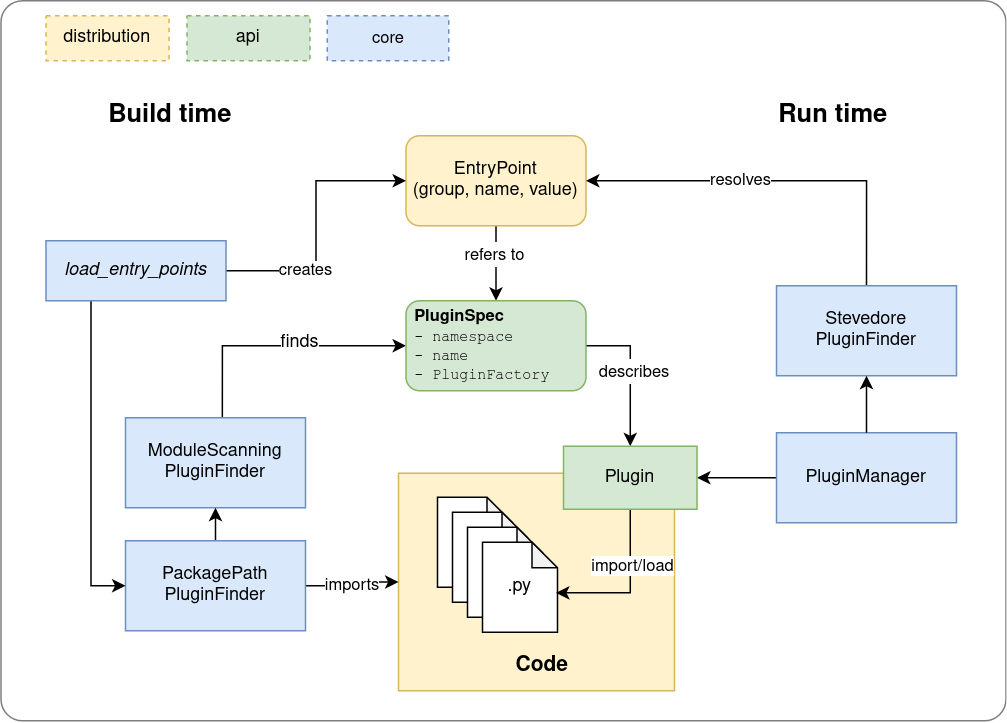
Plux builds a higher-level plugin mechanism around Python's entry point mechanism.
It provides tools to load plugins from entry points at run time, and to discover entry points from plugins at build time (so you don't have to declare entry points statically in your setup.py).
Core concepts
PluginSpec: describes a Plugin. Each plugin has a namespace, a unique name in that namespace, and a PluginFactory (something that creates Plugin the spec is describing.
In the simplest case, that can just be the Plugin's class).
Plugin: an object that exposes a should_load and load method.
Note that it does not function as a domain object (it does not hold the plugins lifecycle state, like initialized, loaded, etc..., or other metadata of the Plugin)
PluginFinder: finds plugins, either at build time (by scanning the modules using pkgutil and setuptools) or at run time (reading entrypoints of the distribution using importlib)
PluginManager: manages the run time lifecycle of a Plugin, which has three states:
resolved: the entrypoint pointing to the PluginSpec was imported and the PluginSpec instance was created
init: the PluginFactory of the PluginSpec was successfully invoked
loaded: the load method of the Plugin was successfully invoked
Loading Plugins
At run time, a PluginManager uses a PluginFinder that in turn uses importlib to scan the available entrypoints for things that look like a PluginSpec.
With PluginManager.load(name: str) or PluginManager.load_all(), plugins within the namespace that are discoverable in entrypoints can be loaded.
If an error occurs at any state of the lifecycle, the PluginManager informs the PluginLifecycleListener about it, but continues operating.
Discovering entrypoints
Plux supports two modes for building entry points: build-hooks mode (default) and manual mode.
Build-hooks mode (default)
To build a source distribution and a wheel of your code with your plugins as entrypoints, simply run python setup.py plugins sdist bdist_wheel.
If you don't have a setup.py, you can use the plux build frontend and run python -m plux entrypoints.
How it works:
For discovering plugins at build time, plux provides a custom setuptools command plugins, invoked via python setup.py plugins.
The command uses a special PluginFinder that collects from the codebase anything that can be interpreted as a PluginSpec, and creates from it a plugin index file plux.json, that is placed into the .egg-info distribution metadata directory.
When a setuptools command is used to create the distribution (e.g., python setup.py sdist/bdist_wheel/...), plux finds the plux.json plugin index and extends automatically the list of entry points (collected into .egg-info/entry_points.txt).
The plux.json file becomes a part of the distribution, s.t., the plugins do not have to be discovered every time your distribution is installed elsewhere.
Discovering at build time also works when using python -m build, since it calls registered setuptools scripts.
Manual mode
Manual mode is useful for isolated build environments where dependencies cannot be installed, or when build hooks are not suitable for your build process.
To enable manual mode, add the following to your pyproject.toml:
[tool.plux]
entrypoint_build_mode = "manual"
In manual mode, plux does not use build hooks. Instead, you manually generate entry points by running:
python -m plux entrypoints
This creates a plux.ini file in your working directory with the discovered plugins. You can then include this file in your distribution by configuring your pyproject.toml:
You can also manually control the output format and location:
python -m plux discover --format ini --output plux.ini
Examples
To build something using the plugin framework, you will first want to introduce a Plugin that does something when it is loaded.
And then, at runtime, you need a component that uses the PluginManager to get those plugins.
One class per plugin
This is the way we went with LocalstackCliPlugin. Every plugin class (e.g., ProCliPlugin) is essentially a singleton.
This is easy, as the classes are discoverable as plugins.
Simply create a Plugin class with a name and namespace and it will be discovered by the build time PluginFinder.
from plux import Plugin

# abstract case (not discovered at build time, missing name)
class CliPlugin(Plugin):
    namespace = "my.plugins.cli"

    def load(self, cli):
        self.attach(cli)

    def attach(self, cli):
        raise NotImplementedError

# discovered at build time (has a namespace, name, and is a Plugin)
class MyCliPlugin(CliPlugin):
    name = "my"

    def attach(self, cli):
        # ... attach commands to cli object
now we need a PluginManager (which has a generic type) to load the plugins for us:
cli = # ... needs to come from somewhere

manager: PluginManager[CliPlugin] = PluginManager("my.plugins.cli", load_args=(cli,))

plugins: List[CliPlugin] = manager.load_all()

# todo: do stuff with the plugins, if you want/need
#  in this example, we simply use the plugin mechanism to run a one-shot function (attach) on a load argument
Re-usable plugins
When you have lots of plugins that are structured in a similar way, we may not want to create a separate Plugin class
for each plugin. Instead we want to use the same Plugin class to do the same thing, but use several instances of it.
The PluginFactory, and the fact that PluginSpec instances defined at module level are discoverable (inpired
by pluggy), can be used to achieve that.
from plux import Plugin, PluginFactory, PluginSpec
import importlib

class ServicePlugin(Plugin):

    def __init__(self, service_name):
        self.service_name = service_name
        self.service = None

    def should_load(self):
        return self.service_name in config.SERVICES

    def load(self):
        module = importlib.import_module("localstack.services.%s" % self.service_name)
        # suppose we define a convention that each service module has a Service class, like moto's `Backend`
        self.service = module.Service()

def service_plugin_factory(name) -> PluginFactory:
    def create():
        return ServicePlugin(name)

    return create

# discoverable
s3 = PluginSpec("localstack.plugins.services", "s3", service_plugin_factory("s3"))

# discoverable
dynamodb = PluginSpec("localstack.plugins.services", "dynamodb", service_plugin_factory("dynamodb"))

# ... could be simplified with convenience framework code, but the principle will stay the same
Then we could use the PluginManager to build a Supervisor
from plux import PluginManager

class Supervisor:
    manager: PluginManager[ServicePlugin]

    def start(self, service_name):
        plugin = self.manager.load(service_name)
        service = plugin.service
        service.start()
Functions as plugins
with the @plugin decorator, you can expose functions as plugins. They will be wrapped by the framework
into FunctionPlugin instances, which satisfy both the contract of a Plugin, and that of the function.
from plux import plugin

@plugin(namespace="localstack.configurators")
def configure_logging(runtime):
    logging.basicConfig(level=runtime.config.loglevel)


@plugin(namespace="localstack.configurators")
def configure_somethingelse(runtime):
    # do other stuff with the runtime object
    pass
With a PluginManager via load_all, you receive the FunctionPlugin instances, that you can call like the functions
runtime = LocalstackRuntime()

for configurator in PluginManager("localstack.configurators").load_all():
    configurator(runtime)
Configuring your distribution
If you are building a python distribution that exposes plugins discovered by plux, you need to configure your projects build system so other dependencies creates the entry_points.txt file when installing your distribution.
For a pyproject.toml template this involves adding the build-system section:
You can pass additional configuration to Plux, either via the command line or your project pyproject.toml.
Configuration options
The following options can be configured in the [tool.plux] section of your pyproject.toml:
[tool.plux]
# The build mode for entry points: "build-hooks" (default) or "manual"
entrypoint_build_mode = "manual"

# The file path to scan for plugins (optional)
path = "mysrc"

# Python packages to exclude during discovery (optional)
exclude = ["**/database/alembic*"]

# Python packages to include during discovery (optional), setting this will ignore all other paths
include = ["**/database*"]
entrypoint_build_mode
Controls how plux generates entry points:
build-hooks (default): Plux automatically hooks into the build process to generate entry points
manual: You manually control when and how entry points are generated (see Manual mode)
path
Specifies the file path to scan for plugins. By default, plux scans the entire project.
include
A list of paths to include during plugin discovery. If specified, only the named items will be included. If not specified, all found items in the path will be included. The include parameter supports shell-style wildcard patterns.
Examples:
# Include multiple patterns
python -m plux discover --include "myapp/plugins*,myapp/extensions*" --format ini
You can also specify these values in the [tool.plux] section of your pyproject.toml as shown above.
Note: When include is specified, plux ignores all other paths that would otherwise be found.
exclude
When discovering entrypoints, Plux will try importing your code to discover Plugins.
Some parts of your codebase might have side effects, or raise errors when imported outside a specific context like some database
migration scripts.
You can ignore those Python packages by specifying the --exclude flag to the entrypoints discovery commands:
The option takes a list of comma-separated values that can be paths or package names with shell-style wildcards. 'foo.*' will exclude all subpackages of foo (but not foo itself).
You can also specify these values in the [tool.plux] section of your pyproject.toml as shown above.
Install
pip install plux
Develop
Create the virtual environment, install dependencies, and run tests
The most recent commit recorded on localstack/plux was 16 days ago, based on the GitHub push timestamp. The repository has 0 forks — one of the better signals of community interest.
How many stars does localstack/plux have?
localstack/plux has 76 GitHub stars — refresh the page for the live number, or check github.com/localstack/plux. TopGit mirrors GitHub's count but does not claim minute-by-minute accuracy.
What else is in the Backend space?
localstack/plux is tracked by TopGit under the Backend category, alongside 3 GitHub-tagged topics. Trending and Topics pages list peer repositories of comparable stars and language.
What language is localstack/plux written in?
localstack/plux is written primarily in Python. GitHub's language field is based on the largest share of bytes in the default branch.
What topics is localstack/plux associated with?
GitHub's repository topics for localstack/plux: "plugin", "python", "setuptools". TopGit's editorial category is Backend.
Where do I read more about localstack/plux?
This TopGit page is a snapshot — the READ ME tab shows the project's own README content (links stripped, images preserved). The GitHub repository at github.com/localstack/plux is the definitive source.
Why is localstack/plux categorized under Backend?
TopGit places localstack/plux in the Backend category based on its GitHub topics and description (tagged: "plugin", "python", "setuptools"). Categories are assigned from real repository metadata, not editorial guesswork.
Read full README in the tab above.
Curious whether plux is right for you?
Let ChatGPT, Claude, or Perplexity look into it — click below and see what AI actually says about plux.

 /plux