MaartenGr/BERTopic is a AI Tools project on GitHub, written primarily in Python. It has 7.9k stars. Leveraging BERT and c-TF-IDF to create easily interpretable topics.
Snapshot summary built from the project's own GitHub metadata — there's no written TopGit review yet. The page will update automatically when a full review is published.
WHY NO REVIEW YET
TopGit writes full reviews for the most-starred, most-requested repositories. This page is a snapshot until then — see the READ ME tab for the original README in full.
BERTopic is a topic modeling technique that leverages 🤗 transformers and c-TF-IDF to create dense clusters
allowing for easily interpretable topics whilst keeping important words in the topic descriptions.
BERTopic supports all kinds of topic modeling techniques:
Guided
Supervised
Semi-supervised
Manual
Multi-topic distributions
Hierarchical
Class-based
Dynamic
Online/Incremental
Multimodal
Multi-aspect
Text Generation/LLM
Zero-shot (new!)
Merge Models (new!)
Seed Words (new!)
Corresponding medium posts can be found here, here and here. For a more detailed overview, you can read the paper or see a brief overview.
Installation
Installation, with sentence-transformers, can be done using uv:
uv add bertopic
or with pip:
pip install bertopic
If you want to install BERTopic with other embedding models, you can choose one of the following:
# Choose an embedding backend
pip install bertopic[flair,gensim,spacy,use]

# Topic modeling with images
pip install bertopic[vision]
For a light-weight installation without transformers, UMAP and/or HDBSCAN (for training with Model2Vec or inference), see this tutorial.
Getting Started
For an in-depth overview of the features of BERTopic
you can check the full documentation or you can follow along
with one of the examples below:
Name
Link
Start Here - Best Practices in BERTopic
🆕 New! - Topic Modeling on Large Data (GPU Acceleration)
🆕 New! - Topic Modeling with Llama 2 🦙
🆕 New! - Topic Modeling with Quantized LLMs
Topic Modeling with BERTopic
(Custom) Embedding Models in BERTopic
Advanced Customization in BERTopic
(semi-)Supervised Topic Modeling with BERTopic
Dynamic Topic Modeling with Trump's Tweets
Topic Modeling arXiv Abstracts
Quick Start
We start by extracting topics from the well-known 20 newsgroups dataset containing English documents:
The -1 topic refers to all outlier documents and are typically ignored. Each word in a topic describes the underlying theme of that topic and can be used
for interpreting that topic. Next, let's take a look at the most frequent topic that was generated:
Using .get_document_info, we can also extract information on a document level, such as their corresponding topics, probabilities, whether they are representative documents for a topic, etc.:
>>> topic_model.get_document_info(docs)

Document                               Topic	Name	                        Top_n_words                     Probability    ...
I am sure some bashers of Pens...	0	0_game_team_games_season	game - team - games...	        0.200010       ...
My brother is in the market for...      -1     -1_can_your_will_any	        can - your - will...	        0.420668       ...
Finally you said what you dream...	-1     -1_can_your_will_any	        can - your - will...            0.807259       ...
Think! It's the SCSI card doing...	49     49_windows_drive_dos_file	windows - drive - docs...	0.071746       ...
1) I have an old Jasmine drive...	49     49_windows_drive_dos_file	windows - drive - docs...	0.038983       ...
🔥 Tip: Use BERTopic(language="multilingual") to select a model that supports 50+ languages.
Fine-tune Topic Representations
In BERTopic, there are a number of different topic representations that we can choose from. They are all quite different from one another and give interesting perspectives and variations of topic representations. A great start is KeyBERTInspired, which for many users increases the coherence and reduces stopwords from the resulting topic representations:
from bertopic.representation import KeyBERTInspired

# Fine-tune your topic representations
representation_model = KeyBERTInspired()
topic_model = BERTopic(representation_model=representation_model)
However, you might want to use something more powerful to describe your clusters. You can even use ChatGPT or other models from OpenAI to generate labels, summaries, phrases, keywords, and more:
🔥 Tip: Instead of iterating over all of these different topic representations, you can model them simultaneously with multi-aspect topic representations in BERTopic.
Visualizations
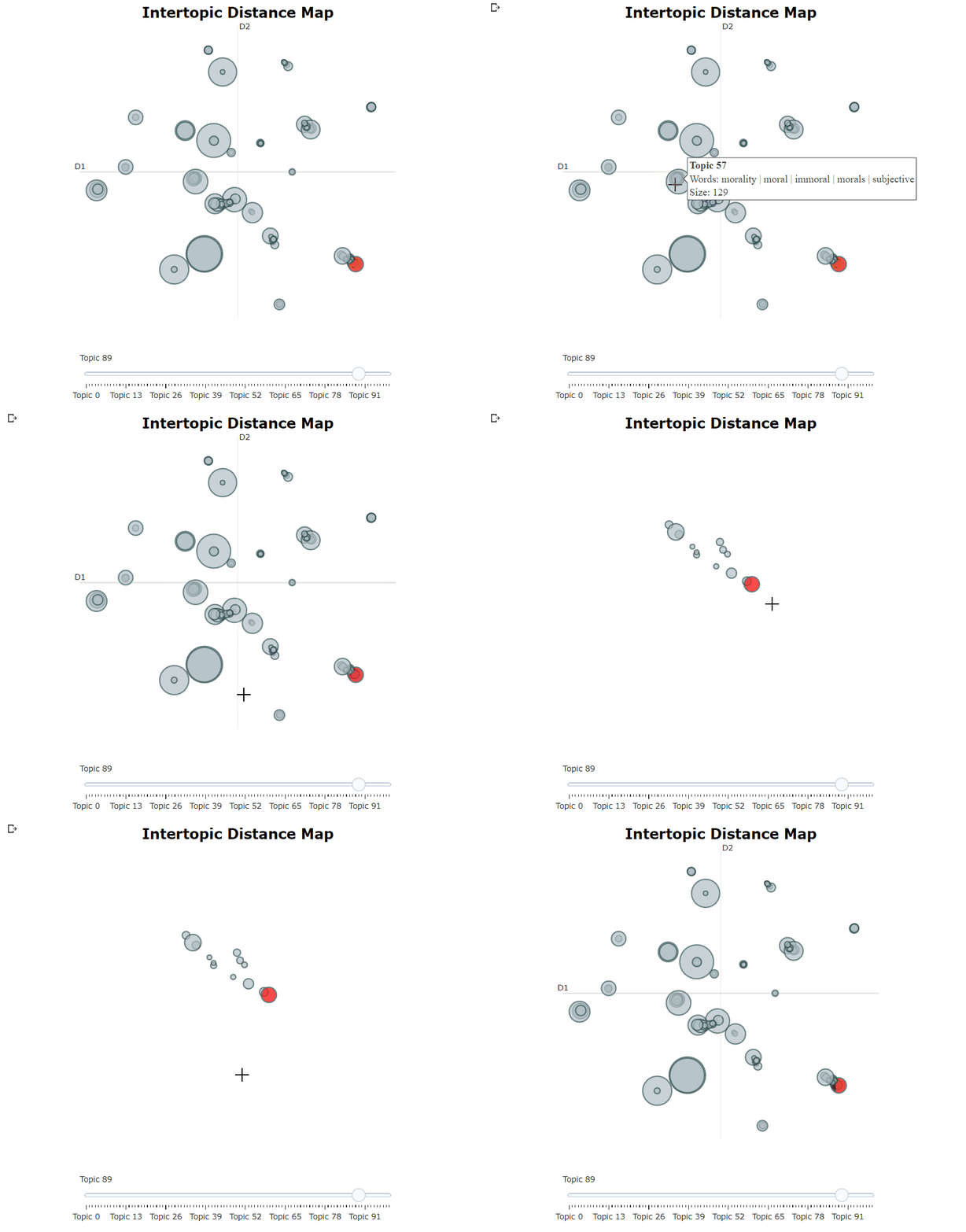
After having trained our BERTopic model, we can iteratively go through hundreds of topics to get a good
understanding of the topics that were extracted. However, that takes quite some time and lacks a global representation. Instead, we can use one of the many visualization options in BERTopic.
For example, we can visualize the topics that were generated in a way very similar to
LDAvis:
topic_model.visualize_topics()
Modularity
By default, the main steps for topic modeling with BERTopic are sentence-transformers, UMAP, HDBSCAN, and c-TF-IDF run in sequence. However, it assumes some independence between these steps which makes BERTopic quite modular. In other words, BERTopic not only allows you to build your own topic model but to explore several topic modeling techniques on top of your customized topic model:
You can swap out any of these models or even remove them entirely. The following steps are completely modular:
Embedding documents
Reducing dimensionality of embeddings
Clustering reduced embeddings into topics
Tokenization of topics
Weight tokens
Represent topics with one or multiple representations
Functionality
BERTopic has many functions that quickly can become overwhelming. To alleviate this issue, you will find an overview
of all methods and a short description of its purpose.
Common
Below, you will find an overview of common functions in BERTopic.
Method
Code
Fit the model
.fit(docs)
Fit the model and predict documents
.fit_transform(docs)
Predict new documents
.transform([new_doc])
Access single topic
.get_topic(topic=12)
Access all topics
.get_topics()
Get topic freq
.get_topic_freq()
Get all topic information
.get_topic_info()
Get all document information
.get_document_info(docs)
Get representative docs per topic
.get_representative_docs()
Update topic representation
.update_topics(docs, n_gram_range=(1, 3))
Generate topic labels
.generate_topic_labels()
Set topic labels
.set_topic_labels(my_custom_labels)
Merge topics
.merge_topics(docs, topics_to_merge)
Reduce nr of topics
.reduce_topics(docs, nr_topics=30)
Reduce outliers
.reduce_outliers(docs, topics)
Find topics
.find_topics("vehicle")
Save model
.save("my_model", serialization="safetensors")
Load model
BERTopic.load("my_model")
Get parameters
.get_params()
Attributes
After having trained your BERTopic model, several attributes are saved within your model. These attributes, in part,
refer to how model information is stored on an estimator during fitting. The attributes that you see below all end in _ and are
public attributes that can be used to access model information.
Attribute
Description
.topics_
The topics that are generated for each document after training or updating the topic model.
.probabilities_
The probabilities that are generated for each document if HDBSCAN is used.
.topic_sizes_
The size of each topic
.topic_mapper_
A class for tracking topics and their mappings anytime they are merged/reduced.
.topic_representations_
The top n terms per topic and their respective c-TF-IDF values.
.c_tf_idf_
The topic-term matrix as calculated through c-TF-IDF.
.topic_aspects_
The different aspects, or representations, of each topic.
.topic_labels_
The default labels for each topic.
.custom_labels_
Custom labels for each topic as generated through .set_topic_labels.
.topic_embeddings_
The embeddings for each topic if embedding_model was used.
.representative_docs_
The representative documents for each topic if HDBSCAN is used.
Variations
There are many different use cases in which topic modeling can be used. As such, several variations of BERTopic have been developed such that one package can be used across many use cases.
Evaluating topic models can be rather difficult due to the somewhat subjective nature of evaluation.
Visualizing different aspects of the topic model helps in understanding the model and makes it easier
to tweak the model to your liking.
Method
Code
Visualize Topics
.visualize_topics()
Visualize Documents
.visualize_documents()
Visualize Document Hierarchy
.visualize_hierarchical_documents()
Visualize Topic Hierarchy
.visualize_hierarchy()
Visualize Topic Tree
.get_topic_tree(hierarchical_topics)
Visualize Topic Terms
.visualize_barchart()
Visualize Topic Similarity
.visualize_heatmap()
Visualize Term Score Decline
.visualize_term_rank()
Visualize Topic Probability Distribution
.visualize_distribution(probs[0])
Visualize Topics over Time
.visualize_topics_over_time(topics_over_time)
Visualize Topics per Class
.visualize_topics_per_class(topics_per_class)
Citation
To cite the BERTopic paper, please use the following bibtex reference:
@article{grootendorst2022bertopic,
  title={BERTopic: Neural topic modeling with a class-based TF-IDF procedure},
  author={Grootendorst, Maarten},
  journal={arXiv preprint arXiv:2203.05794},
  year={2022}
}
The most recent commit recorded on MaartenGr/BERTopic was 5 months ago, based on the GitHub push timestamp. The repository has 932 forks — one of the better signals of community interest.
How does MaartenGr/BERTopic compare to other AI Tools projects?
MaartenGr/BERTopic is tracked by TopGit in the AI Tools category, with 7.9k GitHub stars and written in Python. Browse the AI Tools topic page on TopGit to compare it against similar projects by stars and activity.
How many stars does MaartenGr/BERTopic have?
MaartenGr/BERTopic has 7.9k GitHub stars — refresh the page for the live number, or check github.com/MaartenGr/BERTopic. TopGit mirrors GitHub's count but does not claim minute-by-minute accuracy.
Is MaartenGr/BERTopic open source?
Yes — MaartenGr/BERTopic ships under the MIT license, which makes its source code freely readable (and, depending on license terms, forkable and reusable). Source: github.com/MaartenGr/BERTopic.
What is MaartenGr/BERTopic?
MaartenGr/BERTopic (MaartenGr/BERTopic) is a Python project on GitHub. From the project's own README: Leveraging BERT and c-TF-IDF to create easily interpretable topics.
Where do I read more about MaartenGr/BERTopic?
This TopGit page is a snapshot — the READ ME tab shows the project's own README content (links stripped, images preserved). The GitHub repository at github.com/MaartenGr/BERTopic is the definitive source.
Read full README in the tab above.
Still deciding about BERTopic?
One click hands the question to an AI along with this page — see what it says about BERTopic.

 /BERTopic