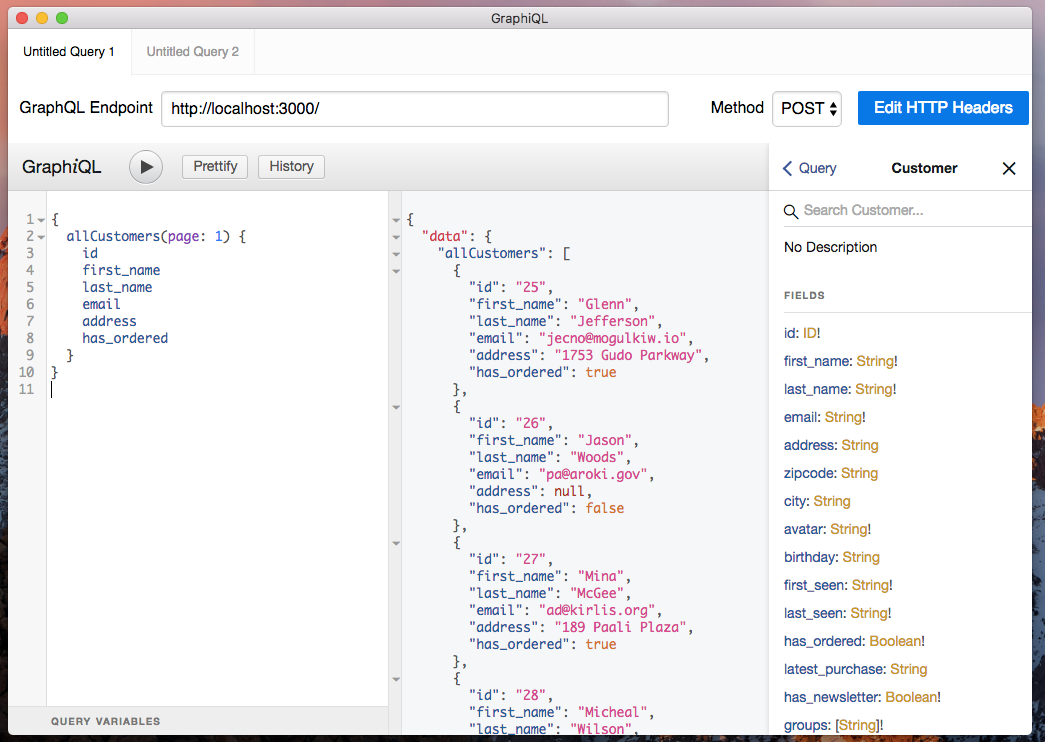
Snapshot of marmelab/json-graphql-server: 1.9k★, JavaScript, API. Get a full fake GraphQL API with zero coding in less than 30 seconds.
Snapshot summary built from the project's own GitHub metadata — there's no written TopGit review yet. The page will update automatically when a full review is published.
WHY NO REVIEW YET
TopGit writes full reviews for the most-starred, most-requested repositories. This page is a snapshot until then — see the READ ME tab for the original README in full.
Get a full fake GraphQL API with zero coding in less than 30 seconds.
Motivation
I'd love to learn GraphQL, but it seems that I first have to read a book about GraphQL Types and Queries, then install a gazillion npm packages.
About every developer
Start playing with GraphQL right away with json-graphql-server, a testing and mocking tool for GraphQL written in Node.js. All it takes is a JSON of your data.
Inspired by the excellent json-server.
Usage
Create a db.js file that exports an object where the keys are the entity types. The values should be lists of entities, i.e. arrays of value objects with at least an id key. For instance:
Use the npx json-graphql-server <db_file_name> command to start the GraphQL server on localhost, port 3000.
npx json-graphql-server db.js
To use a different port, use the --port or -p option:
npx json-graphql-server db.js --p 8080
To use a different host, use the --host or -h option:
npx json-graphql-server db.js -h 127.0.0.1
Now you can query your data in graphql. For instance, to issue the following query:
{
    Post(id: 1) {
        id
        title
        views
        User {
            name
        }
        Comments {
            date
            body
        }
    }
}
Go to http://localhost:3000/?query=%7B%20Post%28id%3A%201%29%20%7B%20id%20title%20views%20User%20%7B%20name%20%7D%20Comments%20%7B%20date%20body%20%7D%20%7D%20%7D. You'll get the following result:
The json-graphql-server accepts queries in GET and POST. Under the hood, it uses the graphql-http module. Please refer to their documentations for details about passing variables, etc.
Note that the server is GraphiQL enabled, so you can query your server using a full-featured graphical user interface, providing autosuggest, history, etc. Just browse http://localhost:3000/ to access it.
Install
npm install -D json-graphql-server
Generated Types and Queries
Based on your data, json-graphql-server will generate a schema with one type per entity, as well as 3 query types and 3 mutation types. For instance for the Post entity:
type Query {
  Post(id: ID!): Post
  allPosts(page: Int, perPage: Int, sortField: String, sortOrder: String, filter: PostFilter): [Post]
  _allPostsMeta(page: Int, perPage: Int, sortField: String, sortOrder: String, filter: PostFilter): ListMetadata
}
type Mutation {
  createPost(data: String): Post
  createManyPost(data: [{data:String}]): [Post]
  updatePost(data: String): Post
  deletePost(id: ID!): Post
}
type Post {
    id: ID!
    title: String!
    views: Int!
    user_id: ID!
    User: User
    Comments: [Comment]
}
type PostFilter {
    q: String
    id: ID
    id_neq: ID
    title: String
    title_neq: String
    views: Int
    views_lt: Int
    views_lte: Int
    views_gt: Int
    views_gte: Int
    views_neq: Int
    user_id: ID
    user_id_neq: ID
}
type ListMetadata {
    count: Int!
}
scalar Date
By convention, json-graphql-server expects all entities to have an id field that is unique for their type - it's the entity primary key. The type of every field is inferred from the values, so for instance, Post.title is a String!, and Post.views is an Int!. When all entities have a value for a field, json-graphql-server makes the field type non nullable (that's why Post.views type is Int! and not Int).
For every field named *_id, json-graphql-server creates a two-way relationship, to let you fetch related entities from both sides. For instance, the presence of the user_id field in the posts entity leads to the ability to fetch the related User for a Post - and the related Posts for a User.
The all* queries accept parameters to let you sort, paginate, and filter the list of results. You can filter by any field, not just the primary key. For instance, you can get the posts written by user 123. Json-graphql-server also adds a full-text query field named q, and created range filter fields for numeric and date fields. All types (excluding booleans and arrays) get a not equal filter. The detail of all available filters can be seen in the generated *Filter type.
Supported types
Type
GraphQL Type
Rule
Example value
Id
GraphQLID
name === 'id' || name.substr(name.length - 3) === '_id'
1
Integer
GraphQLInt
Number.isInteger(value)
12
Numeric
GraphQLFloat
!isNaN(parseFloat(value)) && isFinite(value)
12.34
Boolean
GraphQLBoolean
typeof value === 'boolean'
false
String
GraphQLString
typeof value === 'string'
'foo'
Array
GraphQLList
Array.isArray(value)
['bar'], [12, 34]
Date
DateType (custom)
value instanceof Date || isISODateString(value)
new Date('2016-06-10T15:49:14.236Z'), '2016-06-10T15:49:14.236Z'
// all fields (except boolean and array) get not equal filters
// -lt, _lte, -gt, and _gte
{
  allPosts(filter: { title_neq: "Lorem Ipsum" }) {
    title
    views
  }
}
Then use the jsonGraphqlExpress express middleware:
import express from 'express';
import jsonGraphqlExpress from 'json-graphql-server/node';

const PORT = 3000;
const app = express();
const data = {
    // ... your data
};

app.use('/graphql', jsonGraphqlExpress(data));
app.listen(PORT);
Usage in browser with XMLHttpRequest
Useful when using XMLHttpRequest directly or libraries such as axios.
import JsonGraphqlServer from 'json-graphql-server';

const data = [...];

const server = JsonGraphqlServer({
    data,
    url: 'http://localhost:3000/graphql'
});

server.start();

const xhr = new XMLHttpRequest();
xhr.open('POST', 'http://localhost:3000/graphql', true);
xhr.setRequestHeader('Content-Type', 'application/json');
xhr.setRequestHeader('Accept', 'application/json');
xhr.onerror = function(error) {
    console.error(error);
}
xhr.onload = function() {
    const result = JSON.parse(xhr.responseText);
    console.log('data returned:', result);
    alert('Found ' + result.data.allPosts.length + ' posts');
}
const body = JSON.stringify({ query: 'query allPosts { allPosts { id } }' });
xhr.send(body);
Usage in browser with fetch
import fetchMock from 'fetch-mock';
import JsonGraphqlServer from 'json-graphql-server';

const data = [...];
const server = JsonGraphqlServer({ data });

fetchMock.post('http://localhost:3000/graphql', server.getHandler());

fetch({
    url: 'http://localhost:3000/graphql',
    method: 'POST',
    body: JSON.stringify({ query: 'query allPosts { allPosts { id } }' })
})
.then(response => response.json())
.then(json => {
    alert('Found ' + result.data.allPosts.length + ' posts');
})
Adding Authentication, Custom Routes, etc.
json-graphql-server doesn't deal with authentication or custom routes. But you can use your favorite middleware with Express:
import express from 'express';
import jsonGraphqlExpress from 'json-graphql-server';

import OAuthSecurityMiddleWare from './path/to/OAuthSecurityMiddleWare';

const PORT = 3000;
const app = express();
const data = {
    // ... your data
};
app.use(OAuthSecurityMiddleWare());
app.use('/graphql', jsonGraphqlExpress(data));
app.listen(PORT);
Schema Export
You can also use the export jsonSchemaBuilder to get your own copy of the GraphQLSchema:
In node:
import {graphql} from 'graphql';
import {jsonSchemaBuilder} from 'json-graphql-server/node';

const data = { };
const schema = jsonSchemaBuilder(data);
const query = `[...]`

graphql(schema, query).then(result => {
  console.log(result);
});
Or available in the global scope when running on a client as jsonSchemaBuilder.
Plain Schema
If you want to use another server type instead of the built in graphql express,
like apollo-server or etc, you can expose the plain schema to be built into
an executable schema (there may be version issues otherwise).
How active is development on marmelab/json-graphql-server?
The most recent commit recorded on marmelab/json-graphql-server was 14 days ago, based on the GitHub push timestamp. The repository has 166 forks — one of the better signals of community interest.
How does marmelab/json-graphql-server compare to other API projects?
marmelab/json-graphql-server is tracked by TopGit in the API category, with 1.9k GitHub stars and written in JavaScript. Browse the API topic page on TopGit to compare it against similar projects by stars and activity.
How many stars does marmelab/json-graphql-server have?
marmelab/json-graphql-server has 1.9k GitHub stars — refresh the page for the live number, or check github.com/marmelab/json-graphql-server. TopGit mirrors GitHub's count but does not claim minute-by-minute accuracy.
What is marmelab/json-graphql-server?
marmelab/json-graphql-server (marmelab/json-graphql-server) is a JavaScript project on GitHub. From the project's own README: Get a full fake GraphQL API with zero coding in less than 30 seconds.
What language is marmelab/json-graphql-server written in?
marmelab/json-graphql-server is written primarily in JavaScript. GitHub's language field is based on the largest share of bytes in the default branch.
What topics is marmelab/json-graphql-server associated with?
GitHub's repository topics for marmelab/json-graphql-server: "express-graphql", "graphql", "graphql-server". TopGit's editorial category is API.
Why is marmelab/json-graphql-server categorized under API?
TopGit places marmelab/json-graphql-server in the API category based on its GitHub topics and description (tagged: "express-graphql", "graphql", "graphql-server"). Categories are assigned from real repository metadata, not editorial guesswork.
Read full README in the tab above.
Still deciding about json-graphql-server?
One click hands the question to an AI along with this page — see what it says about json-graphql-server.
 /json-graphql-server