marmelroy/PhoneNumberKit is a mobile-focused project on GitHub with 5.4k stars, written primarily in Swift. A Swift framework for parsing, formatting and validating international phone numbers. Inspired by Google's libphonenumber.
Snapshot summary built from the project's own GitHub metadata — there's no written TopGit review yet. The page will update automatically when a full review is published.
WHY NO REVIEW YET
TopGit writes full reviews for the most-starred, most-requested repositories. This page is a snapshot until then — see the READ ME tab for the original README in full.
This repository is frozen at 4.3.0 and no longer receives metadata updates, so its validation
data will drift out of date over time. PhoneNumberKit was created and maintained here for years by
Roy Marmelstein — thank you. Maintenance has moved to the organization to keep the metadata
current and the project sustainable.
Migrating: point your package at https://github.com/PhoneNumberKit/PhoneNumberKit — the module
name PhoneNumberKit is unchanged, so core usage needs no source changes. If you use the text field
or picker, add the PhoneNumberKitUI package and import PhoneNumberKitUI. Full steps in the
migration guide.
PhoneNumberKit
Swift 5.3 framework for parsing, formatting and validating international phone numbers.
Inspired by Google's libphonenumber.
Features
Features
:phone:
Validate, normalize and extract the elements of any phone number string.
:100:
Simple Swift syntax and a lightweight readable codebase.
:checkered_flag:
Fast. 1000 parses -> ~0.4 seconds.
:books:
Best-in-class metadata from Google's libPhoneNumber project.
:trophy:
Fully tested to match the accuracy of Google's JavaScript implementation of libPhoneNumber.
:iphone:
Built for iOS. Automatically grabs the default region code from the phone.
📝
Editable (!) AsYouType formatter for UITextField.
:us:
Convert country codes to country names and vice versa
Usage
Import PhoneNumberKit at the top of the Swift file that will interact with a phone number.
import PhoneNumberKit
All of your interactions with PhoneNumberKit happen through a PhoneNumberUtility object. The first step you should take is to allocate one.
A PhoneNumberUtility instance is relatively expensive to allocate (it parses the metadata and keeps it in memory for the object's lifecycle), you should try and make sure PhoneNumberUtility is allocated once and deallocated when no longer needed.
let phoneNumberUtility = PhoneNumberUtility()
To parse a string, use the parse function. The region code is automatically computed but can be overridden if needed. PhoneNumberKit automatically does a hard type validation to ensure that the object created is valid, this can be quite costly performance-wise and can be turned off if needed.
do {
    let phoneNumber = try phoneNumberUtility.parse("+33 6 89 017383")
    let phoneNumberCustomDefaultRegion = try phoneNumberUtility.parse("+44 20 7031 3000", withRegion: "GB", ignoreType: true)
}
catch {
    print("Generic parser error")
}
If you need to parse and validate a large amount of numbers at once, PhoneNumberKit has a special, lightning fast array parsing function. The default region code is automatically computed but can be overridden if needed. Here you can also ignore hard type validation if it is not necessary. Invalid numbers are ignored in the resulting array.
let rawNumberArray = ["0291 12345678", "+49 291 12345678", "04134 1234", "09123 12345"]
let phoneNumbers = phoneNumberUtility.parse(rawNumberArray)
let phoneNumbersCustomDefaultRegion = phoneNumberUtility.parse(rawNumberArray, withRegion: "DE",  ignoreType: true)
PhoneNumber objects are immutable Swift structs with the following properties:
phoneNumber.numberString
phoneNumber.countryCode
phoneNumber.nationalNumber
phoneNumber.numberExtension
phoneNumber.type // e.g Mobile or Fixed
Formatting a PhoneNumber object into a string is also very easy
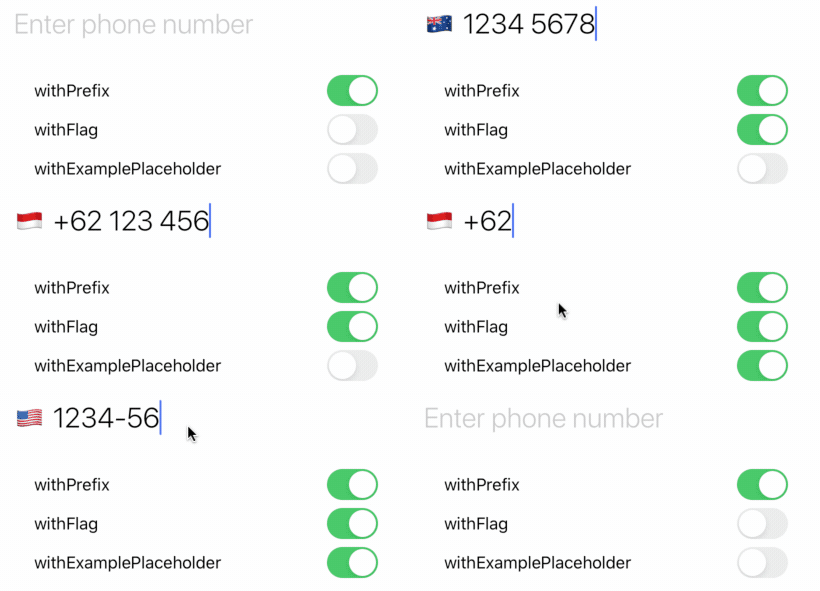
To use the AsYouTypeFormatter, just replace your UITextField with a PhoneNumberTextField (if you are using Interface Builder make sure the module field is set to PhoneNumberKit).
You can customize your TextField UI in the following ways
withFlag will display the country code for the currentRegion. The flagButton is displayed in the leftView of the text field with it's size set based off your text size.
withExamplePlaceholder uses attributedPlaceholder to show an example number for the currentRegion. In addition when withPrefix is set, the country code's prefix will automatically be inserted and removed when editing changes.
PhoneNumberTextField automatically formats phone numbers and gives the user full editing capabilities. If you want to customize you can use the PartialFormatter directly. The default region code is automatically computed but can be overridden if needed (see the example given below).
class MyGBTextField: PhoneNumberTextField {
    override var defaultRegion: String {
        get {
            return "GB"
        }
        set {} // exists for backward compatibility
    }
}
Please refer to CountryCodePickerOptions for more information about usage and how it affects the view.
Need more customization?
You can access the metadata powering PhoneNumberKit yourself, this enables you to program any behaviours as they may be implemented in PhoneNumberKit itself. It does mean you are exposed to the less polished interface of the underlying file format. If you program something you find useful please push it upstream!
The Swift Package Manager is now the preferred tool for distributing PhoneNumberKit.
From Xcode 11+ :
Select File > Swift Packages > Add Package Dependency. Enter https://github.com/marmelroy/PhoneNumberKit.git in the "Choose Package Repository" dialog.
In the next page, specify the version resolving rule as "Up to Next Major" from "4.0.0".
After Xcode checked out the source and resolving the version, you can choose the "PhoneNumberKit" library and add it to your app target.
For more info, read Adding Package Dependencies to Your App from Apple.
Alternatively, you can also add PhoneNumberKit to your Package.swift file:
How active is development on marmelroy/PhoneNumberKit?
The most recent commit recorded on marmelroy/PhoneNumberKit was 2 months ago, based on the GitHub push timestamp. The repository has 854 forks — one of the better signals of community interest.
How does marmelroy/PhoneNumberKit compare to other Mobile projects?
marmelroy/PhoneNumberKit is tracked by TopGit in the Mobile category, with 5.4k GitHub stars and written in Swift. Browse the Mobile topic page on TopGit to compare it against similar projects by stars and activity.
How many stars does marmelroy/PhoneNumberKit have?
marmelroy/PhoneNumberKit has 5.4k GitHub stars — refresh the page for the live number, or check github.com/marmelroy/PhoneNumberKit. TopGit mirrors GitHub's count but does not claim minute-by-minute accuracy.
What is marmelroy/PhoneNumberKit?
marmelroy/PhoneNumberKit (marmelroy/PhoneNumberKit) is a Swift project on GitHub. From the project's own README: A Swift framework for parsing, formatting and validating international phone numbers. Inspired by Google's libphonenumber.
What language is marmelroy/PhoneNumberKit written in?
marmelroy/PhoneNumberKit is written primarily in Swift. GitHub's language field is based on the largest share of bytes in the default branch.
What topics is marmelroy/PhoneNumberKit associated with?
GitHub's repository topics for marmelroy/PhoneNumberKit: "contacts", "formatting", "google-libphonenumber", "parsing", "phone-number", "swift", "validation". TopGit's editorial category is Mobile.
Why is marmelroy/PhoneNumberKit categorized under Mobile?
TopGit places marmelroy/PhoneNumberKit in the Mobile category based on its GitHub topics and description (tagged: "contacts", "formatting", "google-libphonenumber"). Categories are assigned from real repository metadata, not editorial guesswork.
Read full README in the tab above.
Is PhoneNumberKit worth your time?
ChatGPT, Claude and Perplexity can all read this page. Ask one of them what it makes of PhoneNumberKit.