793 GitHub stars and counting — mifi/ezshare is a TypeScript project TopGit is tracking across repositories on the platform. Easily share files, folders and clipboard over LAN - Like Google Drive but without internet
Snapshot summary built from the project's own GitHub metadata — there's no written TopGit review yet. The page will update automatically when a full review is published.
WHY NO REVIEW YET
TopGit writes full reviews for the most-starred, most-requested repositories. This page is a snapshot until then — see the READ ME tab for the original README in full.
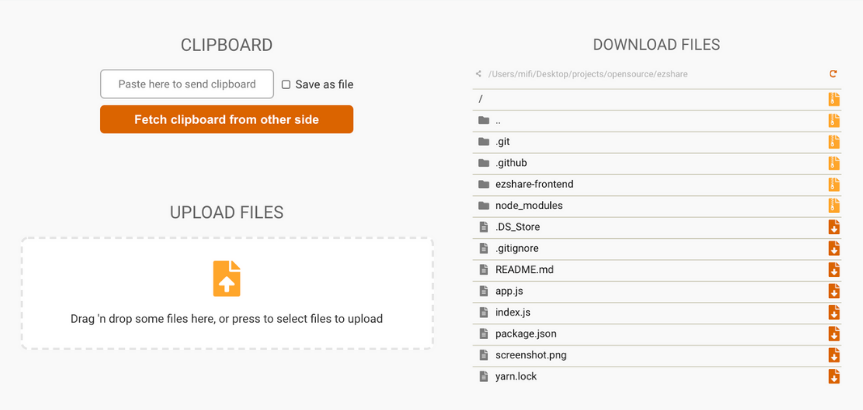
A simple file server that lets you easily share many big files like photos and videos with friends (or between your devices) over a local network without requiring an internet connection. It starts an HTTP server that lists all files and directories in the directory where it is started from. Then anyone can then connect to the server and download files or automatically generated ZIP of whole directories, kind of like a self hosted Google Drive. The client can also upload files to the server via their browser, and clipboard card be shared both ways. A QR code is generated for convenience.
Features
Local two-way transfers without going through the internet
Send full quality photos and videos to others without needing a fast internet connection
Handles really big files and directories
Handles a LOT of files
Auto ZIPs directories on-the-fly
Two-way sharing of clipboard
The web client works on all major platforms, including iOS and Android (however the server must run on a Mac/Windows/Linux computer)
Video/image playback and slideshows
Install (with Node.js / npm)
Install Node.js and open a terminal:
npm install -g @ezshare/cli
🐳 Docker Deployment
You can run ezshare easily using Docker. This ensures all dependencies like ffmpeg and xvfb are pre-installed and configured correctly.
Prerequisites
Docker Desktop or Docker Engine installed.
Option 1: Using Docker Compose (Recommended)
The easiest way to run the application is with Docker Compose. This handles the build, port mapping, and volume creation automatically.
Start the application:
docker compose up --build
Access the app:
Open your browser to http://localhost:3003.
Shared Files:
Place files in the ./my-shared-data folder (created automatically in your project root). These will appear in the application under /shared.
Option 2: Manual Docker CLI
If you prefer to run the Dockerfile manually without Compose:
Build the image:
docker build -t ezshare .
Run the container:
You must map port 3003 and mount a volume to /shared for the application to function properly.
docker run -p 3003:3003 -v $(pwd)/my-shared-data:/shared ezshare
Configuration Details
Port: The Docker image starts ezshare with --port 3003 (see the Dockerfile), so the container listens on port 3003. Note that this differs from the standalone CLI, which listens on port 8080 by default.
Data Volume: The application expects a volume mounted at /shared to store and retrieve files.
Environment: The container uses node:20-slim and includes necessary runtime tools like ffmpeg for media processing.
Volume Permissions (Important)
Since the container now runs as UID 1000 (node), the host directory mounted to /shared (defined in docker-compose.yml as ./my-shared-data) must be writable by UID 1000.
If you encounter Permission Denied errors on Linux/Mac, run the following on the host machine to fix local folder permissions:
How does mifi/ezshare compare to other Developer Tools projects?
mifi/ezshare is tracked by TopGit in the Developer Tools category, with 793 GitHub stars and written in TypeScript. Browse the Developer Tools topic page on TopGit to compare it against similar projects by stars and activity.
Is mifi/ezshare open source?
Yes — mifi/ezshare ships under the MIT license, which makes its source code freely readable (and, depending on license terms, forkable and reusable). Source: github.com/mifi/ezshare.
What else is in the Developer Tools space?
mifi/ezshare is tracked by TopGit under the Developer Tools category, alongside 7 GitHub-tagged topics. Trending and Topics pages list peer repositories of comparable stars and language.
What is mifi/ezshare?
mifi/ezshare (mifi/ezshare) is a TypeScript project on GitHub. From the project's own README: Easily share files, folders and clipboard over LAN - Like Google Drive but without internet
Where do I read more about mifi/ezshare?
This TopGit page is a snapshot — the READ ME tab shows the project's own README content (links stripped, images preserved). The GitHub repository at github.com/mifi/ezshare is the definitive source.
Why is mifi/ezshare categorized under Developer Tools?
TopGit places mifi/ezshare in the Developer Tools category based on its GitHub topics and description (tagged: "airdrop", "cli", "easy"). Categories are assigned from real repository metadata, not editorial guesswork.
Read full README in the tab above.
Want a second opinion on ezshare?
Ask an AI that can read this page — one click and you get its take on ezshare.
 /ezshare