mikepenz/FastAdapter is tracked by TopGit as a mobile project, with 3.9k stars on GitHub, written primarily in Kotlin. The bullet proof, fast and easy to use adapter library, which minimizes developing time to a fraction...
Snapshot summary built from the project's own GitHub metadata — there's no written TopGit review yet. The page will update automatically when a full review is published.
WHY NO REVIEW YET
TopGit writes full reviews for the most-starred, most-requested repositories. This page is a snapshot until then — see the READ ME tab for the original README in full.
The FastAdapter is here to simplify creating adapters for RecyclerViews. Don't worry about the adapter anymore. Just write the logic for how your view/item should look like, and you are done.
It's blazing fast, minimizing the code you need to write, and is easy to extend.
What's included 🚀 •
Setup 🛠️ •
Migration Guide 🧬 •
Used by •
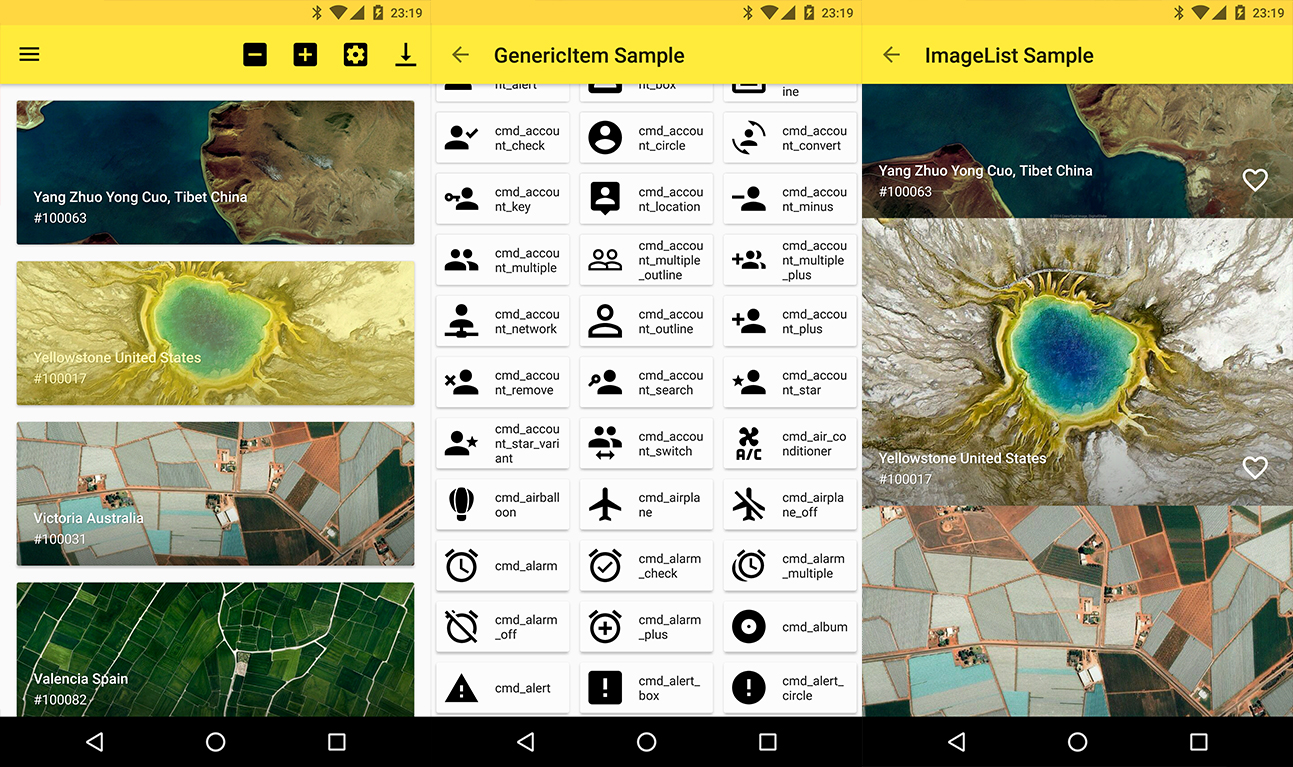
Sample App
Many helper classes are included in the following dependency.
implementation "com.mikepenz:fastadapter-extensions-binding:${latestFastAdapterRelease}" // view binding helpers
implementation "com.mikepenz:fastadapter-extensions-diff:${latestFastAdapterRelease}" // diff util helpers
implementation "com.mikepenz:fastadapter-extensions-drag:${latestFastAdapterRelease}" // drag support
implementation "com.mikepenz:fastadapter-extensions-paged:${latestFastAdapterRelease}" // paging support
implementation "com.mikepenz:fastadapter-extensions-scroll:${latestFastAdapterRelease}" // scroll helpers
implementation "com.mikepenz:fastadapter-extensions-swipe:${latestFastAdapterRelease}" // swipe support
implementation "com.mikepenz:fastadapter-extensions-ui:${latestFastAdapterRelease}" // pre-defined ui components
implementation "com.mikepenz:fastadapter-extensions-utils:${latestFastAdapterRelease}" // needs the `expandable`, `drag` and `scroll` extension.

// required for the ui components and the utils
implementation "com.google.android.material:material:${androidX}"
How to use
1. Implement your item
1a. Implement your item as usual (the easy way)
Just create a class which extends the AbstractItem as shown below. Implement the methods, and your item is ready.
open class SimpleItem : AbstractItem<SimpleItem.ViewHolder>() {
    var name: String? = null
    var description: String? = null

    /** defines the type defining this item. must be unique. preferably an id */
    override val type: Int
        get() = R.id.fastadapter_sample_item_id

    /** defines the layout which will be used for this item in the list */
    override val layoutRes: Int
        get() = R.layout.sample_item

    override fun getViewHolder(v: View): ViewHolder {
        return ViewHolder(v)
    }

    class ViewHolder(view: View) : FastAdapter.ViewHolder<SimpleItem>(view) {
        var name: TextView = view.findViewById(R.id.material_drawer_name)
        var description: TextView = view.findViewById(R.id.material_drawer_description)

        override fun bindView(item: SimpleItem, payloads: List<Any>) {
            name.text = item.name
            description.text = item.name
        }

        override fun unbindView(item: SimpleItem) {
            name.text = null
            description.text = null
        }
    }
}
1b. Implement item with ViewBinding (the easiest way)
class BindingIconItem : AbstractBindingItem<IconItemBinding>() {
    var name: String? = null

    override val type: Int
        get() = R.id.fastadapter_icon_item_id

    override fun bindView(binding: IconItemBinding, payloads: List<Any>) {
        binding.name.text = name
    }

    override fun createBinding(inflater: LayoutInflater, parent: ViewGroup?): IconItemBinding {
        return IconItemBinding.inflate(inflater, parent, false)
    }
}
Use the binding extension dependency in your application for this.
2. Set the Adapter to the RecyclerView
//create the ItemAdapter holding your Items
val itemAdapter = ItemAdapter<SimpleItem>()
//create the managing FastAdapter, by passing in the itemAdapter
val fastAdapter = FastAdapter.with(itemAdapter)

//set our adapters to the RecyclerView
recyclerView.setAdapter(fastAdapter)

//set the items to your ItemAdapter
itemAdapter.add(ITEMS)
3. Extensions
By default the FastAdapter only provides basic functionality, which comes with the abstraction of items as Item and Model.
And the general functionality of adding/removing/modifying elements. To enable selections, or expandables the provided extensions need to be activated.
3.1. SelectExtension
// Gets (or creates and attaches if not yet existing) the extension from the given `FastAdapter`
val selectExtension = fastAdapter.getSelectExtension()
// configure as needed
selectExtension.isSelectable = true
selectExtension.multiSelect = true
selectExtension.selectOnLongClick = false
// see the API of this class for more options.
3.2. ExpandableExtension
This requires the fastadapter-extensions-expandable extension.
// Gets (or creates and attaches if not yet existing) the extension.
val expandableExtension = fastAdapter.getExpandableExtension()
// configure as needed
expandableExtension.isOnlyOneExpandedItem = true
For further details scroll down to the ExpandableItems (under advanced usage) section.
3. Click listener
fastAdapter.onClickListener = { view, adapter, item, position ->
    // Handle click here
    false
}
4. Click listeners for views inside your item
// just add an `EventHook` to your `FastAdapter` by implementing either a `ClickEventHook`, `LongClickEventHook`, `TouchEventHook`, `CustomEventHook`
fastAdapter.addEventHook(object : ClickEventHook<SimpleImageItem>() {
    override fun onBind(viewHolder: RecyclerView.ViewHolder): View? {
        //return the views on which you want to bind this event
        return if (viewHolder is SimpleImageItem.ViewHolder) {
            viewHolder.viewWhichReactsOnClick
        } else {
	    null
	}
    }

    override fun onClick(v: View, position: Int, fastAdapter: FastAdapter<SimpleImageItem>, item: SimpleImageItem) {
        //react on the click event
    }
})
5. Filter
// Call this in onQueryTextSubmit() & onQueryTextChange() when using SearchView
itemAdapter.filter("yourSearchTerm")
itemAdapter.itemFilter.filterPredicate = { item: SimpleItem, constraint: CharSequence? ->
    item.name?.text.toString().contains(constraint.toString(), ignoreCase = true)
}
filter() should return true for items to be retained and false for items to be removed.
6. Drag and drop
This requires the fastadapter-extensions-drag extension.
First, attach ItemTouchHelper to RecyclerView.
val dragCallback = SimpleDragCallback()
val touchHelper = ItemTouchHelper(dragCallback)
touchHelper.attachToRecyclerView(recyclerView)
Implement ItemTouchCallback interface in your Activity, and override the itemTouchOnMove() method.
override fun itemTouchOnMove(oldPosition: Int, newPosition: Int): Boolean {
    DragDropUtil.onMove(fastItemAdapter.itemAdapter, oldPosition, newPosition) // change position
    return true
}
7. Using different ViewHolders (like HeaderView)
Start by initializing your adapters:
// Header is a model class for your header
val headerAdapter = ItemAdapter<Header>()
Initialize a Model FastAdapter:
val itemAdapter = GenericItemAdapter()
Finally, set the adapter:
val fastAdapter: GenericFastAdapter = FastAdapter.with(headerAdapter, itemAdapter) //the order defines in which order the items will show up
// alternative the super type of both item adapters can be used. e.g.:
recyclerView.setAdapter(fastAdapter)
8. Infinite (endless) scrolling
Create a FooterAdapter. We need this to display a loading ProgressBar at the end of our list. (Don't forget to pass it into FastAdapter.with(..))
val footerAdapter = ItemAdapter<ProgressItem>()
Keep in mind that ProgressItem is provided by FastAdapter’s extensions.
recyclerView.addOnScrollListener(object : EndlessRecyclerOnScrollListener(footerAdapter) {
     override fun onLoadMore(currentPage: Int) {
         footerAdapter.clear()
         footerAdapter.add(ProgressItem())

	 // Load your items here and add it to FastAdapter
         itemAdapter.add(NEWITEMS)
    }
})
For the complete tutorial and more features such as multi-select and CAB check out the sample app.
Advanced Usage
Proguard
As of v2.5.0 there are no more known requirements to use the FastAdapter with Proguard
ExpandableItems
The FastAdapter comes with support for expandable items. After adding the dependency set up the Expandable extension via:
val expandableExtension = fastAdapter.getExpandableExtension()
Expandable items have to implement the IExpandable interface, and the sub items the ISubItem interface. This allows better support.
The sample app provides sample implementations of those. (Those in the sample are kept Model which allows them to be used with different parent / subitems)
As of the way how SubItems and their state are handled it is highly recommended to use the identifier based StateManagement. Just add withPositionBasedStateManagement(false) to your FastAdapter setup.
A simple item just needs to extend from the AbstractExpandableItem and provide the ViewHolder as type.
open class SimpleSubExpandableItem : AbstractExpandableItem<SimpleSubExpandableItem.ViewHolder>() {

    /**
     * BASIC ITEM IMPLEMENTATION
     */
}
// See the SimpleSubExpandableItem.kt of the sample application for more details.
This free, open source software was also made possible by a group of volunteers that put many hours of hard work into it. See the CONTRIBUTORS.md file for details.
Special mentions
A special thanks to the very active contributors who added many improvements to this library.
Allan Wang
MFlisar
RobbWatershed
License
Copyright 2021 Mike Penz

Licensed under the Apache License, Version 2.0 (the "License");
you may not use this file except in compliance with the License.
You may obtain a copy of the License at

   http://www.apache.org/licenses/LICENSE-2.0

Unless required by applicable law or agreed to in writing, software
distributed under the License is distributed on an "AS IS" BASIS,
WITHOUT WARRANTIES OR CONDITIONS OF ANY KIND, either express or implied.
See the License for the specific language governing permissions and
limitations under the License.
How active is development on mikepenz/FastAdapter?
The most recent commit recorded on mikepenz/FastAdapter was 6 months ago, based on the GitHub push timestamp. The repository has 490 forks — one of the better signals of community interest.
How many stars does mikepenz/FastAdapter have?
mikepenz/FastAdapter has 3.9k GitHub stars — refresh the page for the live number, or check github.com/mikepenz/FastAdapter. TopGit mirrors GitHub's count but does not claim minute-by-minute accuracy.
What language is mikepenz/FastAdapter written in?
mikepenz/FastAdapter is written primarily in Kotlin. GitHub's language field is based on the largest share of bytes in the default branch.
What license does mikepenz/FastAdapter use?
mikepenz/FastAdapter is released under the Apache-2.0 license. Always verify the LICENSE file directly on GitHub for the authoritative terms — license strings can be edited out of sync with a project's actual stance.
What topics is mikepenz/FastAdapter associated with?
The project maintains a homepage at https://mikepenz.dev. The README tab on this page also usually contains screenshots and a quickstart.
Where do I read more about mikepenz/FastAdapter?
This TopGit page is a snapshot — the READ ME tab shows the project's own README content (links stripped, images preserved). The GitHub repository at github.com/mikepenz/FastAdapter is the definitive source.
Read full README in the tab above.
Want a second opinion on FastAdapter?
Ask an AI that can read this page — one click and you get its take on FastAdapter.
 /FastAdapter