minio/operator — a developer tool — sits at 1.4k GitHub stars in the Developer Tools space. Simple Kubernetes Operator for MinIO clusters :computer:
Snapshot summary built from the project's own GitHub metadata — there's no written TopGit review yet. The page will update automatically when a full review is published.
WHY NO REVIEW YET
TopGit writes full reviews for the most-starred, most-requested repositories. This page is a snapshot until then — see the READ ME tab for the original README in full.
MinIO is a Kubernetes-native high performance object store with an S3-compatible API. The
MinIO Kubernetes Operator supports deploying MinIO Tenants onto private and public
cloud infrastructures ("Hybrid" Cloud).
This README provides a high level description of the MinIO Operator and
quickstart instructions. See https://min.io/docs/minio/kubernetes/upstream/index.html for
complete documentation on the MinIO Operator.
Table of Contents
Architecture
Deploy the MinIO Operator and Create a Tenant
Prerequisites
Procedure
Architecture
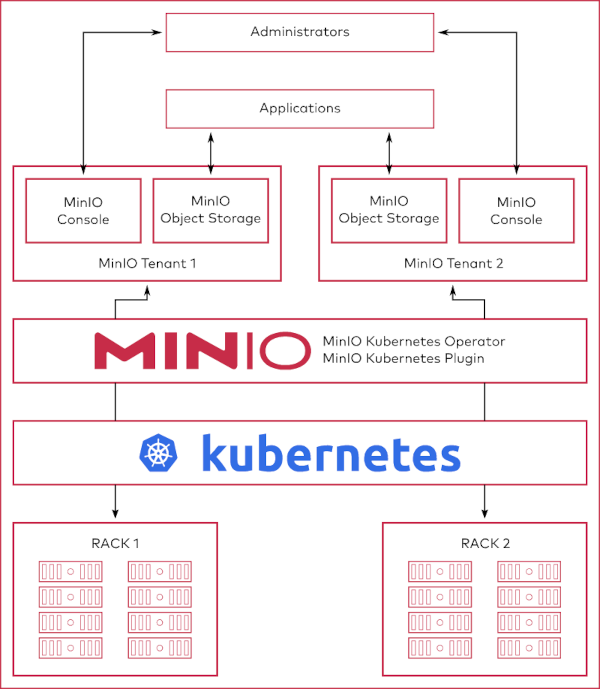
Each MinIO Tenant represents an independent MinIO Object Store within
the Kubernetes cluster. The following diagram describes the architecture of a
MinIO Tenant deployed into Kubernetes:
MinIO provides multiple methods for accessing and managing the MinIO Tenant:
Deploy the MinIO Operator and Create a Tenant
This procedure installs the MinIO Operator and creates a 4-node MinIO Tenant for supporting object storage operations in
a Kubernetes cluster.
Prerequisites
Kubernetes 1.30.0 or Later
Starting with Operator v7.1.1, MinIO requires Kubernetes version 1.30.0 or later.
This procedure assumes the host machine has kubectl installed and configured
with access to the target Kubernetes cluster.
MinIO Tenant Namespace
MinIO supports no more than one MinIO Tenant per Namespace. The following kubectl command creates a new namespace
for the MinIO Tenant.
kubectl create namespace minio-tenant
Tenant Storage Class
The MinIO Kubernetes Operator automatically generates Persistent Volume Claims (PVC) as part of deploying a MinIO
Tenant.
The plugin defaults to creating each PVC with the default
Kubernetes Storage Class. If the default storage
class cannot support the generated PVC, the tenant may fail to deploy.
MinIO Tenants require that the StorageClass sets volumeBindingMode to WaitForFirstConsumer. The
default StorageClass may use the Immediate setting, which can cause complications during PVC binding. MinIO
strongly recommends creating a custom StorageClass for use by PV supporting a MinIO Tenant.
The following StorageClass object contains the appropriate fields for supporting a MinIO Tenant using
MinIO DirectPV-managed drives:
The MinIO Operator generates one Persistent Volume Claim (PVC) for each volume in the tenant plus two PVC to support
collecting Tenant Metrics and logs. The cluster must have
sufficient Persistent Volumes that meet the capacity
requirements of each PVC for the tenant to start correctly. For example, deploying a Tenant with 16 volumes requires
18 (16 + 2). If each PVC requests 1TB capacity, then each PV must also provide at least 1TB of capacity.
MinIO recommends using the MinIO DirectPV Driver to automatically provision
Persistent Volumes from locally attached drives. This procedure assumes MinIO DirectPV is installed and configured.
For clusters which cannot deploy MinIO DirectPV,
use Local Persistent Volumes. The following example YAML
describes a local persistent volume:
Replace values in brackets <VALUE> with the appropriate value for the local drive.
You can estimate the number of PVC by multiplying the number of minio server pods in the Tenant by the number of
drives per node. For example, a 4-node Tenant with 4 drives per node requires 16 PVC and therefore 16 PV.
MinIO strongly recommends using the following CSI drivers for creating local PV to ensure best object storage
performance:
MinIO DirectPV
Local Persistent Volume
Procedure
1) Install the MinIO Operator via Kustomization
The standard kubectl tool ships with support
for kustomize out of the box, so you can
use that to install MiniO Operator.
Run the following command to verify the status of the Operator:
kubectl get pods -n minio-operator
The output resembles the following:
NAME                              READY   STATUS    RESTARTS   AGE
minio-operator-69fd675557-lsrqg   1/1     Running   0          99s
2) Build the Tenant Configuration
We provide a variety of examples for creating MinIO Tenants in the examples directory. The following example creates a
4-node MinIO Tenant with 4 volumes per node:
Use the following command to list the services created by the MinIO
Operator:
kubectl get svc -n NAMESPACE
Replace NAMESPACE with the namespace for the MinIO Tenant. The output
resembles the following:
NAME                             TYPE            CLUSTER-IP        EXTERNAL-IP   PORT(S)
minio                            LoadBalancer    10.104.10.9       <pending>     443:31834/TCP
myminio-console           LoadBalancer    10.104.216.5      <pending>     9443:31425/TCP
myminio-hl                ClusterIP       None              <none>        9000/TCP
Applications internal to the Kubernetes cluster should use the minio service for performing object storage
operations on the Tenant.
Administrators of the Tenant should use the minio-tenant-1-console service to access the MinIO Console and manage the
Tenant, such as provisioning users, groups, and policies for the Tenant.
MinIO Tenants deploy with TLS enabled by default, where the MinIO Operator uses the
Kubernetes certificates.k8s.io API to generate the required x.509 certificates. Each
certificate is signed using the Kubernetes Certificate Authority (CA) configured during
cluster deployment. While Kubernetes mounts this CA on Pods in the cluster, Pods do
not trust that CA by default. You must copy the CA to a directory such that the
update-ca-certificates utility can find and add it to the system trust store to
enable validation of MinIO TLS certificates:
For applications external to the Kubernetes cluster, you must configure
Ingress or a
Load Balancer to
expose the MinIO Tenant services. Alternatively, you can use the kubectl port-forward command
to temporarily forward traffic from the local host to the MinIO Tenant.
License
Use of MinIO Operator is governed by the GNU AGPLv3 or later, found in the LICENSE file.
The most recent commit recorded on minio/operator was 7 months ago, based on the GitHub push timestamp. The repository has 518 forks — one of the better signals of community interest.
How many stars does minio/operator have?
minio/operator has 1.4k GitHub stars — refresh the page for the live number, or check github.com/minio/operator. TopGit mirrors GitHub's count but does not claim minute-by-minute accuracy.
Is minio/operator open source?
Yes — minio/operator ships under the AGPL-3.0 license, which makes its source code freely readable (and, depending on license terms, forkable and reusable). Source: github.com/minio/operator.
What else is in the Developer Tools space?
minio/operator is tracked by TopGit under the Developer Tools category, alongside 4 GitHub-tagged topics. Trending and Topics pages list peer repositories of comparable stars and language.
What topics is minio/operator associated with?
GitHub's repository topics for minio/operator: "k8s", "kubernetes", "minio", "storage". TopGit's editorial category is Developer Tools.
Where can I see minio/operator in action?
The project maintains a homepage at https://min.io/docs/minio/kubernetes/upstream/index.html. The README tab on this page also usually contains screenshots and a quickstart.
Where do I read more about minio/operator?
This TopGit page is a snapshot — the READ ME tab shows the project's own README content (links stripped, images preserved). The GitHub repository at github.com/minio/operator is the definitive source.
Read full README in the tab above.
Curious whether operator is right for you?
Let ChatGPT, Claude, or Perplexity look into it — click below and see what AI actually says about operator.
 /operator