mrousavy/react-native-mmkv is a Mobile project on GitHub, written primarily in TypeScript. It has 8.5k stars. ⚡️ The fastest key/value storage for React Native. ~30x faster than AsyncStorage!
Snapshot summary built from the project's own GitHub metadata — there's no written TopGit review yet. The page will update automatically when a full review is published.
WHY NO REVIEW YET
TopGit writes full reviews for the most-starred, most-requested repositories. This page is a snapshot until then — see the READ ME tab for the original README in full.
MMKV is an efficient, small mobile key-value storage framework developed by WeChat. See Tencent/MMKV for more information
react-native-mmkv is a library that allows you to easily use MMKV inside your React Native app through fast and direct JS bindings to the native C++ library.
Features
Get and set strings, booleans, numbers and ArrayBuffers
Fully synchronous calls, no async/await, no Promises, no Bridge.
Encryption support (secure storage)
Multiple instances support (separate user-data with global data)
Customizable storage location
High performance because everything is written in C++
~30x faster than AsyncStorage
Uses JSI and C++ NitroModules instead of the "old" Bridge
iOS, Android and Web support
Easy to use React Hooks API
[!IMPORTANT]
You're looking at MMKV V4. If you're still on V3, check out the V3 docs here!
react-native-mmkv V4 is now a Nitro Module. See the V4 Upgrade Guide for more information.
Benchmark
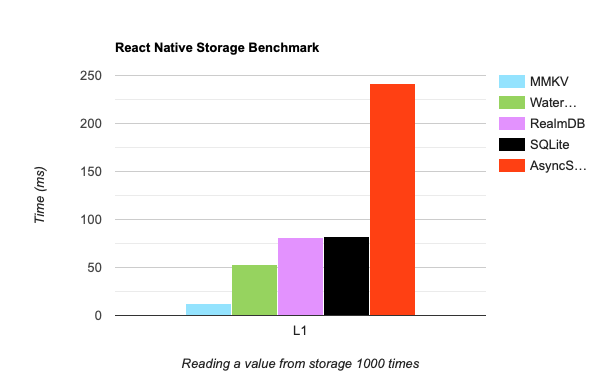
StorageBenchmark compares popular storage libraries against each other by reading a value from storage for 1000 times:
MMKV vs other storage libraries: Reading a value from Storage 1000 times.
Measured in milliseconds on an iPhone 11 Pro, lower is better.
Installation
React Native
npm install react-native-mmkv react-native-nitro-modules
cd ios && pod install
To create a new instance of the MMKV storage, use the MMKV constructor. It is recommended that you re-use this instance throughout your entire app instead of creating a new instance each time, so export the storage object.
This creates a new storage instance using the default MMKV storage ID (mmkv.default).
App Groups or Extensions
If you want to share MMKV data between your app and other apps or app extensions in the same group, open Info.plist and create an AppGroupIdentifier key with your app group's value. MMKV will then automatically store data inside the app group which can be read and written to from other apps or app extensions in the same group by making use of MMKV's multi processing mode.
See Configuring App Groups.
This creates a new storage instance using a custom MMKV storage ID. By using a custom storage ID, your storage is separated from the default MMKV storage of your app.
The following values can be configured:
id: The MMKV instance's ID. If you want to use multiple instances, use different IDs. For example, you can separate the global app's storage and a logged-in user's storage. (required if path or encryptionKey fields are specified, otherwise defaults to: 'mmkv.default')
path: The MMKV instance's root path. By default, MMKV stores file inside $(Documents)/mmkv/. You can customize MMKV's root directory on MMKV initialization (documentation: iOS / Android)
encryptionKey: The MMKV instance's encryption/decryption key. By default, MMKV stores all key-values in plain text on file, relying on iOS's/Android's sandbox to make sure the file is encrypted. Should you worry about information leaking, you can choose to encrypt MMKV. (documentation: iOS / Android)
encryptionType: The MMKV instance's encryption/decryption algorithm. By default, AES-128 encryption will be used, but you can switch to AES-256 for advanced security.
mode: The MMKV's process behaviour - when set to multi-process, the MMKV instance will assume data can be changed from the outside (e.g. App Clips, Extensions or App Groups).
readOnly: Whether this MMKV instance should be in read-only mode. This is typically more efficient and avoids unwanted writes to the data if not needed. Any call to set(..) will throw.
compareBeforeSet: Whether this MMKV instance will compare values for equality before writing them to disk. By default this is disabled, enabling it might improve performance if values are repeatedly written to disk, even if they are already persisted.
// checking if a specific key exists
const hasUsername = storage.contains('user.name')

// getting all keys
const keys = storage.getAllKeys() // ['user.name', 'user.age', 'is-mmkv-fast-asf']

// delete a specific key + value
const wasRemoved = storage.remove('user.name')

// delete all keys
storage.clearAll()
Objects
const user = {
  username: 'Marc',
  age: 21
}

// Serialize the object into a JSON string
storage.set('user', JSON.stringify(user))

// Deserialize the JSON string into an object
const jsonUser = storage.getString('user') // '{ "username": "Marc", "age": 21 }'
const userObject = JSON.parse(jsonUser) // { username: 'Marc', age: 21 }
Encryption
// encrypt all data with a private key using AES-128
storage.encrypt('hunter2')
// encrypt all data with a private key using AES-256
storage.encrypt('hunter2again', 'AES-256')

// remove encryption
storage.decrypt()
To check if an MMKV instance exists, use existsMMKV(...):
import { existsMMKV } from 'react-native-mmkv'

const exists = existsMMKV('my-instance')
Delete an MMKV instance
To delete an MMKV instance, use deleteMMKV(...):
import { deleteMMKV } from 'react-native-mmkv'

const wasDeleted = deleteMMKV('my-instance')
Log Level
By default, MMKV logs at Debug level in debug builds and Warning level in release builds. You can override this at build time to control the verbosity of MMKV's native logs.
Value
Level
0
Debug
1
Info
2
Warning
3
Error
4
None
Android
Set MMKV_logLevel in your app's android/gradle.properties:
MMKV_logLevel=4
iOS
Set $MMKVLogLevel in your app's ios/Podfile, then run pod install:
$MMKVLogLevel = 4
Or use an environment variable during pod install:
MMKV_LOG_LEVEL=4 pod install
Testing with Jest or Vitest
A mocked MMKV instance is automatically used when testing with Jest or Vitest, so you will be able to use createMMKV() as per normal in your tests. Refer to example/__tests__/MMKV.harness.ts for an example using Jest.
Documentation
Hooks
Value-change Listeners
Migrate from AsyncStorage
Using MMKV with redux-persist
Using MMKV with recoil
Using MMKV with mobx-persist-storage
Using MMKV with mobx-persist
Using MMKV with zustand persist-middleware
Using MMKV with jotai
Using MMKV with react-query
Using MMKV with Tinybase
How is this library different from react-native-mmkv-storage?
LocalStorage and In-Memory Storage (Web)
If a user chooses to disable LocalStorage in their browser, the library will automatically provide a limited in-memory storage as an alternative. However, this in-memory storage won't persist data, and users may experience data loss if they refresh the page or close their browser. To optimize user experience, consider implementing a suitable solution within your app to address this scenario.
Limitations
react-native-mmkv V4 requires react-native 0.76 or higher.
Since react-native-mmkv uses JSI for synchronous native method invocations, remote debugging (e.g. with Chrome) is no longer possible. Instead, you should use Flipper or React DevTools.
Integrations
Rozenite
Use @rozenite/mmkv-plugin to debug your MMKV storage using Rozenite.
Reactotron
Use reactotron-react-native-mmkv to automatically log writes to your MMKV storage using Reactotron. See the docs for how to setup this plugin with Reactotron.
Community Discord
Join the Margelo Community Discord to chat about react-native-mmkv or other Margelo libraries.
Adopting at scale
react-native-mmkv is provided as is, I work on it in my free time.
If you're integrating react-native-mmkv in a production app, consider funding this project and contact me to receive premium enterprise support, help with issues, prioritize bugfixes, request features, help at integrating react-native-mmkv, and more.
Contributing
See the contributing guide to learn how to contribute to the repository and the development workflow.
How does mrousavy/react-native-mmkv compare to other Mobile projects?
mrousavy/react-native-mmkv is tracked by TopGit in the Mobile category, with 8.5k GitHub stars and written in TypeScript. Browse the Mobile topic page on TopGit to compare it against similar projects by stars and activity.
How many stars does mrousavy/react-native-mmkv have?
mrousavy/react-native-mmkv has 8.5k GitHub stars — refresh the page for the live number, or check github.com/mrousavy/react-native-mmkv. TopGit mirrors GitHub's count but does not claim minute-by-minute accuracy.
Is mrousavy/react-native-mmkv open source?
Yes — mrousavy/react-native-mmkv ships under the MIT license, which makes its source code freely readable (and, depending on license terms, forkable and reusable). Source: github.com/mrousavy/react-native-mmkv.
What else is in the Mobile space?
mrousavy/react-native-mmkv is tracked by TopGit under the Mobile category, alongside 15 GitHub-tagged topics. Trending and Topics pages list peer repositories of comparable stars and language.
What is mrousavy/react-native-mmkv?
mrousavy/react-native-mmkv (mrousavy/react-native-mmkv) is a TypeScript project on GitHub. From the project's own README: ⚡️ The fastest key/value storage for React Native. ~30x faster than AsyncStorage!
Where can I see mrousavy/react-native-mmkv in action?
The project maintains a homepage at https://mrousavy.com. The README tab on this page also usually contains screenshots and a quickstart.
Where do I read more about mrousavy/react-native-mmkv?
This TopGit page is a snapshot — the READ ME tab shows the project's own README content (links stripped, images preserved). The GitHub repository at github.com/mrousavy/react-native-mmkv is the definitive source.
Read full README in the tab above.
Still deciding about react-native-mmkv?
One click hands the question to an AI along with this page — see what it says about react-native-mmkv.