Snapshot of naptha/tesseract.js: 38.6k★, JavaScript, AI Tools. Pure Javascript OCR for more than 100 Languages 📖🎉🖥
Snapshot summary built from the project's own GitHub metadata — there's no written TopGit review yet. The page will update automatically when a full review is published.
WHY NO REVIEW YET
TopGit writes full reviews for the most-starred, most-requested repositories. This page is a snapshot until then — see the READ ME tab for the original README in full.
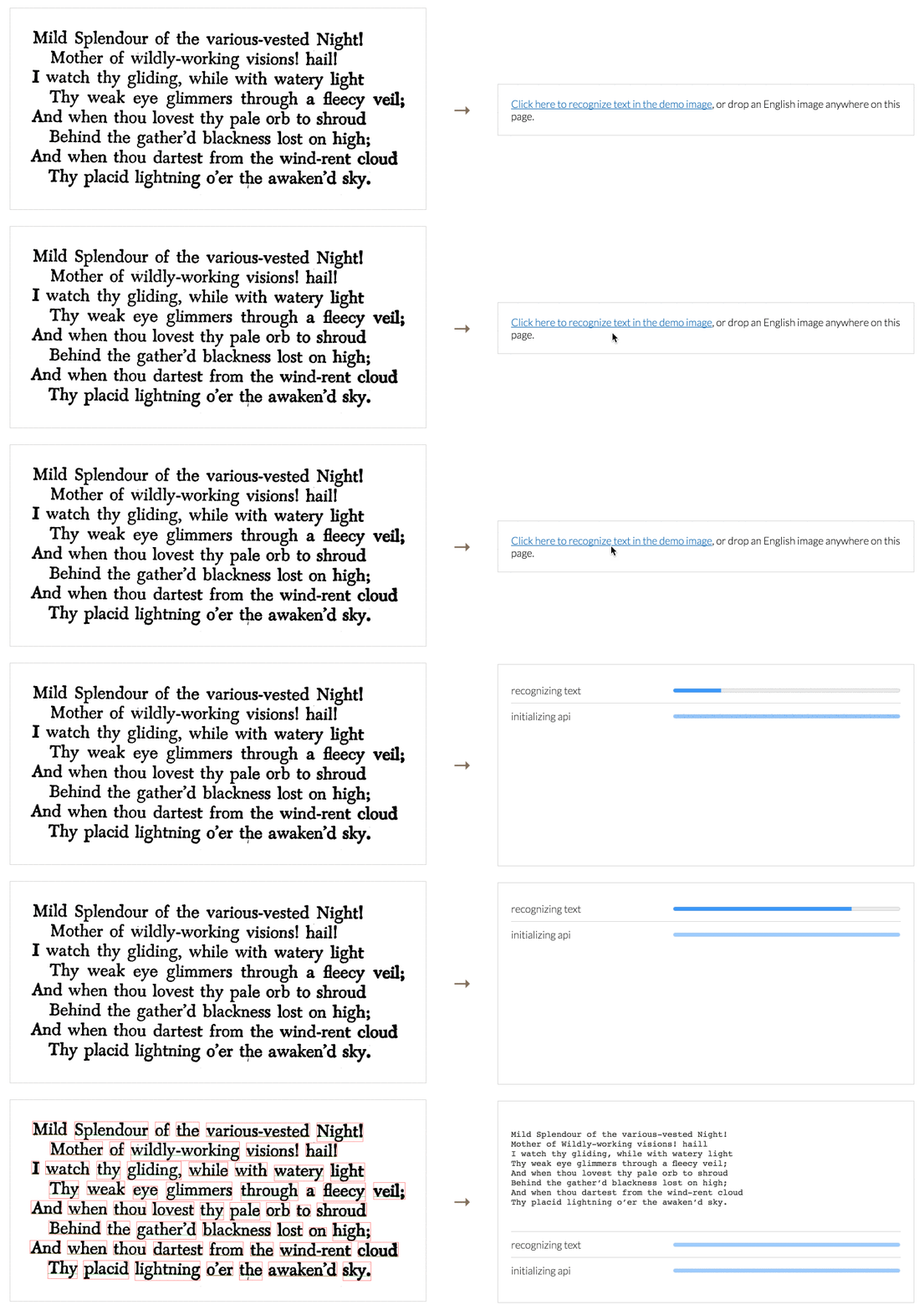
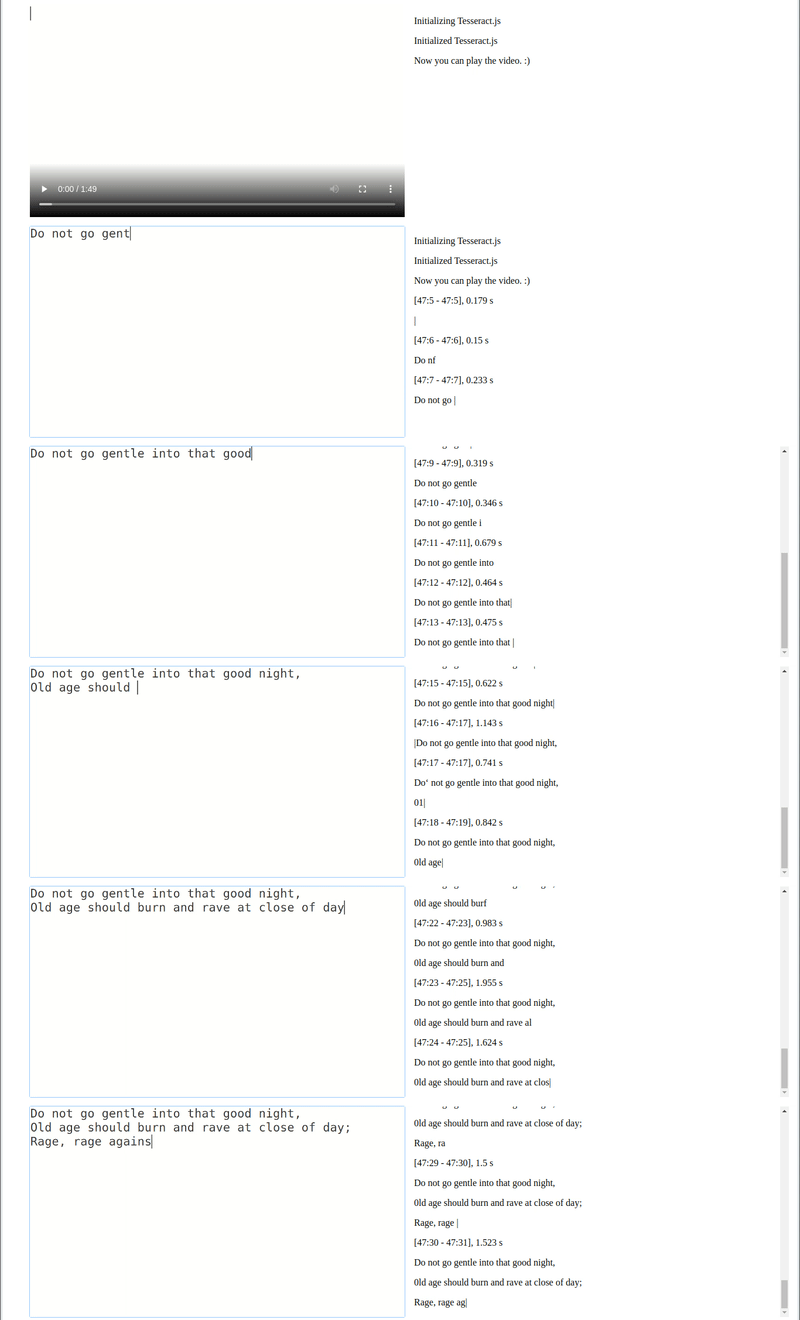
Tesseract.js is a javascript library that gets words in almost any language out of images. (Demo)
Image Recognition
Video Real-time Recognition
Tesseract.js works in the browser using webpack, esm, or plain script tags with a CDN and on the server with Node.js.
After you install it, using it is as simple as:
When recognizing multiple images, users should create a worker once, run worker.recognize for each image, and then run worker.terminate() once at the end (rather than running the above snippet for every image).
Installation
Tesseract.js works with a <script> tag via local copy or CDN, with webpack via npm and on Node.js with npm/yarn.
After including the script the Tesseract variable will be globally available and a worker can be created using Tesseract.createWorker.
Alternatively, an ESM build (used with import syntax) can be found at https://cdn.jsdelivr.net/npm/tesseract.js@5/dist/tesseract.esm.min.js.
Node.js
Tesseract.js v7 requires Node.js v16 or newer. (Tesseract.js v6 requires Node.js v14 or newer.)
# For latest version
npm install tesseract.js
yarn add tesseract.js

# For old versions
npm install [email protected]
yarn add [email protected]
Project Scope
Tesseract.js aims to bring the Tesseract OCR engine (a separate project) to the browser and Node.js, and works by wrapping a WebAssembly port of Tesseract. This project does not modify core Tesseract features. Most notably, Tesseract.js does not support PDF files and does not modify the Tesseract recognition model to improve accuracy.
If your project requires features outside of this scope, consider the Scribe.js library. Scribe.js is an alternative library created to accommodate common feature requests that are outside of the scope of this repo. Scribe.js includes improvements to the Tesseract recognition model and supports extracting text from PDF documents, among other features. For more information see Scribe.js vs. Tesseract.js.
Documentation
Workers vs. Schedulers
Examples
Supported Image Formats
API
Local Installation
FAQ
Community Projects and Examples
The following are examples and projects built by the community using Tesseract.js. Officially supported examples are found in the examples directory.
Projects
Scribe OCR: web application for scanning documents (images and PDFs)
Site at scribeocr.com, repo at github.com/scribeocr/scribeocr
If you have a project or example repo that uses Tesseract.js, feel free to add it to this list using a pull request. Examples submitted should be well documented such that new users can run them; projects should be functional and actively maintained.
Major changes in v6
Version 6 changes are documented in this issue. Highlights are below.
Fixed memory leak in previous versions
Overall reductions in runtime and memory usage
Breaking changes:
All outputs formats other than text are disabled by default.
To re-enable the hocr output (for example), set the following: worker.recognize(image, {}, { hocr: true })
Minor changes to the structure of the JavaScript object (blocks) output
See this issue for full list
Major changes in v5
Version 5 changes are documented in this issue. Highlights are below.
Significantly smaller files by default (54% smaller for English, 73% smaller for Chinese)
This results in a ~50% reduction in runtime for first-time users (who do not have the files cached yet)
Significantly lower memory usage
Breaking changes:
createWorker arguments changed
Setting non-default language and OEM now happens in createWorker
E.g. createWorker("chi_sim", 1)
worker.initialize and worker.loadLanguage functions should be deleted from code
See this issue for full list
Upgrading from v2 to v5? See this guide.
Major changes in v4
Version 4 includes many new features and bug fixes--see this issue for a full list. Several highlights are below.
Added rotation preprocessing options (including auto-rotate) for significantly better accuracy
Processed images (rotated, grayscale, binary) can now be retrieved
Improved support for parallel processing (schedulers)
Breaking changes:
createWorker is now async
getPDF function replaced by pdf recognize option
Contributing
Development
To run a development copy of Tesseract.js do the following:
# First we clone the repository
git clone https://github.com/naptha/tesseract.js.git
cd tesseract.js

# Then we install the dependencies
npm install

# And finally we start the development server
npm start
The development server will be available at http://localhost:3000/examples/browser/basic-efficient.html in your favorite browser.
It will automatically rebuild tesseract.min.js and worker.min.js when you change files in the src folder.
Building Static Files
To build the compiled static files just execute the following:
npm run build
This will output the files into the dist directory.
Run Tests
Always confirm the automated tests pass before submitting a pull request. To run the automated tests locally, run the following commands.
npm run lint
npm run test
Contributors
Code Contributors
This project exists thanks to all the people who contribute. [Contribute].
Financial Contributors
Become a financial contributor and help us sustain our community. [Contribute]
Individuals
Organizations
Support this project with your organization. Your logo will show up here with a link to your website. [Contribute]
The most recent commit recorded on naptha/tesseract.js was 2 months ago, based on the GitHub push timestamp. The repository has 2.4k forks — one of the better signals of community interest.
How does naptha/tesseract.js compare to other AI Tools projects?
naptha/tesseract.js is tracked by TopGit in the AI Tools category, with 38.6k GitHub stars and written in JavaScript. Browse the AI Tools topic page on TopGit to compare it against similar projects by stars and activity.
How many stars does naptha/tesseract.js have?
naptha/tesseract.js has 38.6k GitHub stars — refresh the page for the live number, or check github.com/naptha/tesseract.js. TopGit mirrors GitHub's count but does not claim minute-by-minute accuracy.
Is naptha/tesseract.js open source?
Yes — naptha/tesseract.js ships under the Apache-2.0 license, which makes its source code freely readable (and, depending on license terms, forkable and reusable). Source: github.com/naptha/tesseract.js.
What is naptha/tesseract.js?
naptha/tesseract.js (naptha/tesseract.js) is a JavaScript project on GitHub. From the project's own README: Pure Javascript OCR for more than 100 Languages 📖🎉🖥
Where do I read more about naptha/tesseract.js?
This TopGit page is a snapshot — the READ ME tab shows the project's own README content (links stripped, images preserved). The GitHub repository at github.com/naptha/tesseract.js is the definitive source.