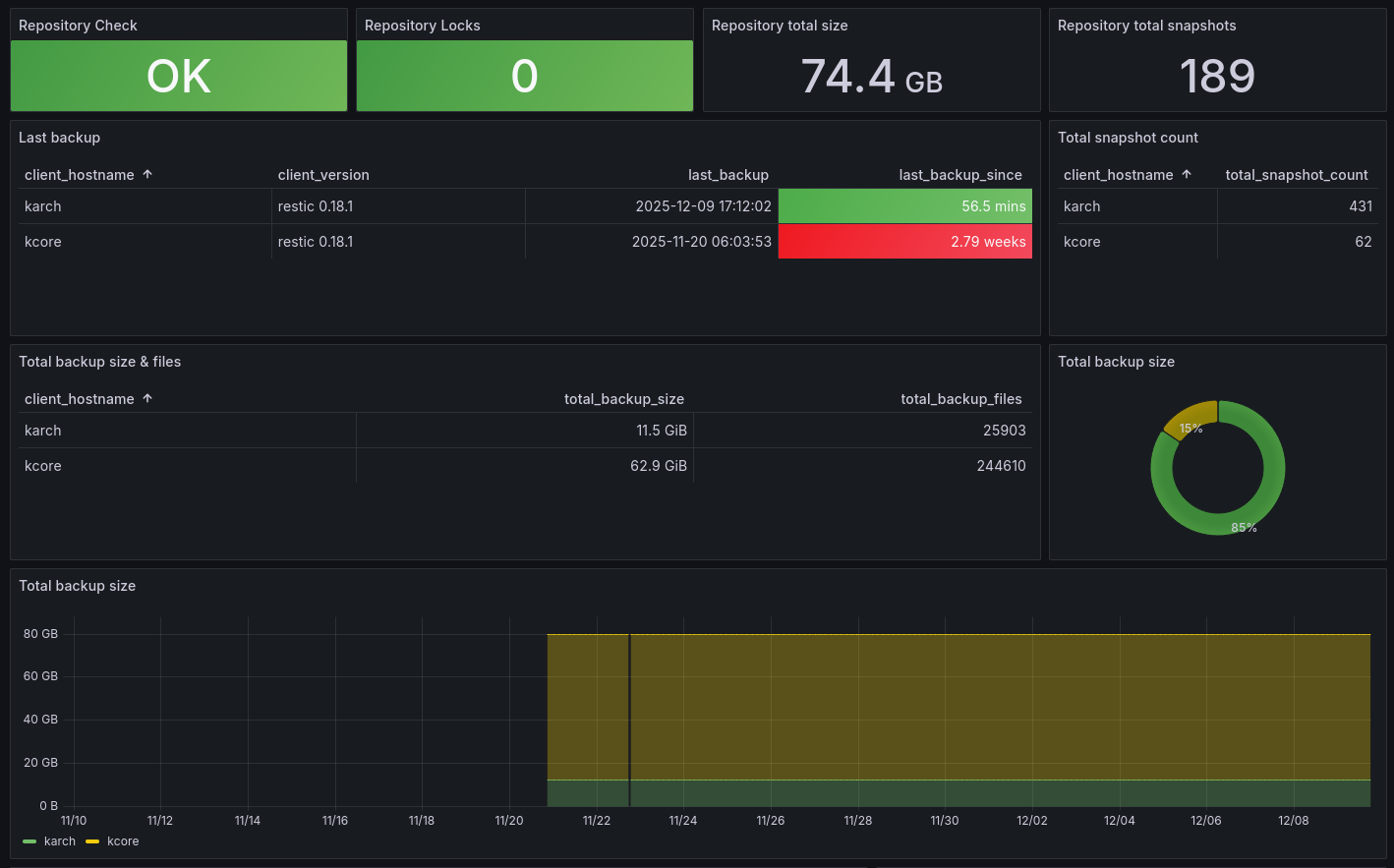
A look at ngosang/restic-exporter: 159 stars on GitHub, written primarily in Python, tracked under the Developer Tools category. Prometheus exporter for the Restic backup system
Snapshot summary built from the project's own GitHub metadata — there's no written TopGit review yet. The page will update automatically when a full review is published.
WHY NO REVIEW YET
TopGit writes full reviews for the most-starred, most-requested repositories. This page is a snapshot until then — see the READ ME tab for the original README in full.
export RESTIC_REPOSITORY=/data
export RESTIC_PASSWORD=restic_password
uv run exporter/exporter.py
Format the code:
uv run ruff format ./
uv run ruff check --fix ./
Run the tests:
uv run pytest ./
Docker
Docker images are available in GHCR and DockerHub.
docker pull ghcr.io/ngosang/restic-exporter
# or
docker pull ngosang/restic-exporter
Supported Architectures
The architectures supported by this image are:
linux/386
linux/amd64
linux/arm/v6
linux/arm/v7
linux/arm64
linux/ppc64le
linux/riscv64
linux/s390x
Docker Compose
NOTE: It is recommended to mount the /root/.cache/restic path as an external volume to speed up Restic Exporter
startup time and to reduce costs if your repository is remote. This path contains the Restic repository cache.
Rclone (see notes below): rclone:gd-backup:/restic
Repository password configuration. Choose one of the following methods:
RESTIC_PASSWORD: Restic repository password in plain text.
RESTIC_PASSWORD_FILE: File with the Restic repository password in plain text. Remember to mount the Docker volume
with the file.
RESTIC_PASSWORD_COMMAND: Program to be called when the password is needed.
REFRESH_INTERVAL: (Optional) Refresh interval for the metrics in seconds. Computing the metrics is an expensive
task, keep this value as high as possible. Default is 3600 seconds (1 hour).
WARNING: With default settings, downloading from remote repositories may be costly if using this exporter with
a remote Cloud-based restic repository (e.g. GCP GCS, Amazon S3). This may cause a surprisingly high spike in your
infrastructure costs (e.g. for small restic repositories that don't download frequently, this may increase your costs
by multiple orders of magnitude). Consider setting REFRESH_INTERVAL to considerably higher values (e.g. 86400 for
once per day) to lower this impact.
LISTEN_PORT: (Optional) The address the exporter should listen on. The default is 8001.
LISTEN_ADDRESS: (Optional) The address the exporter should listen on. The default is to listen on all addresses.
LOG_LEVEL: (Optional) Log level of the traces. The default is INFO.
EXIT_ON_ERROR: (Optional) Shutdown exporter on any restic error. Default is False (only log error, such as
network error with Cloud backends).
NO_CHECK: (Optional) Do not perform restic check operation for performance reasons. Default is False (perform
restic check).
NO_GLOBAL_STATS: (Optional) Do not perform restic stats operation for performance reasons. Default is False (perform
restic stats).
NO_LEGACY_STATS: (Optional) Do not collect per backup statistics for performance reasons. Default is False (collect per
backup statistics).
NOTE: Since Restic 0.17 getting the statistics is much faster, and it is always enabled. This configuration only
applies for backups performed with an old version of the Restic client.
NO_LOCKS: (Optional) Do not collect the number of locks. Default is False (collect the number of locks).
INCLUDE_PATHS: (Optional) Include snapshot paths for each backup. The paths are separated by commas. Default is
False (not collect the paths).
INSECURE_TLS: (Optional) skip TLS verification for self-signed certificates. Default is False (not skip).
AWS_ACCESS_KEY_ID: (Optional) Required for Amazon S3, Minio and Wasabi backends.
AWS_SECRET_ACCESS_KEY: (Optional) Required for Amazon S3, Minio and Wasabi backends.
B2_ACCOUNT_ID: (Optional) Required for Backblaze B2 backend.
B2_ACCOUNT_KEY: (Optional) Required for Backblaze B2 backend.
Configuration for Rclone
Rclone is not included in the Docker image. You have to mount the Rclone executable and the Rclone configuration from
the host machine. Here is an example with docker-compose:
# HELP restic_check_success Result of restic check operation in the repository
restic_check_success 1.0
# HELP restic_locks_total Total number of locks in the repository
restic_locks_total 0.0
# HELP restic_scrape_duration_seconds Amount of time each scrape takes
restic_scrape_duration_seconds 87.033
# HELP restic_size_total Total size of the repository in bytes
restic_size_total 38573452
# HELP restic_uncompressed_size_total Total uncompressed size of the repository in bytes
restic_uncompressed_size_total 44077773
# HELP restic_compression_ratio Compression ratio of the repository
restic_compression_ratio 1.142
# HELP restic_blob_count_total Total number of blobs in the repository
restic_blob_count_total 1500
# HELP restic_snapshots_total Total number of snapshots in the repository
restic_snapshots_total 100.0
# HELP restic_backup_timestamp Timestamp of the last backup
restic_backup_timestamp{client_hostname="example",client_username="root",client_version="restic 0.18.1",snapshot_hash="785c44996fa586ccf634fb0b45cd50d3afe8556ad44476bc5c3372bcdfbae4cd",snapshot_tag="mysql",snapshot_tags="mysql,tag2",snapshot_paths="/mysql/data,/mysql/config"} 1.666273638e+09
# HELP restic_backup_snapshots_total Total number of snapshots
restic_backup_snapshots_total{client_hostname="example",client_username="root",client_version="restic 0.18.1",snapshot_hash="785c44996fa586ccf634fb0b45cd50d3afe8556ad44476bc5c3372bcdfbae4cd",snapshot_tag="mysql",snapshot_tags="mysql,tag2",snapshot_paths="/mysql/data,/mysql/config"} 1.0
# HELP restic_backup_files_total Number of files in the backup
restic_backup_files_total{client_hostname="example",client_username="root",client_version="restic 0.18.1",snapshot_hash="785c44996fa586ccf634fb0b45cd50d3afe8556ad44476bc5c3372bcdfbae4cd",snapshot_tag="mysql",snapshot_tags="mysql,tag2",snapshot_paths="/mysql/data,/mysql/config"} 8.0
# HELP restic_backup_size_total Total size of backup in bytes
restic_backup_size_total{client_hostname="example",client_username="root",client_version="restic 0.18.1",snapshot_hash="785c44996fa586ccf634fb0b45cd50d3afe8556ad44476bc5c3372bcdfbae4cd",snapshot_tag="mysql",snapshot_tags="mysql,tag2",snapshot_paths="/mysql/data,/mysql/config"} 4.3309562e+07
# HELP restic_backup_files_new Number of new files in the backup
restic_backup_files_new{client_hostname="example",client_username="root",client_version="restic 0.18.1",snapshot_hash="785c44996fa586ccf634fb0b45cd50d3afe8556ad44476bc5c3372bcdfbae4cd",snapshot_tag="mysql",snapshot_tags="mysql,tag2",snapshot_paths="/mysql/data,/mysql/config"} 2280.0
# HELP restic_backup_files_changed Number of changed files in the backup
restic_backup_files_changed{client_hostname="example",client_username="root",client_version="restic 0.18.1",snapshot_hash="785c44996fa586ccf634fb0b45cd50d3afe8556ad44476bc5c3372bcdfbae4cd",snapshot_tag="mysql",snapshot_tags="mysql,tag2",snapshot_paths="/mysql/data,/mysql/config"} 3167.0
# HELP restic_backup_files_unmodified Number of unmodified files in the backup
restic_backup_files_unmodified{client_hostname="example",client_username="root",client_version="restic 0.18.1",snapshot_hash="785c44996fa586ccf634fb0b45cd50d3afe8556ad44476bc5c3372bcdfbae4cd",snapshot_tag="mysql",snapshot_tags="mysql,tag2",snapshot_paths="/mysql/data,/mysql/config"} 239163.0
# HELP restic_backup_dirs_new Number of new directories in the backup
restic_backup_dirs_new{client_hostname="example",client_username="root",client_version="restic 0.18.1",snapshot_hash="785c44996fa586ccf634fb0b45cd50d3afe8556ad44476bc5c3372bcdfbae4cd",snapshot_tag="mysql",snapshot_tags="mysql,tag2",snapshot_paths="/mysql/data,/mysql/config"} 1.0
# HELP restic_backup_dirs_changed Number of changed directories in the backup
restic_backup_dirs_changed{client_hostname="example",client_username="root",client_version="restic 0.18.1",snapshot_hash="785c44996fa586ccf634fb0b45cd50d3afe8556ad44476bc5c3372bcdfbae4cd",snapshot_tag="mysql",snapshot_tags="mysql,tag2",snapshot_paths="/mysql/data,/mysql/config"} 255.0
# HELP restic_backup_dirs_unmodified Number of unmodified directories in the backup
restic_backup_dirs_unmodified{client_hostname="example",client_username="root",client_version="restic 0.18.1",snapshot_hash="785c44996fa586ccf634fb0b45cd50d3afe8556ad44476bc5c3372bcdfbae4cd",snapshot_tag="mysql",snapshot_tags="mysql,tag2",snapshot_paths="/mysql/data,/mysql/config"} 53499.0
# HELP restic_backup_data_added_bytes Number of bytes added in the backup
restic_backup_data_added_bytes{client_hostname="example",client_username="root",client_version="restic 0.18.1",snapshot_hash="785c44996fa586ccf634fb0b45cd50d3afe8556ad44476bc5c3372bcdfbae4cd",snapshot_tag="mysql",snapshot_tags="mysql,tag2",snapshot_paths="/mysql/data,/mysql/config"} 5.29759957e+08
# HELP restic_backup_duration_seconds Amount of time Restic took to make the backup
restic_backup_duration_seconds{client_hostname="example",client_username="root",client_version="restic 0.18.1",snapshot_hash="785c44996fa586ccf634fb0b45cd50d3afe8556ad44476bc5c3372bcdfbae4cd",snapshot_tag="mysql",snapshot_tags="mysql,tag2",snapshot_paths="/mysql/data,/mysql/config"} 33.165685
Edit /etc/default/restic-exporter and set at least the repo address and the password. You can add any other environment variable if needed. Since this file holds the repository password, restrict its permissions:
How active is development on ngosang/restic-exporter?
The most recent commit recorded on ngosang/restic-exporter was 3 months ago, based on the GitHub push timestamp. The repository has 34 forks — one of the better signals of community interest.
How does ngosang/restic-exporter compare to other Developer Tools projects?
ngosang/restic-exporter is tracked by TopGit in the Developer Tools category, with 159 GitHub stars and written in Python. Browse the Developer Tools topic page on TopGit to compare it against similar projects by stars and activity.
How many stars does ngosang/restic-exporter have?
ngosang/restic-exporter has 159 GitHub stars — refresh the page for the live number, or check github.com/ngosang/restic-exporter. TopGit mirrors GitHub's count but does not claim minute-by-minute accuracy.
Is ngosang/restic-exporter open source?
Yes — ngosang/restic-exporter ships under the MIT license, which makes its source code freely readable (and, depending on license terms, forkable and reusable). Source: github.com/ngosang/restic-exporter.
What is ngosang/restic-exporter?
ngosang/restic-exporter (ngosang/restic-exporter) is a Python project on GitHub. From the project's own README: Prometheus exporter for the Restic backup system
Where do I read more about ngosang/restic-exporter?
This TopGit page is a snapshot — the READ ME tab shows the project's own README content (links stripped, images preserved). The GitHub repository at github.com/ngosang/restic-exporter is the definitive source.
Read full README in the tab above.
Want a second opinion on restic-exporter?
Ask an AI that can read this page — one click and you get its take on restic-exporter.
 /restic-exporter