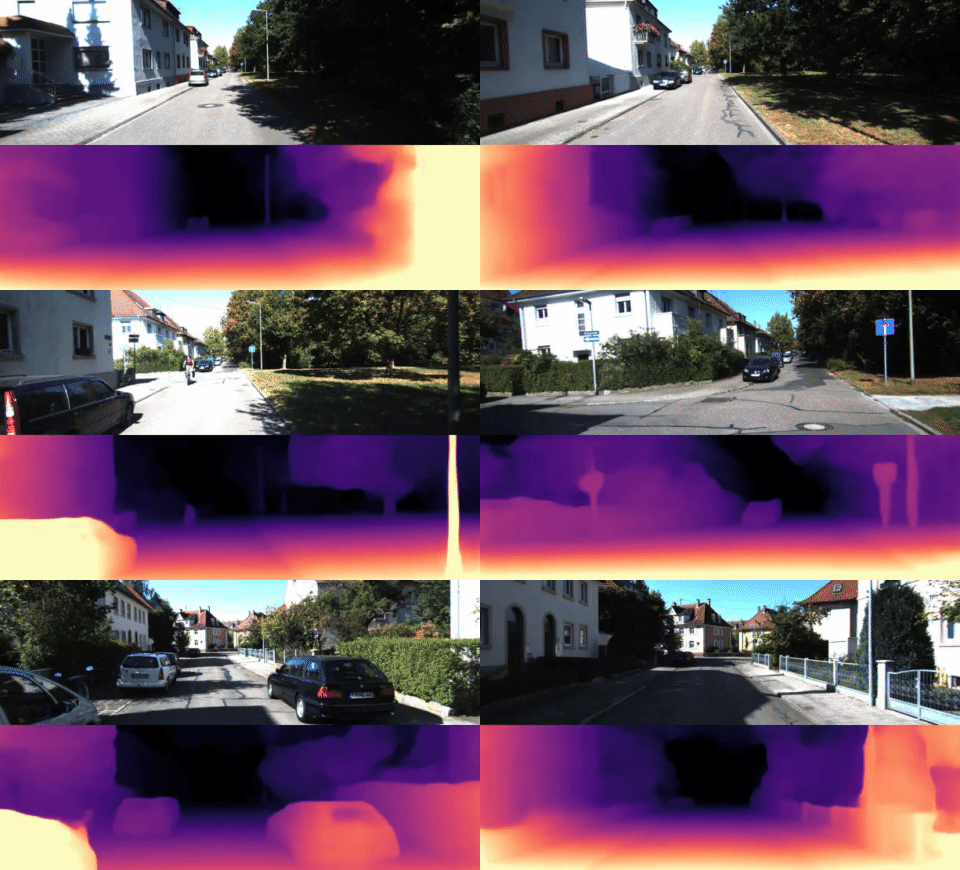
A look at nianticlabs/monodepth2: 4.5k stars on GitHub, written primarily in Jupyter Notebook, tracked under the AI Tools category. [ICCV 2019] Monocular depth estimation from a single image
Snapshot summary built from the project's own GitHub metadata — there's no written TopGit review yet. The page will update automatically when a full review is published.
WHY NO REVIEW YET
TopGit writes full reviews for the most-starred, most-requested repositories. This page is a snapshot until then — see the READ ME tab for the original README in full.
This is the reference PyTorch implementation for training and testing depth estimation models using the method described in
Digging into Self-Supervised Monocular Depth Prediction
Clément Godard, Oisin Mac Aodha, Michael Firman and Gabriel J. Brostow
ICCV 2019 (arXiv pdf)
This code is for non-commercial use; please see the license file for terms.
If you find our work useful in your research please consider citing our paper:
@article{monodepth2,
  title     = {Digging into Self-Supervised Monocular Depth Prediction},
  author    = {Cl{\'{e}}ment Godard and
               Oisin {Mac Aodha} and
               Michael Firman and
               Gabriel J. Brostow},
  booktitle = {The International Conference on Computer Vision (ICCV)},
  month = {October},
year = {2019}
}
⚙️ Setup
Assuming a fresh Anaconda distribution, you can install the dependencies with:
conda install pytorch=0.4.1 torchvision=0.2.1 -c pytorch
pip install tensorboardX==1.4
conda install opencv=3.3.1   # just needed for evaluation
We ran our experiments with PyTorch 0.4.1, CUDA 9.1, Python 3.6.6 and Ubuntu 18.04.
We have also successfully trained models with PyTorch 1.0, and our code is compatible with Python 2.7. You may have issues installing OpenCV version 3.3.1 if you use Python 3.7, we recommend to create a virtual environment with Python 3.6.6 conda create -n monodepth2 python=3.6.6 anaconda .
🖼️ Prediction for a single image
You can predict scaled disparity for a single image with:
On its first run either of these commands will download the mono+stereo_640x192 pretrained model (99MB) into the models/ folder.
We provide the following options for --model_name:
--model_name
Training modality
Imagenet pretrained?
Model resolution
KITTI abs. rel. error
delta < 1.25
mono_640x192
Mono
Yes
640 x 192
0.115
0.877
stereo_640x192
Stereo
Yes
640 x 192
0.109
0.864
mono+stereo_640x192
Mono + Stereo
Yes
640 x 192
0.106
0.874
mono_1024x320
Mono
Yes
1024 x 320
0.115
0.879
stereo_1024x320
Stereo
Yes
1024 x 320
0.107
0.874
mono+stereo_1024x320
Mono + Stereo
Yes
1024 x 320
0.106
0.876
mono_no_pt_640x192
Mono
No
640 x 192
0.132
0.845
stereo_no_pt_640x192
Stereo
No
640 x 192
0.130
0.831
mono+stereo_no_pt_640x192
Mono + Stereo
No
640 x 192
0.127
0.836
You can also download models trained on the odometry split with monocular and mono+stereo training modalities.
Finally, we provide resnet 50 depth estimation models trained with ImageNet pretrained weights and trained from scratch.
Make sure to set --num_layers 50 if using these.
💾 KITTI training data
You can download the entire raw KITTI dataset by running:
or you can skip this conversion step and train from raw png files by adding the flag --png when training, at the expense of slower load times.
The above conversion command creates images which match our experiments, where KITTI .png images were converted to .jpg on Ubuntu 16.04 with default chroma subsampling 2x2,1x1,1x1.
We found that Ubuntu 18.04 defaults to 2x2,2x2,2x2, which gives different results, hence the explicit parameter in the conversion command.
You can also place the KITTI dataset wherever you like and point towards it with the --data_path flag during training and evaluation.
Splits
The train/test/validation splits are defined in the splits/ folder.
By default, the code will train a depth model using Zhou's subset of the standard Eigen split of KITTI, which is designed for monocular training.
You can also train a model using the new benchmark split or the odometry split by setting the --split flag.
Custom dataset
You can train on a custom monocular or stereo dataset by writing a new dataloader class which inherits from MonoDataset – see the KITTIDataset class in datasets/kitti_dataset.py for an example.
⏳ Training
By default models and tensorboard event files are saved to ~/tmp/<model_name>.
This can be changed with the --log_dir flag.
Monocular training:
python train.py --model_name mono_model
Stereo training:
Our code defaults to using Zhou's subsampled Eigen training data. For stereo-only training we have to specify that we want to use the full Eigen training set – see paper for details.
If you train your own model with our code you are likely to see slight differences to the publication results due to randomization in the weights initialization and data loading.
An additional parameter --eval_split can be set.
The three different values possible for eval_split are explained here:
--eval_split
Test set size
For models trained with...
Description
eigen
697
--split eigen_zhou (default) or --split eigen_full
The standard Eigen test files
eigen_benchmark
652
--split eigen_zhou (default) or --split eigen_full
Evaluate with the improved ground truth from the new KITTI depth benchmark
benchmark
500
--split benchmark
The new KITTI depth benchmark test files.
Because no ground truth is available for the new KITTI depth benchmark, no scores will be reported when --eval_split benchmark is set.
Instead, a set of .png images will be saved to disk ready for upload to the evaluation server.
External disparities evaluation
Finally you can also use evaluate_depth.py to evaluate raw disparities (or inverse depth) from other methods by using the --ext_disp_to_eval flag:
Our stereo models are trained with an effective baseline of 0.1 units, while the actual KITTI stereo rig has a baseline of 0.54m. This means a scaling of 5.4 must be applied for evaluation.
In addition, for models trained with stereo supervision we disable median scaling.
Setting the --eval_stereo flag when evaluating will automatically disable median scaling and scale predicted depths by 5.4.
⤴️⤵️ Odometry evaluation
We include code for evaluating poses predicted by models trained with --split odom --dataset kitti_odom --data_path /path/to/kitti/odometry/dataset.
For this evaluation, the KITTI odometry dataset (color, 65GB) and ground truth poses zip files must be downloaded.
As above, we assume that the pngs have been converted to jpgs.
If this data has been unzipped to folder kitti_odom, a model can be evaluated with:
How active is development on nianticlabs/monodepth2?
The most recent commit recorded on nianticlabs/monodepth2 was 2.0 years ago, based on the GitHub push timestamp. The repository has 986 forks — one of the better signals of community interest.
How many stars does nianticlabs/monodepth2 have?
nianticlabs/monodepth2 has 4.5k GitHub stars — refresh the page for the live number, or check github.com/nianticlabs/monodepth2. TopGit mirrors GitHub's count but does not claim minute-by-minute accuracy.
Is nianticlabs/monodepth2 open source?
TopGit's metadata for nianticlabs/monodepth2 does not record a license. Most public repositories on GitHub ARE open source, but the exact terms vary — verify by opening the LICENSE file directly.
What else is in the AI Tools space?
nianticlabs/monodepth2 is tracked by TopGit under the AI Tools category, alongside 7 GitHub-tagged topics. Trending and Topics pages list peer repositories of comparable stars and language.
What is nianticlabs/monodepth2?
nianticlabs/monodepth2 (nianticlabs/monodepth2) is a Jupyter Notebook project on GitHub. From the project's own README: [ICCV 2019] Monocular depth estimation from a single image
What language is nianticlabs/monodepth2 written in?
nianticlabs/monodepth2 is written primarily in Jupyter Notebook. GitHub's language field is based on the largest share of bytes in the default branch.
Where do I read more about nianticlabs/monodepth2?
This TopGit page is a snapshot — the READ ME tab shows the project's own README content (links stripped, images preserved). The GitHub repository at github.com/nianticlabs/monodepth2 is the definitive source.
Read full README in the tab above.
Curious whether monodepth2 is right for you?
Let ChatGPT, Claude, or Perplexity look into it — click below and see what AI actually says about monodepth2.
 /monodepth2