nteract/papermill is tracked by TopGit as an automation project, with 6.5k stars on GitHub, written primarily in Python. 📚 Parameterize, execute, and analyze notebooks
Snapshot summary built from the project's own GitHub metadata — there's no written TopGit review yet. The page will update automatically when a full review is published.
WHY NO REVIEW YET
TopGit writes full reviews for the most-starred, most-requested repositories. This page is a snapshot until then — see the READ ME tab for the original README in full.
papermill is a tool for parameterizing, executing, and analyzing
Jupyter Notebooks.
Papermill lets you:
parameterize notebooks
execute notebooks
This opens up new opportunities for how notebooks can be used. For
example:
Perhaps you have a financial report that you wish to run with
different values on the first or last day of a month or at the
beginning or end of the year, using parameters makes this task
easier.
Do you want to run a notebook and depending on its results, choose a
particular notebook to run next? You can now programmatically
execute a workflow without having to copy and paste from
notebook to notebook manually.
Papermill takes an opinionated approach to notebook parameterization and
execution based on our experiences using notebooks at scale in data
pipelines.
Installation
From the command line:
pip install papermill
For all optional io dependencies, you can specify individual bundles
like s3, or azure -- or use all. To use Black to format parameters you can add as an extra requires ['black'].
pip install papermill[all]
Python Version Support
This library currently supports Python 3.10+ versions. As minor Python
versions are officially sunset by the Python org papermill will similarly
drop support in the future.
Usage
Parameterizing a Notebook
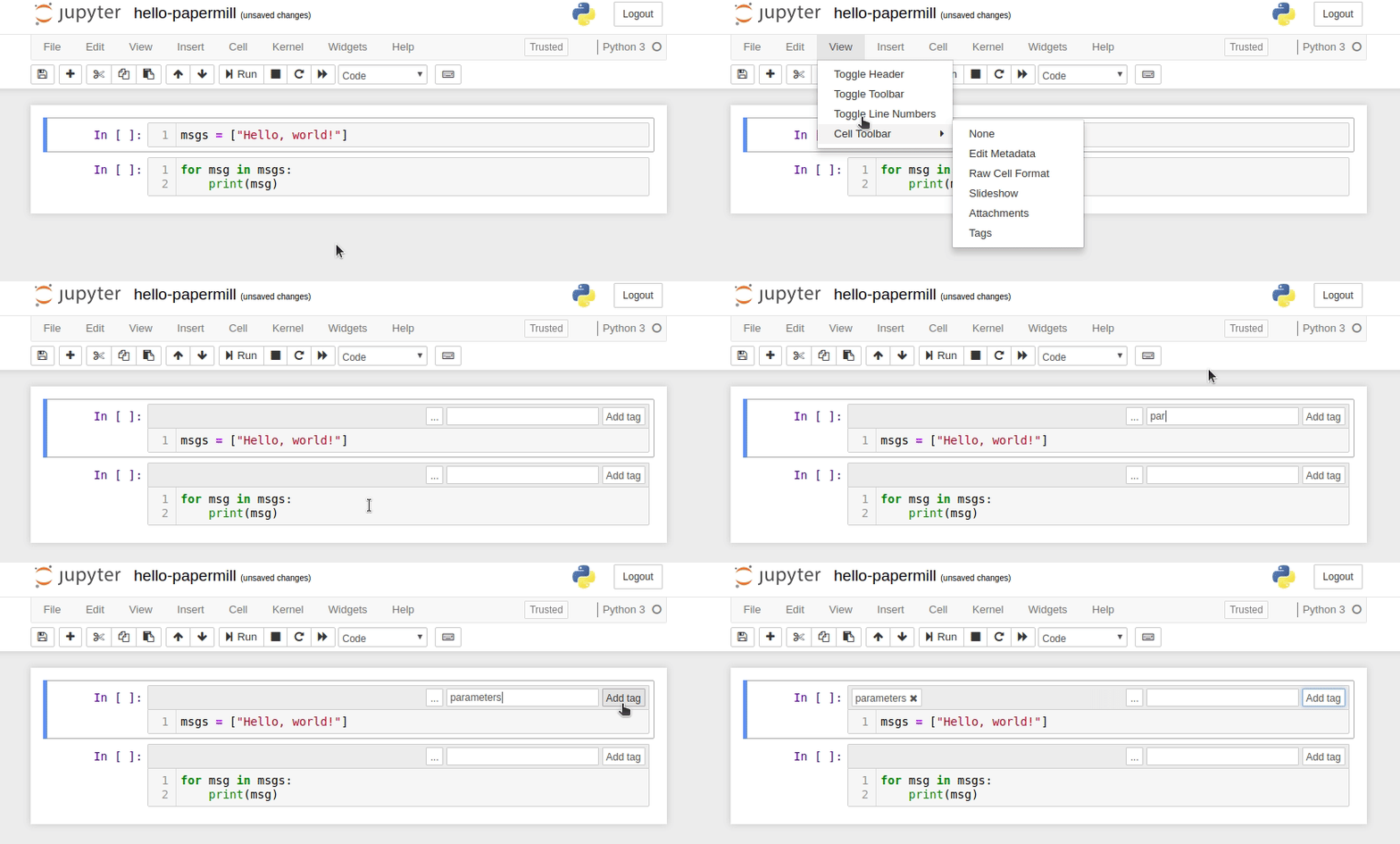
To parameterize your notebook designate a cell with the tag parameters.
Papermill looks for the parameters cell and treats this cell as defaults for the parameters passed in at execution time. Papermill will add a new cell tagged with injected-parameters with input parameters in order to overwrite the values in parameters. If no cell is tagged with parameters the injected cell will be inserted at the top of the notebook.
Additionally, if you rerun notebooks through papermill and it will reuse the injected-parameters cell from the prior run. In this case Papermill will replace the old injected-parameters cell with the new run's inputs.
Executing a Notebook
The two ways to execute the notebook with parameters are: (1) through
the Python API and (2) through the command line interface.
NOTE:
If you use multiple AWS accounts, and you have properly configured your AWS credentials, then you can specify which account to use by setting the AWS_PROFILE environment variable at the command-line. For example:
In the above example, two parameters are set: alpha and l1_ratio using -p (--parameters also works). Parameter values that look like booleans or numbers will be interpreted as such. Here are the different ways users may set parameters:
$ papermill local/input.ipynb s3://bkt/output.ipynb -r version 1.0
Using -r or --parameters_raw, users can set parameters one by one. However, unlike -p, the parameter will remain a string, even if it may be interpreted as a number or boolean.
How does nteract/papermill compare to other Automation projects?
nteract/papermill is tracked by TopGit in the Automation category, with 6.5k GitHub stars and written in Python. Browse the Automation topic page on TopGit to compare it against similar projects by stars and activity.
Is nteract/papermill open source?
Yes — nteract/papermill ships under the BSD-3-Clause license, which makes its source code freely readable (and, depending on license terms, forkable and reusable). Source: github.com/nteract/papermill.
What else is in the Automation space?
nteract/papermill is tracked by TopGit under the Automation category, alongside 11 GitHub-tagged topics. Trending and Topics pages list peer repositories of comparable stars and language.
What is nteract/papermill?
nteract/papermill (nteract/papermill) is a Python project on GitHub. From the project's own README: 📚 Parameterize, execute, and analyze notebooks
Where do I read more about nteract/papermill?
This TopGit page is a snapshot — the READ ME tab shows the project's own README content (links stripped, images preserved). The GitHub repository at github.com/nteract/papermill is the definitive source.
Why is nteract/papermill categorized under Automation?
TopGit places nteract/papermill in the Automation category based on its GitHub topics and description (tagged: "julia", "jupyter", "notebook"). Categories are assigned from real repository metadata, not editorial guesswork.
Read full README in the tab above.
Curious whether papermill is right for you?
Let ChatGPT, Claude, or Perplexity look into it — click below and see what AI actually says about papermill.

 /papermill