nunomaduro/termwind sits at 2.5k stars on GitHub, written primarily in PHP. 🍃 In short, it's like Tailwind CSS, but for the PHP command-line applications.
Snapshot summary built from the project's own GitHub metadata — there's no written TopGit review yet. The page will update automatically when a full review is published.
WHY NO REVIEW YET
TopGit writes full reviews for the most-starred, most-requested repositories. This page is a snapshot until then — see the READ ME tab for the original README in full.
Termwind allows you to build unique and beautiful PHP command-line applications, using the Tailwind CSS API. In short, it's like Tailwind CSS, but for the PHP command-line applications.
Installation
Requires PHP 8.0+
Require Termwind using Composer:
composer require nunomaduro/termwind
Usage
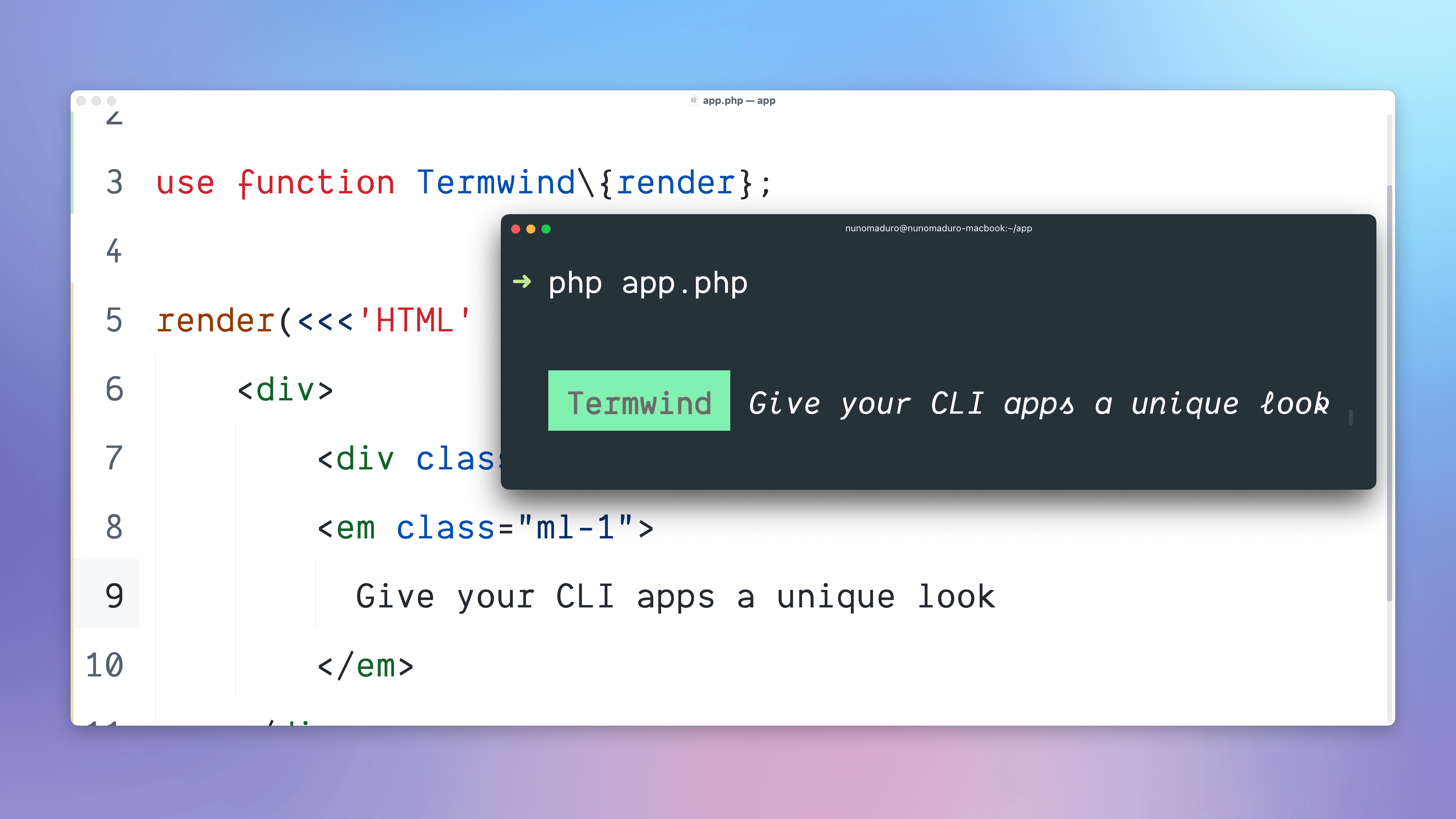
use function Termwind\{render};

// single line html...
render('<div class="px-1 bg-green-300">Termwind</div>');

// multi-line html...
render(<<<'HTML'
    <div>
        <div class="px-1 bg-green-600">Termwind</div>
        <em class="ml-1">
          Give your CLI apps a unique look
        </em>
    </div>
HTML);

// Laravel or Symfony console commands...
class UsersCommand extends Command
{
    public function handle()
    {
        render(
            view('users.index', [
                'users' => User::all()
            ])
        );
    }
}
style()
The style() function may be used to add own custom styles and also update colors.
use function Termwind\{style};

style('green-300')->color('#bada55');
style('btn')->apply('p-4 bg-green-300 text-white');

render('<div class="btn">Click me</div>');
ask()
The ask() function may be used to prompt the user with a question.
use function Termwind\{ask};

$answer = ask(<<<HTML
    <span class="mt-1 ml-2 mr-1 bg-green px-1 text-black">
        What is your name?
    </span>
HTML);
The return provided from the ask method will be the answer provided from the user.
terminal()
The terminal() function returns an instance of the Terminal class, with the following methods:
->width(): Returns the full width of the terminal.
->height(): Returns the full height of the terminal.
->clear(): It clears the terminal screen.
Classes Supported
All the classes supported use exactly the same logic that is available on tailwindcss.com/docs.
Background Color:bg-{color}-{variant}.
Text Color:text-{color}-{variant}.
Font Weight:font-bold, font-normal.
Font Style:italic.
Text Decoration:underline, line-through.
Text Transform:uppercase, lowercase, capitalize, snakecase.
Text Overflow:truncate.
Text Alignment:text-left, text-center, text-right.
List Style:list-disc, list-decimal, list-square, list-none.
Content:content-repeat-['.'].
Responsive Design
Like TailwindCSS we also support Responsive Design media queries and this are the breakpoints supported:
sm: 64 spaces (640px)
md: 76 spaces (768px)
lg: 102 spaces (1024px)
xl: 128 spaces (1280px)
2xl: 153 spaces (1536px)
render(<<<'HTML'
    <div class="bg-blue-500 sm:bg-red-600">
        If bg is blue is sm, if red > than sm breakpoint.
    </div>
HTML);
All the sizes for the CLI are based on Font Size 15.
HTML Elements Supported
All the elements have the capability to use the class attribute.
<div>
The <div> element can be used as a block type element.
Default Styles: block
render(<<<'HTML'
    <div>This is a div element.</div>
HTML);
<p>
The <p> element can be used as a paragraph.
Default Styles: block
render(<<<'HTML'
    <p>This is a paragraph.</p>
HTML);
<span>
The <span> element can be used as an inline text container.
render(<<<'HTML'
    <p>
        This is a CLI app built with <span class="text-green-300">Termwind</span>.
    </p>
HTML);
<a>
The <a> element can be used as a hyperlink. It allows to use the href attribute to open the link when clicked.
render(<<<'HTML'
    <p>
        This is a CLI app built with Termwind. <a href="/">Click here to open</a>
    </p>
HTML);
<b> and <strong>
The <b>and <strong> elements can be used to mark the text as bold.
Default Styles: font-bold
render(<<<'HTML'
    <p>
        This is a CLI app built with <b>Termwind</b>.
    </p>
HTML);
<i> and <em>
The <i> and <em> elements can be used to mark the text as italic.
Default Styles: italic
render(<<<'HTML'
    <p>
        This is a CLI app built with <i>Termwind</i>.
    </p>
HTML);
<s>
The <s> element can be used to add a line through the text.
Default Styles: line-through
render(<<<'HTML'
    <p>
        This is a CLI app built with <s>Termwind</s>.
    </p>
HTML);
<br>
The <br> element can be used to do a line break.
render(<<<'HTML'
    <p>
        This is a CLI <br>
        app built with Termwind.
    </p>
HTML);
<ul>
The <ul> element can be used for an unordered list. It can only accept <li> elements as childs, if there is another element provided it will throw an InvalidChild exception.
The <ol> element can be used for an ordered list. It can only accept <li> elements as childs, if there is another element provided it will throw an InvalidChild exception.
The <dl> element can be used for a description list. It can only accept <dt> or <dd> elements as childs, if there is another element provided it will throw an InvalidChild exception.
Default Styles: block
render(<<<'HTML'
    <dl>
        <dt>🍃 Termwind</dt>
        <dd>Give your CLI apps a unique look</dd>
    </dl>
HTML);
<dt>
The <dt> element can be used as a description title. It should only be used as a child of <dl> elements.
The most recent commit recorded on nunomaduro/termwind was 4 months ago, based on the GitHub push timestamp. The repository has 92 forks — one of the better signals of community interest.
How many stars does nunomaduro/termwind have?
nunomaduro/termwind has 2.5k GitHub stars — refresh the page for the live number, or check github.com/nunomaduro/termwind. TopGit mirrors GitHub's count but does not claim minute-by-minute accuracy.
Is nunomaduro/termwind open source?
Yes — nunomaduro/termwind ships under the MIT license, which makes its source code freely readable (and, depending on license terms, forkable and reusable). Source: github.com/nunomaduro/termwind.
What else is in the Frontend space?
nunomaduro/termwind is tracked by TopGit under the Frontend category, alongside 4 GitHub-tagged topics. Trending and Topics pages list peer repositories of comparable stars and language.
What topics is nunomaduro/termwind associated with?
GitHub's repository topics for nunomaduro/termwind: "console", "css", "php", "tailwind". TopGit's editorial category is Frontend.
Where can I see nunomaduro/termwind in action?
The project maintains a homepage at https://youtube.com/@nunomaduro?sub_confirmation=1. The README tab on this page also usually contains screenshots and a quickstart.
Where do I read more about nunomaduro/termwind?
This TopGit page is a snapshot — the READ ME tab shows the project's own README content (links stripped, images preserved). The GitHub repository at github.com/nunomaduro/termwind is the definitive source.
Read full README in the tab above.
Still deciding about termwind?
One click hands the question to an AI along with this page — see what it says about termwind.

 /termwind