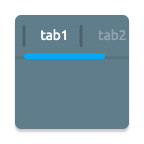
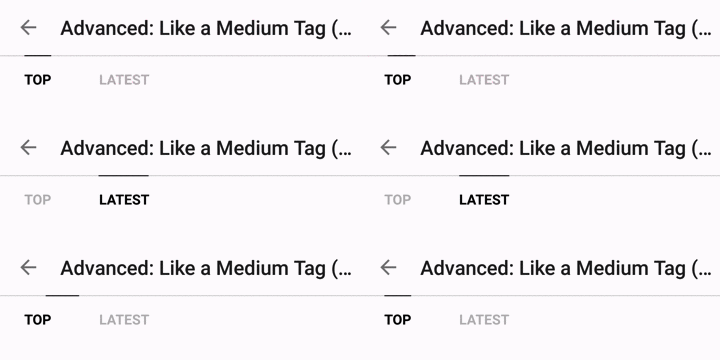
7.1k GitHub stars and counting — ogaclejapan/SmartTabLayout is a Java project TopGit is tracking across repositories on the platform. A custom ViewPager title strip which gives continuous feedback to the user when scrolling
Snapshot summary built from the project's own GitHub metadata — there's no written TopGit review yet. The page will update automatically when a full review is published.
WHY NO REVIEW YET
TopGit writes full reviews for the most-starred, most-requested repositories. This page is a snapshot until then — see the READ ME tab for the original README in full.
A custom ViewPager title strip which gives continuous feedback to the user when scrolling.
This library has been added some features and utilities based on android-SlidingTabBasic project of Google Samples.
Try out the sample application on the Play Store.
Usage
(For a working implementation of this project see the demo/ folder.)
Add the dependency to your build.gradle.
// For androidx (1.0.0)
dependencies {
    compile 'com.ogaclejapan.smarttablayout:library:2.0.0@aar'

    //Optional: see how to use the utility.
    compile 'com.ogaclejapan.smarttablayout:utils-v4:2.0.0@aar'
}

// For legacy android support library (28.0.0)
dependencies {
    compile 'com.ogaclejapan.smarttablayout:library:1.7.0@aar'

    //Optional: see how to use the utility.
    compile 'com.ogaclejapan.smarttablayout:utils-v4:1.7.0@aar'

    //Deprecated since 1.7.0
    compile 'com.ogaclejapan.smarttablayout:utils-v13:1.7.0@aar'
}
Include the SmartTabLayout widget in your layout.
This should usually be placed above the ViewPager it represents.
In your onCreate method (or onCreateView for a fragment), bind the widget to the ViewPager.
(If you use a utility together, you can easily add items to PagerAdapter)
(Optional) Using the FragmentPagerItemAdapter of utility, you will be able to get a position in the Fragment side.
int position = FragmentPagerItem.getPosition(getArguments());
This position will help to implement the parallax scrolling header that contains the ViewPager :P
Attributes
There are several attributes you can set:
attr
description
stl_indicatorAlwaysInCenter
If set to true, active tab is always displayed in center (Like Newsstand google app), default false
stl_indicatorWithoutPadding
If set to true, draw the indicator without padding of tab, default false
stl_indicatorInFront
Draw the indicator in front of the underline, default false
stl_indicatorInterpolation
Behavior of the indicator: 'linear' or 'smart'
stl_indicatorGravity
Drawing position of the indicator: 'bottom' or 'top' or 'center', default 'bottom'
stl_indicatorColor
Color of the indicator
stl_indicatorColors
Multiple colors of the indicator, can set the color for each tab
stl_indicatorThickness
Thickness of the indicator
stl_indicatorWidth
Width of the indicator, default 'auto'
stl_indicatorCornerRadius
Radius of rounded corner the indicator
stl_overlineColor
Color of the top line
stl_overlineThickness
Thickness of the top line
stl_underlineColor
Color of the bottom line
stl_underlineThickness
Thickness of the bottom line
stl_dividerColor
Color of the dividers between tabs
stl_dividerColors
Multiple colors of the dividers between tabs, can set the color for each tab
stl_dividerThickness
Thickness of the divider
stl_defaultTabBackground
Background drawable of each tab. In general it set the StateListDrawable
stl_defaultTabTextAllCaps
If set to true, all tab titles will be upper case, default true
stl_defaultTabTextColor
Text color of the tab that was included by default
stl_defaultTabTextSize
Text size of the tab that was included by default
stl_defaultTabTextHorizontalPadding
Text layout padding of the tab that was included by default
stl_defaultTabTextMinWidth
Minimum width of tab
stl_customTabTextLayoutId
Layout ID defined custom tab. If you do not specify a layout, use the default tab
stl_customTabTextViewId
Text view ID in a custom tab layout. If you do not define with customTabTextLayoutId, does not work
stl_distributeEvenly
If set to true, each tab is given the same weight, default false
stl_clickable
If set to false, disable the selection of a tab click, default true
stl_titleOffset
If set to 'auto_center', the slide position of the tab in the middle it will keep to the center. If specify a dimension it will be offset from the left edge, default 24dp
stl_drawDecorationAfterTab
Draw the decoration(indicator and lines) after drawing of tab, default false
Notes: Both 'stl_indicatorAlwaysInCenter' and 'stl_distributeEvenly' if it is set to true, it will throw UnsupportedOperationException.
How to customize the tab
The customization of tab There are three ways.
Customize the attribute
SmartTabLayout#setCustomTabView(int layoutResId, int textViewId)
If set the TabProvider, can build a view for each tab.
public class SmartTabLayout extends HorizontalScrollView {

    //...

    /**
     * Create the custom tabs in the tab layout. Set with
     * {@link #setCustomTabView(com.ogaclejapan.smarttablayout.SmartTabLayout.TabProvider)}
     */
    public interface TabProvider {

        /**
         * @return Return the View of {@code position} for the Tabs
         */
        View createTabView(ViewGroup container, int position, PagerAdapter adapter);

    }

    //...
}
How to use the utility
Utility has two types available to suit the Android support library.
utils-v4 library contains the PagerAdapter implementation class for androidx.fragment.app.Fragment
(Deprecated) utils-v13 library contains the PagerAdapter implementation class for android.app.Fragment
The two libraries have different Android support libraries that depend,
but implemented functionality is the same.
PagerAdapter for View-based Page
ViewPagerItemAdapter adapter = new ViewPagerItemAdapter(ViewPagerItems.with(this)
        .add(R.string.title, R.layout.page)
        .add("title", R.layout.page)
        .create());

viewPager.setAdapter(adapter);

//...

public void onPageSelected(int position) {

  //.instantiateItem() from until .destroyItem() is called it will be able to get the View of page.
  View page = adapter.getPage(position);

}
PagerAdapter for Fragment-based Page
Fragment-based PagerAdapter There are two implementations.
Please differences refer to the library documentation for Android.
FragmentPagerItemAdapter adapter = new FragmentPagerItemAdapter(
        getSupportFragmentManager(), FragmentPagerItems.with(this)
        .add(R.string.title, PageFragment.class),
        .add(R.string.title, WithArgumentsPageFragment.class, new Bundler().putString("key", "value").get()),
        .add("title", PageFragment.class)
        .create());

viewPager.setAdapter(adapter);

//...

public void onPageSelected(int position) {

  //.instantiateItem() from until .destoryItem() is called it will be able to get the Fragment of page.
  Fragment page = adapter.getPage(position);

}
Notes: If using fragment inside a ViewPager, Must be use Fragment#getChildFragmentManager().
Looking for iOS ?
Check WormTabStrip out.
LICENSE
Copyright (C) 2015 ogaclejapan
Copyright (C) 2013 The Android Open Source Project

Licensed under the Apache License, Version 2.0 (the "License");
you may not use this file except in compliance with the License.
You may obtain a copy of the License at

http://www.apache.org/licenses/LICENSE-2.0

Unless required by applicable law or agreed to in writing, software
distributed under the License is distributed on an "AS IS" BASIS,
WITHOUT WARRANTIES OR CONDITIONS OF ANY KIND, either express or implied.
See the License for the specific language governing permissions and
limitations under the License.
How active is development on ogaclejapan/SmartTabLayout?
The most recent commit recorded on ogaclejapan/SmartTabLayout was 6.5 years ago, based on the GitHub push timestamp. The repository has 1.3k forks — one of the better signals of community interest.
How does ogaclejapan/SmartTabLayout compare to other Mobile projects?
ogaclejapan/SmartTabLayout is tracked by TopGit in the Mobile category, with 7.1k GitHub stars and written in Java. Browse the Mobile topic page on TopGit to compare it against similar projects by stars and activity.
How many stars does ogaclejapan/SmartTabLayout have?
ogaclejapan/SmartTabLayout has 7.1k GitHub stars — refresh the page for the live number, or check github.com/ogaclejapan/SmartTabLayout. TopGit mirrors GitHub's count but does not claim minute-by-minute accuracy.
What is ogaclejapan/SmartTabLayout?
ogaclejapan/SmartTabLayout (ogaclejapan/SmartTabLayout) is a Java project on GitHub. From the project's own README: A custom ViewPager title strip which gives continuous feedback to the user when scrolling
What language is ogaclejapan/SmartTabLayout written in?
ogaclejapan/SmartTabLayout is written primarily in Java. GitHub's language field is based on the largest share of bytes in the default branch.
What topics is ogaclejapan/SmartTabLayout associated with?
GitHub's repository topics for ogaclejapan/SmartTabLayout: "android", "smarttablayout", "viewpager". TopGit's editorial category is Mobile.
Why is ogaclejapan/SmartTabLayout categorized under Mobile?
TopGit places ogaclejapan/SmartTabLayout in the Mobile category based on its GitHub topics and description (tagged: "android", "smarttablayout", "viewpager"). Categories are assigned from real repository metadata, not editorial guesswork.
Read full README in the tab above.
Still deciding about SmartTabLayout?
One click hands the question to an AI along with this page — see what it says about SmartTabLayout.

 /SmartTabLayout