openfaas/of-watchdog — an API project — sits at 266 GitHub stars in the API space. Reverse proxy/middleware for functions using STDIO/HTTP
Snapshot summary built from the project's own GitHub metadata — there's no written TopGit review yet. The page will update automatically when a full review is published.
WHY NO REVIEW YET
TopGit writes full reviews for the most-starred, most-requested repositories. This page is a snapshot until then — see the READ ME tab for the original README in full.
Reverse proxy/middleware for functions using STDIO/HTTP
The of-watchdog implements an HTTP server listening on port 8080, and acts as a reverse proxy for running functions and microservices. It can be used independently, or as the entrypoint for a container with OpenFaaS.
This version of the OpenFaaS watchdog adds support for HTTP proxying as well as STDIO, which enables reuse of memory and very fast serving of requests. It does not aim to replace the Classic Watchdog, but offers another option for those who need these features.
A download is made via GitHub releases, but the watchdog is meant to be copied from the container image published to ghcr.io in a multi-stage build:
FROM --platform=${TARGETPLATFORM:-linux/amd64} ghcr.io/openfaas/of-watchdog:0.9.11 as watchdog
FROM --platform=${TARGETPLATFORM:-linux/amd64} node:18-alpine as ship

COPY --from=watchdog /fwatchdog /usr/bin/fwatchdog
See example templates
Goals
Keep function process warm for lower latency / caching / persistent connections through using HTTP
Enable streaming of large responses from functions, beyond the RAM or disk capacity of the container
Cleaner abstractions for each "mode"
Modes
There are several modes available for the of-watchdog which changes how it interacts with your microservice or function code.
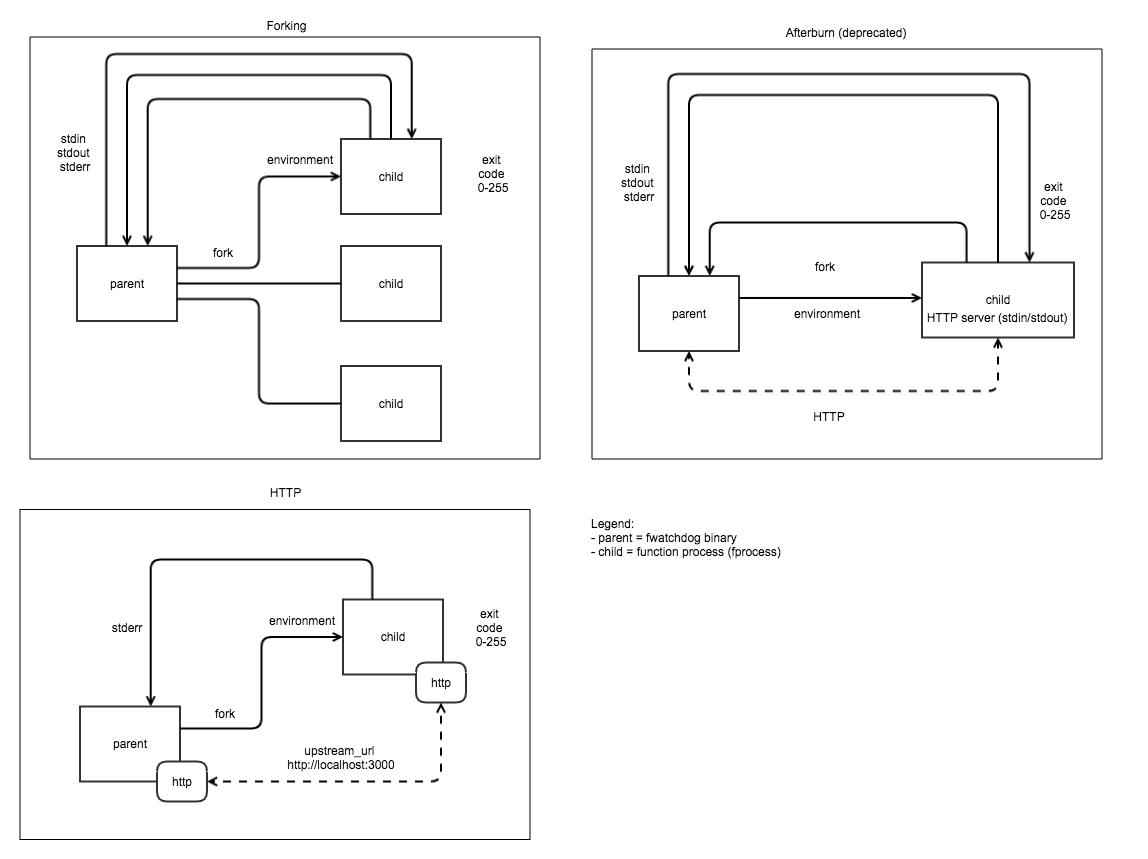
A comparison of three watchdog modes. Top left - Classic Watchdog, top right: afterburn (deprecated), bottom left HTTP mode from of-watchdog.
HTTP mode - the default and most efficient option all template authors should consider this option if the target language has a HTTP server implementation.
Serializing mode - for when a HTTP server implementation doesn't exist, STDIO is read into memory then sent into a forked process.
Streaming mode - as per serializing mode, however the request and response are both streamed instead of being buffered completely into memory before the function starts running.
API
Private endpoints, served by watchdog:
/_/health - returns true when the process is started, or if a lock file is in use, when that file exists.
/_/ready - as per /_/health, but if max_inflight is configured to a non-zero value, and the maximum number of connections is met, it will return a 429 status
Any other HTTP requests:
/* any other Path and HTTP verbs are sent to the function
1. HTTP (mode=http)
1.1 Status
HTTP mode is recommend for all templates where the target language has a HTTP server implementation available.
See a few different examples of templates, more are available via faas-cli template store list, such as golang-middleware, python3-http and node*.
To get the repository for a specific template use faas-cli template store describe NAME.
1.2 Description
A process is forked when the watchdog starts, we then forward any request incoming to the watchdog to a HTTP port within
the container.
Pros:
Fastest option for high concurrency and throughput
More efficient concurrency and RAM usage vs. forking model
Database connections can be persisted for the lifetime of the container
Files or models can be fetched and stored in /tmp/ as a one-off initialization task and used for all requests after that
Does not require new/custom client libraries like afterburn but makes use of a long-running daemon such as Express.js for Node or Flask for Python
Example usage for testing:
Forward to an Nginx container:
$ go build && mode=http port=8081 fprocess="docker run -p 80:80 --name nginx -t nginx" upstream_url=http://127.0.0.1:80 ./of-watchdog
Forward to a Node.js / Express.js hello-world app:
$ go build && mode=http port=8081 fprocess="node expressjs-hello-world.js" upstream_url=http://127.0.0.1:3000 ./of-watchdog
Cons:
One more HTTP hop in the chain between the client and the function
Daemons such as express/flask/sinatra can be unpredictable when used in this way so many need additional configuration
Additional memory may be occupied between invocations vs. forking model
1.3 Structured logging
It is not currently possible to have the watchdog's own messages outputted in JSON:
2024/04/25 17:29:06 Listening on port: 8080
2024/04/25 17:29:06 Writing lock-file to: /tmp/.lock
2024/04/25 17:29:06 Metrics listening on port: 8081
2024/04/25 17:29:08 GET / - 301 Moved Permanently - ContentLength: 39B (0.0049s) [test]
However, you can write your own log lines in JSON. Just set the prefix_logs environment variable to false, to remove the default prefix that the watchdog emits otherwise.
With prefix_logs on:
2024-04-24T21:00:04Z {"msg": "unable to connect to database"}
With prefix_logs off:
{"msg": "unable to connect to database"}
1.4 Tracing / correlation IDs
The gateway sends an X-Call-Id header which should be used in your own logger to correlate and trace requests.
In HTTP mode, the watchdog will append the X-Call-Id to its own HTTP log messages in square brackets if you set the log_callid environment variable to true:
2024/04/25 17:29:58 GET / - 301 Moved Permanently - ContentLength: 39B (0.0037s) [079d9ff9-d7b7-4e37-b195-5ad520e6f797]
1.5 Reducing timeouts
If a function has a timeout set via exec_timeout of a large value like 1h, but you need an individual request to timeout earlier, i.e. 1m, then you can pass in a HTTP header of X-Timeout with a Go duration to override the behaviour.
The value for X-Timeout must be equal to or shorter than the exec_timeout environment variable.
X-Timeout cannot be set when the exec_timeout is set to 0 or hasn't been specified.
2. Serializing fork (mode=serializing)
2.1 Status
This mode is designed to replicate the behaviour of the original watchdog for backwards compatibility.
2.2 Description
Forks one process per request. Multi-threaded. Ideal for retro-fitting a CGI application handler i.e. for Flask.
Limited to processing files sized as per available memory.
Reads entire request into memory from the HTTP request. At this point we serialize or modify if required. That is then written into the stdin pipe.
Stdout pipe is read into memory and then serialized or modified if necessary before being written back to the HTTP response.
A static Content-type can be set ahead of time.
HTTP headers can be set even after executing the function (not implemented).
Exec timeout: supported.
3. Streaming fork (mode=streaming) - default.
Forks a process per request and can deal with a request body larger than memory capacity - i.e. 512mb VM can process multiple GB of video.
HTTP headers cannot be sent after function starts executing due to input/output being hooked-up directly to response for
streaming efficiencies. Response code is always 200 unless there is an issue forking the process. An error mid-flight
will have to be picked up on the client. Multi-threaded.
Input is sent back to client as soon as it's printed to stdout by the executing process.
A static Content-type can be set ahead of time.
Exec timeout: supported.
4. Static (mode=static)
This mode starts an HTTP file server for serving static content found at the directory specified by static_path.
See an example in the Hugo blog post.
Metrics
Name
Description
Type
http_requests_total
Total number of requests
Counter
http_request_duration_seconds
Duration of requests
Histogram
http_requests_in_flight
Number of requests in-flight
Gauge
Configuration
Environmental variables:
Note: timeouts should be specified as Golang durations i.e. 1m or 20s.
Option
Usage
buffer_http
(Deprecated) Alias for http_buffer_req_body, will be removed in future version
content_type
Force a specific Content-Type response for all responses - only in forking/serializing modes.
exec_timeout
Exec timeout for process exec'd for each incoming request (in seconds). Disabled if set to 0.
fprocess / function_process
Process to execute a server in http mode or to be executed for each request in the other modes. For non http mode the process must accept input via STDIN and print output via STDOUT. Also known as "function process".
healthcheck_interval
Interval (in seconds) for HTTP healthcheck by container orchestrator i.e. kubelet. Used for graceful shutdowns.
http_buffer_req_body
http mode only - buffers request body in memory before forwarding upstream to your template's upstream_url. Use if your upstream HTTP server does not accept Transfer-Encoding: chunked, for example WSGI tends to require this setting. Default: false
http_upstream_url
http mode only - where to forward requests i.e. http://127.0.0.1:5000
jwt_auth
For OpenFaaS for Enterprises customers only. When set to true, the watchdog will require a JWT token to be passed as a Bearer token in the Authorization header. This token can only be obtained through the OpenFaaS gateway using a token exchange using the http://gateway.openfaas:8080 address as the authority.
jwt_auth_debug
Print out debug messages from the JWT authentication process (OpenFaaS for Enterprises only).
jwt_auth_local
When set to true, the watchdog will attempt to validate the JWT token using a port-forwarded or local gateway running at http://127.0.0.1:8080 instead of attempting to reach it via an in-cluster service name (OpenFaaS for Enterprises only).
log_buffer_size
The amount of bytes to read from stderr/stdout for log lines. When exceeded, the user will see an "bufio.Scanner: token too long" error. The default value is bufio.MaxScanTokenSize. To turn off buffering for unlimited log line lengths, set this value to -1 and bufio.Reader will be used which does not allocate a buffer.
log_call_id
In HTTP mode, when printing a response code, content-length and timing, include the X-Call-Id header at the end of the line in brackets i.e. [079d9ff9-d7b7-4e37-b195-5ad520e6f797] or [none] when it's empty. Default: false
max_inflight
Limit the maximum number of requests in flight, and return a HTTP status 429 when exceeded
mode
The mode which of-watchdog operates in, Default streaming see doc. Options are http, serialising fork, streaming fork, static
port
Specify an alternative TCP port for testing. Default: 8080
prefix_logs
When set to true the watchdog will add a prefix of "Date Time" + "stderr/stdout" to every line read from the function process. Default true
read_timeout
HTTP timeout for reading the payload from the client caller (in seconds)
ready_path
When non-empty, requests to /_/ready will invoke the function handler with this path. This can be used to provide custom readiness logic. When max_inflight is set, the concurrency limit is checked first before proxying the request to the function.
static_path
Absolute or relative path to the directory that will be served if mode="static"
suppress_lock
When set to false the watchdog will attempt to write a lockfile to /tmp/.lock for healthchecks. Default false
upstream_url
Alias for http_upstream_url
write_timeout
HTTP timeout for writing a response body from your function (in seconds)
Unsupported options from the Classic Watchdog:
Option
Usage
write_debug
In the classic watchdog, this prints the response body out to the console
read_debug
In the classic watchdog, this prints the request body out to the console
combined_output
In the classic watchdog, this returns STDOUT and STDERR in the function's HTTP response, when off it only returns STDOUT and prints STDERR to the logs of the watchdog
How active is development on openfaas/of-watchdog?
The most recent commit recorded on openfaas/of-watchdog was 2 months ago, based on the GitHub push timestamp. The repository has 122 forks — one of the better signals of community interest.
How many stars does openfaas/of-watchdog have?
openfaas/of-watchdog has 266 GitHub stars — refresh the page for the live number, or check github.com/openfaas/of-watchdog. TopGit mirrors GitHub's count but does not claim minute-by-minute accuracy.
Is openfaas/of-watchdog open source?
Yes — openfaas/of-watchdog ships under the MIT license, which makes its source code freely readable (and, depending on license terms, forkable and reusable). Source: github.com/openfaas/of-watchdog.
What else is in the API space?
openfaas/of-watchdog is tracked by TopGit under the API category, alongside 10 GitHub-tagged topics. Trending and Topics pages list peer repositories of comparable stars and language.
What is openfaas/of-watchdog?
openfaas/of-watchdog (openfaas/of-watchdog) is a Go project on GitHub. From the project's own README: Reverse proxy/middleware for functions using STDIO/HTTP
What language is openfaas/of-watchdog written in?
openfaas/of-watchdog is written primarily in Go. GitHub's language field is based on the largest share of bytes in the default branch.
What license does openfaas/of-watchdog use?
openfaas/of-watchdog is released under the MIT license. Always verify the LICENSE file directly on GitHub for the authoritative terms — license strings can be edited out of sync with a project's actual stance.
Where do I read more about openfaas/of-watchdog?
This TopGit page is a snapshot — the READ ME tab shows the project's own README content (links stripped, images preserved). The GitHub repository at github.com/openfaas/of-watchdog is the definitive source.
Read full README in the tab above.
Still deciding about of-watchdog?
One click hands the question to an AI along with this page — see what it says about of-watchdog.
 /of-watchdog