Indexed by TopGit from live GitHub metadata: pahen/madge has 10.2k stars, written primarily in JavaScript. Create graphs from your CommonJS, AMD or ES6 module dependencies
Snapshot summary built from the project's own GitHub metadata — there's no written TopGit review yet. The page will update automatically when a full review is published.
WHY NO REVIEW YET
TopGit writes full reviews for the most-starred, most-requested repositories. This page is a snapshot until then — see the READ ME tab for the original README in full.
Madge is a developer tool for generating a visual graph of your module dependencies, finding circular dependencies, and giving you other useful info. Joel Kemp's awesome dependency-tree is used for extracting the dependency tree.
Works for JavaScript (AMD, CommonJS, and ES6 modules)
Also works for CSS preprocessors (Sass, Stylus, and Less)
NPM installed dependencies are excluded by default (can be enabled)
All core Node.js modules (assert, path, fs, etc) are excluded
Will traverse child dependencies automatically
Read the changelog for latest changes.
I've worked with Madge on my free time for the last couple of years and it's been a great experience. It started as an experiment but turned out to be a very useful tool for many developers. I have many ideas for the project and it would definitely be easier to dedicate more time to it with some financial support 🙏
Regardless of your contribution, thanks for your support!
Examples
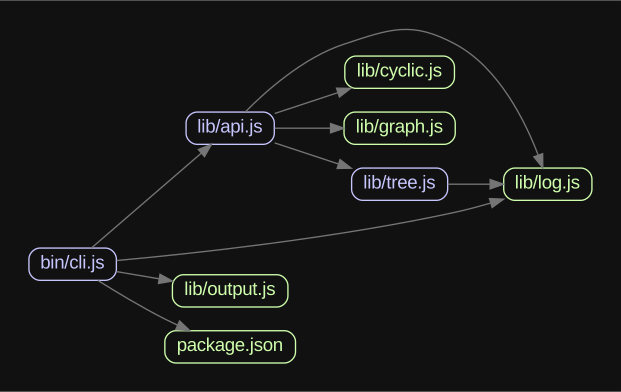
Graph generated from madge's own code and dependencies.
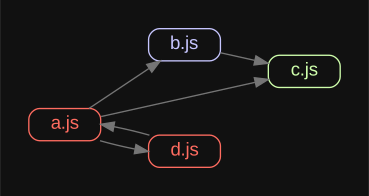
A graph with circular dependencies. Blue has dependencies, green has no dependencies, and red has circular dependencies.
See it in action
Installation
npm -g install madge
Graphviz (optional)
Graphviz is only required if you want to generate visual graphs (e.g. in SVG or DOT format).
Mac OS X
brew install graphviz || port install graphviz
Ubuntu
apt-get install graphviz
API
madge(path: string|array|object, config: object)
path is a single file or directory, or an array of files/directories to read. A predefined tree can also be passed in as an object.
config is optional and should be the configuration to use.
Returns a Promise resolved with the Madge instance object.
Write the graph as an image to the given image path. Set circularOnly to only include circular dependencies. The image format to use is determined from the file extension. Returns a Promise resolved with a full path to the written image.
const madge = require('madge');

madge('path/to/app.js')
	.then((res) => res.image('path/to/image.svg'))
	.then((writtenImagePath) => {
		console.log('Image written to ' + writtenImagePath);
	});
.svg()
Return a Promise resolved with the XML SVG representation of the dependency graph as a Buffer.
Valid file extensions used to find files in directories
excludeRegExp
Array
false
An array of RegExp for excluding modules
requireConfig
String
null
RequireJS config for resolving aliased modules
webpackConfig
String
null
Webpack config for resolving aliased modules
tsConfig
String|Object
null
TypeScript config for resolving aliased modules - Either a path to a tsconfig file or an object containing the config
layout
String
dot
Layout to use in the graph
rankdir
String
LR
Sets the direction of the graph layout
fontName
String
Arial
Font name to use in the graph
fontSize
String
14px
Font size to use in the graph
backgroundColor
String
#000000
Background color for the graph
nodeShape
String
box
A string specifying the shape of a node in the graph
nodeStyle
String
rounded
A string specifying the style of a node in the graph
nodeColor
String
#c6c5fe
Default node color to use in the graph
noDependencyColor
String
#cfffac
Color to use for nodes with no dependencies
cyclicNodeColor
String
#ff6c60
Color to use for circular dependencies
edgeColor
String
#757575
Edge color to use in the graph
graphVizOptions
Object
false
Custom Graphviz options
graphVizPath
String
null
Custom Graphviz path
detectiveOptions
Object
false
Custom detective options for dependency-tree and precinct
dependencyFilter
Function
false
Function called with a dependency filepath (exclude subtrees by returning false)
You can use configuration file either in .madgerc in your project or home folder or directly in package.json. Look here for alternative locations for the file.
To enable debugging output if you encounter problems, run madge with the --debug option then throw the result in a gist when creating issues on GitHub.
madge --debug path/src/app.js
Running tests
npm install
npm test
Creating a release
npm run release
FAQ
Missing dependencies?
It could happen that the files you're not seeing have been skipped due to errors or that they can't be resolved. Run madge with the --warning option to see skipped files. If you need even more info run with the --debug option.
Using both Javascript and Typescript in your project?
Madge uses dependency-tree which uses filing-cabinet to resolve modules. However it requires configurations for each file type (js/jsx) and (ts/tsx). So provide both webpackConfig and tsConfig options to madge.
Using mixed import syntax in the same file?
Only one syntax is used by default. You can use both though if you're willing to take the degraded performance. Put this in your madge config to enable mixed imports.
What's the "Error: write EPIPE" when exporting graph to image?
Ensure you have installed Graphviz. If you're running Windows, note that Graphviz is not added to the PATH variable during install. You should add the folder of gvpr.exe (typically %Graphviz_folder%/bin) to the PATH variable manually.
How do I fix the "Graphviz not built with triangulation library" error when using sfdp layout?
Homebrew doesn't include GTS by default. Fix this by doing:
The image produced by madge is very hard to read, what's wrong?
Try running madge with a different layout, here's a list of the ones you can try:
dot "hierarchical" or layered drawings of directed graphs. This is the default tool to use if edges have directionality.
neato "spring model'' layouts. This is the default tool to use if the graph is not too large (about 100 nodes) and you don't know anything else about it. Neato attempts to
minimize a global energy function, which is equivalent to statistical multi-dimensional scaling.
fdp "spring model'' layouts similar to those of neato, but does this by reducing forces rather than working with energy.
sfdp multiscale version of fdp for the layout of large graphs.
twopi radial layouts, after Graham Wills 97. Nodes are placed on concentric circles depending their distance from a given root node.
circo circular layout, after Six and Tollis 99, Kauffman and Wiese 02. This is suitable for certain diagrams of multiple cyclic structures, such as certain telecommunications networks.
Credits
Contributors
This project exists thanks to all the people who contribute.
Donations ❤️
Thanks to the awesome people below for making donations! 🙏Donate
The most recent commit recorded on pahen/madge was 7 months ago, based on the GitHub push timestamp. The repository has 349 forks — one of the better signals of community interest.
How many stars does pahen/madge have?
pahen/madge has 10.2k GitHub stars — refresh the page for the live number, or check github.com/pahen/madge. TopGit mirrors GitHub's count but does not claim minute-by-minute accuracy.
What else is in the Frontend space?
pahen/madge is tracked by TopGit under the Frontend category, alongside 10 GitHub-tagged topics. Trending and Topics pages list peer repositories of comparable stars and language.
What language is pahen/madge written in?
pahen/madge is written primarily in JavaScript. GitHub's language field is based on the largest share of bytes in the default branch.
What topics is pahen/madge associated with?
GitHub's repository topics for pahen/madge: "amd", "commonjs", "dependencies", "es6", "graph", "graphviz", "less", "madge", "sass", "stylus". TopGit's editorial category is Frontend.
Where do I read more about pahen/madge?
This TopGit page is a snapshot — the READ ME tab shows the project's own README content (links stripped, images preserved). The GitHub repository at github.com/pahen/madge is the definitive source.
Why is pahen/madge categorized under Frontend?
TopGit places pahen/madge in the Frontend category based on its GitHub topics and description (tagged: "amd", "commonjs", "dependencies"). Categories are assigned from real repository metadata, not editorial guesswork.
Read full README in the tab above.
Still deciding about madge?
One click hands the question to an AI along with this page — see what it says about madge.
 /madge