palantir/palantir-java-format is a Developer Tools project on GitHub, written primarily in Java. It has 930 stars. A modern, lambda-friendly, 120 character Java formatter.
Snapshot summary built from the project's own GitHub metadata — there's no written TopGit review yet. The page will update automatically when a full review is published.
WHY NO REVIEW YET
TopGit writes full reviews for the most-starred, most-requested repositories. This page is a snapshot until then — see the READ ME tab for the original README in full.
A modern, lambda-friendly, 120 character Java formatter.
Eclipse plugin
IntelliJ plugin
Gradle plugin
Spotless
It is based on the excellent google-java-format, and benefits from the work of all the original authors. palantir-java-format is available under the same Apache 2.0 License.
Upsides of automatic formatting
reduce 'nit' comments in code reviews, allowing engineers to focus on the important logic rather than bikeshedding about whitespace
bot-authored code changes can be auto-formatted to a highly readable style (we use refaster and error-prone heavily)
increased consistency across all repos, so contributing to other projects feels familiar
reduce the number builds that trivially fail checkstyle
easier to onboard new devs
Downsides of automatic formatting
if you don't like how the formatter laid out your code, you may need to introduce new functions/variables
the formatter is not as clever as humans are, so it can sometimes produce less readable code (we want to fix this where feasible)
Many other languages have already adopted formatters enthusiastically, including typescript (prettier), go (gofmt), rust (rustfmt).
Even though PJF sometimes inlines code more than other formatters, reducing what we see as unnecessary breaks that don't help code comprehension, there are also cases where it will split code into more lines too, in order to improve clarity and code reviewability.
One such case is long method chains. Whereas other formatters are content to completely one-line a long method call chain if it fits, it doesn't usually produce a very readable result:
var foo = SomeType.builder().thing1(thing1).thing2(thing2).thing3(thing3).build();
To avoid this edge case, we employ a limit of 80 chars for chained method calls, such that the last method call dot must come before that column, or else the chain is not inlined.
var foo = SomeType.builder()
        .thing1(thing1)
        .thing2(thing2)
        .thing3(thing3)
        .build();
Palantir Java format Gradle plugin
You should apply this plugin to all projects where you want your java code formatted, e.g.
Applying this automatically configures IntelliJ, whether you run ./gradlew idea
or import the project directly from IntelliJ, to use the correct version of the formatter
when formatting java code.
./gradlew format can be enabled by using the com.palantir.baseline-format Gradle plugin.
Spotless
See integration in Spotless Gradle plugin.
See integration in Spotless Maven plugin.
IntelliJ plugin
A
palantir-java-format IntelliJ plugin
is available from the plugin repository. To install it, go to your IDE's
settings and select the Plugins category. Click the Marketplace tab, search
for the palantir-java-format plugin, and click the Install button.
The plugin will be disabled by default on new projects, but as mentioned above,
if using the com.palantir.java-format gradle plugin, it will be recommended
in IntelliJ, and automatically configured.
To manually enable it in the current project, go
to File→Settings...→palantir-java-format Settings (or IntelliJ IDEA→Preferences...→Other Settings→palantir-java-format Settings on macOS) and
check the Enable palantir-java-format checkbox.
To enable it by default in new projects, use File→Other Settings→Default Settings....
When enabled, it will replace the normal Reformat Code action, which can be
triggered from the Code menu or with the Ctrl-Alt-L (by default) keyboard
shortcut.
Running a pre-release version of the IntelliJ plugin
Clone this repo
run ./gradlew :idea-plugin:build
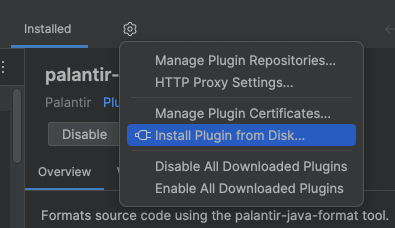
In IntelliJ, install a plugin from disk. Build artifacts are located in ./idea-plugin/build/distributions/
Java 21 Support
In 1211 we shipped Java 21 support. In order to use the
Java 21 formatting capabilities, ensure that either:
the Gradle daemon and the Intellij Project SDK are set to Java 21
or that the gradle property palantir.native.formatter=true. This will run the formatter as a native image,
independent of the Gradle daemon/Intellij project JDK version.
Native image formatter
This comment explains why we
switched to a native image for the formatter. The startup time for the native image esp. in Intellij is >10x faster than
spinning up a new JVM process that does the formatting.
However, the throughput of running the native image for a large set of files (eg. running ./gradlew spotlessApply) is
considerably slower (eg. 30s using the Java implementation vs 1m20s using the native image implementation). Therefore,
when running the formatter from spotlessApply we will default to using the Java implementation (if the Java version >= 21).
Future works
preserve NON-NLS markers - these are comments that are used when implementing NLS internationalisation, and need to stay on the same line with the strings they come after.
License
(c) Copyright 2019 Palantir Technologies Inc. All rights reserved.

Licensed under the Apache License, Version 2.0 (the "License"); you may not
use this file except in compliance with the License. You may obtain a copy of
the License at

    http://www.apache.org/licenses/LICENSE-2.0

Unless required by applicable law or agreed to in writing, software
distributed under the License is distributed on an "AS IS" BASIS, WITHOUT
WARRANTIES OR CONDITIONS OF ANY KIND, either express or implied. See the
License for the specific language governing permissions and limitations under
the License.
This is a fork of google-java-format.
Original work copyrighted by Google under the same license:
Copyright 2015 Google Inc.

Licensed under the Apache License, Version 2.0 (the "License"); you may not
use this file except in compliance with the License. You may obtain a copy of
the License at

    http://www.apache.org/licenses/LICENSE-2.0

Unless required by applicable law or agreed to in writing, software
distributed under the License is distributed on an "AS IS" BASIS, WITHOUT
WARRANTIES OR CONDITIONS OF ANY KIND, either express or implied. See the
License for the specific language governing permissions and limitations under
the License.
How does palantir/palantir-java-format compare to other Developer Tools projects?
palantir/palantir-java-format is tracked by TopGit in the Developer Tools category, with 930 GitHub stars and written in Java. Browse the Developer Tools topic page on TopGit to compare it against similar projects by stars and activity.
Is palantir/palantir-java-format open source?
Yes — palantir/palantir-java-format ships under the Apache-2.0 license, which makes its source code freely readable (and, depending on license terms, forkable and reusable). Source: github.com/palantir/palantir-java-format.
What else is in the Developer Tools space?
palantir/palantir-java-format is tracked by TopGit under the Developer Tools category, alongside 5 GitHub-tagged topics. Trending and Topics pages list peer repositories of comparable stars and language.
What is palantir/palantir-java-format?
palantir/palantir-java-format (palantir/palantir-java-format) is a Java project on GitHub. From the project's own README: A modern, lambda-friendly, 120 character Java formatter.
Where do I read more about palantir/palantir-java-format?
This TopGit page is a snapshot — the READ ME tab shows the project's own README content (links stripped, images preserved). The GitHub repository at github.com/palantir/palantir-java-format is the definitive source.
Why is palantir/palantir-java-format categorized under Developer Tools?
TopGit places palantir/palantir-java-format in the Developer Tools category based on its GitHub topics and description (tagged: "codeformatter", "formatter", "gofmt"). Categories are assigned from real repository metadata, not editorial guesswork.
Read full README in the tab above.
Still deciding about palantir-java-format?
One click hands the question to an AI along with this page — see what it says about palantir-java-format.

 /palantir-java-format