TopGit tracks piitaya/lovelace-mushroom on GitHub. The project has 5.1k stars. Build a beautiful Home Assistant dashboard easily
Snapshot summary built from the project's own GitHub metadata — there's no written TopGit review yet. The page will update automatically when a full review is published.
WHY NO REVIEW YET
TopGit writes full reviews for the most-starred, most-requested repositories. This page is a snapshot until then — see the READ ME tab for the original README in full.
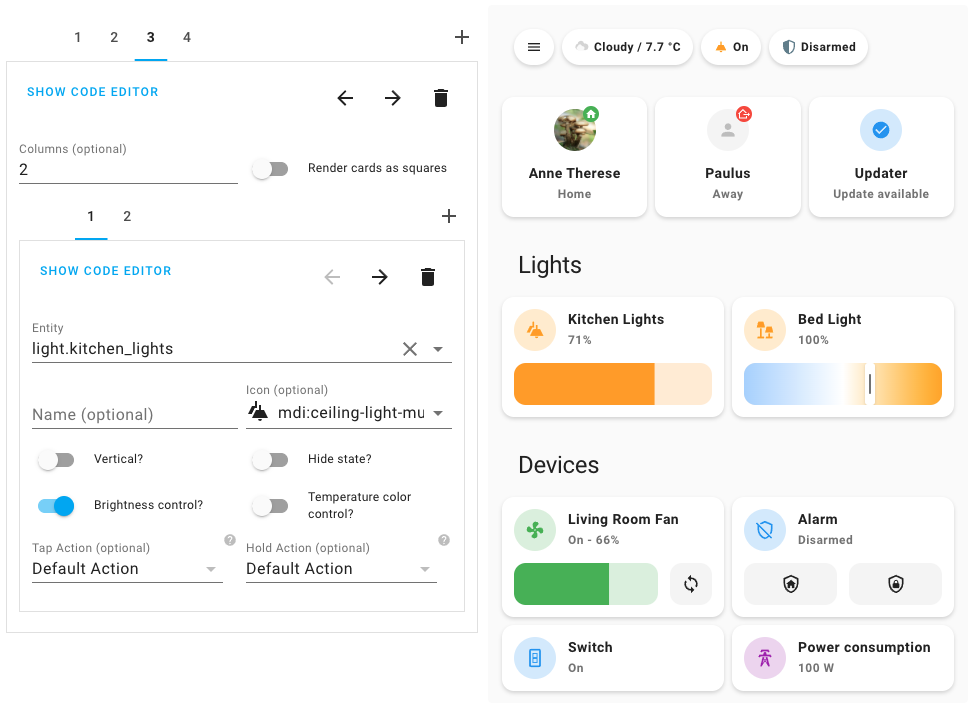
Mushroom is a collection of cards for Home Assistant Dashboard UI.
Mushroom mission is to propose easy to use components to build your Home Assistant dashboard.
Features
🛠 Editor for all cards and and all options (no need to edit yaml)
😍 Icon picker
🖌 Color picker
🚀 0 dependencies : no need to install another card.
🌈 Based on Material UI colors
🌓 Light and dark theme support
🎨 Optional theme customization
🌎 Internationalization
The goal of Mushroom is not to provide custom card for deep customization. You can use the excellent UI Lovelace Minimalist and Button card plugins for this.
Installation
HACS
Mushroom is available in HACS (Home Assistant Community Store).
Use this link to directly go to the repository in HACS
or
Install HACS if you don't have it already
Open HACS in Home Assistant
Search for "Mushroom"
Click the download button. ⬇️
Manual
Download mushroom.js file from the latest release.
Put mushroom.js file into your config/www folder.
Add reference to mushroom.js in Dashboard. There's two way to do that:
Using UI:Settings → Dashboards → More Options icon → Resources → Add Resource → Set Url as /local/mushroom.js → Set Resource type as JavaScript Module.
Note: If you do not see the Resources menu, you will need to enable Advanced Mode in your User Profile
Using YAML: Add following code to lovelace section.
resources:
  - url: /local/mushroom.js
    type: module
Usage
All the Mushroom cards can be configured using Dashboard UI editor.
In Dashboard UI, click 3 dots in top right corner.
Click Edit Dashboard.
Click Plus button to add a new card.
Find one of the Custom: Mushroom card in the list.
Cards
Different cards are available for differents entities :
🚨 Alarm card
🔔 Chips card
🌡 Climate card
🪟 Cover card
🪄 Entity card
🕳 Empty card
💨 Fan card
💧 Humidifier card
💡 Light card
🔒 Lock card
📺 Media card
🔢 Number card
🙋 Person card
📑 Select card
🛠 Template card
✏️ Title card
📦 Update card
🧹 Vacuum card
Legacy cards
Some cards are considered as legacy, are not available in the card picker but you can still use them :
🛠 Legacy Template card
Badges
A template badge is available if you're using at least Home Assistant 2024.8.
Theme customization
Mushroom works without theme but you can add a theme for better experience by installing the Mushroom Themes. If you want more information about themes, check out the official Home Assistant documentation about themes.
Development server
Home assistant demo
You can run a demo instance of Home Assistant with docker by running:
npm run start:hass
Once it's done, go to Home Assistant instance http://localhost:8123 and start configuration.
Windows Users
If you are on Windows, either run the above command in Powershell, or use the below if using Command Prompt:
npm run start:hass-cmd
Development
In another terminal, install dependencies and run development server:
npm install
npm start
Server will start on port 4000.
Build
You can build the mushroom.js file in dist folder by running the build command.
npm run build
Translations
If you want to help translating Mushroom, you can translate it directly from your browser using Weblate.
Maintainer steps to add a new language
To be compatible with Home Assistant, language tags have to follow BCP 47. A list of most language tags can be found here: IANA subtag registry. Examples: fr, fr-CA, zh-Hans.
Create a new file {language_code}.json with your language code in the translation folder. Examples: fr.json.
Import your file into the localize.ts file and add your language in the languages record.
Don't forget to test locally with the development server by choosing the language with the Home Assistant UI in your profile.
Troubleshooting
I don't see the last changes
Check that your Home Assistant version is the latest. Some new Mushroom features can only be visible for the latest Home Assistant version.
Check that you have the latest Mushroom version on HACS
Check that you have the latest Mushroom version by checking the browser console
How active is development on piitaya/lovelace-mushroom?
The most recent commit recorded on piitaya/lovelace-mushroom was 20 days ago, based on the GitHub push timestamp. The repository has 435 forks — one of the better signals of community interest.
How many stars does piitaya/lovelace-mushroom have?
piitaya/lovelace-mushroom has 5.1k GitHub stars — refresh the page for the live number, or check github.com/piitaya/lovelace-mushroom. TopGit mirrors GitHub's count but does not claim minute-by-minute accuracy.
What is piitaya/lovelace-mushroom?
piitaya/lovelace-mushroom (piitaya/lovelace-mushroom) is a TypeScript project on GitHub. From the project's own README: Build a beautiful Home Assistant dashboard easily
What language is piitaya/lovelace-mushroom written in?
piitaya/lovelace-mushroom is written primarily in TypeScript. GitHub's language field is based on the largest share of bytes in the default branch.
What topics is piitaya/lovelace-mushroom associated with?
GitHub's repository topics for piitaya/lovelace-mushroom: "card", "hacktoberfest", "hacs", "home-assistant", "lovelace", "mushroom". TopGit's editorial category is open-source.
Read full README in the tab above.
Want a second opinion on lovelace-mushroom?
Ask an AI that can read this page — one click and you get its take on lovelace-mushroom.
 /lovelace-mushroom